If a board shows up as USB-Enhanced-SERIAL CH9102 — or as nothing at all — the CH340 driver you already installed will not help it. The CH9102, CH343 and the rest of WCH’s newer USB-to-UART chips use a different driver package with a different set of USB product IDs, and on Linux they usually need no driver at all.
Below is the official download, a table of every chip that package covers with its VID:PID and the exact name Windows gives it, the install steps per OS, and the five failures that actually show up in bug trackers. Everything here comes from WCH’s own files (datasheets, INF files, README) and from the Linux kernel source — all linked at the end. Last checked: 10 September 2026.
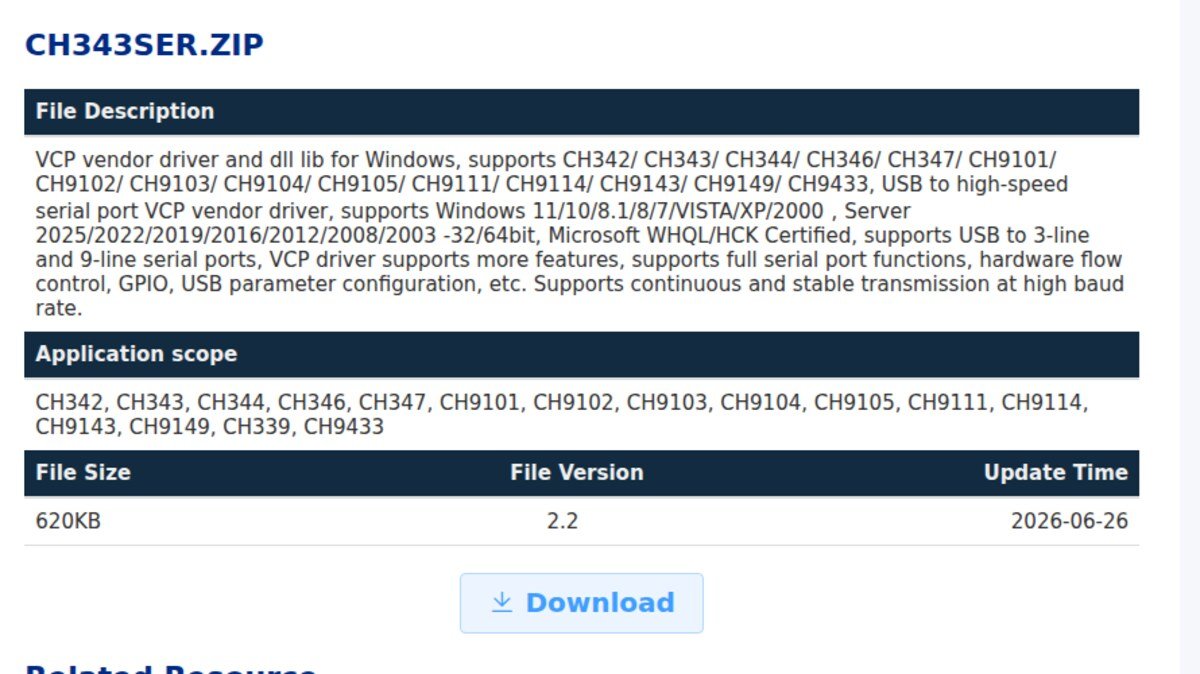
⬇ CH9102 / CH343 driver — official WCH download
We do not mirror this file. WCH updates it and an old mirrored installer is exactly what this site complains about elsewhere. WCH publishes no checksum, so here is ours: the ZIP downloaded from the official URL on 10 September 2026 was 635,034 bytes, SHA-256 6084fd47cc2a6bf27eb3df3a6f57430ec8a3fa69d8f32dc9c6f6807816a15e57. Inside, CH343SER.INF reports DriverVer = 05/19/2026, 2.2.2026.05.
Which file do you actually need
| Package | What it is | Version | Updated |
|---|---|---|---|
| CH343SER.ZIP | Windows VCP vendor driver — full serial features, hardware flow control, GPIO, USB parameter configuration | 2.2 | 2026-06-26 |
| CH343CDC.ZIP | Windows CDC driver — the plain serial-class route, fewer features | 1.6 | 2023-05-18 |
| CH34XSER_MAC.ZIP | macOS driver (OS X 10.9–10.15 and 11 Big Sur and above), includes a PDF install guide | 2.1 | 2026-08-31 |
| ch343ser_linux | WCH’s GPL kernel module on GitHub — only if you want GPIO or the vendor-specific features | source | — |
| nothing | Linux, normal case. These chips are CDC-compliant, so the in-box cdc-acm driver binds them |
— | — |
Both datasheets say the same thing in almost the same words. The CH343 one: “CH343 supports the CDC class drivers that come with the system, and can also install high-speed VCP vendor drivers.” The CH9102 one repeats it. So the VCP package is an upgrade, not a requirement — you need it when you want the extra features or the higher sustained baud rates, and on Windows it is also what gives you the familiar COM port behaviour.
Every chip in the package, with its USB ID
This is the table we could not find anywhere, so we built it: the hardware IDs and device names were read directly out of the [Models] and [Strings] sections of the two official INF files, the per-PID chip names come from the comments in WCH’s own ch343.c, and the Linux column comes from the kernel’s ch341.c id table. Max baud rates are from the datasheets and the official file descriptions.
| Chip | USB VID:PID | Name in Device Manager | Windows package | Max baud | Linux, no install |
|---|---|---|---|---|---|
| CH340 | 1a86:7523 | USB-SERIAL CH340 | CH341SER 4.0 | 2 Mbps | ch341 → ttyUSB |
| CH340K | 1a86:7522 | USB-SERIAL CH340K | CH341SER 4.0 | 2 Mbps | ch341 → ttyUSB |
| CH341A | 1a86:5523 | USB-SERIAL CH341A | CH341SER 4.0 | 2 Mbps | ch341 → ttyUSB |
| CH343C | 1a86:7523 rev 8234 | USB-Enhanced-SERIAL CH343C | CH343SER 2.2 | 6 Mbps | cdc-acm → ttyACM |
| CH343 | 1a86:55d3 | USB-Enhanced-SERIAL CH343 | CH343SER 2.2 | 6 Mbps | cdc-acm → ttyACM |
| CH9102 | 1a86:55d4 | USB-Enhanced-SERIAL CH9102 | CH343SER 2.2 | 4 Mbps | cdc-acm → ttyACM |
| CH9101 | 1a86:55d8 | USB-Enhanced-SERIAL CH9101 | CH343SER 2.2 | 3 Mbps | cdc-acm → ttyACM |
| CH342 (2 ports) | 1a86:55d2 | USB-Enhanced-SERIAL-A / -B CH342 | CH343SER 2.2 | 3 Mbps | cdc-acm → ttyACM |
| CH9103 (2 ports) | 1a86:55d7 | USB-Enhanced-SERIAL-A / -B CH9103 | CH343SER 2.2 | — | cdc-acm → ttyACM |
| CH344 (4 ports) | 1a86:55d5 | USB-Enhanced-SERIAL-A…D CH344 | CH343SER 2.2 | 6 Mbps | cdc-acm → ttyACM |
| CH9104 / CH9105 / CH9114 (4 ports) | 1a86:55df / 55ef / 55e8 | USB-Enhanced-SERIAL-A…D | CH343SER 2.2 | — | cdc-acm → ttyACM |
| CH347T / CH347F | 1a86:55da, 55db, 55dd / 55de | USB-HiSpeed-SERIAL-A / -B CH347 | CH343SER 2.2 | USB high speed | cdc-acm → ttyACM |
| CH9143 (BLE) | 1a86:55d6 | USB-BLE-SERIAL CH9143 | CH343SER 2.2 | — | cdc-acm → ttyACM |
Read the first three rows against the rest and the whole confusion resolves itself: no PID in the 0x55xx range appears anywhere in the CH340 driver, and no 0x7523/0x7522/0x5523 appears in the CH343 one — except for a single line, which is the interesting part of this post.
The part nobody covers: 1a86:7523 is not always a CH340
Deep in CH343SER.INF there is one entry that does not belong to the 0x55xx family:
%CH343CSER.DeviceDesc% = CH343SER_Inst, USBVID_1A86&PID_7523&REV_8234, where CH343CSER.DeviceDesc = "USB-Enhanced-SERIAL CH343C".
The CH343C enumerates with the classic CH340 vendor and product ID — the same 1a86:7523 that a hundred tutorials tell you means “CH340” — and is separated from it only by the device revision, bcdDevice = 0x8234. Meanwhile CH341SER.INF claims the bare USBVID_1A86&PID_7523 with no revision at all.
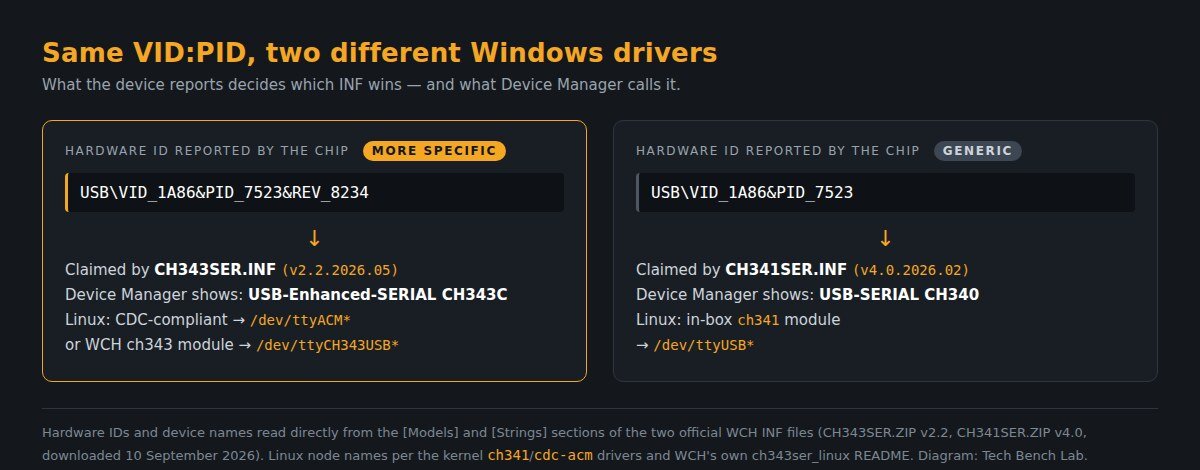
Microsoft’s driver ranking rules are what make this work: a rank is “a composite value” whose identifier score depends on “the type of match between a device identification string that is reported by a device and a device identification string that is specified in the entries of an INF Models section”, and “the lower the rank, the better a match”. A device reports its hardware IDs from most to least specific, so the INF matching the revision-qualified ID outranks the one matching the bare ID. That is the documented behaviour; we have no Windows bench here to read a SetupAPI log against, so treat the mechanism as our reading of the rules rather than a measurement.
What is not a deduction is the practical consequence. If you ran lsusb, saw 1a86:7523, and went looking for a CH340 driver, you may be holding a CH343C — and the giveaway is free: Device Manager says USB-Enhanced-SERIAL CH343C, not USB-SERIAL CH340. Read the name before you download anything.
Installing it
Windows. Unplug the board first. Extract the ZIP, run SETUP.EXE, click INSTALL, then plug the board back in. A COM port appears under Ports (COM & LPT) with one of the names in the table above. The package is WHQL certified and ships a .CAT catalog, so Windows Update can also serve it on its own — if a port appeared without you doing anything, that is why.
macOS. Per WCH’s own install guide (v2.1, inside the ZIP): install the .pkg normally, or the .dmg when the OS does not support Rosetta. On macOS 11 Big Sur and above there is a mandatory extra step that people skip — open LaunchPad, find the CH34xVCPDriver app, open it and click Install. The port then shows up as /dev/tty.wchusbserial*. What Apple’s own driver does without the package, why esptool uploads fail on the usbmodem port, and the Linux kernels that refuse BREAK on the CH343 are on the CH9102 and CH343 on macOS and Linux page.
Linux. Plug it in and run ls /dev/ttyACM*. That is normally the end of it. Build WCH’s ch343ser_linux module only if you need GPIO or vendor features; its nodes are named /dev/ttyCH343USBx, and WCH’s README warns you to check that cdc-acm has not already claimed the device.
The five failures that actually happen
We counted the public bug reports instead of guessing: 19 GitHub issues carry “CH9102” in the title, across 10 repositories. Six of them are filed against WCH’s own driver repos, and five name macOS in the title (Big Sur, Monterey, M1, M2). On this chip, macOS — not Windows — is where the pain is.
1. Windows installed “the CH340 driver” and nothing happened. Expected: the CH340 package does not list 0x55d4 or 0x55d3. Install CH343SER instead.
2. Linux: no /dev/ttyUSB0, and your flashing tool insists on one. The mainline ch341 driver’s id table contains exactly six entries, none of them 0x55xx — so the chip lands on cdc-acm as /dev/ttyACM0. Point the tool at that. (WCH’s README says it plainly: “you can use command ls /dev/ttyACM* to confirm that”.) The kernel does know this family by name, incidentally: cdc-acm carries one WCH quirk, { USB_DEVICE(0x1a86, 0x55d3), .driver_info = MISSING_CAP_BRK }, commented “CH343 supports CAP_BRK, but doesn’t advertise it” — if your CH343 ignores a break condition, that is the line explaining it.
3. macOS: the port appears but flashing fails. Two issues on WCH’s macOS repo are titled almost exactly that (“CH9102 driver not flashing but CH340 driver flashing”; “…on Big Sur version 11.7.1”). Nine times out of ten the DriverKit extension was never activated — go back and click Install inside the CH34xVCPDriver app.
4. Dropped bytes or overflow at high baud. There is a datasheet answer for this. Full-speed USB is only 12 Mbps, and the CH343 datasheet states that “the serial port should be prevented from being in a continuous or full-duplex high-speed communication state of 3Mbps or above in practical application”, recommending hardware flow control instead. A 4 or 6 Mbps rating is a peak, not a sustained throughput budget.
5. The board is labelled CH340 but Windows says CH343C. See above — same PID, different revision, different driver.
FAQ
Is the CH9102 just a faster CH340? Faster and richer: 4 Mbps against 2, I/O power from 1.8 V to 5 V, plus RS485 direction control (the TNOW pin) and up to seven GPIOs the driver can address — none of which the CH340 has.
Do I need any driver on Windows 11? Not necessarily, because these chips are CDC-compliant. You need the VCP package for the vendor features and the high sustained rates.
Can I use one package for CH340 and CH9102 boards? No. They are two separate downloads and can coexist; CH341SER for the older chips, CH343SER for everything in the 0x55xx list.
Is the download signed? WCH’s page states Microsoft WHQL/HCK certification, and the ZIP ships CH343SER.CAT alongside the INF.
Sources
- WCH — CH343SER.ZIP (Windows VCP driver, v2.2) · CH343CDC.ZIP · CH34XSER_MAC.ZIP · CH341SER.ZIP
- CH343 datasheet (v2.0) and CH9102 datasheet (v1.3) — baud rates, I/O voltages, CDC/VCP wording
- WCHSoftGroup/ch343ser_linux — GPL Linux module, README and the per-PID chip comments in
ch343.c - Linux kernel
ch341.c(id table) andcdc-acm.c(the CH343 break quirk) - Microsoft — How Windows Ranks Driver Packages
Related guides
If the chip on your board turns out to be the older one after all, start at the CH340 driver guide. Silicon Labs part? That is the CP2102 driver. Prolific on Windows 11 brings its own misery, the “Phased Out” fix, and FTDI has the non-genuine device lockout — worth noting that WCH has never done either to its clones. Once the port is visible and the name matches the table above, an ESP board is ready for the Flash Download Tool and its offsets.