rpiboot is the host tool that puts a Raspberry Pi Compute Module into USB boot mode so its eMMC (or NVMe) shows up as a USB drive you can image. The message “Waiting for BCM2835/6/7/2711/2712…” is just its idle loop: it is polling for a USB device with Broadcom’s vendor ID, and on Windows 11 there is one common reason it never finds one even though Device Manager clearly shows the module. That reason is a missing WinUSB binding, and it has three fixes, only one of which is signed.
Nothing is hosted here: the installer bundles Raspberry Pi’s boot firmware, which is not redistributable, so the links go to the official GitHub releases with the checksums of the files as served on 31 Oct 2026.
⬇ rpiboot Windows installer 1.1 (official, GitHub release)
rpiboot_setup.exe (github.com/raspberrypi/usbboot)
Source and all releases: github.com/raspberrypi/usbboot/releases. Linux: sudo apt install rpiboot; macOS: build from source (official docs).
Install, step by step (Windows 11)
- Run
rpiboot_setup.exe. Watch the install log: it prints “Installing BCM2711 driver… Driver install returned 0” for each of the four chips. Any number other than 0 means that driver did not install (table below). Reboot, as the official guide asks. - Fit the boot jumper before applying power:
nRPI_BOOTon J2 (“disable eMMC Boot”) on the CM4 IO Board and CM5 IO Board; J4 to 1-2 (“USB BOOT ENABLED”) on the original CM1/CM3 IO Board. Connect the IO board’s slave USB port (micro-USB J11 on CM4IO, USB-C J11 on CM5IO, micro-USB J15 on CMIO) straight to the PC, no hub. - Power the IO board. Device Manager should show “Raspberry Pi USB boot” under Universal Serial Bus devices. If instead you see “BCM2711 Boot” (or “BCM2712D0 Boot”, “BCM2710 Boot”, “BCM2708 Boot”) under Other devices with Code 28, stop here and go to the fixes.
- Start rpiboot – Mass Storage Gadget from the Start menu. It runs
rpiboot -d mass-storage-gadget64; after a few seconds the eMMC, NVMe or SD card appears as a USB drive and a serial console shows up as a COM port. - Write the image with Raspberry Pi Imager, remove the jumper, power-cycle.
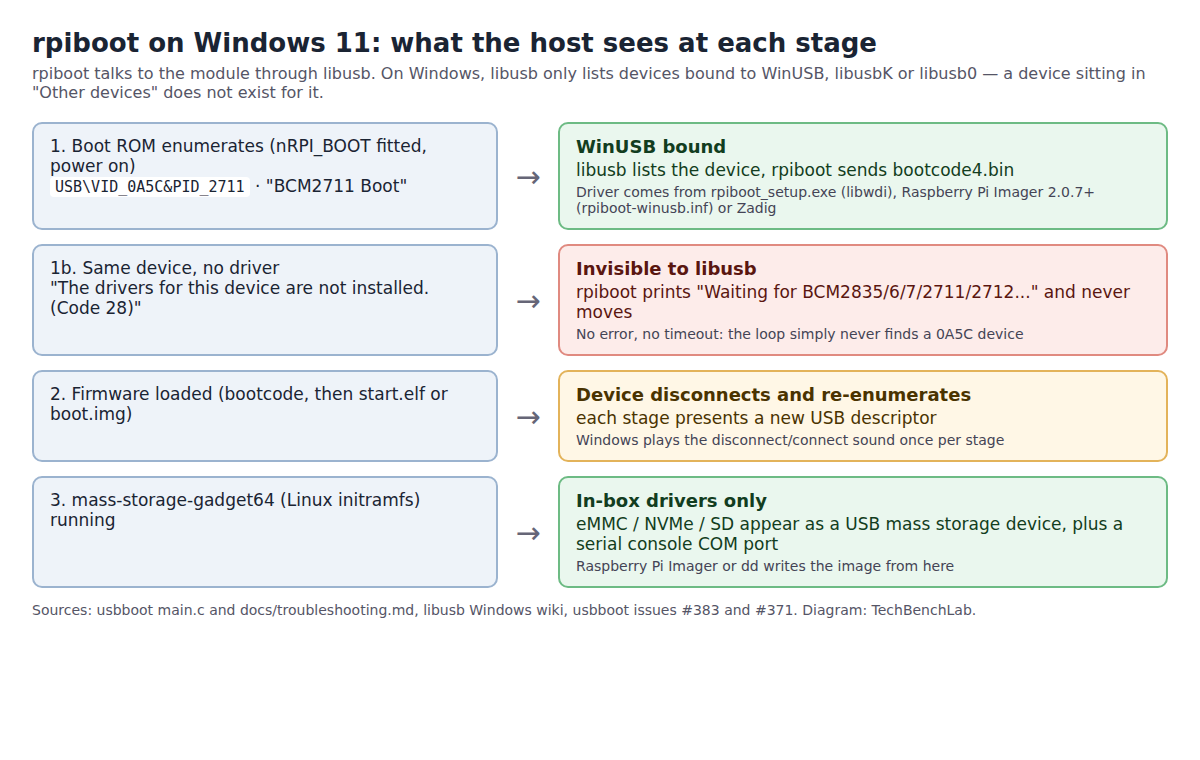
main.c, docs/troubleshooting.md and the libusb Windows wiki.The data: USB ID, chip, module, and the name Windows shows
The four product IDs are hard-coded in main.c; the module names are from Raspberry Pi’s own rpiboot-winusb.inf in the Imager repository; the Device Manager strings are the boot ROM’s product string as quoted in usbboot issues.
| Hardware ID | SoC | Modules and boards | Device Manager before a driver | Installer step | Imager built-in rpiboot |
|---|---|---|---|---|---|
USB\VID_0A5C&PID_2763 |
BCM2835 | CM1, Pi Zero, Pi 1A+ | “BCM2708 Boot” | “Installing BCM2708 driver” | No (deliberately excluded in rpiboot_scanner.cpp) |
USB\VID_0A5C&PID_2764 |
BCM2836 / BCM2837 | CM3, CM3+, CM3E, Pi 2, Pi 3, Zero 2 W, Pi 3A+ | “BCM2710 Boot” | “Installing BCM2710 driver” | Yes |
USB\VID_0A5C&PID_2711 |
BCM2711 | CM4, CM4S, Pi 4B / 400 (rpiboot must be enabled in the EEPROM first) | “BCM2711 Boot” | “Installing BCM2711 driver” | Yes |
USB\VID_0A5C&PID_2712 |
BCM2712 | CM5, Pi 5, Pi 500 / 500+ | “BCM2712D0 Boot” | “Installing BCM2712 driver” | Yes |
USB\VID_18D1&PID_4E40 |
(Linux gadget) | Fastboot gadget sideloaded by Imager | “Raspberry Pi Fastboot” once Imager’s INF is in | not covered by rpiboot_setup | Yes (Imager only) |
Note that 0A5C is Broadcom’s vendor ID, shared with dozens of Bluetooth dongles in the public usb.ids list. rpiboot only accepts the four PIDs above; with -s (serial selection) a different Broadcom product prints “Unknown Raspberry Pi Product, wanted 2763, 2764, 2711 or 2712”.
What “Driver install returned -3” and “-11” mean
The installer runs wdi-simple.exe -n "Raspberry Pi USB boot" -v 0x0a5c -p 0xNNNN -t 0 (type 0 = WinUSB) once per PID and prints only the raw libwdi return code, discarding the text. The codes are in libwdi.h; the strings are what wdi_strerror() would have printed.
| Code printed | libwdi name | Text the installer drops | Where libwdi returns it |
|---|---|---|---|
| 0 | WDI_SUCCESS | Success | Driver staged; also returned when the device is not plugged in yet (“Copying driver files for next time device is plugged in”) |
| -3 | WDI_ERROR_ACCESS | Access denied | Could not read or create the extraction directory (usb_driver inside the install folder) |
| -11 | WDI_ERROR_RESOURCE | Could not allocate resource | Allocation or file-handling failure while extracting the embedded driver files |
| -12 | WDI_ERROR_NOT_SUPPORTED | Operation not supported | Windows refused to trust libwdi’s self-signed certificate, or the driver does not match this Windows version |
| -13 | WDI_ERROR_EXISTS | Resource already exists | A more recent driver is already installed for that hardware ID |
| -15 | WDI_ERROR_NEEDS_ADMIN | Unable to run process with required administrative privileges | Installer not elevated |
| -19 | WDI_ERROR_UNSIGNED | System policy has been modified to reject unsigned drivers | Windows 10/11 without test signing: libwdi could not sign its generated .cat, or SetupAPI returned ERROR_NO_CATALOG_FOR_OEM_INF |
This is the structural point: libwdi generates an INF and a catalog on the fly and signs the catalog with a certificate it creates on your machine. Raspberry Pi Imager’s route is the opposite: a fixed rpiboot-winusb.inf (DriverVer 2.0.0.0, class USBDevice, same five hardware IDs, amd64 and arm64 sections) added to the driver store with pnputil /add-driver ... /install by a signed installer. The Imager source notes that signed builds ship the matching signed catalog; we could not open the 2.0.12 installer to confirm the catalog is inside, but the installer itself carries a valid Raspberry Pi Limited signature.
“Waiting for BCM2835/6/7/2711/2712…”: the causes, in order
| What you see | Cause | Fix | Source |
|---|---|---|---|
| “BCM2711 Boot” with Code 28; installer logged -3 and -11 | wdi-simple failed; no WinUSB bound | Zadig → Options → List All Devices → “BCM2711 Boot” → WinUSB. Or install Imager 2.0.7+ and let its INF bind it | usbboot #383 (Jun 2026, Waveshare CM4 carrier, open) |
“BCM2712D0 Boot” with Code 28; manual wdi-simple says “System policy has been modified to reject unsigned drivers” |
Windows 11 rejects libwdi’s self-signed catalog | Do not disable signature enforcement. Use Imager (maintainer’s answer: its rpiboot is a signed executable) or Zadig | usbboot #371 (Apr 2026, CM5) |
| Nothing new in Device Manager at all | Jumper fitted after power-on, cable on the wrong (host) port, charge-only cable, hub in between | Jumper first, then power. On BCM2711 with the jumper fitted and USB unplugged the green LED must be off; if it is on, the ROM sees nRPIBOOT high | troubleshooting.md; RevPi forum (jumper question first) |
| Driver fine, rpiboot runs, but no USB drive appears afterwards | Legacy msd firmware path or a module with no eMMC (Lite) |
Run rpiboot -d mass-storage-gadget64; Lite modules have no eMMC to flash, image the SD/NVMe elsewhere |
troubleshooting.md “Hardware – CM4 / CM5”; official docs |
| Works on one PC, not another | The binding lives in each host’s driver store, not on the module | Repeat the driver step (installer, Imager or Zadig) on every host PC | rpi-imager.iss.in (pnputil /add-driver stages the INF per machine) |
FAQ
Zadig and rpiboot_setup both use libwdi. Why does Zadig succeed where the installer fails? Issue #383 documents exactly that and has no answer from the maintainers yet. The difference we can point to is procedural: Zadig is run with the device already enumerated and the user picks it from the list, while the installer stages drivers blind, from inside an NSIS process, and reports only the number.
Can I skip rpiboot_setup entirely? On Windows, yes, for CM3 and newer: Imager 2.0.7+ bundles rpiboot, installs the WinUSB INF, and flashes through its fastboot gadget. CM1 and Pi Zero (PID 2763) are excluded from Imager’s scanner and still need the installer.
Related guides
- Raspberry Pi Pico not detected: no RPI-RP2 drive, and the Zadig trap
- “USB Serial Device” and usbser.sys: why some boards get Code 28
- Zadig: driver types, presets and what each build of libwdi ships
- Rockchip RKDevTool “No Devices Found” in MASKROM mode
- Qualcomm QDLoader 9008 driver on Windows 11
- USB VID/PID lookup for bench tools
Sources
- usbboot source: main.c (PIDs 2763/2764/2711/2712, the “Waiting for” loop, “Unknown Raspberry Pi Product”), win32/install_script.nsi (the four wdi-simple calls), win32/Readme.md, docs/troubleshooting.md, Readme.md (compatible devices)
- usbboot releases: windows-v1.1 (1 Jun 2026), windows-v1.0 (22 Jan 2026)
- libwdi: libwdi.h (error codes), libwdi.c (
wdi_strerror, self-signed cat on Windows 10+), installer.c (SetupAPI error mapping), wdi-simple.c (-t 0, default directory) - Raspberry Pi Imager: rpiboot-winusb.inf, rpi-imager.iss.in (pnputil install), rpiboot_scanner.cpp, 99-rpiboot.rules, release v2.0.7 (“Fastboot, rpiboot, compute modules”), v2.0.12
- Official guide: Flash an image to a Compute Module (jumpers J2/J4, slave ports J11/J15, Windows steps, Lite note, hub warning)
- libusb Windows wiki: “you must install a driver before you can communicate with it using libusb”
- Threads: usbboot #383, #371, #343 (“BCM2710 Boot”), #69 (“BCM2708 Boot”), #385; Revolution Pi forum
- usb.ids (vendor 0A5C Broadcom Corp.)