“No Devices Found” is the idle text of RKDevTool, Rockchip’s Windows flashing tool. It changes to “Found One MASKROM Device” only when three things are true at once: the board’s boot ROM is actually running its USB download mode, the cable reaches the one USB port wired to the SoC’s OTG controller, and Windows has bound that device to Rockchip’s rockusb.sys driver. Each of those fails in its own way, and the fixes below are in the order the failures are usually found.
The tools themselves are not hosted here: Rockchip distributes them through board vendors and ships no licence text, so the links go to Radxa’s public mirror, with the checksums of the files as served there on 30 Oct 2026.
⬇ DriverAssistant 5.14 and RKDevTool (official files, Radxa mirror)
DriverAssitant_v5.14.zip (dl.radxa.com)
Full directory with older builds: dl.radxa.com/tools/windows/. Linux and macOS use rkdeveloptool instead, no driver needed.
Install, step by step (Windows 11)
- Unzip DriverAssistant and run
DriverInstall.exe(file version 5.1.4.0) as administrator. If any Rockchip driver was ever installed, click Uninstall Driver first, then Install Driver. Rockchip’s ownReadme.txtin the zip gives the reason: uninstall first “so that all devices use the newer driver”. - Do not plug the board in during this step. The package pre-installs the driver, so the device binds the moment it enumerates.
- Unzip RKDevTool to a path without spaces or non-ASCII characters and start
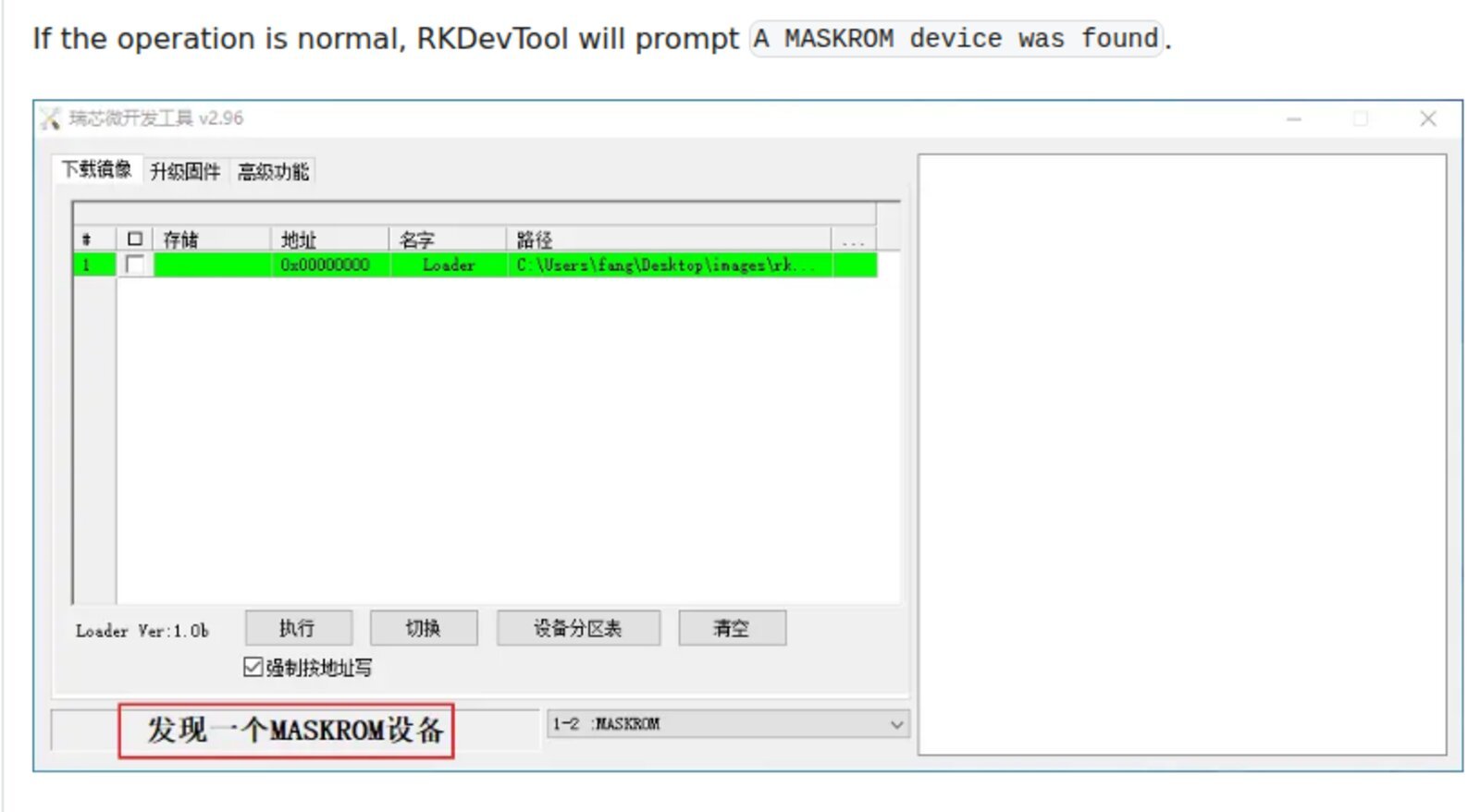
RKDevTool.exe. The status bar should read No Devices Found: that is normal with nothing connected. - Power the board off completely, remove the microSD card, hold the MASKROM button, connect the USB cable to the PC (or apply power while holding the button, per your board’s guide), then release.
- Expect Found One MASKROM Device. In Device Manager the entry appears in a class of its own, Rockusb Device, not under Ports or Universal Serial Bus devices.
The data: what each DriverAssistant release actually installs
We unpacked the three DriverAssistant releases on Radxa’s mirror and read the INF and catalog files without running anything. Two things decide whether Windows 11 accepts the driver and whether it recognises your chip.
| Release | DriverVer in rockusb.inf |
USB PIDs matched | Knows RK3566/RK3568 (350A), RK3588 (350B), RK3576 (350E)? | win10 folder catalog signed by |
win7/win8/win81 folders signed by |
|---|---|---|---|---|---|
| Rockchip_DriverAssitant_v4.8 | 12/19/2018, 4.80 | 40 | No: highest family is 33xx (RK3399, RK3308, PX30) | Microsoft Windows Hardware Compatibility Publisher | Fuzhou Rockchip, cross-signed |
| DriverAssitant_v5.0 | 09/01/2020, 5.00 | 121 | Yes | Microsoft Windows Hardware Compatibility Publisher | Fuzhou Rockchip, cross-signed |
| DriverAssitant_v5.14 | 05/20/2024, 5.14 | 240 (every PID xx0A–xx0F and xx1A–xx1F from family 06 to 39) |
Yes, plus RK3528 (350C) and RK3506 (350F) | Microsoft Windows Hardware Compatibility Publisher | Rockchip Electronics (DigiCert certificate issued 26 May 2021) + Microsoft cross-certificate |
Why this matters on Windows 11: Microsoft’s kernel-mode code-signing policy says that from Windows 10 1607 with Secure Boot on, a cross-signed kernel driver only loads if its certificate was issued before 29 July 2015. Rockchip’s certificate dates from 2021, so the win7, win8 and win81 folders of 5.14 are unusable on a Secure Boot machine; the win10 folder is the one with a Microsoft signature and the one DriverAssistant must install. If the installer reports a failure, point Device Manager’s Update driver → Browse → Have Disk at Driver\x64\win10\rockusb.inf yourself. And if you are still on the 4.8 package that older guides link, an RK3566, RK3568 or RK3588 board will never bind: its PID is simply not in that INF.
Which PID your board shows in MASKROM mode
Every Rockchip SoC in boot-ROM download mode enumerates as vendor 2207 with a product ID fixed per chip. The table merges U-Boot’s per-SoC defaults, the Linux usb.ids database, rkdeveloptool’s udev rules and rkflashtool’s table, so the ID is confirmed by at least two independent sources per row.
| SoC | USB ID in MASKROM/Loader | Sources |
|---|---|---|
| RK3036 | 2207:301A |
U-Boot, usb.ids, udev rules |
| RK3066 / RK3188 / RK3126-RK3128 | 300A / 310B / 310C |
U-Boot, usb.ids |
| RK3228 / RK3229 | 320B |
U-Boot, usb.ids, udev rules |
| RK3288 | 320A |
U-Boot, usb.ids, udev rules |
| RK3328 | 320C |
U-Boot, usb.ids, udev rules |
| RK3368 | 330A |
U-Boot, usb.ids, udev rules |
| RK3399 (ROCK Pi 4, NanoPC-T4) | 330C |
U-Boot, usb.ids, udev rules, Radxa guide |
| PX30 / RK3308 | 330D / 330E |
U-Boot, rkflashtool (RK3308) |
| RK3566 / RK3568 (ROCK 3, Zero 3, Orange Pi 3B) | 350A |
U-Boot, udev rules, rkflashtool |
| RK3588 / RK3588S (ROCK 5, Orange Pi 5) | 350B |
U-Boot, rkflashtool, Radxa guide |
| RK3528 | 350C |
U-Boot, rkflashtool |
| RK3576 / RK3506 | 350E / 350F |
U-Boot |
| RV1108 / RV1126 | 110A / 110B |
U-Boot |
MASKROM and Loader mode use the same VID:PID. The tools tell them apart by one bit: in rkdeveloptool’s RKScan.cpp, bcdUSB & 1 == 0 means MASKROM and 1 means Loader, which is why a device reporting bcdUSB 2.01 is listed as Loader (rkdeveloptool issue #88). RKDevTool uses the same words in its status bar: “Found One MASKROM Device”, “Found One LOADER Device”, “Found Many Devices”, “No Devices Found” (strings from Language\English.ini).
“No Devices Found”: the five causes, in order
| # | Cause | How to tell | Fix |
|---|---|---|---|
| 1 | Wrong port or no data path | Nothing new in Device Manager when you plug in, not even an unknown device | Use the port marked OTG/Debug: on the E20C the USB-C “for Debug and Data”, not the “5 V only power” one; on ROCK Pi 4 the upper USB 3 port with a USB-A to USB-A cable (Radxa: “USB C to USB A cable does not working on all PCs”). A ROCK 5B owner had the cable in a wall charger instead of the PC (Radxa forum 13672). |
| 2 | Board boots normally instead of entering MASKROM | Board’s LEDs behave as on a normal boot; after some seconds an ADB or network device may appear | Remove microSD, hold the button before power, release after. A board with a valid loader in eMMC or SPI never reaches the ROM’s USB path: after an Armbian image overwrote the eMMC, one RK3566 board only came back by shorting the eMMC CLK pad to ground during power-on (Armbian forum). The ROCK Pi 4 guide calls this “short-circuit SPI NOR flash”. |
| 3 | Driver missing or too old | Device Manager shows the board under Other devices with a yellow mark, or no “Rockusb Device” class exists | Install DriverAssistant 5.14 after uninstalling the old one. Check with pnputil /enum-devices /problem /deviceids that USB\VID_2207&PID_350B (or your PID) has no problem code. Reinstall the driver, not the tool: the owner in Radxa forum 28960 was on RKDevTool 2.81 and a 5.12 driver, which is fine; the cable and port were the suspects. |
| 4 | Found One LOADER Device instead of MASKROM | Status bar says LOADER | Most flashing works from Loader, but Rockchip’s bundled manual says erasing and multi-storage operations need MASKROM. Use the Switch button (RKDevTool’s “Loader → Maskrom”) or power-cycle with the button held. |
| 5 | USB 3 host port or hub misbehaving | Device appears and disappears, or transfers fail after detection | Move to a USB 2.0 port or a USB 2.0 hub. RKDevTool only gained USB 3 download in v3.20 (Sep 2023) and a fallback “usb2 reconnection when failure of switching usb3” in v3.25 (Dec 2023), per its revision.txt; v2.96 has none of this. |
When all five check out and the status bar still says nothing, suspect the board: the ROCK 5B in Radxa forum 16616 lost MASKROM after an erase crashed mid-way and came back only after a hardware repair by the seller.
FAQ
RKDevTool 2.96 or 3.37? Radxa’s current guides still link 2.96 and its board-specific .cfg files. 3.37 is the newer line (UFS, USB 3, 64-partition sparse images). A Zero 3W owner found 2.96’s eMMC storage column failed while 2.86 with “Write by Address” worked (Radxa forum 23887), so keep two versions on disk.
Can I use Zadig/WinUSB instead? Not for RKDevTool: it talks to rockusb.sys. rkdeveloptool on Linux or macOS uses libusb directly and needs no driver at all.
Related guides
- Qualcomm HS-USB QDLoader 9008 driver on Windows 11: the same “ROM download mode” idea on Qualcomm phones
- MediaTek USB VCOM driver on Windows 11: the signed package from Microsoft Update
- Unknown USB Device (Device Descriptor Request Failed): reading what Windows says before the driver
- USB VID/PID lookup for bench tools
- Raspberry Pi Pico not detected (no RPI-RP2 drive)
Sources
- Radxa Docs, E20C: Install OS on eMMC, Windows host (CC BY 4.0) and Radxa Wiki, ROCK Pi 4: Install image to eMMC from USB OTG port, ROCK 5: Install Rockchip flashing tools
- dl.radxa.com/tools/windows: DriverAssitant v4.8, v5.0, v5.14 and RKDevTool v2.96, v3.37 (INF, CAT,
Readme.txt,revision.txt,Language\English.iniand the bundled Chinese manual, read without executing) - rkdeveloptool: RKScan.cpp, 99-rk-rockusb.rules, issue #88
- U-Boot, drivers/usb/gadget/Kconfig (
USB_GADGET_PRODUCT_NUMdefaults per SoC) and README.rockusb - usb.ids, vendor 2207; rkflashtool.c PID table
- Microsoft Learn, Kernel-mode code signing policy
- Radxa forum threads 13672, 16616, 18785, 28960, 23887; Armbian forum 34455