Last checked: 2 November 2026.
A USBtinyISP, a SparkFun Pocket AVR or Tiny AVR Programmer, a FabISP and an Adafruit Trinket in bootloader mode all enumerate as the same USB device, USB\VID_1781&PID_0C9F, and none of them is a COM port. When avrdude says Could not find USBtiny device (0x1781/0xc9f) (cannot find USBtiny device from avrdude 7.1 on), the programmer is usually visible in Device Manager: what is missing is a driver that the USB library inside your avrdude can open. Which driver that is depends on the avrdude build, and no vendor page says so.
⬇ Zadig 2.9 + AVRDUDE 8.3 for Windows (official builds) · Adafruit driver installer (official link)
Download AVRDUDE 8.3 for Windows x64 (7.3 MB)
Adafruit’s own package, official link only: adafruit_drivers_2.5.0.0.exe (12 Nov 2020, 14,147,750 bytes, SHA-256 665936f79a3c9f8354e5c80cbd859a5647d791ea29dda2866b15a90e14256f6b). The repository is MIT, but the installer bundles FTDI and Silicon Labs drivers under their own licences, so we don’t mirror it. The two USBtiny INF files it is built from are readable in the repository: USBtinyISP (libusb-win32) and USBtinyISP_WinUSB.
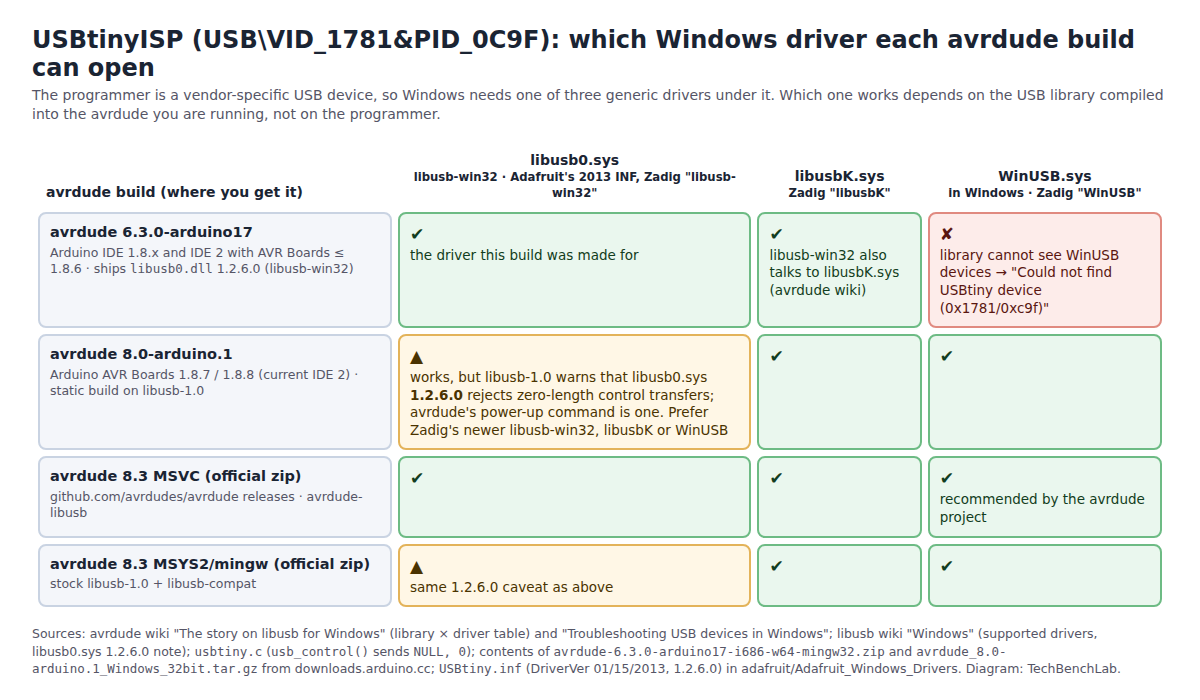
1781:0C9F, from the avrdude and libusb wikis and the contents of the Arduino tool packages. Diagram: TechBenchLab.Why avrdude says “not found” while Device Manager shows the programmer
usbtiny.c asks libusb to list every USB device it can reach and looks for idVendor 0x1781, idProduct 0x0c9f (from avrdude.conf, programmer usbtiny). On Windows, libusb only lists devices that already have a libusb-compatible driver bound: the libusb wiki says “you must install a driver before you can communicate with it using libusb”. A programmer under Other devices with a yellow mark, or under a driver the library doesn’t support, is invisible to avrdude, and the loop ends in the “not found” line.
| Device Manager | avrdude says | Meaning |
|---|---|---|
| Nothing appears when you plug it in, no sound | Could not find / cannot find USBtiny device (0x1781/0xc9f) |
Not enumerated: charge-only cable, dead board, or a USB 3 port that dislikes this low-speed (1.5 Mbit/s) device. Check the green LED first (Adafruit help page) |
| Other devices → “USBtiny”, “FabISP” or “Unknown device”, yellow mark | same | Enumerated, no driver. Install one with Zadig (below) |
| Universal Serial Bus devices → USBtiny (WinUSB) | same, only with avrdude 6.3 | WinUSB is bound but the Arduino 6.3 build (libusb-win32) cannot open WinUSB devices. Switch the driver to libusb-win32/libusbK, or use avrdude 7.0+ |
| libusb-win32 devices → USBtiny or FabISP | programs, or initialization failed, rc=-1 |
Driver is right. rc=-1 is the target side: ISP wiring, target power, a fuse set to an external clock |
| Anything | cannot open USB device: Permission denied + not found (Linux) |
udev rule missing; avrdude works as root. Not a Windows symptom |
The two INF files Adafruit maintains for the same hardware ID
Both live in adafruit/Adafruit_Windows_Drivers; SparkFun’s Pocket AVR Programmer and Tiny AVR Programmer repositories ship the first one unchanged (their README names Adafruit’s usbtiny_signed_8.zip as the source). The table comes from reading the INF files, the catalog signatures and the extracted installer, not from running anything.
USBtinyISP\USBtiny.inf |
USBtinyISP_WinUSB\USBtiny_WinUSB.inf |
|
|---|---|---|
| Driver bound | libusb0.sys (libusb-win32) 1.2.6.0, signed by its author Travis Lee Robinson, timestamp 17 Jan 2012 |
WinUSB.sys (part of Windows) |
| DriverVer | 01/15/2013, 1.2.6.0 | 03/07/2020, 1.0.0.0 |
| Device class / name shown | “libusb-win32 devices” / USBtiny | USBDevice / USBtiny |
| Catalog | usbtiny.cat present, signed with Adafruit Industries’ GlobalSign code-signing certificate (issued Oct 2016, timestamped) |
Declares usbtiny_winusb.cat, but no .cat file exists in the folder: an unsigned package, which 64-bit Windows refuses to install outside test-signing mode |
| In the released installer 2.5.0.0? | Yes, byte-identical to the repository (INF, .cat and libusb0.sys hashes match) |
No. The installer script has an optional “(alt driver)” section for it, but the shipped adafruit_drivers_2.5.0.0.exe contains no USBtinyISP_WinUSB folder |
| Works with | Arduino’s avrdude 6.3 (made for it); avrdude 7.0+ with the 1.2.6.0 caveat below | avrdude 7.0 and later; not Arduino’s 6.3-arduino17 |
So the Adafruit installer still gives you the 2013 libusb-win32 package and nothing else; WinUSB on this programmer comes only from Zadig or from Device Manager’s “WinUsb device” entry (the procedure the avrdude wiki documents, naming the USBtinyISP as an example).
Install the driver on Windows 11 with Zadig
- Plug the programmer in directly, no target attached. Start
zadig-2.9.exe, open Options → List All Devices. Without that option the programmer does not appear, which is the detour the Arduino forum thread below took. - Pick the entry whose USB ID reads
1781 0C9F. Its name is whatever the firmware reports: SparkFun’s units report FabISP, Adafruit’s INF names it USBtiny. - Choose the target driver with the arrows, then Install Driver (or Replace Driver). Which one:
- Arduino IDE 1.8.x, or IDE 2 with “Arduino AVR Boards” 1.8.6 or older:
libusb-win32. That IDE runsavrdude 6.3.0-arduino17, whose package containslibusb0.dll1.2.6.0: it opens libusb0.sys and libusbK.sys and cannot see WinUSB. - IDE 2 with “Arduino AVR Boards” 1.8.7 or 1.8.8, which switched the tool to
avrdude 8.0-arduino.1, a static build on libusb-1.0:WinUSBorlibusbK. libusb-1.0 also drives libusb0.sys, but its wiki warns that libusb0.sys 1.2.6.0, the exact version in Adafruit’s package, “cannot send libusb_control_transfer with zero wLength”, and the programmer’s power-up command inusbtiny.cis a zero-length control transfer. Zadig’s libusb-win32 is a newer 1.4.0.0 and is not affected by that note. - Standalone avrdude 8.x (the zip above):
WinUSB, which is what the avrdude project recommends; libusb0 and libusbK also work with the MSVC build.
- Arduino IDE 1.8.x, or IDE 2 with “Arduino AVR Boards” 1.8.6 or older:
- Check in Device Manager: the programmer now sits under Universal Serial Bus devices (WinUSB), libusbK USB Devices or libusb-win32 devices. Then
avrdude -c usbtiny -p attiny85 -v(no-P: a port makes no sense here) should print the signature.
Which avrdude your IDE runs is in the verbose upload output: …\tools\avrdude\6.3.0-arduino17\bin\avrdude or …\8.0.0-arduino1\….
Five boards, one hardware ID
| Board | USB ID | Product string / name | avrdude -c |
Source |
|---|---|---|---|---|
| Adafruit USBtinyISP | 1781:0C9F | “USBtiny” (INF); usb.ids lists 0C9F as “USBtiny” under vendor 1781 “Multiple Vendors” | usbtiny |
USBtiny.inf, usb.ids |
| SparkFun Pocket AVR Programmer | 1781:0C9F, bcdDevice 1.04 | FabISP (what dmesg and Zadig show) |
usbtiny |
usbtiny.h in the firmware (“SparkFun Licensed VendorID”, USBTINY_DEVICE_VERSION 0x104); forum thread |
| SparkFun Tiny AVR Programmer | 1781:0C9F | FabISP | usbtiny |
Arduino forum thread 1216550 (“recognized … as FabISP”) |
| FabISP (Fab Academy build of USBtiny) | 1781:0C9F | FabISP | usbtiny |
same firmware family |
| Adafruit Trinket / Gemma bootloader | 1781:0C9F | “bootloader disguised as USBtiny”, 10 s window after reset | adafruit_gemma (usbtiny type) |
avrdude.conf; Adafruit Trinket guide |
| Arduino Gemma bootloader | 2341:0C9F | same bootloader, Arduino’s VID | arduino_gemma |
avrdude.conf |
So a Trinket that “stopped being detected” and a USBtinyISP that “stopped being detected” are the same Windows problem, and one Zadig install covers both.
What the forum threads actually found
- Driver replaced after an update (Arduino forum, Jan 2024, 17 posts, and its twin on the SparkFun forum): a Tiny AVR Programmer that had worked for years returned “Could not find USBtiny device” on IDE 1.8.19; the greyed-out Port menu was a red herring (“a pure USB device that does not produce a serial port”). Fix: Zadig, List All Devices, FabISP, libusb-win32. The later
initialization failed, rc=-1in the same thread was target-side, not the driver. - IDE 2 needs the menu: in IDE 1.x the Upload button falls back to the programmer; in IDE 2 you must use Sketch → Upload Using Programmer (same thread, post 17).
- USB 3 ports: Adafruit’s help page says “USB 3 ports are sometimes a little more sensitive than USB 2”. The device is low-speed USB 1.1 (
dmesg: “new low-speed USB device”), so a cheap USB 2.0 hub in between is the usual cure. - Linux “Permission denied” (SparkFun forum, 2019): blamed on USB 3.0, it was a missing udev rule. The
dmesgthere is the source of the FabISP string and bcdDevice 1.04 above. - The 2011 classic (SparkFun forum, 25,000 views): WinAVR’s avrdude 5.10, same message, same driver question. The
-P usb:xxtried there is rejected by modern avrdude asinvalid -P.
FAQ
Device Manager shows “FabISP” under libusb-win32 devices. Wrong driver? No: FabISP is the product string of SparkFun’s firmware, and that class means libusb0.sys is bound, the right driver for the Arduino 6.3 avrdude.
Can I keep WinUSB and still use Arduino IDE 1.8.19? Not with its bundled avrdude 6.3. Switch the driver to libusb-win32 or libusbK with Zadig, or upload from the command line with avrdude 8.3 (see the AVRDUDE on Windows guide).
Related guides
- Zadig and the USBasp driver on Windows 11 (same tool, the other common AVR programmer)
- AVRDUDE on Windows: install and first commands
- Digispark ATtiny85 driver on Windows 11 (another libusb device with a timing window)
- Arduino Nano “stk500_recv(): programmer is not responding”
- USB VID/PID lookup for bench tools
Sources
- avrdude
src/usbtiny.c(device loop,usb_control()zero-length transfers, error strings); v6.3, v7.0 and v7.1 for the wording change;avrdude.conf.in(usbtiny, adafruit_gemma, arduino_gemma IDs) - avrdude wiki: The story on libusb for Windows and Troubleshooting USB devices in Windows; release v8.3
- libusb wiki: Windows (supported drivers, libusb0.sys 1.2.6.0 note)
- adafruit/Adafruit_Windows_Drivers:
Drivers/USBtinyISP/USBtiny.inf,usbtiny.cat,Drivers/USBtinyISP_WinUSB/USBtiny_WinUSB.inf,adafruit_drivers.nsi, release 2.5.0.0 - Arduino
package_index.json(AVR Boards 1.8.6 → avrdude 6.3.0-arduino17; 1.8.7/1.8.8 → 8.0.0-arduino1) and the contents of both tool archives - sparkfun/Pocket_AVR_Programmer (firmware
usbtiny.h, Drivers README); SparkFun hookup guide, troubleshooting - Adafruit USBtinyISP help page; Trinket: starting the bootloader
- usb.ids (1781 / 0C9F)
- Threads: Arduino forum 1216550; SparkFun 46859, 36849, 21420