Every USB device announces itself with two 16-bit numbers, a Vendor ID and a Product ID, and the operating system picks the driver from that pair before it reads anything else. If you can read the pair, you can name the chip on a no-name board, tell a programmer from its clone, and know which driver page to open. Below: where the pair is shown on each OS, a lookup table of 53 bench devices (more than 90 VID:PID pairs) built from the kernel drivers, the tools’ own source code and the usb.ids database, and six cases where the number says less than people think.
Where to read the pair
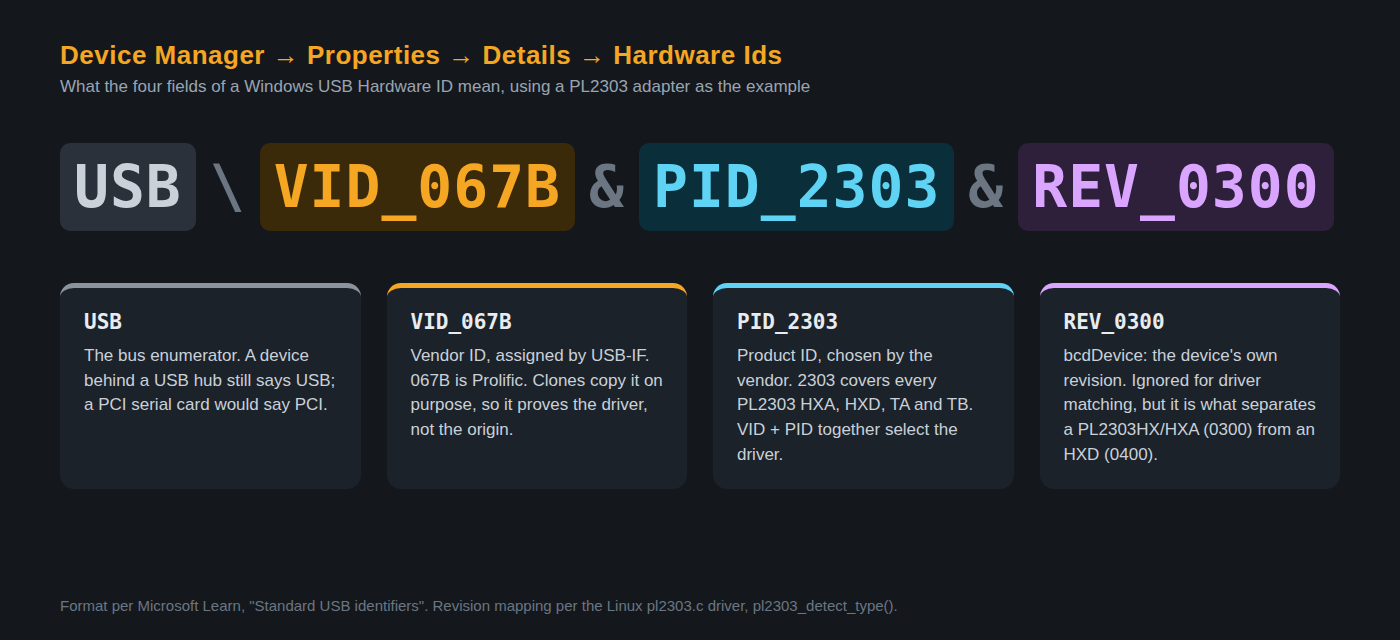
Windows: Device Manager, right-click the device, Properties, Details tab, property Hardware Ids. The first line reads, for example, USB\VID_067B&PID_2303&REV_0300: vendor, product, and the device’s own revision number. This works even when the device sits under “Other devices” with a yellow mark, which is exactly when you need it. Linux: lsusb prints ID 1a86:7523 plus a name, if the ID is in the usb.ids file. macOS: system_profiler SPUSBDataType lists “Vendor ID” and “Product ID” per device.
The lookup table
IDs are written the way Windows shows them (upper-case hex). Where one device has several IDs, they are listed in the order of the names. “Guide” links to the TechBenchLab post that hosts the driver or tool. Sources are per row group and listed at the end.
USB-to-serial bridges
| Device | VID:PID | Enumerates as | Driver / tool | Guide |
| CH340G, CH340C, CH340E | 1A86:7523 | “USB-SERIAL CH340”, COM port | WCH CH341SER | CH340 driver |
| CH340K | 1A86:7522 | COM port | WCH CH341SER | CH340 driver |
| CH341 in UART mode | 1A86:5523 | COM port | WCH CH341SER | CH340 driver |
| CH341A in programmer (EPP/I2C/SPI) mode | 1A86:5512 | Vendor-specific interface, no COM port | WCH CH341PAR; AsProgrammer | CH341A + AsProgrammer |
| CH343 | 1A86:55D3 | “USB-Enhanced-SERIAL CH343” | WCH CH343SER | CH9102 / CH343 driver |
| CH9102F, CH9102X | 1A86:55D4 | “USB-Enhanced-SERIAL CH9102” | WCH CH343SER | CH9102 / CH343 driver |
| CH347T (mode 3), CH347F | 1A86:55DD, 1A86:55DE | UART + JTAG/SPI composite | WCH CH343SER + OpenOCD | — |
| CP2102, CP2102N, CP2104 | 10C4:EA60 | “Silicon Labs CP210x USB to UART Bridge” | Silicon Labs CP210x VCP | CP2102 driver |
| CP2105 (dual), CP2108 (quad) | 10C4:EA70, 10C4:EA71 | Two or four COM ports | Silicon Labs CP210x VCP | CP2102 driver |
| FT232R, FT232RL | 0403:6001 | “USB Serial Converter” + “USB Serial Port” | FTDI CDM (VCP) | FTDI FT232 driver |
| FT2232C/D/H, FT4232H, FT232H | 0403:6010, 0403:6011, 0403:6014 | Converter A/B (C/D), one per channel | FTDI CDM; D2XX or WinUSB for JTAG | FTDI FT232 driver |
| FT230X, FT231X, FT234X (FT-X) | 0403:6015 | COM port | FTDI CDM | FTDI FT232 driver |
| PL2303 HXA, HXD, TA, TB (generation is in REV, see below) | 067B:2303 | “Prolific USB-to-Serial Comm Port” | Prolific, version depends on the chip | PL2303 “Phased Out” fix |
| PL2303 GC, GB, GT, GL, GE, GS | 067B:23A3, 23B3, 23C3, 23D3, 23E3, 23F3 | COM port | Prolific 4.x | PL2303 “Phased Out” fix |
| Arduino Uno R3, Mega 2560 R3 (ATmega16U2) | 2341:0043, 2341:0042 | CDC-ACM COM port | usbser.sys, built in | Arduino IDE 2 port not showing |
| Arduino Leonardo (sketch / bootloader) | 2341:8036, 2341:0036 | CDC-ACM + HID | usbser.sys, built in | Arduino IDE 2 port not showing |
| STM32 USB CDC (ST’s default Virtual COM Port example) | 0483:5740 | “STMicroelectronics Virtual COM Port” | usbser.sys (Windows 10+) | — |
Native-USB microcontrollers, bootloaders and phone download modes
| Device | VID:PID | Enumerates as | Driver / tool | Guide |
| STM32 built-in DFU bootloader | 0483:DF11 | “STM32 BOOTLOADER” | WinUSB via Zadig; dfu-util, STM32CubeProgrammer | STM32 DFU driver |
| RP2040 in BOOTSEL | 2E8A:0003 | RPI-RP2 drive + “RP2 Boot” vendor interface | Mass storage, no driver; picotool needs WinUSB | Pico not detected |
| RP2350 (Pico 2) in BOOTSEL | 2E8A:000F | RP2350 drive | Mass storage; picotool | Pico not detected |
| Pico SDK USB serial (RP2040 / RP2350) | 2E8A:000A, 2E8A:0009 | CDC-ACM COM port | usbser.sys | Pico not detected |
| Raspberry Pi Debug Probe, Picoprobe | 2E8A:000C, 2E8A:0004 | CMSIS-DAP + CDC | None; OpenOCD, pyOCD | — |
| ESP32-S3, C3, C6, H2 USB-Serial/JTAG | 303A:1001 | “USB JTAG/serial debug unit” (CDC + vendor) | usbser.sys for the port; esptool talks to it directly | esptool step by step |
| ESP32-S2 USB DFU | 303A:0002 | DFU runtime | dfu-util (idf.py dfu-flash) | ESP-IDF install |
| Teensy HalfKay bootloader / Teensyduino serial | 16C0:0478, 16C0:0483 | HID / CDC-ACM | Teensy Loader; usbser.sys | — |
| Digispark (Micronucleus bootloader) | 16D0:0753 | Vendor-specific | libusb via Zadig | — |
| Qualcomm EDL (Emergency Download), “QDLoader 9008” | 05C6:9008 | COM port once the Qualcomm driver is in | Qualcomm HS-USB driver (proprietary) | — |
| Qualcomm diagnostic port | 05C6:900E | COM port | Qualcomm HS-USB driver | — |
| MediaTek BROM / Preloader | 0E8D:0003 / 0E8D:2000, 0E8D:2001 | VCOM port, appears for a few seconds | MediaTek USB VCOM driver (proprietary); mtkclient | — |
Programmers and debug probes
| Device | VID:PID | Enumerates as | Driver / tool | Guide |
| ST-Link/V2, including the aluminium clone dongles | 0483:3748 | “STM32 STLink” | ST-Link USB driver (STSW-LINK009) | ST-Link V2 driver |
| ST-Link/V2-1 (on Nucleo and Discovery boards) | 0483:374B, 0483:3752 | ST-Link + VCP + mass storage | ST-Link USB driver | ST-Link V2 driver |
| STLINK-V3 (loader / modes) | 0483:374D / 374E, 374F, 3753, 3754, 3755, 3757 | ST-Link + VCP (+ bridge) | ST-Link USB driver | ST-Link V2 driver |
| SEGGER J-Link (classic / new-format PIDs) | 1366:0101 / 1366:1001 to 1366:101F and up | Vendor interface, optionally CDC and MSD | J-Link Software; WinUSB mode is encoded in the PID | J-Link driver + J-Flash Lite |
| CMSIS-DAP, DAPLink (any vendor’s board) | 0D28:0204 | HID (v1) or WinUSB (v2) + CDC + MSD | None; OpenOCD, pyOCD, Keil | — |
| WCH-LinkE in RISC-V mode / in ARM (DAP) mode | 1A86:8010 / 1A86:8012 | Vendor interface / CMSIS-DAP | WCH-LinkUtility, MounRiver; OpenOCD (WCH build), wlink | — |
| Black Magic Probe (application / DFU) | 1D50:6018 / 1D50:6017 | Two CDC-ACM ports (GDB + UART) | usbser.sys; GDB connects directly | — |
| USBasp and every clone | 16C0:05DC (Objective Development’s shared PID) | “USBasp”, vendor-specific | libusbK or WinUSB via Zadig; avrdude | Zadig + USBasp |
| USBtiny, USBtinyISP | 1781:0C9F | Vendor-specific | libusb via Zadig; avrdude | avrdude on Windows |
| AVRISP mkII, AVR Dragon, JTAGICE3, Atmel-ICE | 03EB:2104, 03EB:2107, 03EB:2140, 03EB:2141 | Vendor / HID (ICE) | Microchip Studio; libusb for avrdude | avrdude on Windows |
| PICkit 2, PICkit 3, PICkit 4 | 04D8:0033, 04D8:900A, 04D8:9012 | HID | None; MPLAB X / IPE | PICkit + MPLAB IPE |
| MPLAB ICD 3, ICD 4, REAL ICE | 04D8:9009, 04D8:9015, 04D8:9004 | HID / vendor | MPLAB X | PICkit + MPLAB IPE |
| TL866A, TL866CS | 04D8:E11C | Vendor-specific | MiniPro software; minipro (Linux) | minipro on Linux |
| TL866II Plus, XGecu T48 and T56 (all three share it) | A466:0A53 | Vendor-specific | Xgpro driver; minipro | TL866II Plus vs T48 vs T56 |
| XGecu T76 | A466:1A86 | Vendor-specific | Xgpro | Xgpro download |
| Olimex ARM-USB-OCD-H, ARM-USB-TINY-H | 15BA:002B, 15BA:002A | FT2232-based, two interfaces | WinUSB via Zadig; OpenOCD | — |
| Bus Pirate v4 | 04D8:FB00 | CDC-ACM | usbser.sys | — |
Logic analyzers and scopes
| Device | VID:PID | Enumerates as | Driver / tool | Guide |
| Saleae Logic (original) and every 24 MHz 8-channel clone | 0925:3881 | Vendor-specific, no firmware yet | WinUSB via Zadig; PulseView, Logic 1.2.40 | 24 MHz logic analyzer driver |
| Same clone after sigrok loads fx2lafw (8 ch / 16 ch) | 1D50:608C / 1D50:608D | “sigrok FX2 LA” | sigrok | PulseView download |
| Saleae Logic16, Logic 8, Logic Pro 8, Logic Pro 16 | 21A9:1001, 1004, 1005, 1006 | Vendor-specific | Saleae Logic 2 (bundled WinUSB) | Saleae Logic 2 download |
| Hantek 6022BE, cold (two factory variants) | 04B4:6022 or 04B5:6022 | “Hantek6022BE DRIVER 1” / “DRIVER 2” | Hantek driver, or sigrok (re-enumerates as 1D50:608E) | Hantek 6022BE driver |
| Hantek 6022BL | 04B4:602A or 04B5:602A | Same pattern | Hantek driver, or sigrok | Hantek 6022BE driver |
| DSLogic, DSLogic Pro, Plus, Basic | 2A0E:0001, 0003, 0020, 0021 | Vendor-specific | DSView; sigrok | — |
| Rigol DS1000Z / MSO1000Z (USBTMC) | 1AB1:04CE | USB Test & Measurement class | Class driver on Linux; NI-VISA or IVI on Windows | — |
Six things the number does not tell you
- Three programmers, one PID. The TL866II Plus, the T48 and the T56 all enumerate as
A466:0A53; the minipro project’s udev file carries one rule for the three. The model only becomes known after the software talks to the device, which is why a T56 with the wrong Xgpro version still “installs” and then fails. - Some devices change ID after you open them. A Hantek 6022BE plugs in as
04B4:6022; the moment sigrok uploads its firmware the scope re-enumerates as1D50:608E. The same happens to a Saleae clone,0925:3881to1D50:608C. Device Manager shows two different devices over time, and Zadig has to be applied to the first one. - The PL2303 generation lives in REV, not in the PID. Every HXA, HXD, TA and TB answers
067B:2303. The Linux driver decides the type frombcdUSBandbcdDevice: USB 1.1 with device revision0300is HX(A),0400is HXD; USB 2.0 with0300is TA,0500is TB. On Windows that revision is theREV_0300at the end of the Hardware Id, which is how you know in advance whether the “Phased Out” message is coming. - 1A86:7523 is not always a CH340. WCH’s newer CH343C claims the same pair with
REV_8234, and the two INF files name it differently; the CH9102 / CH343 guide above has the full INF table. - lsusb knows fewer vendors than you expect. The
usb.idsrelease of 26 June 2026 has no entry for vendor2E8A(Raspberry Pi) or303A(Espressif), so a Pico or an ESP32-S3 shows up as bare numbers with no name. The device is fine; the database is behind. - One probe, two IDs by mode. A WCH-LinkE is
1A86:8010in RISC-V mode and1A86:8012in ARM mode; the switch is done by the WCH tool, not by the cable. A J-Link encodes whether it is in SEGGER-driver or WinUSB mode inside the PID itself.
FAQ
Device Manager shows no VID at all, only “Unknown USB Device (Device Descriptor Request Failed)”. What now? The host never got the descriptor, so no driver was ever a candidate. That is a cable, hub, power or dead-chip problem, not a driver one. Try another cable and a rear port before downloading anything.
The pair is in the table but the yellow mark stays after installing the driver. Check REV and the interface. A composite device (ST-Link/V2-1, ESP32-S3, Black Magic Probe) exposes several interfaces under one PID; the driver you installed may cover only one of them, and Zadig applied to the wrong interface takes a working port away.
Can I trust a VID to prove a chip is genuine? No. The VID:PID is written into the chip or its EEPROM by whoever made the board; clones copy it on purpose, which is the whole story behind the FTDI and Prolific driver lockouts.
Related guides
- CH340 driver for Windows 11 and CP2102 driver: the two pairs behind most of this site’s traffic
- Zadig + USBasp: when the right driver is “no driver” (WinUSB)
- USB microscope not detected: reading the VID/PID of a camera that has no driver at all
- Arduino IDE 2: port not showing: the 141 VID/PID pairs in the official boards.txt files
Sources
- Linux USB project, usb.ids, version 2026.06.26 (names for 1A86, 10C4, 0403, 067B, 0483, 03EB, 04D8, 0925, 21A9, 04B4/04B5, 1366, 15BA, 1AB1, 16C0, 16D0, 05C6, 0E8D, 0D28, 2341, A466)
- Linux kernel, drivers/usb/serial/ch341.c, cp210x.c, ftdi_sio_ids.h, pl2303.h and pl2303.c (
pl2303_detect_type()) - OpenOCD, contrib/60-openocd.rules (ST-Link, J-Link, CH347, Espressif 303A:1001/1002); probe-rs, 69-probe-rs.rules
- minipro, udev/60-minipro.rules (TL866A/CS, TL866II+/T48/T56, T76)
- Raspberry Pi, picotool picoboot_connection.h; pico-sdk stdio_usb_descriptors.c; debugprobe usb_descriptors.c
- Espressif, esp-pylib constants.py (
ESPRESSIF_VID,USB_JTAG_SERIAL_PID); ESP-IDF DFU guide (303A:0002) - Arm Mbed, DAPLink usb_config.c (0D28:0204); ch32-rs, wlink src/probe.rs (WCH-Link 8010/8012); Black Magic Debug usb_descriptors.h
- avrdude, avrdude.conf.in (usbasp, usbtiny, avrispmkII, dragon_isp, jtag3isp)
- sigrok, libsigrok fx2lafw/api.c, hantek-6xxx/api.c, dreamsourcelab-dslogic/api.c
- bkerler, mtkclient usb_ids.py and edl usb_ids.py (MediaTek, Qualcomm)
- Microsoft Learn, Standard USB identifiers (the
USB\VID_xxxx&PID_xxxx&REV_xxxxformat)