esptool is Espressif’s command-line flasher for every ESP8266 and ESP32 chip. Arduino, ESP-IDF and PlatformIO all call it behind the scenes, and you run it yourself when you need to flash a .bin, back up a board or erase it. The current release is v5.4.0 (2 September 2026), and it changed two things that break most tutorials: the command is now esptool without the .py, and every subcommand uses hyphens (write-flash, not write_flash).
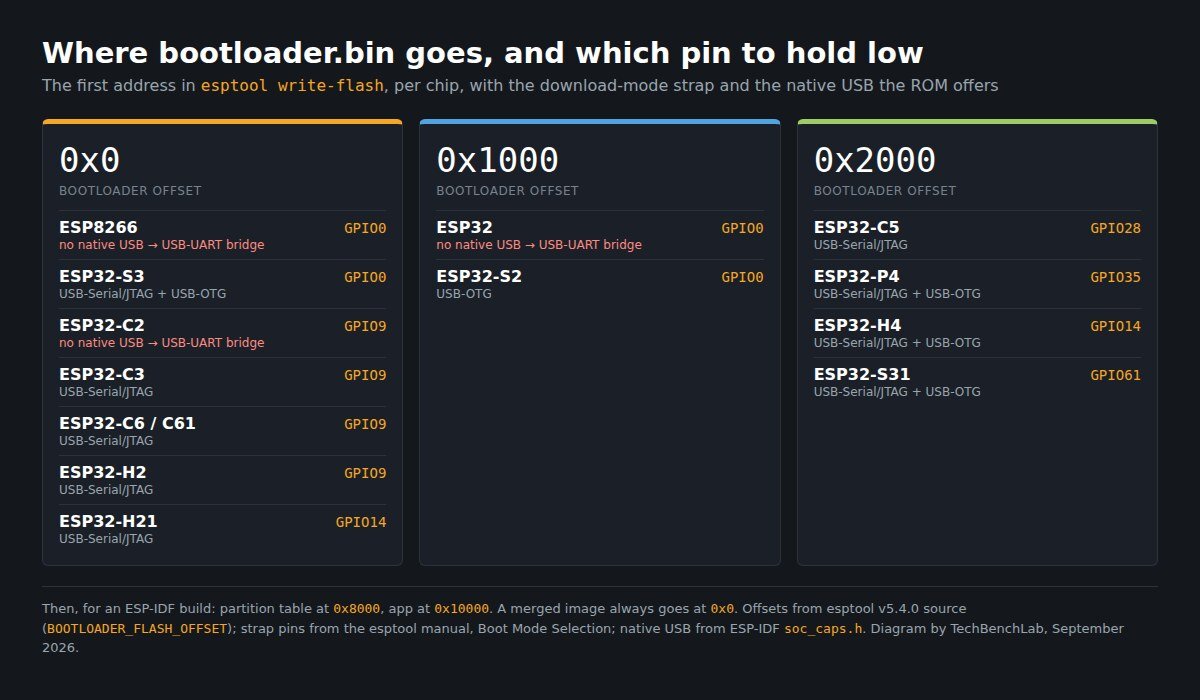
This guide gives you the official download with Espressif’s SHA-256 checksums, then the one table every flashing tutorial skips: for all 14 ESP chips in the esptool manual, the address the bootloader goes to, the pin you hold low for download mode, and whether the chip can be flashed over its own USB port. After that: install per OS, the commands you actually use, and the five errors that come up most in 364 Stack Exchange questions about esptool.
The download: PyPI or GitHub, both official
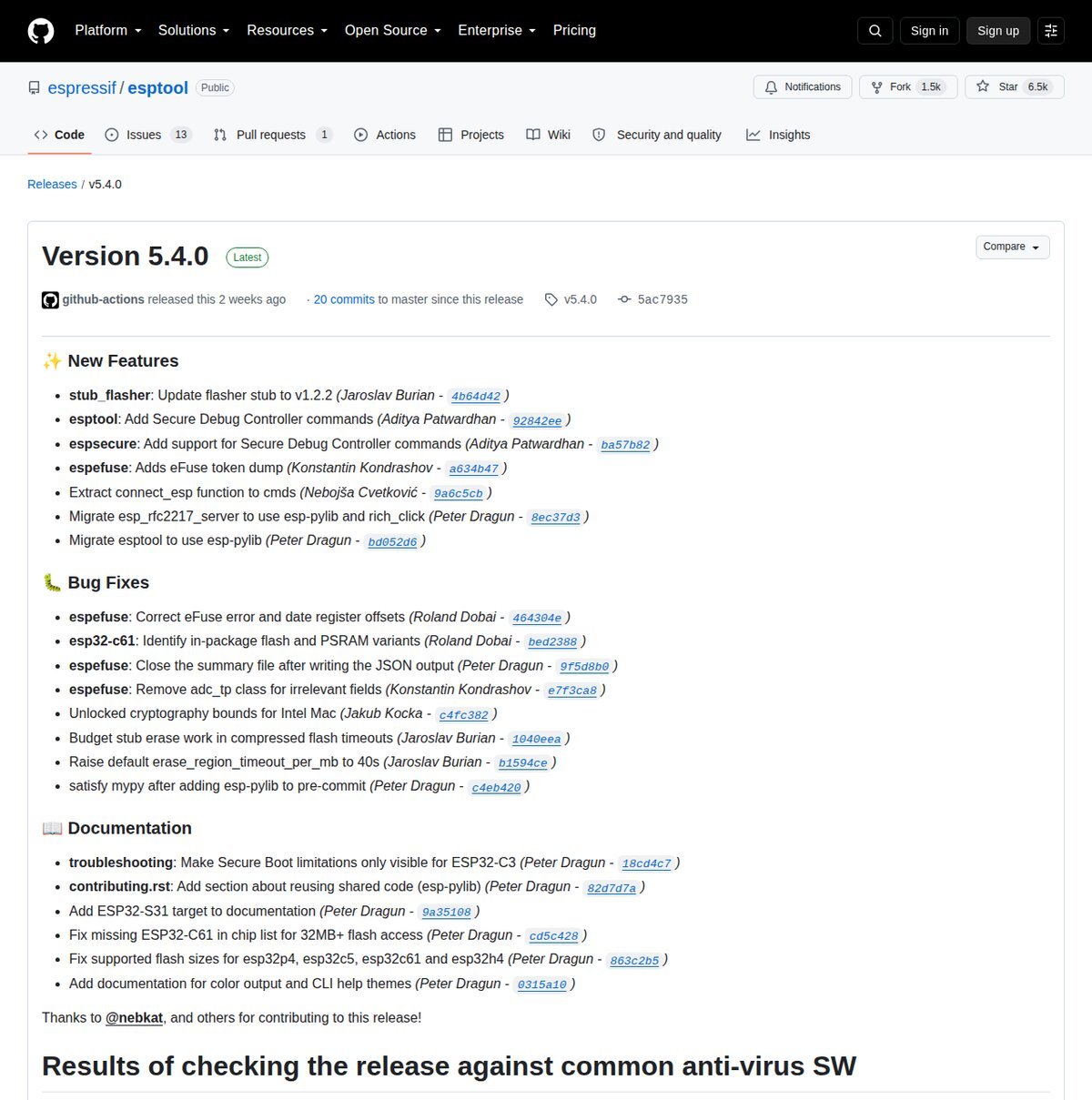
⬇ esptool v5.4.0 — official Espressif releases
github.com/espressif/esptool — releases
We don’t re-host esptool. The binaries come from Espressif’s GitHub, and the Python package is on PyPI. Espressif still maintains a v4 branch (v4.12.0, 14 July 2026) for Python 3.7–3.9 and for scripts that can’t move to v5 yet. Checksums below were read from the GitHub release API on 19 September 2026.
| File (v5.4.0) | For | Size | SHA-256 (published by GitHub for the release asset) |
|---|---|---|---|
| esptool-v5.4.0-windows-amd64.zip | Windows 10/11 x64 | 66.2 MB | b7f6b9dd301a210b31f4829118c909c84aae23107f9ca1fdc14ccf4d7384be2e |
| esptool-v5.4.0-linux-amd64.tar.gz | Linux x86-64 | 85.6 MB | 61648fbae20735cabb342f2fbe8fc89b3046e1ed6f9c3e09528d837dc9a9b152 |
| esptool-v5.4.0-linux-aarch64.tar.gz | Raspberry Pi 64-bit, ARM64 Linux | 78.4 MB | 2964fff085071c1403f2cf812a7a1d425f987f9992851a60236bbee17b6e7dcc |
| esptool-v5.4.0-linux-armv7.tar.gz | 32-bit ARM Linux | 69.7 MB | ee542ac6b60aee2604289ee418fccd0ff6eead6f702b51bbe4f0e483477e31d9 |
| esptool-v5.4.0-macos-arm64.tar.gz | Apple silicon | 62.5 MB | ba332671130939e2e6db90c2784488f7e62a1459b0fe3c5ec66e9a366821de7a |
| esptool-v5.4.0-macos-amd64.tar.gz | Intel Mac | 65.9 MB | 910bb64fe39a84c792752701293c8aa294faeef229fe8705ecd6955b01db3778 |
| esptool-5.4.0.tar.gz (PyPI source) | pip, any OS | 0.5 MB | fd756598db0a26c9975fa18511b08687c54bf2ce7322ede80cf1f5117dad1f50 |
Check before you run: certutil -hashfile esptool-v5.4.0-windows-amd64.zip SHA256 on Windows, sha256sum on Linux, shasum -a 256 on macOS. Espressif’s own release notes warn that the binaries “might get reported as malware by your antivirus software” and publish a VirusTotal link per file. The pip version avoids that and starts faster.
The table: bootloader address, boot pin and native USB, per chip
The first address in an ESP-IDF write-flash command is where the second-stage bootloader goes, and it is not the same on every chip. Tutorials copy 0x1000 from the original ESP32 and it fails on an S3 or C3. Put the bootloader at the wrong address and the flash succeeds, verify passes, and the board boot-loops with invalid header: 0xffffffff. We put this table together from the esptool v5.4.0 source (BOOTLOADER_FLASH_OFFSET in each target file), the esptool manual’s Boot Mode Selection page, and the soc_caps.h file for each chip in ESP-IDF:
Chip (--chip) |
Bootloader offset | Hold low for download mode | Second strap pin | Flash over its own USB? |
|---|---|---|---|---|
ESP8266 (esp8266) |
0x0 |
GPIO0 | GPIO2 high, GPIO15 low | No — needs a USB-UART bridge |
ESP32 (esp32) |
0x1000 |
GPIO0 | GPIO2 floating or low | No — needs a USB-UART bridge |
ESP32-S2 (esp32s2) |
0x1000 |
GPIO0 | GPIO46 floating or low | Yes, USB-OTG |
ESP32-S3 (esp32s3) |
0x0 |
GPIO0 | GPIO46 floating or low | Yes, USB-Serial/JTAG and USB-OTG |
ESP32-C2 (esp32c2) |
0x0 |
GPIO9 | GPIO8 high | No — needs a USB-UART bridge |
ESP32-C3 (esp32c3) |
0x0 |
GPIO9 | GPIO8 high | Yes, USB-Serial/JTAG |
| ESP32-C6 / C61 | 0x0 |
GPIO9 | GPIO8 high | Yes, USB-Serial/JTAG |
ESP32-H2 (esp32h2) |
0x0 |
GPIO9 | GPIO8 high | Yes, USB-Serial/JTAG |
ESP32-H21 (esp32h21) |
0x0 |
GPIO14 | GPIO13 high | Yes, USB-Serial/JTAG |
ESP32-C5 (esp32c5) |
0x2000 |
GPIO28 | GPIO27 high | Yes, USB-Serial/JTAG |
ESP32-P4 (esp32p4) |
0x2000 |
GPIO35 | GPIO36 high | Yes, USB-Serial/JTAG and USB-OTG |
ESP32-H4 (esp32h4) |
0x2000 |
GPIO14 | GPIO13 high | Yes, USB-Serial/JTAG and USB-OTG |
ESP32-S31 (esp32s31) |
0x2000 |
GPIO61 | GPIO60 high | Yes, USB-Serial/JTAG and USB-OTG |
After the bootloader, a default ESP-IDF layout puts the partition table at 0x8000 and the app at 0x10000. A merged image (merge-bin, or the single .bin that MicroPython and most firmware projects ship) always goes at 0x0. Two details from the manual: on the C, H, P and S31 chips, pulling both strap pins low “is invalid and will trigger unexpected behavior”. And the internal pull-up on the boot pin is about 45 kΩ, so a BOOT button needs a strong pull-down, such as 10 kΩ to GND.
The part nobody covers: the error message tells you how old your esptool is. Timed out waiting for packet header is the wording esptool used up to v3.1. Since v3.2 (October 2021) the same failure reads No serial data received or Wrong boot mode detected. Yet the old wording is in 54 of the 364 questions we counted, against 11 for the new one, and 11 of those 54 were posted in 2022 or later. The reason is sitting in the Arduino ESP8266 core: its latest release (3.1.2, March 2023) still bundles esptool as a git submodule pinned to commit 4fa0bd7, “v3.0 release version”, November 2020. The Arduino-ESP32 core 3.3.12, released 18 September 2026, ships esptool 5.3.1. So an ESP8266 sketch uploads with a flasher that’s almost six years old. If the IDE fails and a fresh esptool works from the terminal, that’s why.
Install, per operating system
Windows
- Easiest: unzip the Windows binary and run
esptool.exefrom that folder. No Python needed. - With Python 3.10 or newer:
python -m pip install esptool. The manual notes that with the Microsoft Store Python, probably onlypython -m esptoolworks. - Find the port in Device Manager → Ports (COM & LPT). No COM port means a missing bridge driver: see our CH340, CH9102/CH343 and CP2102 guides. A chip flashed over its own USB-Serial/JTAG port shows up as a plain COM port (a USB CDC device, per the ESP-IDF docs), with no bridge chip involved.
Linux
python3 -m venv esptoolenv && source esptoolenv/bin/activate && pip install esptool, as in the manual. The port shows up as /dev/ttyUSB0 (bridge chip) or /dev/ttyACM0 (native USB). Add yourself to the port group with sudo usermod -aG dialout $USER (uucp on Arch), then log out and back in.
macOS
Same pip or venv install, or the arm64/amd64 binary. Ports are /dev/cu.usbserial-* or /dev/cu.usbmodem*. Details on the CP210x driver and the “port busy” error are in our CP210x on macOS and Linux guide.
The commands you actually use (v5 names)
| Job | esptool v5 command | Old v4 form (still works, with a deprecation warning) |
|---|---|---|
| Identify chip and flash | esptool -p COM5 flash-id |
esptool.py flash_id |
| Back up the whole flash | esptool -p COM5 -b 460800 read-flash 0 ALL backup.bin |
read_flash 0 0x400000 |
| Erase everything | esptool -p COM5 erase-flash |
erase_flash |
| Flash a merged image | esptool -p COM5 -b 460800 write-flash 0x0 firmware.bin |
write_flash 0x0 firmware.bin |
| Flash an ESP-IDF build (ESP32-S3) | esptool --chip esp32s3 -b 460800 write-flash 0x0 bootloader.bin 0x8000 partition-table.bin 0x10000 app.bin |
--before default_reset --after hard_reset → now default-reset, hard-reset |
| Merge into one file | esptool --chip esp32 merge-bin -o merged.bin 0x1000 bootloader.bin 0x8000 partition-table.bin 0x10000 app.bin |
merge_bin |
Things v5 changed that trip up old scripts: --verify is deprecated because verification now runs after every write whenever possible, errors go to STDERR, verify-flash --diff=yes is now just --diff, and beta chips such as ESP32-C6(beta) were removed. Keep v4 for those. Espressif says the .py names “will be removed in the next major release”. The default speed is 115200 baud. The manual says most setups handle -b 230400, and some handle 460800, 921600 or 1500000; drop back down if a write fails part way.
The five errors that come up most
We pulled every question the Stack Exchange API returns for “esptool” or “esptool.py” on Stack Overflow, Arduino, Electronics, IoT and Raspberry Pi Stack Exchange: 364 of them, 2015–2025. Then we counted error strings. “Failed to connect” appears in 62, the old packet-header timeout in 54, the GPIO0/BOOT button in 51, “Invalid head of packet” in 19, port-open or permission errors in 14, and boot-loop headers in 11. ESP8266 is named in 196 of the 364. The fixes below come from Espressif’s troubleshooting page; the linked threads are real cases.
1. “Failed to connect to ESP32: No serial data received” (or “Timed out waiting for packet header”)
The chip didn’t enter download mode, or TX/RX isn’t connected. Hold BOOT (the pin in the table), tap EN/RST, and release BOOT once esptool shows “Connecting…”. The manual notes that some third-party boards leave out the capacitor on EN, which makes auto-reset unreliable, “especially on Windows”. Adding 1 µF or more from EN to GND fixes it. Examples: ESP32 packet header timeout, ESP32-CAM, no serial data.
2. “Wrong boot mode detected (0x13)”
esptool heard the chip, but the chip booted your firmware instead of the ROM loader. The strap pin wasn’t low at reset. Same fix as above. Thread.
3. “Invalid head of packet (0x00): Possible serial noise or corruption”
Espressif lists a bad USB cable, a breadboard shorting the flash pins, and brownout. Their manual says an FT232R’s or an Arduino’s 3.3 V output does not supply enough current for an ESP, which draws up to 70 mA continuous and 200–300 mA peaks. Try -b 115200 and name the chip with --chip. Thread.
4. “could not open port” / “Permission denied”
Another program has the port open, usually the Arduino Serial Monitor. On Linux, you’re not in dialout. On macOS, an old /dev/cu.SLAB_USBtoUART name means an outdated CP210x driver. Threads: permission denied, SLAB_USBtoUART.
5. Flash succeeds, board boot-loops with “invalid header: 0xffffffff”
The bootloader went to the wrong address for that chip (see the table), or the module can’t run the flash mode you wrote. The manual: “Some devices only support the dio flash mode”, so reflash with --flash-mode dio. ESP32-S3 + MicroPython example.
If you would rather not type any of this on Windows, NodeMCU PyFlasher wraps the same esptool in a window — but it writes a single file at 0x00000, so on the original ESP32 and the S2 it needs a merged image that already contains the bootloader. That guide also has the flash mode (DIO, QIO, DOUT) each ESP8266 and ESP32 board declares in its Arduino core definition.
FAQ
Is esptool.py the same as the ESP32 Flash Download Tool?
No. The Flash Download Tool is Espressif’s Windows GUI. esptool is the open-source command-line tool that runs on every OS and inside every IDE.
Do I need Python?
Not with the standalone binaries. With pip, v5 needs Python 3.10 or newer. Use v4 for 3.7–3.9, and v3.3 for older versions.
Should I update the esptool inside Arduino or ESP-IDF?
Espressif advises updating through the framework instead. If you must update it directly, stay on the same major version (pip install "esptool<4" for a v3 install). A standalone esptool next to the IDE is the safe way to test.
Sources
- esptool v5.4.0 release (assets, SHA-256) · v4.12.0 · PyPI esptool 5.4.0
- esptool manual: Installation · Boot Mode Selection · Troubleshooting · v5 Migration Guide · Basic Options
- esptool source: targets/*.py (BOOTLOADER_FLASH_OFFSET) · loader.py (error messages)
- ESP-IDF
soc_caps.hper chip, e.g. ESP32-S3 (SOC_USB_SERIAL_JTAG_SUPPORTED, SOC_USB_OTG_SUPPORTED) - Arduino ESP8266 core — tools/esptool submodule · Arduino-ESP32 package index (esptool_py per core version)
- Stack Exchange API: 364 questions matching “esptool” or “esptool.py” (Stack Overflow 215, Arduino 92, Electronics 45, IoT 10, Raspberry Pi 2), retrieved 19 September 2026
Related guides
- ESP32 Flash Download Tool: the Windows GUI alternative
- CH340 driver for Windows: the bridge on most ESP8266 and ESP32 boards
- CH9102 / CH343 driver: the newer bridge on ESP32 DevKit clones
- CP210x on macOS and Linux: when the port exists but is busy
- ESP-IDF install: esptool ships inside ESP-IDF — what the install actually downloads, and how to cut it