Run install.bat with no argument on Windows and ESP-IDF v6.1 downloads 1,496 MB of toolchains. Type your chip after it — install.bat esp32 — and the same install downloads 487 MB. The number comes from adding up the size field of every tool marked install: always in Espressif’s own tools/tools.json manifest, and it is the single most useful thing to know before you start.
ESP-IDF is Espressif’s official SDK for the ESP32 family: the C libraries, the CMake build system, the Xtensa and RISC-V compilers, and idf.py, the one command that configures, builds, flashes and monitors. This guide covers the download links, what each one weighs, how to install it on Windows, Linux and macOS in 2026 — and the five things that actually break, counted from 212 install issues in the official repository.
The install method changed in v6.0 — and most guides have not noticed
If you learned ESP-IDF before 2026, your muscle memory is esp-idf-tools-setup-offline-5.x.exe. That installer still exists, but it stops at 5.x. Across the 100 most recent releases of espressif/idf-installer, the newest classic Windows installer is offline-5.5.5, published 20 July 2026. There is no 6.0 or 6.1 asset in that repository at all.
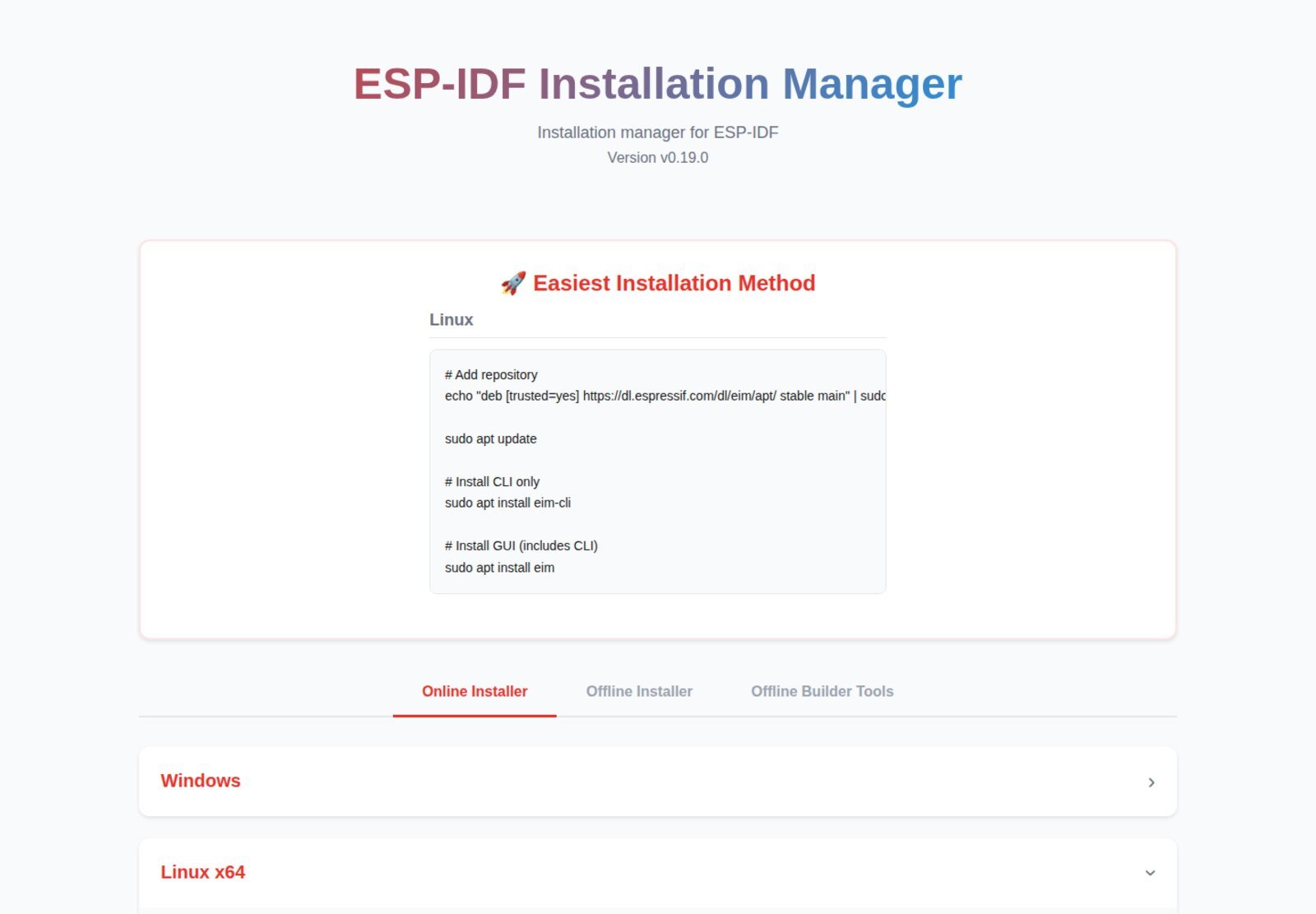
What replaced it is EIM, the ESP-IDF Installation Manager — a separate GUI/CLI application that installs and manages ESP-IDF versions on all three operating systems. The official Windows setup page now says it plainly: this “describes the default and recommended way to install ESP-IDF v6.0 and newer versions”, and the old git clone route is labelled “the legacy method”. The legacy method still works, is still documented, and is still what most CI pipelines use. It is just no longer the front door.
Where to download, officially
Everything below comes from Espressif’s own servers. Never take an ESP-IDF toolchain from a third-party mirror: the archives are large enough that nobody inspects them, and the official ones publish checksums.
| What you want | Official source | Notes |
|---|---|---|
| EIM, any OS | dl.espressif.com/dl/eim/ | v0.19.0 (1 Sep 2026); GUI and CLI, online and offline |
| EIM on Windows | winget install Espressif.EIM |
Espressif.EIM-CLI for the command-line build |
| EIM on Debian/Ubuntu | deb [trusted=yes] https://dl.espressif.com/dl/eim/apt/ stable main |
then apt install eim (GUI) or eim-cli |
| ESP-IDF source | github.com/espressif/esp-idf | the legacy route: clone, then install.sh/install.bat |
| Classic Windows installer | idf-installer releases | 5.x only; last is 5.5.5, 1,622 MB |
| Which versions exist | idf_versions.txt | the plain-text feed the installers read |
Espressif publishes a SHA-256 for every asset. The classic esp-idf-tools-setup-offline-5.5.5.exe is 1611551aa07dc67ecf289f3c1ba4081a1a6bbef0793e289744950797193c4de2; each EIM build carries its own, listed on the download page. Verify before you run a 1.6 GB executable.
How big is it, really
“A couple of gigabytes” is the usual answer. The exact answer is published, per version and per platform, in EIM’s offline archive manifest — the complete bundle of ESP-IDF plus tools plus Python:
| ESP-IDF | Windows x64 | Linux x64 | macOS arm64 |
|---|---|---|---|
| v5.2.7 | 1.96 GB | 1.41 GB | 1.37 GB |
| v5.3.5 | 2.05 GB | 1.49 GB | 1.46 GB |
| v5.4.4 | 2.88 GB | 1.99 GB | 1.97 GB |
| v5.5.5 | 3.06 GB | 2.15 GB | 2.10 GB |
| v6.0.3 | 3.34 GB | 2.38 GB | 2.32 GB |
| v6.1 | 3.43 GB | 2.50 GB | 2.43 GB |
Windows is consistently ~40% heavier than Linux for the same version, and has grown 75% since v5.2.7. If you are on a metered connection, plan around that number — and read the next section on how to cut it.
The part nobody covers: --targets defaults to everything
install.sh detects Python, checks the version, then hands your arguments to idf_tools.py install --targets=… — a flag whose own help text reads “It defaults to installing all supported targets.” All thirteen of them, on v6.1. Applying the selection rule from the code itself — a tool is installed if its supported_targets is all or intersects the chips you asked for — to the v6.1 manifest on Windows x64 gives this:
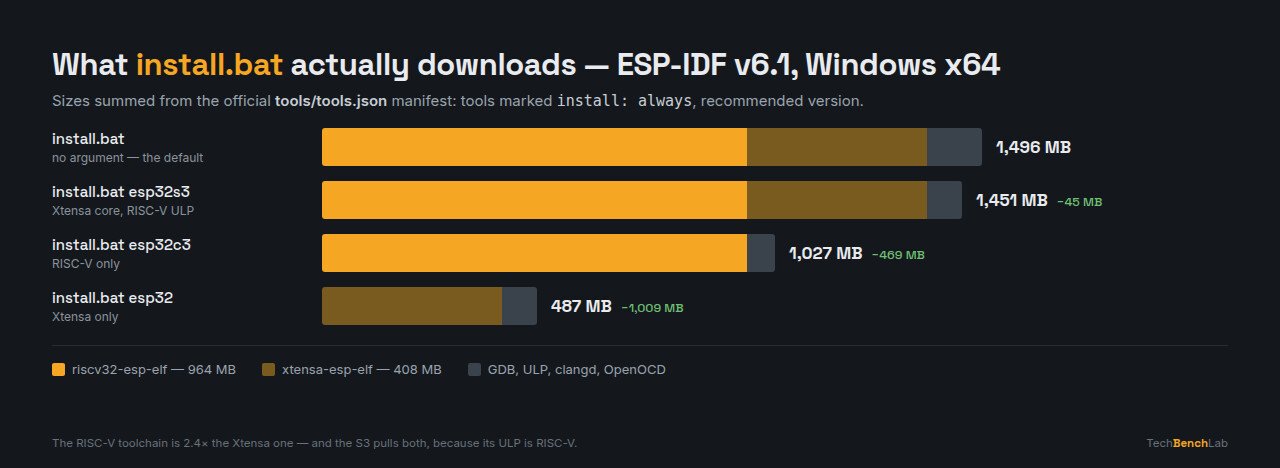
tools/tools.json for ESP-IDF v6.1 on Windows x64. Diagram: Tech Bench Lab.Two results are worth sitting with. First, the RISC-V toolchain is the big one: riscv32-esp-elf is 964 MB against 408 MB for xtensa-esp-elf. If you only own classic ESP32 boards, naming your chip saves you a gigabyte — more than a C3 owner saves. Second, ESP32-S3 barely saves anything (45 MB), because the S3’s ultra-low-power coprocessor is RISC-V, so its entry in supported_targets pulls both toolchains in.
Targets are cumulative and stored in idf-env.json, so ./install.sh esp32 today and ./install.sh esp32c6 next month just adds the second toolchain. In EIM the same choice is the chip selection under Custom Installation.
Installing it, step by step
Windows. Install Python and Git if you do not have them — EIM will offer to do it for you. Then winget install Espressif.EIM, launch it, click Start Installation → Start Easy Installation for the latest stable release with defaults. For a specific version or a custom path, use Custom Installation. From the CLI the whole thing is eim install, or eim install -i v5.4.2 to pin a version.
Linux and macOS. Same manager, same commands. On Debian and Ubuntu add the apt repository above and apt install eim; elsewhere take the archive for your architecture from the EIM page. Prerequisites, per the official list: git, wget, flex, bison, gperf, ccache, libffi-dev, libssl-dev, dfu-util, libusb-1.0-0, plus a Python that can build virtual environments and do SSL. On POSIX systems EIM stops if they are missing, unless you pass --skip-prerequisites-check.
The legacy route, if you want the repository itself — still the right choice for CI, for contributing, or for working on a release branch:
git clone -b v6.1 --recursive https://github.com/espressif/esp-idf.git
cd esp-idf
./install.sh esp32        # or: install.bat esp32
. ./export.sh             # or: export.bat
That last line is not optional and not permanent: export.sh sets IDF_PATH, activates the Python environment and puts the toolchain on your PATH for that shell only. Every new terminal needs it again. “idf.py is not recognised” is almost always a terminal that never ran it.
Which version should you install
Espressif supports each minor release for 30 months — 12 months of “Service”, then 18 of “Maintenance” — per SUPPORT_POLICY.md. The Python floor rises with it, which is the part that bites people upgrading an old project on an old machine. Minimum Python here is read from OLDEST_PYTHON_SUPPORTED in each branch’s tools/python_version_checker.py; the chip count is the union of supported_targets in the same branch’s manifest.
| ESP-IDF | Minimum Python | Chips supported | Status |
|---|---|---|---|
| v4.4 | 3.6 | 5 | EOL July 2024 |
| v5.0 | 3.7 | 6 | EOL May 2025 |
| v5.1 | 3.7 | 7 | EOL December 2025 |
| v5.2 | 3.8 | 8 | EOL August 2026 |
| v5.3 | 3.8 | 10 | supported |
| v5.4 | 3.8 | 10 | supported |
| v5.5 | 3.9 | 12 | supported |
| v6.0 | 3.10 | 12 | supported |
| v6.1 | 3.10 | 13 | current stable |
One trap that is easy to miss: EIM’s offline installer on Linux and macOS requires Python 3.11 to 3.14, a narrower window than ESP-IDF’s own 3.10 floor. A system Python of 3.10 passes ESP-IDF’s check and fails EIM’s offline install.
The five things that actually break
To find out what really goes wrong, rather than what blog posts repeat, we searched the official repository: 244 issues in espressif/esp-idf with “install” in the title. Stripping the 32 that are about API functions such as gpio_install_isr_service leaves 212 genuine installation issues, 2017 to 2026, 206 of them closed. Tagging the titles by theme:
| Theme | Issues | Share |
|---|---|---|
| Python, virtualenv, pip | 43 | 20.3% |
| Windows-specific | 36 | 17.0% |
| Linux / WSL | 18 | 8.5% |
| Download, proxy, TLS, mirrors | 17 | 8.0% |
| Toolchain / compiler | 12 | 5.7% |
| Paths, spaces, non-ASCII | 9 | 4.2% |
The curve is encouraging: 37 install issues in 2020, 35 in 2023, 11 in 2025 and 9 so far in 2026. The installer genuinely got better. What is left:
1. Python is the number one failure, by a wide margin. One issue in five. The classic symptom is Can not create virtual environment; on Debian and Ubuntu it is usually a missing python3-venv, and on systems with several Pythons it is install.sh finding the wrong one. Check with python3 --version against the table above before you blame anything else.
2. Downloads that stall or fail TLS. Eight per cent of issues. ESP-IDF pulls its tools from GitHub release assets, which some corporate networks intercept and some countries throttle. The documented fix is a one-line environment variable: set IDF_GITHUB_ASSETS to dl.espressif.com/github_assets (or dl.espressif.cn/github_assets in China) and every https://github.com/ download URL is rewritten to Espressif’s server. Set it without the https:// prefix — idf_tools.py rejects a value containing ://.
3. The install landed somewhere you did not expect. The tools do not sit next to the repository; they go to IDF_TOOLS_PATH, default $HOME/.espressif on Linux and macOS, %USER_PROFILE%.espressif on Windows. That is where the gigabytes live. Set the variable before installing to move them.
4. Spaces and non-ASCII characters in the path. Nine issues. A profile folder with accented characters, or an esp-idf folder under “My Documents”, fails deep inside the build rather than at install time — which is why it costs people a whole day. Install under a short plain path.
5. Forgetting export. Not a bug and not usually filed as one, but it is the most common first-day question everywhere. The environment is per-shell. If idf.py works in one terminal and not another, that is the entire explanation.
FAQ
Do I need ESP-IDF if I use the Arduino core? No — the Arduino ESP32 core bundles a precompiled ESP-IDF underneath, which is why board packages are large. You need ESP-IDF proper for the native APIs, current chip support or the full build system. If the board simply does not appear in the IDE, that is a USB-serial problem, not an SDK one — see our Arduino IDE 2 port guide.
Can I install several versions side by side? Yes, and it is normal. Each keeps its own tools under IDF_TOOLS_PATH; whichever export script you ran decides which the shell uses. EIM manages them from one dashboard, and eim remove v5.4.2 drops one without touching the rest.
Is the classic esp-idf-tools-setup-offline installer dead? Not for 5.x — offline-5.2.8 shipped on 11 September 2026, so maintenance builds still appear for supported branches. It is dead for anything 6.0 and newer. Across all 100 tracked releases the classic installers total 908,303 downloads for the offline build and 327,529 for the online one, so there is a lot of muscle memory to retrain.
Which chips does the version I want actually support? v6.1 covers thirteen: ESP32, S2, S3, S31, C2, C3, C5, C6, C61, H2, H21, H4 and P4. A newer chip in an older branch is not a configuration problem — the support simply is not there. v5.1, for instance, knows seven.
Do I still need a USB-serial driver? On a board with a separate bridge chip, yes — that is a driver question independent of ESP-IDF. Most modern boards use the CH9102/CH343 or a CP210x; see our CH9102 and CH343 guide and CP210x on macOS and Linux. Boards with native USB need no driver at all.
Sources
- ESP-IDF Programming Guide — Get Started (v6.1)
- Installation of ESP-IDF and Tools on Windows
- IDF Tools —
IDF_TOOLS_PATHand the GitHub assets mirror - ESP-IDF Versions and Support Period Policy
tools/tools.json,python_version_checker.pyandinstall.sh, release/v6.1- EIM documentation — Prerequisites
- EIM downloads and its offline archive manifest
- espressif/idf-installer releases (sizes, SHA-256 and download counts)
- Issue corpus:
repo:espressif/esp-idf is:issue in:title installvia the GitHub search API, 244 results retrieved 22 September 2026
Related guides
- esptool.py step by step — the bootloader offset and boot pin for every ESP chip
- ESP32 Flash Download Tool — the GUI alternative, and the offsets it needs
- CH9102 and CH343 drivers — the bridge on most current ESP32 boards
- Arduino IDE 2: port not showing — 141 USB IDs and the driver you probably do not need