Last checked: 3 November 2026.
Every WCH microcontroller with a factory USB bootloader (CH55x, CH54x, CH32V103/V203/V208/V30x/V317, CH32F103/F20x, CH32X035, CH32L103, CH57x/58x/59x) enumerates as the same vendor-specific device, USB\VID_4348&PID_55E0 or USB\VID_1A86&PID_55E0, and Windows has no class driver for it. The driver you put on that one ID decides which tools see the chip: WCHISPStudio only talks through WCH’s CH375 driver, the stable wchisp release only through WinUSB, and the two cannot be bound at once. Most “Device Not Connected” and “No WCH ISP USB device found” reports below are that mismatch, not a dead board.
⬇ WCH CH372/CH375 driver V3.6 (official package, mirrored) · WCHISPTool_Setup.exe V4.0 · wchisp v0.3.0 · Zadig 2.9
Download CH372DRV V3.6 (298 KB)
WCHISPTool_Setup.exe, official link only: wch-ic.com/downloads/WCHISPTool_Setup_exe.html. The file served on 3 Nov 2026 is V4.0 of 3 Jun 2026, 20,359,032 bytes, SHA-256 8d2004251dcb59d43c63a132f341a76dca99b863fc03c1556987b679e8afac95, Authenticode-signed by Nanjing Qinheng Microelectronics Co., Ltd. with a DigiCert timestamp of 3 Jun 2026 (the English page’s text still reads “3.6, 18.6 MB, 2023-10-18”; the Chinese page says 4.0, 19.4 MB). The NSIS archive contains the launcher WchIspStudio.exe, five per-family programs (WCHISPTool_CH54x-55x.exe, _CH56x, _CH57x-59x, _CH32Fxxx, _CH32Vxxx, all stamped “WCHISPStudio_V4.00”), the manuals WCHISPStudio_EN.pdf and one per family, and the same CH375 driver files as the package above (byte-identical INF, .sys and DLLs). Not mirrored: it is a 20 MB installer with an updater.
wchisp (open source, GPL-2), official link only: v0.3.0, 3 Oct 2024, wchisp-v0.3.0-win-x64.zip, 681,807 bytes, SHA-256 eba605bbc62f217f6454e7236d04ef1b8a6b4396dd7ce8dc26fc83016213c3aa (contains wchisp.exe and README). The nightly build (28 Sep 2026 at the time of writing) is a different program on Windows, see below. We don’t mirror either: the project’s issue #44 documents Microsoft Defender flagging the nightly as Trojan:Win32/Wacatac.B!ml (the maintainer calls it a misclassification; the issue is still open).
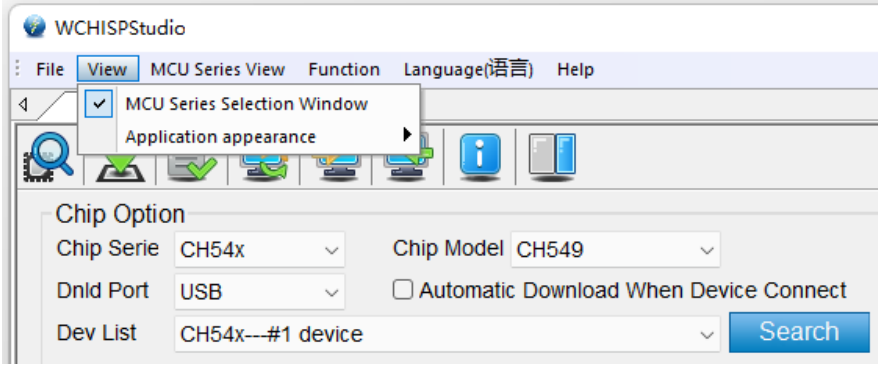
WCHISPStudio_EN.pdf, shipped inside the installer. © WCH.What Windows sees, and what each driver turns it into
The bootloader’s descriptor (dumped with pyusb in ch552tool issue #16) is USB 1.1, class FF/80/55, bulk endpoints 0x02 out and 0x82 in, 64-byte packets, no manufacturer or product string. bcdDevice is the bootloader version (0x0100 on that 2021 CH559, REV_2700 on the CH569 in the HydraUSB3 wiki). With no strings, Device Manager can only call it what the INF says.
| Device Manager shows | Driver bound | Who installed it | Tools that can open it |
|---|---|---|---|
| Other devices → “Unknown device”, yellow mark (or nothing, if the bootloader left before you looked) | none | — | none; install one of the two below while the chip is in the bootloader |
| Interface → “USB Module” | CH375W64.sys (service CH375_A64; CH375WDM.sys on x86, CH375M64.sys on arm64) |
WCHISPTool_Setup.exe, CH372DRV, Windows Update (the catalog is Microsoft-signed) |
WCHISPStudio/WCHISPTool, ch55xduino’s vnproch55x (≥ 0.0.10), chprog, wchisp nightly |
| Universal Serial Bus devices → “USB Module” or whatever name Zadig was given | WinUSB.sys (or libusb0.sys/libusbK.sys) |
Zadig | wchisp v0.3.0, ch55xtool, chprog, vnproch55x, wchisp nightly only with CH375DLL64.dll beside it |
| “Unknown USB Device (Device Descriptor Request Failed)”, VID/PID 0000 | — | — | Hardware, not driver: the CH552 in ch55xduino #152 had no decoupling capacitors. See the descriptor-failed guide |
The odd name comes from the INF: CH375WDM.INF V3.6 lists 4348:55E0, 1A86:55E0, 1A86:55E1, 1A86:E035 and 1A86:E036 as CH37XICP.DeviceDesc = "USB Module" in a WCH-private class called “Interface”, next to the CH372/CH375/CH376/CH378 bridge chips the driver was written for. The catalog is signed by “Microsoft Windows Hardware Compatibility Publisher” (certificate 13 Nov 2025 to 10 Nov 2026), so Secure Boot and Memory Integrity accept it, and the INF also copies CH375DLL64.dll into System32, which is why some tools start working “by magic” once the driver is in.
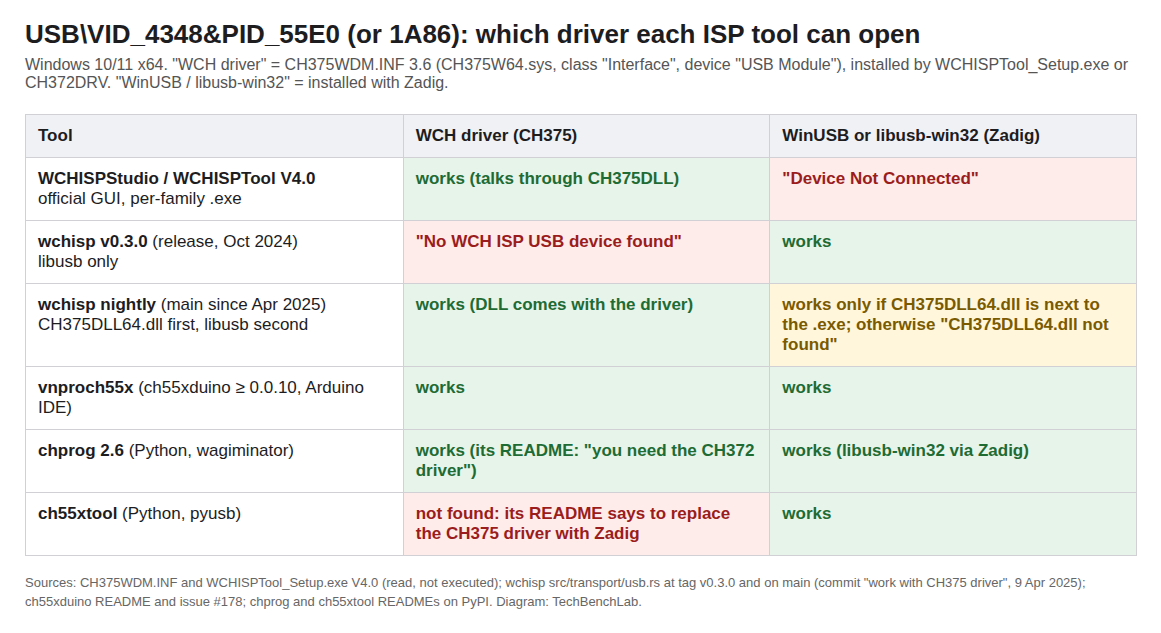
4348:55E0, from the INF, the installer contents and each tool’s source or README. Diagram: TechBenchLab.wchisp: the release and the nightly are different programs on Windows
src/transport/usb.rs at tag v0.3.0 is pure libusb: it looks for 0x4348/0x1a86 with product 0x55e0 and otherwise prints No WCH ISP USB device found(4348:55e0 or 1a86:55e0 device not found at index #0). libusb cannot open a device bound to CH375W64.sys, so with WCH’s driver installed v0.3.0 always fails; the README’s Zadig advice is for this build. The commit “work with CH375 driver” (9 Apr 2025), only in nightly builds, inverts that: on Windows x64 it loads CH375DLL64.dll first and falls through to libusb only when the DLL reports zero devices. The load is fatal when the DLL is missing (CH375DLL64.dll not found. Please download it from the WCH official website and put the dll next to this executable), even with the chip sitting under WinUSB. The DLL is in the zip above (DRIVER\CH375DLL64.dll, 19,061 bytes, SHA-256 103aa207af2240ab66d631d48bac2393193a61e5019e2e76db4745dc66dc82cc).
Install on Windows 11, step by step
Path A, WCH’s driver (WCHISPStudio, Arduino with ch55xduino, chprog, wchisp nightly).
- Run
WCHISPTool_Setup.exe, or unzipCH372DRV_V3.6.zipand runDRIVER\SETUP.EXE; the chip does not need to be connected. - Put the chip in the bootloader (table below) and plug it in. Device Manager → Interface → “USB Module”.
- WCHISPStudio: pick the series, set Dnld Port = USB, click Search. The chip appears in Dev List as “CHxxx—#1 device”; with nothing found the log prints
Device Not Connectedand the command-line mode returns fault code 5, “Not enumerated to device” (table 2.2.2 ofWCHISPStudio_EN.pdf). - wchisp nightly:
wchisp info, thenwchisp flash firmware.hex. No Zadig.
Path B, WinUSB (wchisp v0.3.0, ch55xtool, hydrausb3 tools).
- Start
zadig-2.9.exe, Options → List All Devices, select USB ID 4348 55E0 (or 1A86 55E0): “USB Module” if WCH’s driver is present, “Unknown Device” if not. - Pick WinUSB (libusb-win32 for ch55xtool) and Replace Driver, inside the bootloader window: issue #178 needed four tries because the chip left the bootloader first, and the uninstall fails silently the same way.
- To return to WCHISPStudio: Device Manager → the device → Uninstall with “Delete the driver software”, then reinstall the WCH package (the ch552tool README describes the same round trip).
Getting into the bootloader, family by family
| Family (wchisp device file) | USB ISP? | How to enter the bootloader | Source |
|---|---|---|---|
CH551, CH552, CH554, CH555–CH559 (0x11-CH55x) |
yes (USB + UART) | Pull D+ (P3.6) to 3.3 V through 10 kΩ while applying power; a reset is not enough, power-cycle. A blank chip runs the bootloader by itself; after the first firmware, the current bootloader exits after about 5 s unless a tool talks to it | EEVblog, reply #14; CH552 datasheet §7.3.3 (“after power on reset, firstly run the boot loader”); ch55xduino README and #178 (maintainer: “5 second before the bootloader timeout”) |
CH543–CH549 (0x12-CH54x), the MCU inside WCH-Link |
yes | Short DP (P5.1) to 3V3 at power-up | cjacker’s CH32V toolchain guide |
| CH32V203/V208, V303/V305/V307, V317, CH32F203/F205/F207/F208 | yes | BOOT0 = 1, BOOT1 = 0 at reset selects “boot from system memory”, the 28 KB factory bootloader. On a dev board: hold BOOT0, press and release RESET, release BOOT0 after about a second; or hold BOOT while plugging in | CH32FV2x_V3xRM V2.5, §1.2–1.3, Table 1-1; Adafruit QT Py CH32V203 |
| CH32V103, CH32F103, CH32X035, CH32L103, CH643 | yes | Same BOOT0 + RESET sequence on the dev boards; the pin table lives in each family’s own reference manual | cjacker’s guide, “ISP programming”; wchisp device files (support_usb: true) |
| CH571/573, CH581/582/583, CH591/592 (BLE) | yes | BOOT button on the WeAct and FOSSASIA Badge Magic boards listed as tested in the wchisp README | wchisp README |
CH569/CH565 (0x10-CH56x) |
yes | “Flash Mode” jumper (P3 on HydraUSB3), USB A-to-A cable | HydraUSB3 wiki |
CH32V002/003/004/006 (0x21-CH32V00x) |
no | No USB at all: support_usb: false in the device file; the bootloader is UART-only and cannot be entered from a pin, only by firmware setting FLASH_STATR.MODE and resetting. Use a WCH-LinkE |
wchisp README, CH32V00x notes; our WCH-LinkE driver guide |
The errors in the threads, and what fixed them
- Arduino upload fails, works after Zadig (ch55xduino #178, Jan 2025): Windows 10 and 11 had never installed the bootloader driver, because the chip timed out before Windows Update finished. Installing WCHISPStudio put the CH375 driver in, the stock vnproch55x then worked, and the README now says so.
- “MCU family Not support” on a CH552T that WCHISPTool programs fine (ch55xduino #44): bootloader version 1.0. The V1 protocol answers 2 bytes where V2 answers 6, and ch55xduino’s uploader only speaks V2; old stock needs WCHISPStudio or chprog.
- “Failed to get device” under libusb-win32 (ch552tool #16): pyusb’s libusb-1.0 backend hit
USB_ERROR_CANNOT_SET_CONFIG; falling back to the libusb0 backend fixed it. - VID and PID 0000, Zadig wants “force mode” (ch55xduino #152): a salvaged board without decoupling capacitors. No driver fixes a descriptor that never arrives.
- Linux: permission denied: no driver, but a udev rule for
4348:55e0and1a86:55e0(ch55xduino’s99-ch55xbl.rules, or chprog’s one-liner).lsusbshows “4348:55e0 WinChipHead”.
FAQ
My CH552 shows up as a COM port, not “USB Module”. Wrong driver? No: that is the ch55xduino CDC firmware (1209:C550), not the bootloader, which only enumerates while P3.6 is held or for the seconds after the firmware hands over.
Can WCHISPStudio and wchisp share one PC? With the nightly build, yes: both go through CH375DLL64.dll and the WCH driver. With v0.3.0 you swap drivers every time.
Related guides
- CMSIS-DAP, DAPLink and WCH-LinkE on Windows 11 (the probe for CH32V003 and for bricked ISP)
- CH340 driver on Windows and CH9102/CH343 (WCH’s other USB IDs on your bench)
- Zadig and the USBasp driver (how Zadig picks and replaces drivers)
- STM32 DFU driver on Windows 11 (the same “which driver for which tool” problem on ST parts)
- USB VID/PID lookup for bench tools
Sources
- WCH: CH372DRV.ZIP V3.6 and CH372DRV.EXE (contents of
CH375WDM.INF,CH375WDM.CATread with OpenSSL); WCHISPTool_Setup.exe (NSIS archive listed with 7-Zip, Authenticode checked with osslsigncode;WCHISPStudio_EN.pdfandWCHISPTool_CH54X-55X_EN.pdfinside); CH552 datasheet V1.8 (§6.6, §7.3, bBOOT_LOAD); CH32FV2x_V3xRM V2.5 (§1.2 system memory, §1.3 Table 1-1) - wchisp: README (Windows note, CH32V00x notes, tested boards),
src/transport/usb.rson main and at v0.3.0, devices/*.yaml (17 family files,support_usb), releases, issue #44 - ch55xduino: README (“Driver for windows”, bootloader entry, CDC ID 1209:C550), issues #44, #152, #178; vnproch551
main.cpp(CH375 and libusb paths) - MarsTechHAN/ch552tool issue #16 (full descriptor dump); chprog on PyPI (Windows driver note, udev rules); ch55xtool on PyPI
- EEVblog: “<30 cent MCU with USB controllers”: WCH’s CH55X series (reply #14, P3.6 pull-up); cjacker/opensource-toolchain-ch32v (ISP programming, CH549 in WCH-Link); HydraUSB3 wiki (Zadig on 4348 55E0, PowerShell output); Adafruit QT Py CH32V203, bootloader mode