An STM32 in DFU mode always enumerates as USBVID_0483&PID_DF11, but Windows 11 can bind four different drivers to that same ID — and the driver, not the chip, decides whether STM32CubeProgrammer, dfu-util or the old DfuSe tool can see it. Below: dfu-util 0.11 hosted here, a table mapping every string Device Manager shows to the tool that will actually work, and the STM32 families that have no USB DFU bootloader to begin with.
⬇ dfu-util 0.11 (official binaries, GPL-2)
There is no installer. The Windows executables are in win64 and win32 — run dfu-util.exe from a terminal opened in that folder.
⬇ Zadig 2.9 (driver installer)
Step 1 — get the chip into DFU mode
| Board | How to enter DFU | Source |
| WeAct Black Pill (F401CC/CE, F411CE) | Hold BOOT0, press and release NRST, release BOOT0 about half a second later | Zephyr board docs |
| Generic F4 core board with a BOOT0 header | BOOT0 to 3V3, then reset or power-cycle | Pattern 1, AN2606 |
| Nucleo-H743ZI | BOOT0 (CN11 pin 7) to VDD, user USB port to the PC, ST-LINK port for power | ST’s own walkthrough |
| Blue Pill (F103C8) | Not possible as sold — see the next table | AN2606 Rev 63, Table 3 |
One rule from AN3156 §1 catches people out: enumeration happens “as soon as the USB cable is plugged (or immediately if the cable is already plugged)”. If you do not want the part to enter DFU, the cable has to come out before the reset.
Does your STM32 even have a USB DFU bootloader?
Half of the “DFU device never appears” reports are parts whose factory bootloader has no USB at all. Per Table 3 of AN2606 Rev 63:
| Family | Bootloader interfaces in system memory | USB DFU? |
| STM32F10xxx (F101/F102/F103, all densities) | USART1 only | No |
| STM32F105xx/107xx | USART1/USART2 (remapped), CAN2, DFU | Yes — but an 8, 14.7456 or 25 MHz HSE crystal is mandatory |
| STM32F401xB(C), F401xD(E), F411xx | USART1/USART2, DFU (V2.2), SPI1-3, I2C1-3 | Yes |
| STM32F410xx | USART1/USART2, I2C, SPI | No |
| STM32F40x/41x, F42x/43x, F446, F469/479, F7 | USART + DFU (USB device FS) | Yes |
| STM32G03x/04x, G07x/08x | USART, I2C, SPI | No |
| STM32G0B0/G0B1/G0C1 | USART1-3, DFU (USB device FS) | Yes |
So a stock Blue Pill will never show up as 0483:DF11. It is USART1 on PA9/PA10, or you flash a third-party DFU bootloader — which enumerates under its own USB ID, not ST’s.
Step 2 — the driver, and what each one can talk to
| What Device Manager shows | Under | Driver bound | What can talk to it |
| STM32 BOOTLOADER | Universal Serial Bus devices | WinUSB | STM32CubeProgrammer and dfu-util |
| STM32 BOOTLOADER | Universal Serial Bus devices | libusbK (Zadig) | dfu-util |
| STM Device in DFU Mode | STMicroelectronics DfuSe | STTub30.sys (DfuSe, STSW-STM32080) | DfuSe Demo only — CubeProgrammer and dfu-util will not see it |
| Yellow ⚠ STM32 BOOTLOADER, or “Unknown USB Device” | Other devices | none | nothing — install one of the above |
| nothing appears | — | — | the part never entered DFU — back to step 1 |
The WinUSB route, from ST. ST’s install guide says to run the STM32 Bootloader.bat file “provided with the release package”, found in DriversDFU_Driver under the STM32CubeProgrammer folder. This is the one worth having: it is WinUSB-based, so dfu-util works afterwards with no Zadig at all.
The Zadig route, if you do not want a 44 MB installer for a 1 MB job: Options → List All Devices → pick STM32 BOOTLOADER → choose WinUSB → Replace Driver. Same flow as the USBasp driver install.
They are mutually exclusive. ST’s guide is explicit: “If the DFUSE driver is installed on your machine, first uninstall it, then reboot the machine and run the previously mentioned ‘.bat’ file.” Tick Delete the driver software for this device when you uninstall, or Windows puts STTub30 straight back.
Step 3 — flash it
dfu-util.exe -l
Found DFU: [0483:df11] ver=2200, devnum=5, cfg=1, intf=0, path="1-3",
  alt=0, name="@Internal Flash  /0x08000000/..."

dfu-util.exe -a 0 -s 0x08000000:leave -D firmware.bin
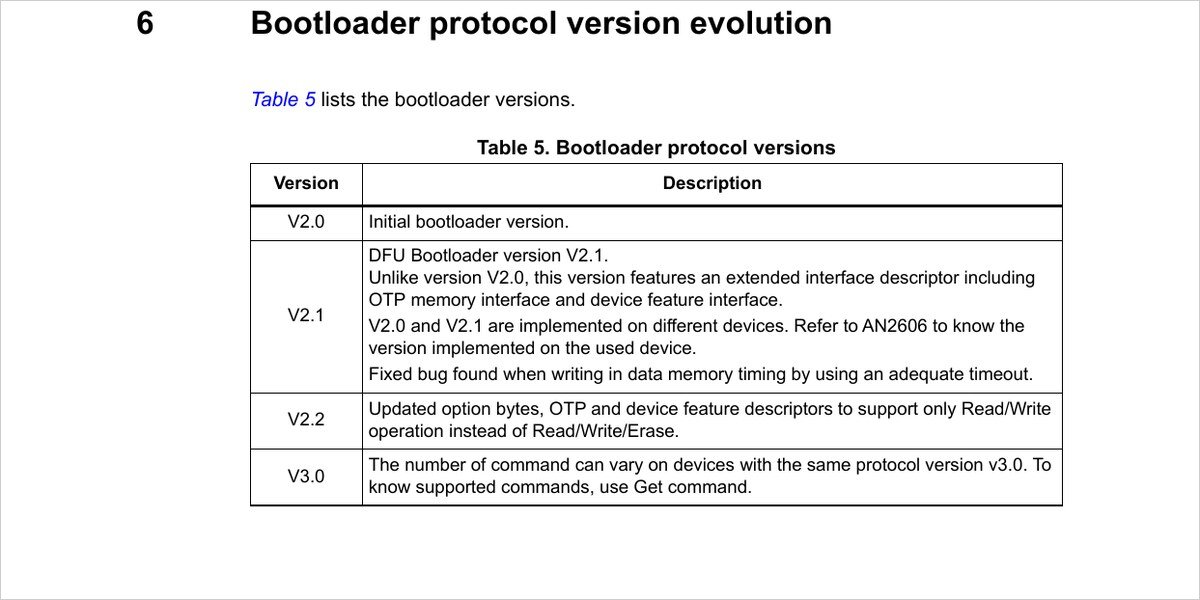
That ver= field is free information most people skip past. dfu-util prints the descriptor’s version word verbatim — the format string inside the binary is Found %s: [%04x:%04x] ver=%04x — and AN3156 §1 says “the bootloader version is returned in the device descriptor in the MSB of the bcd device field (example: 0x2000 = version 2.0)”. So ver=2200 is bootloader protocol V2.2, and Table 5 of the same note tells you what that buys you:
The five failures, with the exact message
“No DFU capable USB device available” — the device is enumerated but bound to a driver libusb cannot open. This is the signature of a DFU device with no WinUSB/libusbK behind it. Fix: step 2.
CubeProgrammer connects to nothing after years of DfuSe. The old STTub30 binding wins until you delete it. Uninstall, reboot, then run the .bat — in that order, per ST.
Windows 11 refuses the DfuSe driver outright. This OpenGD77 thread documents it: STTub30.sys is dated 2015, Memory Integrity blocks it, and it will not load even with driver-signature enforcement turned off. The answer in 2026 is to stop using DfuSe.
An F105/F107 enumerates once, then resets in a loop. AN2606 is blunt about this one: for the connectivity line the external clock “is mandatory only for DFU and CAN bootloaders”, at 8, 14.7456 or 25 MHz, and a clock failure generates a system reset. A missing or wrong crystal looks exactly like a driver problem and is not one.
Device Manager shows nothing when you plug the board in. Before touching drivers, swap the cable — a charge-only USB lead produces the identical symptom on an STM32 as it does on a CH340 board.
FAQ
Do I need Zadig if I already installed STM32CubeProgrammer? No. Its DFU driver is WinUSB-based, and dfu-util speaks to WinUSB. Running Zadig on top only risks swapping it for libusbK, which CubeProgrammer may then refuse.
Can I keep DfuSe for an old project and CubeProgrammer for a new one? Not on the same PC for the same device — one driver is bound to 0483:DF11 at a time. DfuSe has had no update since v3.0.6 and is the one to drop.
My board shows a COM port instead of a DFU device. Then it booted your application, not the bootloader. BOOT0 was not high when reset was released — the timing in step 1 matters.
Sources
- AN3156 Rev 16 — USB DFU protocol used in the STM32 bootloader (ST, September 2024)
- AN2606 Rev 63 — STM32 microcontroller system memory boot mode (ST), Table 3
- Installing STM32CubeProgrammer 2.23.0 — the DFU driver .bat and the DfuSe conflict
- dfu-util project page and the 0.11 release notes
- ST community: “STM DFU driver installer” — where the driver folder lives, and the 1 MB vs 44 MB argument
With the bootloader reachable, the rest is ordinary work. If you would rather go in over SWD and keep the USB port for your application, that is the ST-Link V2 route; if the probe on your bench is a Segger, see the J-Link driver and J-Flash Lite guide.