There is no standalone “J-Link driver” download. SEGGER ships one package — the J-Link Software and Documentation Pack — and the Windows USB driver is an optional checkbox inside it that is unticked by default. Whether you need that checkbox depends entirely on which hardware version of J-Link you own, and your probe already tells you the answer in its USB product ID.
This guide gives you the official download with checksums, the install steps per operating system, and one table nobody publishes: the SEGGER USB product IDs, and which bit in the number says whether your probe is in WinUSB “driverless” mode or in legacy SEGGER-driver mode. Then J-Flash Lite — what it programs, and the four things it deliberately cannot do.
The download: one package, every tool
Everything comes from one page on segger.com: the USB driver, J-Link Commander, J-Flash Lite, the GDB server, RTT Viewer and the DLL your IDE loads. There is no driver-only installer to hunt for, and no third-party mirror worth trusting — SEGGER publishes an MD5 for every file plus a matching .sig signature next to it.
⬇ J-Link Software and Documentation Pack — official SEGGER page
We do not re-host this one. SEGGER ships a new build roughly every week (see below), so a mirrored copy is stale almost immediately. Note also: segger.com answers a datacenter IP with an AWS WAF captcha page, so the version data below was read from the Internet Archive’s capture of the official download page dated 14 August 2026 — check the live page for anything newer.
The newest release in that capture is V9.68, dated 12 August 2026. Sixteen files ship per release; these are the ones most people need:
| File | Size | MD5 (published by SEGGER) |
|---|---|---|
| JLink_Windows_V968_x86_64.exe | 69.8 MiB | 6d4d1aee556b4d0e82089236e78f9966 |
| JLink_Windows_V968_arm64.exe | 60.5 MiB | 4c47f217835f74dc196bbfa7c7a12110 |
| JLink_Linux_V968_x86_64.deb | 56.3 MiB | 22f7d79c5c5ac0d1f2e9d7137c238ced |
| JLink_Linux_V968_x86_64.rpm | 71.9 MiB | 761124e37c32cbb9b932a8250db4037f |
| JLink_Linux_V968_x86_64.tgz | 72.0 MiB | 5877e01a33d6df5de25ae46dd2b4461c |
| JLink_Linux_V968_arm64.deb | 54.7 MiB | 50dd9aa38a7ffba735af6a7f1e47dad2 |
| JLink_MacOSX_V968_universal.pkg | 92.3 MiB | 0173143397235e1888f4d76962ef50e3 |
| JLink_MacOSX_V968_arm64.pkg | 59.3 MiB | 0564b32cee4adf7ff48adbff374cb1a3 |
That page is also an archive, and it is worth knowing how big: it lists 756 distinct versions of the pack, the oldest dated 8 June 2015, each with its own checksum and signature. Per year that is 64 releases in 2024, 73 in 2025 and 46 in the first 32 weeks of 2026 — a median gap of six days. Two machines on different builds is normal; and if a toolchain demands an exact version, the archive still has it.
Do you even need a driver?
On Linux and macOS, never. SEGGER’s own wiki is explicit: there is no SEGGER-specific driver for those systems, the generic USB stack in the OS does the talking. What Linux needs instead is a udev rule, which is a different problem with a different fix (below).
On Windows it depends on whether your probe supports WinUSB — Microsoft’s generic bulk driver, shipped since Windows 8, which lets a device work with no vendor driver at all. SEGGER calls this “driverless mode”. The catch is that WinUSB support arrived at a different hardware version for every model line, and SEGGER documents it one product page at a time. Collected into one table:
| Model | USB 2.0 Hi-Speed since | WinUSB (driverless) since | VCOM since |
|---|---|---|---|
| J-Link BASE | V10 | V12 | V9 |
| J-Link PLUS | V10 | V12 | V9 |
| J-Link EDU Mini | Not supported (Full-Speed only) | Mini V2 | Not supported |
| J-Link WiFi | V1 | V2 | V1 |
| J-Link Ultra | V4 | V6 | V4 |
| J-Link Pro | V4 | V5 | V4 |
| J-Link LITE Cortex-M | Not supported | Never | Not supported |
The part nobody covers: SEGGER’s installer page explains why the USB-driver box is unticked by default — “all SEGGER probes in maintenance period are using WinUSB drivers per default. The USB driver is only required for legacy probes which are out of support & maintenance period.” Fair enough. But by SEGGER’s own model pages, WinUSB on a BASE or PLUS only starts at hardware version V12. A BASE V10 or V11 on your bench, a LITE, or an on-board J-Link OB on an eval kit is therefore outside the default install path, and the wiki says so plainly for one OB variant: “Versions of this OB on older evaluation boards did not feature full WinUSB support due to bootloader limitations. Using such an OB / evalboard and updating the firmware therefore always required to have the SEGGER USB driver to be installed or else updating the OB would fail.”
If that is you, tick the box during install, or run USBDriverInstDrivers.exe from the installed package afterwards.
What the USB product ID tells you
SEGGER’s vendor ID is 0x1366. The product ID is not arbitrary: probe-rs, whose J-Link backend states in a code comment that its ID list “is taken from the udev rules file provided by Segger”, treats it as a bit field — bit 12 marks the current numbering scheme, bit 4 means the probe enumerated under the legacy SEGGER driver, and bit 5 means it enumerated as WinUSB.
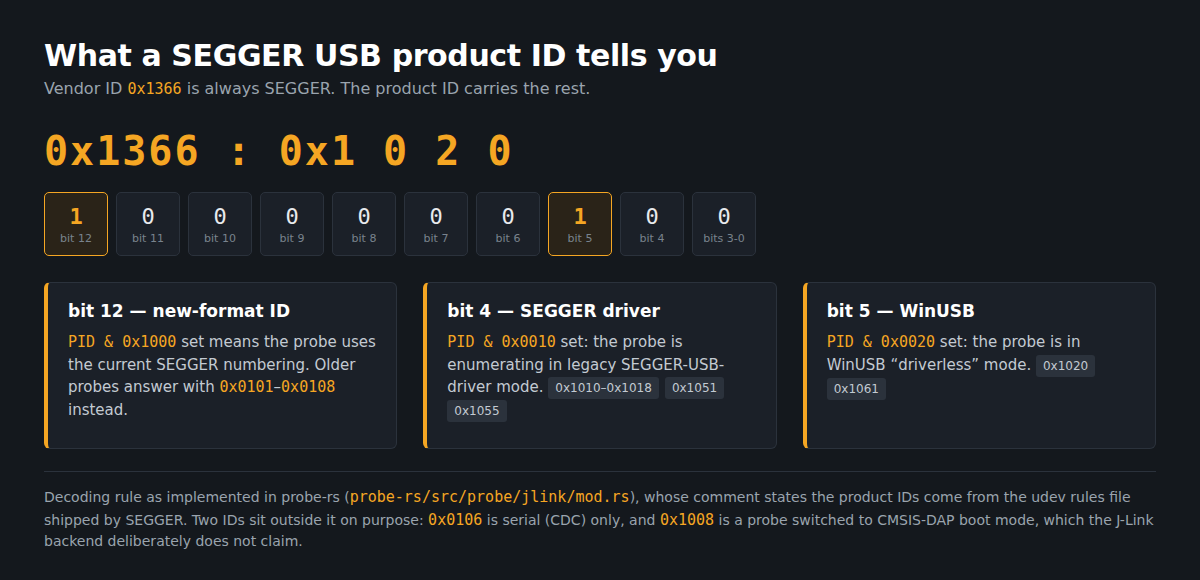
Cross-checking four independent lists — OpenOCD’s udev rules, the libjaylink discovery table, probe-rs, and the public usb.ids database — gives the following. The libjaylink column is the one you will not find anywhere else: it records which USB interface the J-Link protocol lives on for the legacy IDs.
| Product ID | In OpenOCD rules | In libjaylink (USB interface) | Meaning |
|---|---|---|---|
0x0101 |
Yes | Yes (interface 0) | Legacy ID. The only one usb.ids names: “J-Link PLUS” |
0x0102 / 0x0103 / 0x0104 |
Yes | Yes (interface 1 / 2 / 3) | Legacy, protocol on a non-zero interface |
0x0105, 0x0107, 0x0108 |
Yes | Yes (interface 0) | Legacy |
0x0106 |
No | No | Excluded on purpose — “supposed to be serial (CDC) only” |
0x1010–0x1018 |
Yes | Yes | Current format, SEGGER driver mode (bit 4 set) |
0x1015 |
Yes | Yes | Same, and the second ID usb.ids knows: “J-Link” |
0x1020 |
Yes | Yes | Current format, WinUSB mode (bit 5 set) |
0x1051, 0x1055 |
Yes | Only 0x1055 |
SEGGER driver mode |
0x1061 |
Yes | No | WinUSB mode |
0x1008 |
No | No | Probe booted in CMSIS-DAP mode — not claimed as a J-Link |
Two practical payoffs. First, lsusb or the Windows Device Manager now answers the driver question for you: an ID with bit 5 set is already driverless. Second, if your probe reports 0x1008, nothing is broken — it was switched to CMSIS-DAP boot mode and needs switching back in J-Link Configurator, not a reinstall.
Installing it, per OS
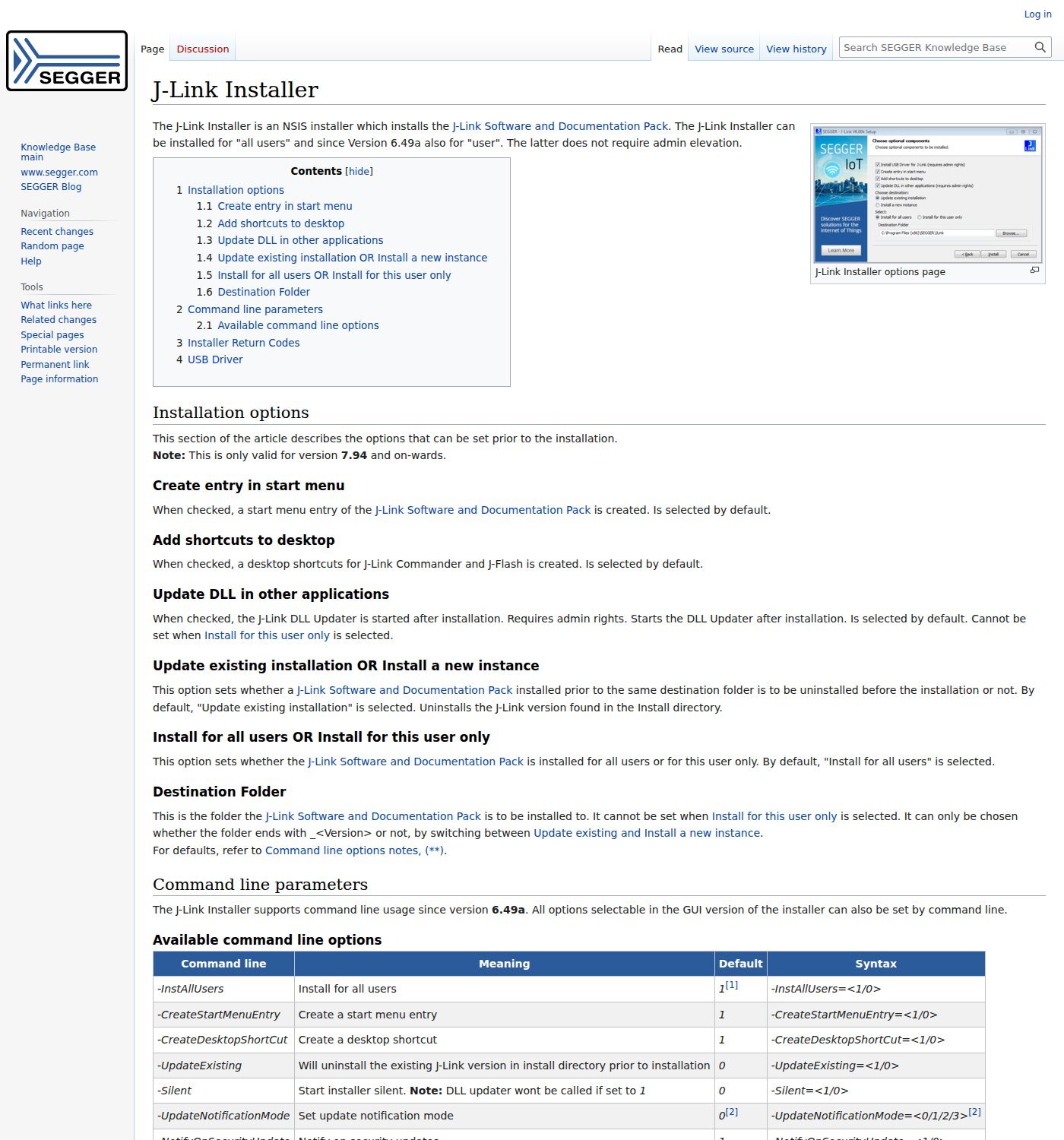
Windows. The installer is NSIS-based. Since version 6.49a it installs per-user without admin rights and accepts switches for unattended setups: -Silent=1, -InstAllUsers=<1/0>, -UpdateExisting=<1/0>, -InstDir="<path>". Return code 740 means it needed elevation. Leave “Update DLL in other applications” ticked — that is the DLL Updater, which points already-installed IDEs at the new JLinkARM.dll.
Linux. Use the .deb or .rpm if you can: the package manager installs the udev rules for you. If you unpack the .tgz instead, you must do it yourself, and this is the single most common reason a J-Link works as root and fails as a normal user. SEGGER’s own README spells it out:
sudo cp 99-jlink.rules /etc/udev/rules.d/
sudo udevadm control -R
sudo udevadm trigger --action=remove --attr-match=idVendor=1366 --subsystem-match=usb
sudo udevadm trigger --action=add    --attr-match=idVendor=1366 --subsystem-match=usb
macOS. Install the .pkg and you are done; there is no driver to add. Pick the arm64 build for Apple Silicon or the universal package if you move the machine image between Intel and Apple Silicon hosts.
J-Flash Lite: what it does, and the four things it can’t
J-Flash Lite is the free flash programmer inside the pack. Its point is that it runs on a J-Link BASE or EDU — full J-Flash requires a PLUS or higher. Start it, pick your device, interface and speed in the configuration dialog, then the main window gives you exactly three controls: choose a file (bin, hex, mot), Erase chip, and Program Device.
The limits, straight from SEGGER’s documentation, are: no support for external CFI NOR flash, no custom init steps, no command-line automation, and no project management — it only remembers the last session’s settings. That third one is what sends people back to the download page: if you need flashing in a build script or CI, J-Flash Lite is a dead end. Use J-Link Commander with a command file, or the GDB server, or buy the licence for full J-Flash.
Five things that actually go wrong
1. Works as root, fails as a user (Linux). Missing udev rules — the .tgz path above. Not a permissions bug in your IDE.
2. OpenOCD and J-Link Commander refuse to share (Windows). Designed behaviour, and SEGGER states it: “If the OpenOCD J-Link USB driver is configured, J-Link can be used with OpenOCD but not with ordinary J-Link utilities like for example J-Link Commander.” Reassigning the probe with a tool like Zadig hands it to OpenOCD and takes it from SEGGER’s own software; going back means reassigning the driver in Device Manager. Same class of conflict as flashrom on Windows and the CH341A.
3. An OEM probe that refuses your chip. SAM-ICE (Microchip), mIDASLink (Analog Devices), Digi JTAG Link, J-Link LITE FSL, Microchip J-32 and J-Link LITE LPC Edition are J-Links inside, locked to that vendor’s silicon — and SEGGER’s wiki says the limitation “can NOT be lifted”. No driver reinstall changes it.
4. The EDU licence, not the hardware. A J-Link EDU Mini is technically a J-Link; its terms are educational use only — not “directly or indirectly for a profit organization, business purpose, or other commercial undertaking”, not “in any commercial environment (e.g. an office)”. Nothing stops it working; it is a licence you would be breaking.
5. A clone. The cheap blue probes are common enough that probe-rs carries a hard-coded quirk for one: vendor 0x1366, product 0x0101, serial 000000123456, commented “Blue J-Link PRO clone” — every unit of that batch reports the same serial. SEGGER’s software is entitled to treat non-genuine hardware as it sees fit, so judge the risk before pointing a firmware update at one.
FAQ
Do I need the driver checkbox if my J-Link is new? No. Anything shipping today enumerates as WinUSB. The box matters for BASE/PLUS below V12, LITE, and on-board OB probes with old bootloaders.
My probe stopped showing up after I used another debug tool. Check the product ID first. If bit 5 is set and SEGGER’s software is blind to it, the driver was reassigned; if it reads 0x1008, it is in CMSIS-DAP boot mode.
Can I pin an old version? Yes — every one of the 756 builds stays downloadable, with its checksum, on the same page. On a Raspberry Pi, use the arm or arm64 .deb; both ship in every release.
Sources
- SEGGER — J-Link Software and Documentation Pack downloads (version, size, MD5 and signature data; read via the Internet Archive capture of 14 August 2026)
- SEGGER KB — J-Link Installer (options, command line, USB driver default)
- SEGGER KB — WinUSB driver selection · Incorrect J-Link USB driver installed
- SEGGER KB — J-Link cannot connect to the CPU (udev steps, OpenOCD exclusivity)
- Feature tables: SEGGER KB BASE, PLUS, EDU, Ultra, Pro, WiFi, LITE Cortex-M
- SEGGER KB — J-Flash Lite · J-Link OEM models · J-Link OB
- SEGGER — J-Link EDU Mini product page (licence terms)
- OpenOCD — 60-openocd.rules · libjaylink — discovery_usb.c · probe-rs — jlink/mod.rs · usb.ids
Related guides
- ST-LINK V2 driver and STM32CubeProgrammer — the same questions, different vendor, and a firmware string that is a capability sheet
- CP210x driver on macOS and Linux — who else grabs your port when it says “busy”
- CH9102 and CH343 driver and CH340 driver for Windows — the USB-serial side of the bench
- Zadig and USBasp — the tool that reassigns Windows drivers