If you came here to download a CP210x driver for macOS or Linux, half of that job is already done for you: the Linux kernel has shipped a CP210x driver for years, and it currently recognises 204 different USB IDs across 52 vendor IDs — only half of which say “Silicon Labs”. On macOS there is a package to install, and the release notes Silicon Labs links from its own download page are four years older than the ones inside the ZIP it hands you.
This guide covers what to actually download per OS, and then the question that brings most people here: why the port says busy. On Linux and macOS “busy” has four different owners, and each one prints a different message. For the Windows side of the same chip, see our CP2102 driver guide.
What you actually need, per operating system
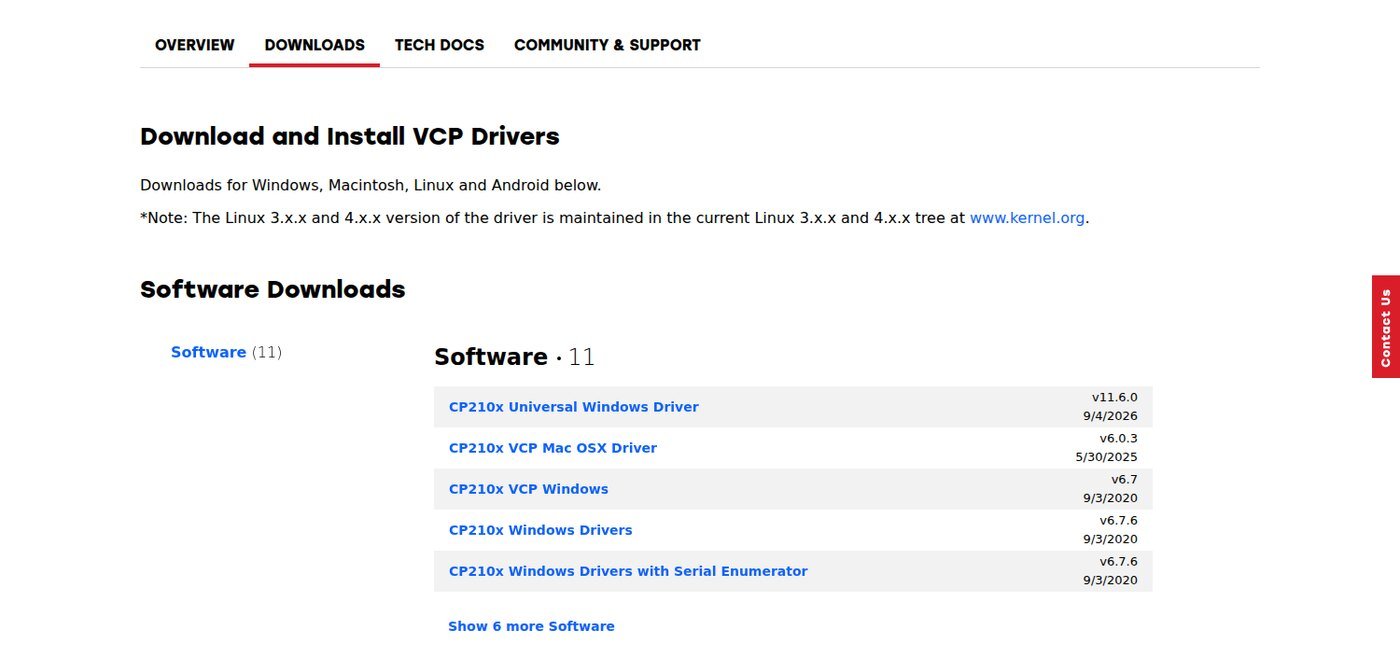
| OS | Do you need a download? | Official package | Version / date on Silicon Labs’ page |
|---|---|---|---|
| Linux (any modern kernel) | No | In-kernel cp210x module |
Ships with your kernel |
| Linux, GPIO control needed | Optional | Linux 3.x/4.x/5.x VCP Driver Source | Source bundle, last modified 29 Jan 2021 |
| macOS 10.11 and later | Yes | CP210x VCP Mac OSX Driver | v6.0.3 · 30 May 2025 |
| Windows 10 (1803+) / 11 | Usually | CP210x Universal Windows Driver | v11.6.0 · 4 Sep 2026 |
⬇ CP210x VCP drivers — Silicon Labs official page
Open the official download page
We do not mirror these files. Silicon Labs revises them and a stale mirror is exactly what this site exists to argue against. For the record, the macOS ZIP we fetched on 12 September 2026 was 1,636,090 bytes, SHA-256 cb7aacb077d9c342092c05ebf0400eac570550b70185e04f1d41e3065a672950 — Silicon Labs does not publish a checksum, so compare against your own download.
Linux: the driver is already there, and it knows 204 devices
Silicon Labs says so on its own download page: “The Linux 3.x.x and 4.x.x version of the driver is maintained in the current Linux 3.x.x and 4.x.x tree at www.kernel.org.” The release notes for its Linux bundle go further — “It is recommended to use the driver there that matches your specific kernel version.” The vendor is telling you not to use the vendor’s download.
We pulled the current drivers/usb/serial/cp210x.c from the kernel tree and counted its id_table. There are 204 entries, all unique VID:PID pairs, spread across 52 different vendor IDs. Only 101 of them — 49.5% — sit under Silicon Labs’ own 0x10C4.
| Vendor ID | Entries | Examples named in the kernel source |
|---|---|---|
10C4 (Silicon Labs) |
101 | Pololu USB-serial converter, Cygnal Debug Adapter, Arkham DS101, Vstabi |
1FB9 |
19 | Lake Shore Model 121 Current Source, Model 218A Temperature Monitor |
166A |
7 | Clipsal C-Bus automation controllers |
1901 |
7 | GE B850 and B650 patient monitors (CP2105 / CP2104) |
17A8 |
6 | Kamstrup Optical Eye, M-Bus Master MultiPort 250D |
16DC |
4 | W-IE-NE-R Plein & Baus power supplies |
18EF |
4 | ELV USB-I2C interface |
3195 |
3 | Link Instruments MSO-19, MSO-28 |
That spread is the practical point. Half the CP210x hardware in the world ships under someone else’s vendor ID and the kernel still binds it correctly, because maintainers have been adding IDs one product at a time for fifteen years. On Linux there is no driver to install and no “unknown device” to fix — plug the board in and you get /dev/ttyUSB0.
The one legitimate reason to build the Silicon Labs bundle is GPIO. Several CP210x parts expose general-purpose pins, and as the vendor’s own notes put it, “the driver on kernel.org does not support GPIO at this time.” It was tested against kernel 5.4 on Ubuntu 18.04.5 and last modified in January 2021, so expect build errors on a current kernel. If you only want a serial port, skip it.
macOS: one package, and paperwork that disagrees with itself
macOS is the one case where you genuinely download something. The current package is CP210x VCP Mac OSX Driver v6.0.3, listed on the download page as 30 May 2025.
Here is where it gets untidy. The release-notes file that Silicon Labs links from that page tops out at version 6.0.2, dated 26 October 2021, copyright 2017–2021. The release-notes file inside the ZIP is a different document: copyright 2017–2025, and its newest entry is 6.0.3, 23 May 2025. If you read the linked notes to decide whether to update, you are reading a four-year-old file that does not mention the version you are about to install. (The Windows package has its own version of this: the notes inside it read “Release date: 2026-09-15”, while the page lists it as 4 September 2026.)
What 6.0.3 actually changed, per the copy inside the ZIP: the device now sends XOFF when macOS goes to sleep, uninstallation on macOS 13 was fixed, a crash under stress testing in 6.0.2 was fixed, and eleven new VID/PIDs were added for customers including TDK, Profoto, ELV and Regula Forensics.
One more contradiction worth knowing before you install. Version 6.0, from December 2020, is described in the same file as adding support for “macOS Big Sur with implementation of DriverKit extension” — meaning it has been a system extension, not a kernel extension, for five years. Yet the installation instructions in that same document still tell you to unblock a “system extension” in Security & Privacy and cite Apple’s TN2459, User-Approved Kernel Extension Loading. Follow the behaviour, not the wording: install the DMG, approve the extension when macOS asks, reboot if prompted, and your adapter shows up as /dev/cu.SLAB_USBtoUART or /dev/cu.usbserial-XXXX.
“Port busy”: four owners, four different messages
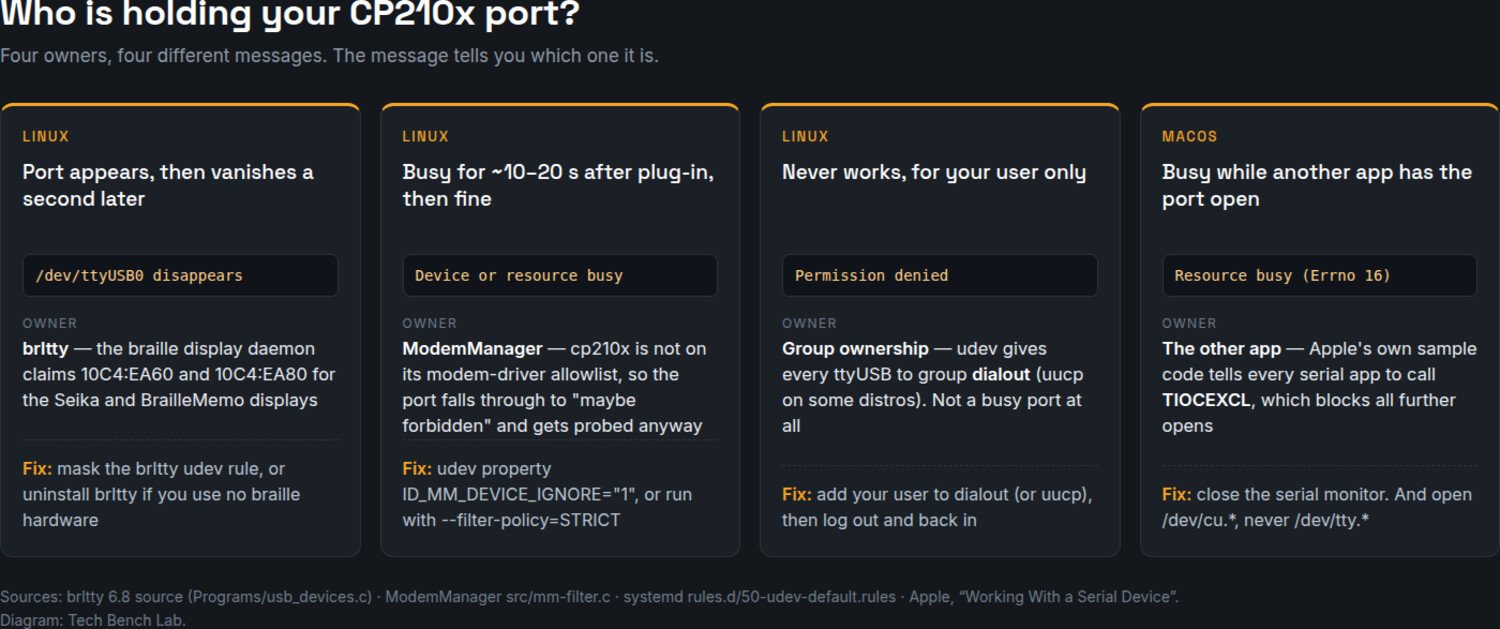
This is the part people actually search for, and it gets answered badly because “busy” is treated as one problem. It is four, and the error text tells you which.
1. The port appears, then disappears (Linux) — brltty
This is the nastiest one because the device node vanishes rather than erroring. brltty, the braille display daemon installed by default on Ubuntu and several other distributions, claims 10C4:EA60 and 10C4:EA80. You can read it in the source: Programs/usb_devices.c lists USB_DEVICE_ENTRY(0X10C4, 0XEA60, "mm", "sk"), and the Seika and BrailleMemo braille drivers claim the same IDs. EA60 is the factory PID of a stock CP2102 and CP2102N, so brltty grabs ordinary dev boards.
Confirm it with journalctl -f while you plug the board in — you will see brltty take the device. If you use no braille hardware, mask the udev rule (sudo systemctl mask brltty.path brltty.service) or remove the package. This is the same daemon that has been stealing CH340 adapters for years, and on Ubuntu 22.04 the CH340 entry was never removed; see CH340 on macOS and Linux for that bug and the fix.
2. Busy for ten or twenty seconds, then fine (Linux) — ModemManager
If the port works on the second try, ModemManager probed it first. We checked why, in src/mm-filter.c. ModemManager keeps an allowlist of kernel drivers that are definitely modems — option, option1, qcserial, qcaux, nozomi, sierra. cp210x is not on it. The cdc_acm rule that filters out Arduino-style devices does not apply either, because a CP210x is a vendor-specific device, not a CDC one. So the port falls through to the default rule, gets flagged internally as “maybe forbidden”, and is probed anyway — ModemManager opens it and sends AT commands to see whether it answers.
The documented escape is a udev property. Drop a rule setting ID_MM_DEVICE_IGNORE="1" for 10C4:EA60 and ModemManager’s explicit-blocklist rule skips every port on that device. Or start the daemon with --filter-policy=STRICT, which its man page defines as probing “only the TTY ports that are heuristically determined to be very likely to be modem ports.”
3. Permission denied (Linux) — not busy at all
Different message, different problem, constantly confused with the other two. systemd’s default udev rules assign every ttyUSB device to the dialout group: KERNEL=="tty[A-Z]*[0-9]|…", GROUP="dialout". Your user is not in it. Add yourself, then log out and back in — group membership is read at login, which is why “I added myself and it still fails” is so common. Some distributions use uucp instead; esptool’s own error handler hedges exactly that way, hinting “Try to add user into dialout or uucp group.”
4. Resource busy while another app is open (macOS and Linux)
A serial monitor left open in the Arduino IDE, PlatformIO or screen will hold the port. On macOS the message is Resource busy; from esptool you get Could not open /dev/cu.usbserial-0001, the port is busy or doesn't exist. — that string is in esptool/loader.py, and the line above it opens the port with exclusive=True, which pyserial implements as a non-blocking flock. So esptool deliberately refuses to share.
The part nobody covers: on macOS, “busy” is Apple’s recommendation
On Linux, two processes can normally open the same tty. On macOS the second one usually cannot, and the reason is not a bug or a driver limitation — it is documented advice that every serial app follows.
Apple’s own guide, Working With a Serial Device, walks through a reference implementation of opening a port. After the open() call, the sample code “calls the ioctl function, passing TIOCEXCL, to prevent additional opens on the device, except from a root-owned process.” That is Apple telling developers to lock the port on purpose. Every terminal program, IDE and flashing tool that followed the guide behaves this way, which is why closing the serial monitor is not a workaround — it is the intended workflow.
The same document settles the other macOS question. Your adapter appears twice, as /dev/tty.usbserial-XXXX and /dev/cu.usbserial-XXXX, and Apple’s guidance is explicit: “Get the callout device’s path (/dev/cu.xxxxx). The callout device should almost always be used. You would use the dialin device (/dev/tty.xxxxx) when monitoring a serial port for incoming calls, for example, a fax listener.” The tty.* node is the dial-in side, and it will sit and wait rather than open cleanly. Unless you are writing a fax listener in 2026, use cu.*.
Limits and honest caveats
Everything above comes from vendor packages, published documentation and source code read on 12 September 2026 — not from a bench. Version numbers and dates are what Silicon Labs’ page and its own release-notes files said on that date; check them before relying on them, since the point of the macOS section is that those two sources disagree. The kernel ID count is from current mainline cp210x.c and will keep growing.
FAQ
Do I need to install anything for a CP2102 on Ubuntu?
No. The kernel binds it and you get /dev/ttyUSB0. If nothing appears, it is brltty or a group-permission problem, not a missing driver.
Why does my port work on the second attempt?
ModemManager probed it first. See section 2 above, or just wait twenty seconds.
Which do I open on macOS, tty or cu?cu, per Apple’s own documentation. The tty.* node is for incoming calls.
Is the Silicon Labs macOS driver safe on Apple Silicon?
It has been a DriverKit system extension since v6.0 in December 2020, so it does not need the reduced-security kext workflow, despite the installation text in the release notes still referring to kernel extensions.
How do I tell a CP210x from a CH340 or a CH9102?
By the USB ID. Silicon Labs devices are usually 10C4:EA60; WCH parts are under 1A86, and that vendor has its own naming trap — see our CH9102 and CH343 driver guide.
Sources
- Silicon Labs — CP210x USB to UART Bridge VCP Drivers (downloads)
- Silicon Labs — macOS VCP driver release notes (the linked copy, ending at 6.0.2)
- Silicon Labs — Linux CP210x VCP release notes (GPIO rationale)
- Linux kernel —
drivers/usb/serial/cp210x.c - brltty —
Programs/usb_devices.c(claims 10C4:EA60 and 10C4:EA80) - ModemManager —
src/mm-filter.c(driver allowlist and ID_MM_DEVICE_IGNORE) - systemd —
50-udev-default.rules.in(dialout group) - Apple — Working With a Serial Device (TIOCEXCL, cu vs tty)
- esptool —
loader.py(exclusive open, busy-port hints)
Related guides
- CP2102 driver: download and install on Windows 11
- ST-LINK V2 driver and STM32CubeProgrammer — same class of Linux permission problem, but the udev rules ship inside ST’s firmware package, not its driver one
- CH340 driver for Windows
- CH9102 and CH343 driver, and every chip’s USB ID
- ESP32 Flash Download Tool: setup and correct offsets
- Zadig and USBasp on Windows 11