There is no single “ST-LINK driver” download. There are three separate ST packages that people arrive looking for, they do different jobs, and only one of them is a driver — the other two are a firmware updater and a programming tool. Worse, the one your Linux box needs most (the udev rules) ships inside the firmware package, not the driver one.
This guide sorts out which download does what, then gets to the part that ends most ST-LINK arguments: the firmware version string your probe reports is a capability sheet, and its letters can never change. If yours reads V2J27S6, it will never have a Virtual COM port — not after any upgrade, ever. ST publishes the rule that says so, in a technical note almost nobody reads.
The three official downloads, and what each one is for
| Package | What it actually is | Do you need it? | OS |
|---|---|---|---|
| STSW-LINK009 | The Windows USB driver. Declares the ST Debug, Virtual COM port and ST Bridge interfaces to the system | Mandatory for ST-LINK/V2 and V2-1 on Windows. Optional for STLINK-V3 | Windows only |
| STSW-LINK007 | The firmware upgrade application — plus, on Linux, the udev rules packages | When a tool says your firmware is too old, or on Linux for the rules | Windows (.exe) and Windows/Linux/macOS (.jar) |
| STM32CubeProgrammer | The actual flashing tool: erase, program, verify, option bytes, CLI | Yes, if you want to put code on a chip | Windows, Linux, macOS |
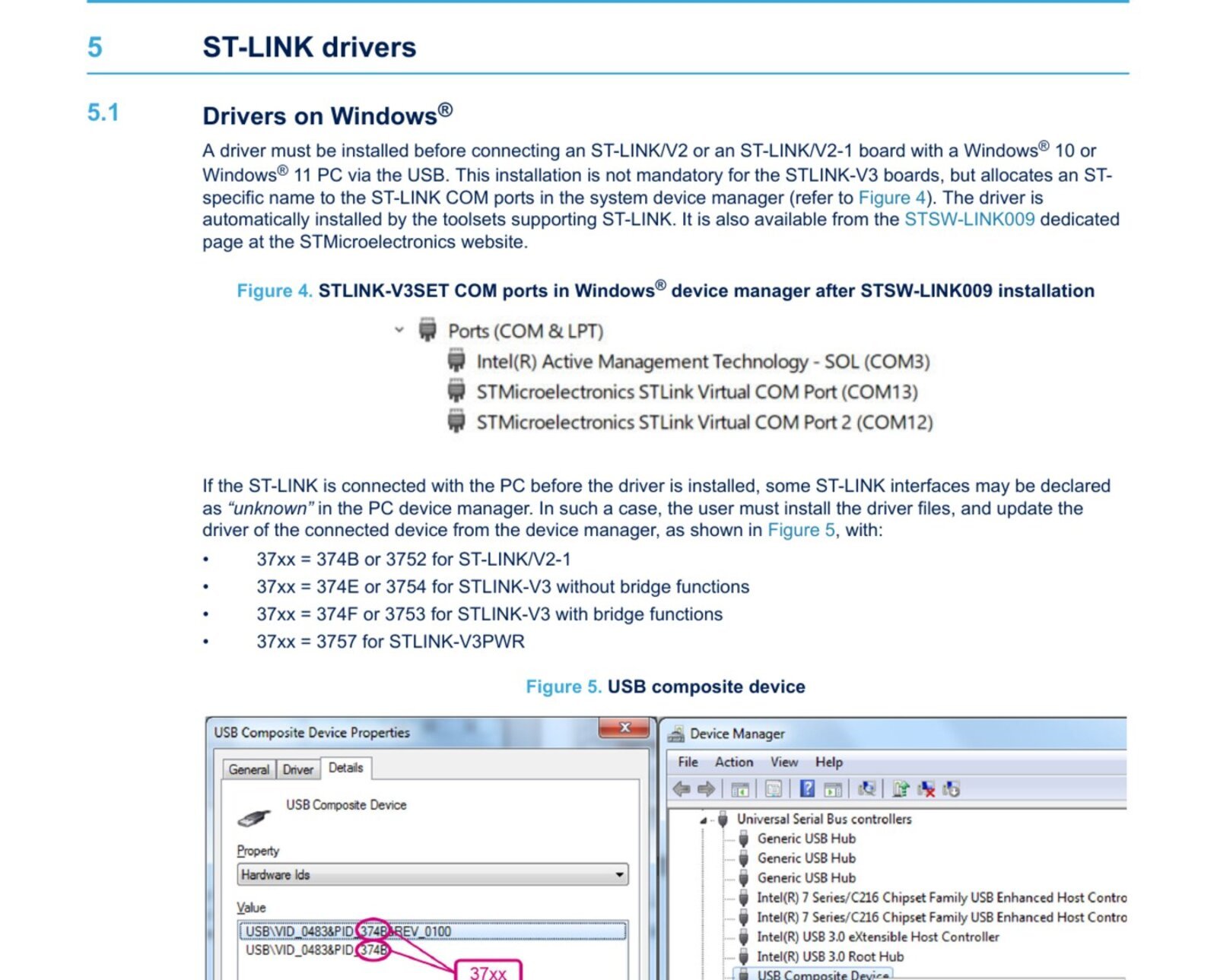
ST is explicit about the Windows rule in TN1235: “A driver must be installed before connecting an ST-LINK/V2 or an ST-LINK/V2-1 board with a Windows 10 or Windows 11 PC via the USB. This installation is not mandatory for the STLINK-V3 boards, but allocates an ST-specific name to the ST-LINK COM ports.” The STSW-LINK009 data brief adds the detail that matters if you plug first and install later: it is a signed driver built on WinUSB CoInstallers for x86 and amd64, and it is “not tested on Windows 7 and 8”.
⬇ ST-LINK driver, firmware and programmer — official ST pages
STSW-LINK009 — Windows USB driver
STSW-LINK007 — firmware upgrade + udev rules
STM32CubeProgrammer
We do not mirror these and we cannot quote you a version number, because ST does not put one where a machine can read it. Each page hides the file behind a “Get Software” button, a licence agreement you must accept, an export-regulation acceptance page, and a form whose own markup is tagged my.st.com with validation — an email address, in practice. The version table itself is loaded by JavaScript after the page renders. Check the version on the page in front of you, then check what you actually installed: on Windows, Device Manager → the ST-LINK entry → Driver tab.
Install, per operating system
Windows. Unzip STSW-LINK009 and run its installer before you plug the probe in — the package ships the x86 and amd64 CoInstallers side by side, so pick the one matching your Windows build. If you already plugged it in and got “unknown device”, ST’s own recovery path is to update the driver from Device Manager against the right hardware ID — and ST notes, in a line worth repeating, “prefer the use of the ‘USB Composite Device’ handle for a full recovery.” Update the composite parent, not the individual child interface.
Linux. There is no driver to install; the kernel already speaks to the probe over libusb. What you need is permission. Two official sources ship the same udev rules: the STSW-LINK007 package, and STM32CubeProgrammer itself under Driver/rules — the manual’s instruction is literally sudo cp *.* /etc/udev/rules.d. You also need libusb, separately: sudo apt-get install libusb-1.0-0-dev on Ubuntu, sudo dnf install libusb1 on Fedora. ST specifies libusb 1.0.12 or higher.
macOS. Nothing to install. Per TN1235: “On macOS, the ST-LINK USB devices connect natively without any specific action.” The Virtual COM port comes up through the native drivers, same as it does for a CP210x bridge.
STM32CubeProgrammer has not needed a system Java since v2.6.0 — it ships a bundled JRE (Liberica 8.0.432). The current manual lists Windows 10 x86/x64 and 11 x64, Ubuntu LTS 22.04 and 24.04, Fedora 42, and macOS 15 Sequoia and 26 Tahoe on x86_64 and ARM.
The part nobody covers: your firmware string is a spec sheet
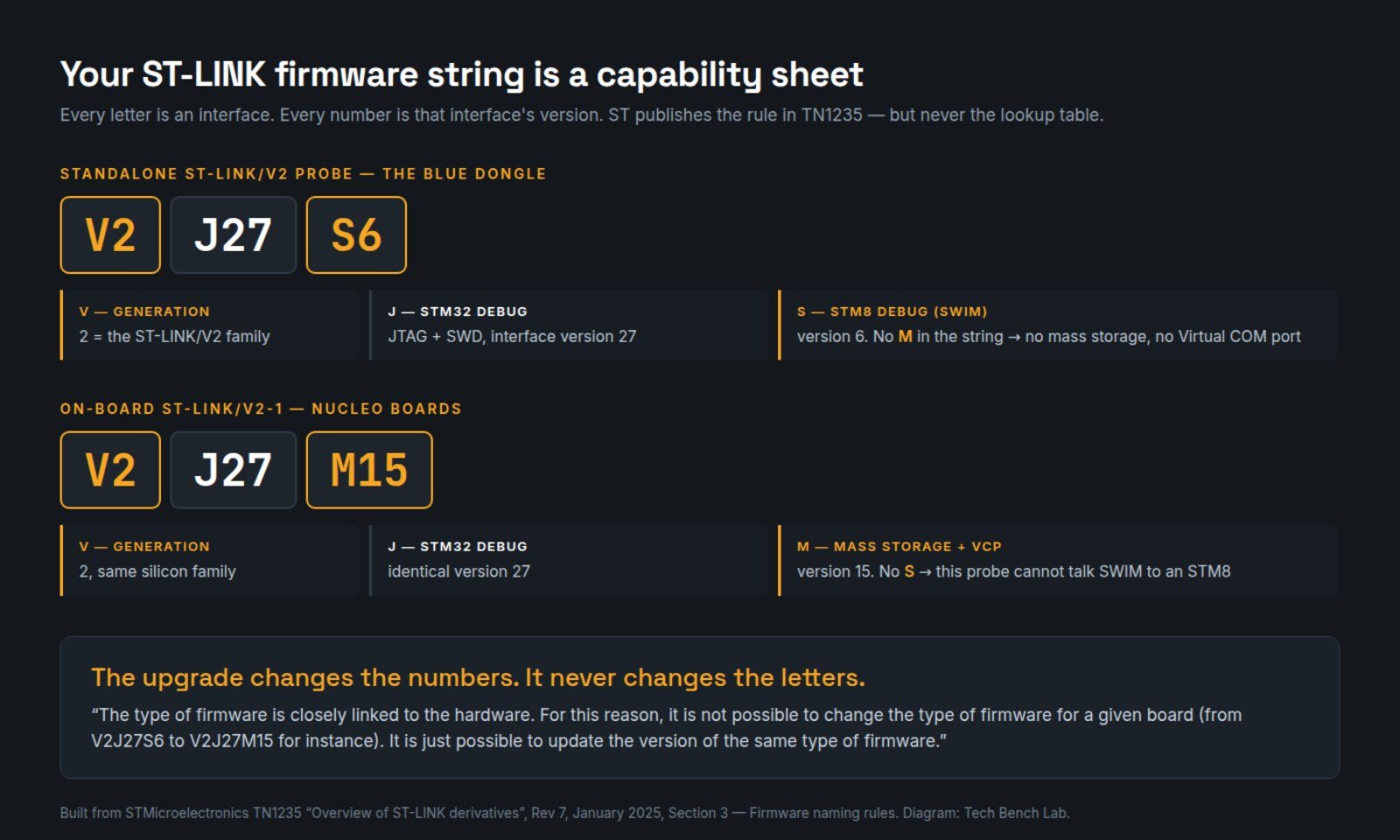
Connect a probe in STM32CubeProgrammer and the ST-LINK panel shows a firmware version like V2J27S6. Almost everyone reads that as a build number. It is not. TN1235 section 3 publishes the encoding: each letter names an interface, and the number after it is that interface’s version. A value of zero means the interface is absent.
| Letter | Interface | Notes |
|---|---|---|
V |
Major generation | 1 = ST-LINK/V1 · 2 = V2, V2-1, V2-A, V2-B, V2EC · 3 = all STLINK-V3 · 4 = STLINK-V3PWR |
J |
STM32 debug (JTAG and SWD) | 0 means no STM32 debug at all — as on some STM8 Discovery boards |
S |
STM8 debug (SWIM) | 0 or absent means the probe cannot talk to an STM8 |
M |
Mass storage and Virtual COM port | Absent means no drag-and-drop drive and no VCP |
B |
Bridge (USB to SPI/UART/I2C/CAN/GPIO) | STLINK-V3 family only |
P |
Power interface | STLINK-V3PWR only; 0 means unsupported |
ST’s own worked examples: V2J27S6 is a standalone ST-LINK/V2 with both STM32 and STM8 debug; V2J27S0 is a 32F401CDISCOVERY, with no SWIM, no mass storage and no VCP; V2J27M15 is a Nucleo-class V2-1; V3J1M1B1S1 is an STLINK-V3SET; V4J4B1P5 is a V3PWR.
Now the sentence that settles the forum threads, quoted in full from the same section: “The type of firmware is closely linked to the hardware. For this reason, it is not possible to change the type of firmware for a given board (from V2J27S6 to V2J27M15 for instance). It is just possible to update the version of the same type of firmware.”
Read that against the string in front of you. A cheap standalone V2 dongle reporting V2J..S.. has no M, so it has no Virtual COM port and no drag-and-drop drive — and running STSW-LINK007 a hundred times will not give it one, because the upgrade changes the number after the letter, never the letter itself. Equally, a Nucleo’s on-board V2J..M.. has no S and will never program an STM8. The upgrade is not failing. You are asking for hardware you do not have.
The USB product ID map — and where the sources disagree
Every ST-LINK enumerates under vendor ID 0x0483. The product ID is how host tools decide which protocol to speak. We cross-referenced three lists that ought to agree: ST’s TN1235, the usb.h header of the open-source stlink-org/stlink project, and that same project’s four udev rules files. They do not.
| PID | TN1235 (ST) | usb.h constant · family per macro |
udev rules file |
|---|---|---|---|
3744 |
— | PID_STLINK · V1 |
49-stlinkv1.rules |
3748 |
— | PID_STLINK_32L · V2 |
49-stlinkv2.rules |
374a |
— | PID_STLINK_32L_AUDIO · V2 |
49-stlinkv2-1.rules |
374b |
ST-LINK/V2-1 | PID_STLINK_NUCLEO · V2 |
49-stlinkv2-1.rules |
3752 |
ST-LINK/V2-1 | PID_STLINK_V2_1 · V2-1 |
both v2-1 and v3 rules |
374d |
— | V3_USBLOADER · V3 |
49-stlinkv3.rules |
374e |
STLINK-V3, no bridge | V3E_PID · V3 |
49-stlinkv3.rules |
374f |
STLINK-V3, with bridge | V3S_PID · V3 |
“V3SET in normal mode” |
3753 |
STLINK-V3, with bridge | V3_2VCP_PID · V3 |
“V3SET in Dual CDC mode” |
3754 |
STLINK-V3, no bridge | V3_NO_MSD_PID · V3 |
“STLink V3SET MINIE” |
3757 |
STLINK-V3PWR | V3P · V3 |
49-stlinkv3.rules |
Three collisions come out of that table. One: 0x3754 carries three different names in three documents — ST calls it “STLINK-V3 without bridge functions”, the header calls it NO_MSD (no mass storage), the project’s own udev comment calls it a V3SET MINIE. Three different axes of the same device, which is why you cannot identify a probe from its PID alone. Two: 0x3752 is the one PID that genuinely belongs to two generations — it appears in both 49-stlinkv2-1.rules and 49-stlinkv3.rules in the same checkout, the latter commented “STLink V3SET in Dual CDC mode”. Three: 0x374b is an ST-LINK/V2-1 according to ST, but the project’s STLINK_V2_USB_PID() macro sorts it into the plain V2 family, and 0x374a sits in the v2-1 rules file while the same macro calls it V2.
The five problems that actually send people here
We counted exact phrases across the issue trackers of four projects that talk to ST-LINK hardware — stlink-org/stlink, probe-rs/probe-rs, pyocd/pyOCD and platformio/platform-ststm32, 3,196 issues between them. “Permission denied” appears in 29, “no device found” or “device not found” in 27, “cannot connect” in 23. The distribution matches what follows.
1. Unknown device in Device Manager after plugging in first. Install STSW-LINK009, then update the driver from Device Manager. ST lists the hardware IDs to look for: 374B or 3752 for ST-LINK/V2-1, 374E or 3754 for STLINK-V3 without bridge, 374F or 3753 for V3 with bridge, 3757 for V3PWR. Target the USB Composite Device entry.
2. Permission denied on Linux. The rules were never copied. Take them from STSW-LINK007 or from CubeProgrammer’s Driver/rules, drop them in /etc/udev/rules.d, then sudo udevadm control --reload-rules && sudo udevadm trigger and replug. This is the same class of problem as a serial adapter landing in the wrong group — see our CP210x port busy guide for the full ownership picture.
3. “Cannot connect to target.” (The message-by-message triage, “No ST-LINK detected” versus “No STM32 target found”, is in our STM32CubeProgrammer connection guide.) Usually the target’s own code has disabled the debug pins, or is running deep sleep. CubeProgrammer’s ST-LINK panel has the fix and it is one dropdown: set Mode to Connect under reset, which catches the reset vector “before executing any instructions”. Hardware reset needs pin 15 of the connector wired to the chip’s nRST — that wire is optional on many breakout boards and its absence is the second most common cause.
4. Firmware upgrade refuses or hangs. STSW-LINK007 ships two applications — STLinkUpgrade.exe for Windows and STLinkUpgrade.jar for Windows, Linux and macOS — and both contain every firmware type, identifying the board and choosing for you. If it picks nothing, see the section above: the type is fixed by the hardware. ST’s warning here is unusually blunt, so heed it: any interruption during this phase can leave the board “arduously recoverable, or even at worst unusable”.
5. The COM LED is orange and you do not know why. ST documents the whole code: blinking red is USB enumeration, solid red is idle, alternating green and red is data moving, green means the last communication with the target succeeded — and orange means the last one failed. Blinking red then orange is a USB port detection failure: check the cable. That LED tells you whether to debug your target or your USB, before you open any software.
FAQ
Do I need STSW-LINK009 for an STLINK-V3? No. It is optional, and all it does is give the V3’s COM ports ST-specific names in Device Manager instead of generic ones.
Why does my probe have no Virtual COM port? Look at the firmware string. No M means no VCP, and no upgrade will add one. If you need a serial console alongside debug, you need different hardware — or a separate USB-serial bridge such as a CH340.
Can two tools share one ST-LINK? Yes — CubeProgrammer has a Shared checkbox that allows two or more instances of CubeProgrammer or another debugger on the same probe. Off by default, which is why the second tool normally reports the probe as in use.
Does CubeProgrammer only work with ST-LINK? No. It also drives SEGGER J-Link probes over SWD, and the STM32 bootloader over UART, USB DFU, I²C, SPI and CAN. The J-Link path is limited to a 4000 kHz SWD clock.
Sources
- STMicroelectronics, TN1235, “Overview of ST-LINK derivatives”, Rev 7, January 2025 — firmware naming rules (§3), drivers and USB product IDs (§5), COM LED (§6)
- STMicroelectronics, DB2694, STSW-LINK009 data brief, Rev 5, January 2025 — WinUSB CoInstallers, signed driver, mandatory-before-connect
- STMicroelectronics, DB2647, STSW-LINK007 data brief, Rev 3, June 2021
- STMicroelectronics, UM2237, “STM32CubeProgrammer software description”, Rev 29, November 2025 — system requirements (§1.1), Linux install and udev rules (§1.2.1), ST-LINK connection modes
- STMicroelectronics, STSW-LINK009 · STSW-LINK007 · STM32CubeProg product pages
stlink-org/stlink—src/stlink-lib/usb.handconfig/udev/rules.d— the PID constants and the four rules files- GitHub Search API issue counts across
stlink-org/stlink,probe-rs/probe-rs,pyocd/pyOCDandplatformio/platform-ststm32, queried 13 September 2026
Related guides
- J-Link driver download and J-Flash Lite — the other debug probe people arrive looking for, where the USB product ID says which driver mode it is in
- CP210x driver on macOS and Linux, and the “port busy” fix
- CH340 driver for Windows 11
- CH9102 and CH343 driver — and why 1a86:7523 is not always a CH340
- ESP32 Flash Download Tool: setup and the correct offsets
- avrdude on Windows with a USBasp
- Zadig and USBasp: “could not find USB device”