Last checked: 24 October 2026.
STM32CubeProgrammer has two “nothing there” messages and they come from different places. “No ST-LINK detected” means Windows never handed the probe to the program: a USB, driver or port problem, and the chip is not in the picture yet. “Error: No STM32 target found!” means the opposite: the probe is fine, and it is the SWD wiring, the power, or the chip’s own state that refuses to answer. Treating the second like the first is why people reinstall drivers for an hour and then find a missing ground wire.
This guide sorts the messages into four layers and gives the check for each, in the order the layers sit between your PC and the die. Every fix is tied to an ST document or to the ST Community thread where it actually settled the case.
⬇ The three official packages (links, no mirror)
STM32CubeProgrammer 2.23.0 (official)
ST does not allow redistribution and publishes no checksums, so we link rather than mirror. Which package is which, the install per OS, and how to read the probe’s firmware string are in our ST-LINK V2 driver and STM32CubeProgrammer guide; this page starts where that one ends, at the moment Connect fails. One Windows 11 note up front: on an ARM64 PC (Snapdragon Surface, Yoga Slim) STSW-LINK009 does not install. ST employees confirmed in thread 144331 that “Windows ARM64 OS [is] not yet supported by official ST-Link USB driver”, because its third-party signature is refused, and that the STLINK-V3 generation needs no driver there. On ARM, use a V3.
Which message, which layer
| Exact message | Where it appears | Layer | What it actually means | First thing to check |
|---|---|---|---|---|
No ST-LINK detected (serial number list empty) |
CubeProgrammer panel, CubeIDE | 1 · USB / driver | Windows has no debug interface bound for the probe, or another program owns it | Device Manager. “STM32 STLink” under Other devices = STSW-LINK009 not installed (thread 3589). Present and driven = port, cable, hub, or CubeIDE still attached. |
No debug device found |
CubeProgrammer, STLINK-V3SET | 1 · probe hardware | The probe enumerates but its debug interface never comes up | In thread 152314 an ST employee ended with “your board is not correctly programmed, you will have to ask for an exchange”. Warranty, not settings. |
Error: Old ST-LINK firmware version. Upgrade ST-LINK firmware · ST-LINK firmware upgrade required |
CubeProgrammer dialog, CubeIDE launch | 2 · firmware | The probe answered, but its firmware is older than the tool’s floor | Firmware upgrade button in the panel, or STSW-LINK007. Updater 3.14.5 had a real bug (“Unexpected flash size for ST-Link Micro”); 3.15.6 fixed it (thread 652514). |
No ST-Link found after GoToUsbLoader commend. Wait for the end of USB enumeration then try again. |
Firmware updater | 2 → 1 | The probe rebooted into its USB loader and Windows lost it: the USB link is marginal | Another cable, another port, no hub. Thread 861526: “the new USB cable today … fixed the issue”. |
Error: Unable to get core ID then Error: No STM32 target found! If your product embeds Debug Authentication, please perform a discovery using Debug Authentication |
CubeProgrammer log | 3 or 4 | The probe is fine. The SWD debug port did not answer the IDCODE read | Read Target voltage in the panel. “–” or near 0 V = layer 3 (VDD sense or ground missing). About 3.3 V = wiring, mode, or chip state (layer 4). |
Error: ST-LINK error (DEV_TARGET_HELD_UNDER_RESET) |
CubeProgrammer log | 4 | You held the reset button while connecting in Normal mode; the core cannot be halted while NRST is low | Release the button. Use Mode = Connect under reset, which times the release for you (thread 132112). |
Target is not responding, retrying... |
CubeIDE console | 4 | Firmware on the chip reassigned PA13/PA14 or entered low power after the debugger attached | Connect under reset, then mass erase (ST article 49693). |
Error in initializing ST-LINK device. Reason: (4) No device found on target. |
CubeIDE launch | 3 or 4 | Same failure as “No STM32 target found”, reported by the GDB server | Same checks; in thread 33252 it was old probe firmware plus a wrong H7 power configuration. |
Can not connect to target! |
ST-LINK Utility (STSW-LINK004) | 3 or 4 | The legacy tool’s wording for the same thing | ST’s own advice in article 786977: stop using the Utility, use CubeProgrammer. |
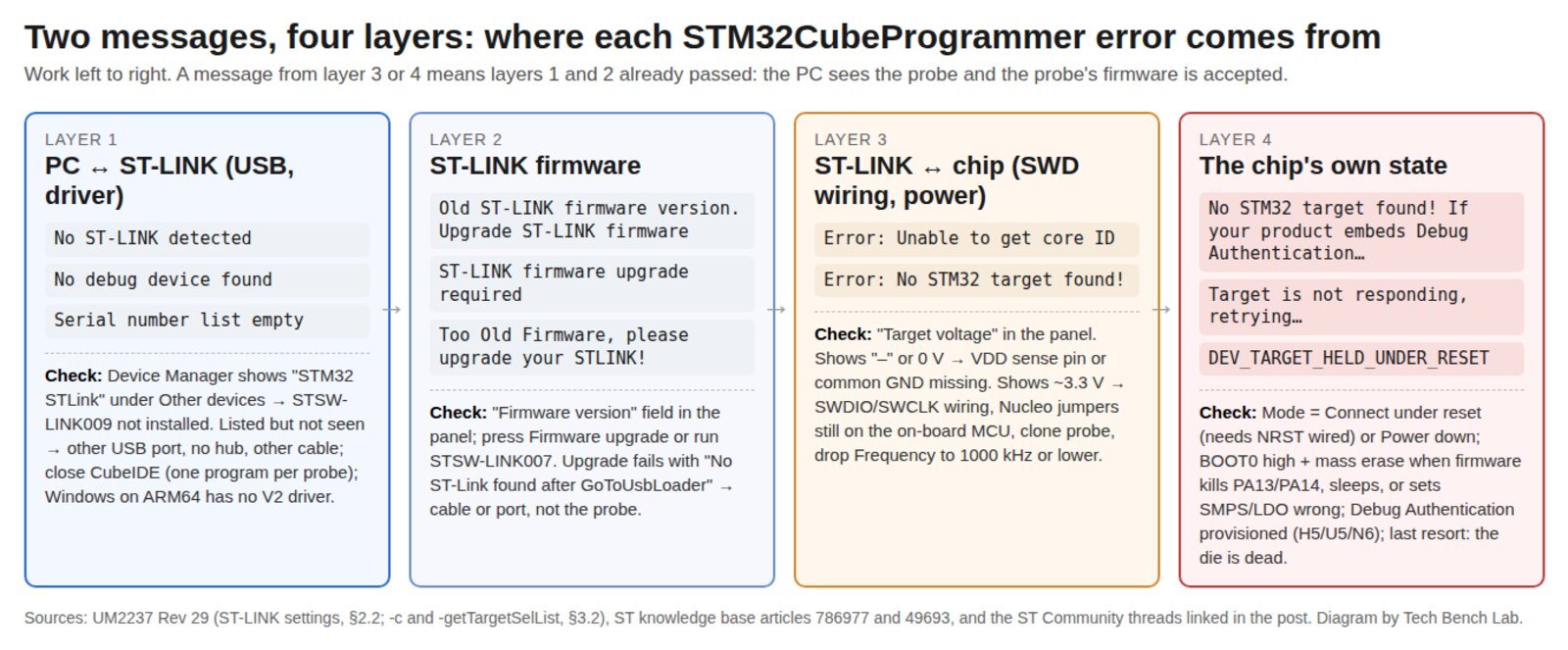
Layer 1: Windows 11 does not see the probe
Open Device Manager before you touch any setting. An ST-LINK/V2 or V2-1 without the driver shows up as STM32 STLink under Other devices with a yellow mark, which is exactly the screenshot in thread 3589. Install STSW-LINK009 with the probe unplugged, then plug in. The 2022 worry in that thread that the package was “signed for Windows7, Windows8, Windows10” only was closed in December 2023: “Works on recent supported Win11 on Intel/AMD PC (ver. 23H2, 22H2)”. A V3 enumerates without the driver.
If the probe is driven in Device Manager and CubeProgrammer still lists no serial number, the cause is physical or exclusive access, not software. An ST-LINK/V2 ISOL with driver 2.2.0.0 and CubeProgrammer 2.17.0 was invisible on a Windows 11 PC that worked under Windows 10 with the same cable; the owner had tried two ports and wrote back “trying more ports found one that worked” (thread 711371). The on-board ST-LINK is a USB full-speed device; try a port on the chassis, no hub or dock. And only one program can hold the probe: with CubeIDE 2.1.1 and CubeProgrammer 2.23.0 open on the same NUCLEO-F446RE, the second one saw “No ST-LINK detected” until the first disconnected (thread 167257). The exception is the panel’s Shared switch, off by default, which per UM2237 allows “two or more instances of STM32CubeProgrammer or other debugger to the same ST-LINK probe”.
The COM LED tells you which side failed before you open anything: blinking red is USB enumeration, solid red is idle and enumerated, orange is “last communication with the target failed” (the full code is in our ST-LINK guide). If Windows reports the probe itself as an unknown device with a descriptor error, the steps in Unknown USB Device (Device Descriptor Request Failed) apply.
Layer 2: the firmware floor
Every CubeProgrammer release carries a minimum ST-LINK firmware and refuses older probes with “Old ST-LINK firmware version. Upgrade ST-LINK firmware”; the multidrop command says “Too Old Firmware, please upgrade your STLINK!” (UM2237 §3.2.10). The panel’s Firmware version field shows what you have (V2J46M32 and V3J15M7 appear in the 2025 threads below) and the Firmware upgrade button runs the same updater as STSW-LINK007. Do it on a direct port with nothing else on the bus: the probe reboots into a USB loader halfway through and a marginal link loses it there, which is the GoToUsbLoader message above.
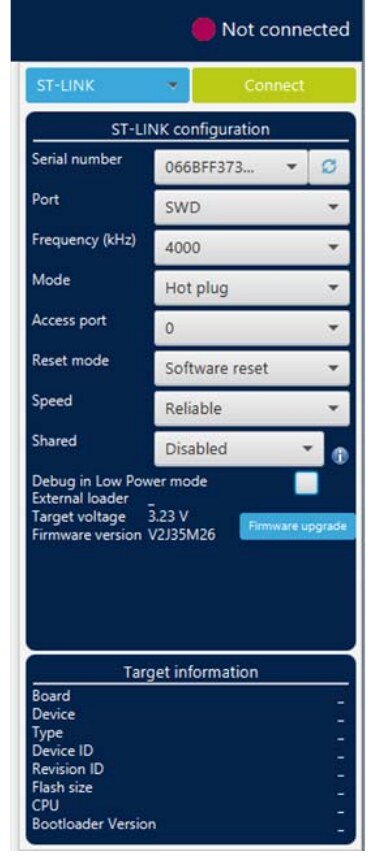
Layer 3: Target voltage is the test
Once the probe is listed, press the refresh arrow next to the serial number and read Target voltage. On a genuine ST-LINK/V2 the VAPP pins (1 and 2 of the 20-pin header, “Target VCC”) are an input: per UM1075 Table 4, “the power supply from the application board is connected to the ST-LINK/V2 … to ensure signal compatibility between the boards”. The probe senses the target supply and uses it as the reference for its level shifters; it does not power the board from it (the 4-pin clones do the opposite and feed 3.3 V out). If the field reads “–” or something far below 3.3 V, the SWD drivers have no reference and “No STM32 target found” is guaranteed. The owner of an STM32F405 board with an ST-LINK/V2 ISOL at V2J43S7 got exactly that, and the fix was “a wiring issue with the not having a common ground to the ST-link”; afterwards the panel read 3.79 V and it connected (thread 131728). Four wires are the minimum: SWDIO, SWCLK, GND, and VDD sense; a fifth, NRST on pin 15, is what the next layer needs.
With a healthy voltage and still no target, check what ST’s connection article (786977) lists before any setting: a genuine probe rather than a clone, jumpers and solder bridges as the board manual shows, and clean wiring, since its follow-up singles out “solderless breadboards and low-quality connectors”. The Nucleo trap is specific: to use a Nucleo’s on-board ST-LINK for an external chip, the two ST-LINK jumpers (CN4 on a Nucleo-64) must come off, otherwise the probe is still wired to the on-board MCU. “Make sure the onboard target is physically disconnected via jumpers” and “Make sure NRST is connected so ‘Connect Under Reset’ can function” were the answers in thread 135626. Then drop Frequency from the 4000 kHz default to 1000 kHz or less for long leads.
Layer 4: the chip is there and will not talk
This is where the Mode and Reset mode dropdowns earn their place. UM2237 defines them precisely, and the right combination depends on what the chip is doing when you press Connect.
| Setting (GUI · CLI) | What it does, per UM2237 Rev 29 | Needs NRST wired? | Use it when |
|---|---|---|---|
Normal · mode=NORMAL |
“the target is reset then halted”; the reset type comes from Reset mode | Only with Hardware reset | Default. Works when the firmware leaves PA13/PA14 alone and does not sleep. |
Connect under reset · mode=UR |
“connection to the target using a reset vector catch before executing any instructions”; CLI forces reset=HWrst |
Yes (pin 15 to the chip’s NRST) | Firmware disables SWD, enters Stop/Standby early, or reconfigures the clock. ST moderators’ first suggestion in threads 51868 and 630310. |
Hot plug · mode=HOTPLUG |
“connection to the target without a halt or reset” | No | Reading RAM or peripheral registers of a running application. Not a fix for a connection failure. |
Power down · mode=POWERDOWN |
“put the target in debug mode, even if the application has not started since the target power-up”; “not fully effective on some boards (MB1360, MB1319, MB1361, MB1355) with STMPS2141 power switch” | Yes | Firmware that kills debug before Connect under reset can catch it. Solved the STM32H7B3I-DK case in thread 630310 after Under reset had not. |
hwRstPulse · mode=hwRstPulse |
“generates a reset pulse, and then connects”; “does not prevent application launch before connection” | Yes | STM32WB0x and STM32WL33, where Under reset is not available. |
Reset mode: Software system reset · reset=SWrst |
Resets everything except Debug through AIRCR | No | Default. Use when NRST is not wired (common on 4-pin clone leads). |
Reset mode: Hardware reset · reset=HWrst |
“resets the STM32 device via the nRST pin” | Yes | Changing to this alone fixed a Nucleo case in thread 51868. |
Reset mode: Core reset · reset=Crst |
Only the Cortex-M via AIRCR; “does not exist for Cortex-M33, Cortex-M55 and Cortex-M85” | No | Rarely; keeps peripherals running across the reset. |
Three chip states account for most layer-4 threads. Debug pins taken by firmware. If the project reassigned PA13/PA14, or CubeMX left SYS debug set to “No Debug”, the chip answers once and then goes quiet; ST article 49693 describes the “Target is not responding, retrying…” symptom and the cure: Connect under reset, full chip erase, then fix the CubeMX setting. Wrong power configuration on H7 and U5. A NUCLEO-H755ZI-Q flashed with a project built for SMPS only, while CubeMX configured SMPS and LDO, produced “Unable to get core ID” and “No STM32 target found” at 3.26 V (thread 145873, closed by an ST moderator). The way back in is the one that works for any bricking firmware: tie BOOT0 high so the chip boots the system bootloader instead of your code, power-cycle, connect, mass erase. The NUCLEO-U575ZI-Q owner in thread 132112 ended with “BOOT0 is the thing!”. Debug Authentication. The second half of the message is not boilerplate. On STM32H5, U5 and the newer TrustZone parts, a provisioned Debug Authentication closes the debug port until a certificate or password is presented, and CubeProgrammer has a separate discovery flow for it (UM2237 §2.4.5 and §3.2.37). If the board came off a product line, ask whether DA was provisioned before you blame the wiring.
And then there is the case nothing fixes. A custom board with an STM32F217ZG, probe at V2J46M32, 3.26 V on the sense pin, every mode and reset combination tried, “Unable to get core ID” throughout. It connected the moment the F217 was swapped for a pin-compatible H536 on the same board with the same cables (thread 863483). When layers 1 to 3 pass and BOOT0-high still gets nothing, the die is the suspect.
The command-line version of the same checks
The CLI lives in bin\ under the CubeProgrammer install and says more than the GUI. From UM2237 §3.2:
STM32_Programmer_CLI -l
    lists every ST-LINK with serial number and firmware (layers 1 and 2 in one line)

STM32_Programmer_CLI -c port=SWD freq=1000 mode=UR reset=HWrst
    connect under reset at 1 MHz; the log prints target voltage, then IDCODE or the error

STM32_Programmer_CLI -c port=SWD mode=POWERDOWN
    for firmware that disables debug before vector catch (NRST must be wired)

STM32_Programmer_CLI -c port=SWD mode=UR -e all
    mass erase once you are in, to remove the firmware that caused it
One version note. A self-built board that programmed fine with CubeProgrammer 2.4 on one PC gave “NO STM32 target is found” with 2.16 on another; ST’s moderator could not reproduce it and asked for 2.17 (thread 701698). No confirmation came back, so treat “upgrade CubeProgrammer” as a cheap step, not a known fix.
Related guides
- ST-LINK V2 driver and STM32CubeProgrammer: which download, and what the firmware string means
- STM32 DFU mode driver on Windows 11 (0483:DF11): the USB route when SWD is not an option
- STM32 UART bootloader “No response from the target”: the serial route, and the BOOT0 rules per family
- Unknown USB Device (Device Descriptor Request Failed)
- USB VID/PID lookup for bench tools: 0483:3748, 374B, 374E and the rest
- CMSIS-DAP, DAPLink and WCH-LinkE on Windows 11
Sources
- STMicroelectronics, UM2237 Rev 29, November 2025: ST-LINK settings (§2.2, Figure 14), Debug authentication (§2.4.5, §3.2.37), connect options (§3.2.3), list and multidrop (§3.2.9, §3.2.10)
- STMicroelectronics, UM1075 Rev 10, April 2024, ST-LINK/V2 user manual: Table 4, 20-pin connector (VAPP, NRST on pin 15)
- STMicroelectronics, STM32CubeProgrammer (RN0109 Rev 34, June 2026, v2.23.0), STSW-LINK009, STSW-LINK007
- ST knowledge base: Imen.D, 28 January 2025, “How to solve connection errors when connecting and programming the STM32 target board”; Sara Ben Hadj Yahya, 4 April 2022, “How to solve debugger connection issues”
- ST Community threads, all linked inline: 3589, 711371, 167257, 144331, 167241, 152314, 861526, 652514, 131728, 135626, 51868, 630310, 132112, 145873, 33252, 863483, 701698