Last checked: 25 October 2026.
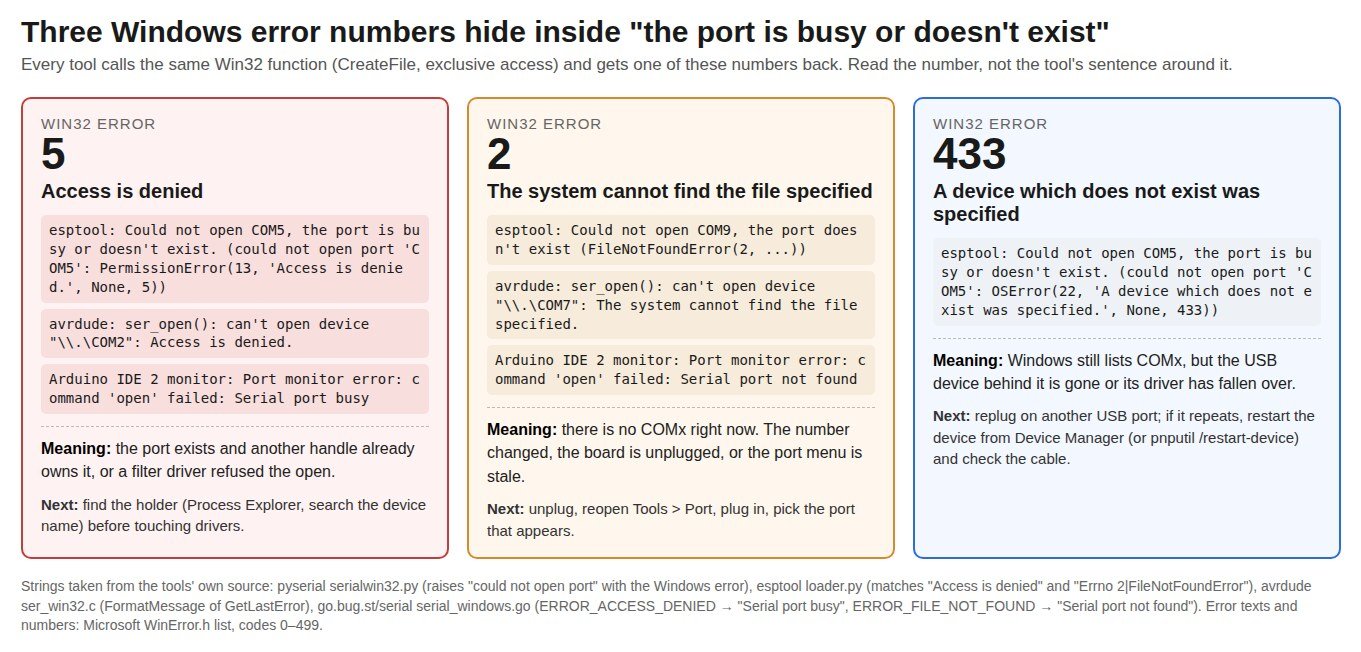
“Could not open COM5, the port is busy or doesn’t exist”, ser_open(): can't open device "\\.\COM2": Access is denied, “Port monitor error: command ‘open’ failed: Serial port busy”. Three tools, one cause: on Windows a serial port is opened for exclusive access, so the second program that asks for COM5 is refused, and the refusal comes back as Windows error 5. Nothing is broken. Something else got there first, and the whole job is to find out what.
This guide gives you the error number hidden inside each message (5, 2 or 433 mean three different things), the two-minute procedure with Process Explorer to name the process that holds the port, and the list of programs that grab serial ports in the background, each with the thread or source line that proves it.
⬇ Process Explorer and Handle (official Sysinternals links, no mirror)
Process Explorer v17.2 (Microsoft Sysinternals)
We link rather than host: the Sysinternals licence forbids publishing the software “for others to copy”. Both tools are free and need no installer, and Handle needs an administrator prompt.
Why only one program can have COM5
Microsoft’s own rule, in the CreateFile documentation: for a communications resource “the dwShareMode parameter must be zero (exclusive access)”. Every serial tool obeys it. pyserial, the library under esptool, PlatformIO and most Python flashers, passes 0, # exclusive access in serialwin32.py. avrdude does the same in ser_win32.c, and Arduino IDE 2’s monitor and upload path do it through go.bug.st/serial. So the second open fails, and what you see is each tool’s wording around the same Windows number.
That number is the key. pyserial prints it as the last field of the exception; avrdude prints the Windows text; go-serial maps it to a fixed phrase. The three you will meet:
| What the tool prints | Tool | Windows error | What it means | First move |
|---|---|---|---|---|
Could not open COM5, the port is busy or doesn't exist. (could not open port 'COM5': PermissionError(13, 'Access is denied.', None, 5)) |
esptool ≥ 4.x (Arduino IDE ESP32 core, PlatformIO, idf.py) | 5 ERROR_ACCESS_DENIED | COM5 exists; another handle owns it, or a filter driver refused the open. | Find the holder (next section). |
avrdude: ser_open(): can't open device "\\.\COM2": Access is denied. |
avrdude 6.3 (AVR boards ≤ 1.8.6) | 5 | Same as above. Classic Nano/Uno case. | Close Serial Monitor first, then find the holder. |
avrdude error: cannot open port \\.\COM2: Access is denied. |
avrdude 8.x (AVR boards 1.8.7+) | 5 | Same error, new wording (pmsg_error("cannot open port %s: %s")). |
Same. |
Port monitor error: command 'open' failed: Serial port busy. Could not connect to COM5 serial port. |
Arduino IDE 2 Serial Monitor | 5 → go-serial PortBusy |
Something else has the port, often the IDE’s own upload or a second IDE window. | Close and reopen the monitor after the upload ends; check other windows. |
Error opening serial port 'COM6'. (Port busy) |
Arduino IDE 1.x (jssc) | jssc TYPE_PORT_BUSY |
Same situation in the old IDE. | Same. |
Could not open COM9, the port doesn't exist / FileNotFoundError(2, ...) |
esptool | 2 ERROR_FILE_NOT_FOUND | There is no COM9 right now: unplugged, renumbered, or stale menu entry. | Unplug, reopen Tools > Port, plug in, pick the new entry. |
ser_open(): can't open device "\\.\COM7": The system cannot find the file specified. |
avrdude | 2 | Same. | Same. |
Port monitor error: command 'open' failed: Serial port not found |
Arduino IDE 2 | 2 → PortNotFound |
Same. | Same. |
OSError(22, 'A device which does not exist was specified.', None, 433) |
esptool / pyserial | 433 ERROR_NO_SUCH_DEVICE | Windows still lists the port, but the USB device behind it is gone or its driver has fallen over. | Replug on another USB port; if it repeats, restart the device (Device Manager or pnputil /restart-device) and suspect the cable. |
Two traps in that table. First, esptool’s sentence says “busy or doesn’t exist” for every failure, and only the bracket after it tells you which; its own loader.py adds the hint “Check if the port is not used by another task” only when it sees “Access is denied”. Second, “Access is denied” is not a permissions problem: running the IDE as administrator does nothing, as the PlatformIO user in thread 30206 found out. The texts and numbers themselves are in Microsoft’s WinError.h list.
Find the holder in two minutes
Windows does not show which process owns a COM port, but every open port is a handle, and Process Explorer searches handles by name. The catch is that the handle is named after the device object, not “COM5”. Get that name first.
- Read the device name. In a command prompt:
reg query HKLM\HARDWARE\DEVICEMAP\SERIALCOMM. Each line pairs a device object with a COM number, for example\Device\USBSER000 REG_SZ COM5. This is the same key .NET’s GetPortNames reads, and it only lists ports that are present right now. If your COM number is not there, you have error 2, not error 5: stop here and replug. - Search for it. Run procexp.exe, press Ctrl+F (Find > Find Handle or DLL), type the device name or just its stem (
USBSER,Serial), and wait for the search to finish. The result row names the process and PID that owns the handle. The Zetafax support note at Equisys shows the classic hit: searching “serial” turned upputty.exestill attached to COM1 (ZTN1838). The same search was used in Arduino forum thread 1288924: searching “usbser” found nothing, and that is informative too (see “stuck port” below). - Close it properly. Close the program from its own window if you can (a terminal that is told to disconnect releases the handle cleanly). Kill it only if it is hung. Then retry the upload; the port is free the instant the handle closes.
Command-line version, from an administrator prompt: handle.exe -a USBSER. Per the Handle documentation, -a dumps all handle types rather than only files, and the name fragment “can be anywhere in the paths you are interested in”, case-insensitive.
Who grabs serial ports in the background
The usual suspects, in the order they turn up in forum threads. Each row says why the program holds the port and how to make it let go.
| Program | Holds the port? | Why | How to release it | Evidence |
|---|---|---|---|---|
| Arduino IDE 2 Serial Monitor / Serial Plotter | Yes, while open; it is meant to hand the port over during upload | The IDE closes the monitor’s port, uploads, then reopens it. With FT232R boards (classic Nano, many clones) that hand-over fails and avrdude gets “Access is denied”; a second IDE window never hands over at all (issue 726, closed 2022). Issue 1423 (still open) says the port stays open after closing the Serial Plotter. | Close the monitor/plotter before uploading; keep one IDE window. | Forum 1228096, 1089761; GitHub #726, #1423 |
| Ultimaker Cura (USB Printing plugin) | Yes, every serial port, whenever a USB-capable printer profile is active | The plugin lists serial ports every 5 s and calls connect() on each new one, which opens it to auto-detect the baud rate (USBPrinterOutputDeviceManager.py, USBPrinterOutputDevice.py). Users saw cura.exe “claiming every usbser instance”. |
Marketplace > Installed > untick USB printing, restart Cura. Or set CURA_DEVICENAMES to a pattern that excludes your board. |
GitHub #4039, #7888; source manager, device |
| PuTTY, Tera Term, RealTerm, VS Code serial extensions, idf.py monitor, PlatformIO monitor | Yes, while connected | A terminal is a program holding the port on purpose. People forget the window behind the IDE. | Disconnect or close it. In PlatformIO, stop the monitor task before upload. |
Equisys ZTN1838 (putty.exe on COM1) |
| Any app that “talks to Arduino” (vvvv, Processing sketches, Unity plugins, dashboards) | Yes, while its serial node is active | The host program keeps the port open between runs. | Stop the patch/sketch, or add a disconnect button to it. | Forum 650269 (vvvv) |
| Windows serial enumerator (serenum) on FTDI ports | Briefly at boot and on “Scan for hardware changes”; can install a “Microsoft Serial BallPoint” mouse on top of your board | FTDI’s INF loads serenum as an upper filter on every FT232 port. Serenum probes the port with the 1995 Plug and Play COM protocol and legacy mouse detection; a board that streams data at boot can be taken for a mouse, and the pointer starts jumping. |
Device Manager > the FTDI COM port > Port Settings > Advanced > untick Serial Enumerator. If a “Serial BallPoint” already appeared under Mice, disable it. | FTDI KB Serial Enumerator; Microsoft Serial and Serenum; SparkFun 28810 |
| Anti-ransomware / endpoint protection | No handle, but the open is refused | A filter driver can veto CreateFile. Process Explorer then finds nothing, and you still get error 5. | Add the flasher (python.exe, esptool.exe, avrdude.exe) to the exclusions, or switch the module off for the session. | SparkFun 42213 (Malwarebytes Ransomware Protection) |
| A “stuck” port | Nobody, and still “Access is denied” | Rare: the previous owner died without the driver releasing the handle. The search finds no process. | Unplug/replug, or restart the device: Device Manager > Disable > Enable, or pnputil /restart-device "<instance id>" (Windows 10 2004+). Reboot if that fails. |
Forum 1288924; Microsoft PnPUtil syntax |
One popular workaround deserves a word: changing the COM number in Device Manager (Port Settings > Advanced > COM Port Number), as the user in PlatformIO thread 30206 did when he moved COM5 to COM100. It works because the program that was polling or holding “COM5” keeps the old name while your board moves to a new one. It is a fine escape when you cannot find the holder, but it leaves that program grabbing the next board you plug in.
Does COMx exist right now? Four one-liners
- PowerShell:
[System.IO.Ports.SerialPort]::GetPortNames(). Lists the present ports from the SERIALCOMM key; per Microsoft, stale registry data gives stale answers, so trust it only as “present now”. - PowerShell:
Get-PnpDevice -Class Ports -PresentOnly. Shows the friendly name (“USB-SERIAL CH340 (COM5)”), the status and the instance ID you need forpnputil /restart-device. (Get-PnpDevice) - Command prompt:
pnputil /enum-devices /class Ports /connected. Same list, with the driver in use. - Command prompt:
mode. With no parameters it “displays all the controllable attributes of the console and the available COM devices” (mode). Quick, but it says nothing about who holds the port.
If the port is present and the holder search is empty, you are out of the “busy” problem and into the driver one: see Arduino IDE 2: port not showing for the driver each board needs, and Unknown USB Device (Device Descriptor Request Failed) when Windows cannot even enumerate the chip.
FAQ
Does “Run as administrator” fix “Access is denied” on a COM port? No. Exclusive access is a sharing rule, not a privilege. The PlatformIO user in thread 30206 tried it; the fix was finding (or dodging) the other program.
The IDE lists four COM ports from Bluetooth. Are they holding my board’s port? No, they are separate ports (“Standard Serial over Bluetooth link”) and do nothing to COM5. They are a problem only if you select one by mistake: an upload to a Bluetooth COM port hangs with “Uploading…” instead of failing. Pick the port that appears when you plug the board in (thread 405159).
Why does unplugging and replugging free the port? Removing the device invalidates every handle on it; when it comes back, the new device object starts with none. That is also why the fix is temporary when a background program re-opens whatever appears.
Related guides
- esptool step by step and ESP8266 “Timed out waiting for packet header”, for what comes after the port opens.
- Arduino Nano “stk500_recv(): programmer is not responding”, the other avrdude message.
- CH340 driver, CP2102 driver, FTDI FT232 driver, PL2303 “phased out”: the drivers behind the ports.
- USB VID/PID lookup to identify the chip from Device Manager.
Sources
- Microsoft Learn: CreateFileA, Communications Resources; System Error Codes 0–499; SerialPort.GetPortNames; Process Explorer v17.2; Handle v5.0; Sysinternals licence; PnPUtil syntax; Get-PnpDevice; mode; Features of Serial and Serenum; Doron Holan, What is the serial enumeration protocol? (2006).
- Source code: pyserial serialwin32.py; esptool loader.py; avrdude ser_win32.c; go-serial serial_windows.go and serial.go; jssc SerialPortException.java; Cura USBPrinterOutputDeviceManager.py.
- Threads: Arduino forum 1288924, 1377622, 1228096, 1089761, 1302369, 650269, 405159; PlatformIO 30206; SparkFun 42213, 28810; GitHub arduino-ide #726, #1423, #1508; Ultimaker/Cura #4039, #7888; Equisys ZTN1838; FTDI Serial Enumerator (archived).