An Arduino Leonardo, Arduino Micro or SparkFun Pro Micro has no USB-to-serial chip: the ATmega32U4 is the USB device, and it presents two different COM ports at two different times. The bootloader port exists for exactly 8 seconds after a reset (750 ms on a SparkFun Pro Micro unless you reset it twice), then the chip switches to the sketch’s port, and if the sketch has broken USB, that second port never appears. Every “Pro Micro not detected” thread is a timing problem between that window and the moment the IDE looks for the port.
There is no driver to download for Windows 10 and 11: both ports are CDC-ACM and bind to Microsoft’s in-box usbser.sys (see which boards bind to usbser.sys). The box below is only for Windows 7/8.
Nothing to install on Windows 10/11 · SparkFun signed INF for Windows 7/8 (official, GitHub)
sparkfun.inf + sparkfun.cat (github.com/sparkfun/Arduino_Boards)
Board packages: arduino/ArduinoCore-avr (Leonardo, Micro) and sparkfun/Arduino_Boards (Pro Micro; add the JSON URL from its README under File → Preferences → Additional boards manager URLs).
The two VID:PIDs of each board, and how long the bootloader one lives
Every line is read from the two boards.txt files: the vid.N/pid.N pairs are what the IDE accepts as “this board”, the build.pid is what the compiled sketch enumerates as, and the bootloader’s own PID is the lower one. The timeout column comes from the two Caterina.c sources.
| Board (boards.txt entry) | Bootloader port | Sketch port | Bootloader stays after one external reset | After a 1200-bps touch or a double reset |
|---|---|---|---|---|
Arduino Leonardo (leonardo) |
2341:0036 (also 2A03:0036) |
2341:8036 (also 2A03:8036) |
8,000 ms | 8,000 ms |
Arduino Micro (micro) |
2341:0037, 2341:0237, 2A03:0037 |
2341:8037, 2341:8237, 2A03:8037 |
8,000 ms | 8,000 ms |
| Pro Micro clone with the stock Leonardo bootloader | 2341:0036 (“Arduino Leonardo bootloader”) |
whatever board you compiled for | 8,000 ms | 8,000 ms |
SparkFun Pro Micro 5 V / 16 MHz (promicro, cpu=16MHzatmega32U4) |
1B4F:9205 |
1B4F:9206 |
750 ms, then the sketch | 8,000 ms |
| SparkFun Pro Micro 3.3 V / 8 MHz (cpu=8MHzatmega32U4) | 1B4F:9203 |
1B4F:9204 |
375 ms, then the sketch | 4,000 ms |
| SparkFun Fio v3 / MaKey MaKey | 1B4F:F100 / 1B4F:2B74 |
1B4F:F101 / 1B4F:2B75 |
750 ms (16 MHz) or 375 ms (8 MHz) | 8,000 / 4,000 ms |
LilyPad Arduino USB (LilyPadUSB, 8 MHz, Arduino package) |
1B4F:9207 |
1B4F:9208 |
375 ms: its caterina-LilyPadUSB folder is the SparkFun variant |
4,000 ms |
| Old SparkFun Pro Micro (the IDs the INF marks “Old ones”) | 1B4F:0002 / 1B4F:0003 |
same PID, interface MI_00 |
still listed in sparkfun.inf; not in the current boards.txt |
|
Two consequences of the code that the forum answers get wrong. First, the stock bootloader does not run at power-up: on a power-on reset with a sketch present, Caterina.c jumps straight to the sketch, so plugging the cable in never shows the bootloader port. Second, the 8-second counter (TIMEOUT_PERIOD 8000, incremented by a 1 ms Timer1 interrupt) only counts when flash address 0 is programmed; a chip with its sketch erased stays in the bootloader forever, which is why a fresh “Burn Bootloader” always shows a port.
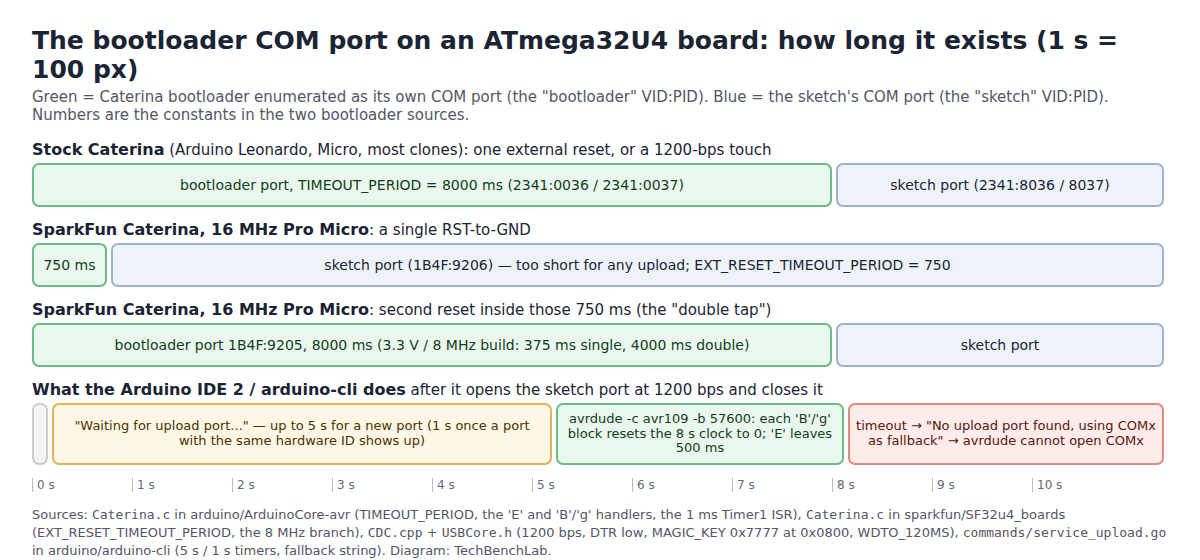
How the IDE gets into the window, and where it fails
Both leonardo and promicro carry upload.use_1200bps_touch=true and upload.wait_for_upload_port=true. The core’s CDC.cpp watches for the host opening the port at exactly 1200 baud and then dropping DTR; when that happens it writes MAGIC_KEY (0x7777) at RAM address 0x0800 and arms a 120 ms watchdog. Caterina reads that key after the watchdog reset and stays in the bootloader for the full 8 s instead of starting the sketch. arduino-cli then prints “Waiting for upload port…” and waits up to 5 seconds for a new port to appear (1 second once a port with the same hardware ID shows up); if none does, it prints “No upload port found, using COMx as fallback” and avrdude tries the old port number, which no longer exists.
It fails in three ways: the sketch’s USB stack is dead, so the 1200-bps touch never reaches the chip; the new port takes longer than 5 s to enumerate (slow hub, long cable); or the board has SparkFun’s bootloader and you reset it once, so the port was gone after 750 ms.
Upload with a manual reset, step by step (Windows 11)
- Select the right board and the right voltage/clock variant (Tools → Processor on the Pro Micro). A 16 MHz board flashed as 8 MHz re-enumerates with a wrong USB clock and vanishes; that is the number-one “brick” in SparkFun’s guide.
- Pick any COM port so the IDE lets you upload; on an arduino-cli line pass
--port COM5even if COM5 is stale. - Click Upload. Watch the output pane. When it shows the memory usage lines and then “Waiting for upload port…”, reset the board: press the reset button once on a Leonardo/Micro/clone, or bridge RST to GND twice quickly on a Pro Micro (it has no button).
- Device Manager flashes a new “USB Serial Device” or “Arduino Leonardo bootloader” entry for 8 s; the IDE picks it up, avrdude runs at 57600 baud with
-c avr109, and the sketch port comes back when it finishes. - If the IDE times out before you reset: shorten the cable, unplug other USB devices, repeat. The 5-second IDE window is the real constraint, not the 8-second bootloader.
The cases in the threads
| What was seen | Cause | What fixed it | Thread |
|---|---|---|---|
| Clone shows “Arduino Leonardo bootloader (COM4)” for ~8 s after RST→GND, then the whole Ports category disappears; uploads fail | SimHub firmware had killed the sketch’s USB; the board was on a 5 m USB extension and the new port enumerated too slowly | A 0.5 m cable, same reset procedure | Arduino forum 1449120 (Jun 2026) |
| Pro Micro with a keyboard .hex loaded over USB no longer appears as a COM port | The keyboard firmware has no CDC port, so there is nothing for the 1200-bps touch to open | Manual reset timed to the upload; another program holding the port had to be closed first | Arduino forum 882257 (11,100 views) |
| Bootloader re-burned with “Arduino as ISP”, then an example sketch uploaded through the ISP; after that no port at all | Uploading over ISP erases the bootloader section; the next USB upload had nothing to talk to | Burn the bootloader again and upload only over USB from then on | Arduino forum 926388 |
| Port changes during the upload and the download fails; “8 seconds is not enough” | Expected behaviour; the PC took longer than the window to find the bootloader port | SparkFun support: try a faster PC/port; the port swap is by design | SparkFun forum 39393 |
| Qwiic Pro Micro USB-C “only lasts ~8 seconds in the bootloader”, CLI upload fails | Reset pressed before the CLI was waiting | Start arduino-cli upload first, double-tap reset when “Waiting for upload port…” appears |
SparkFun forum 45137 |
| Qwiic Pro Micro COM port gone after the first sketch, repeatable on two boards in a Qwiic chain | Not diagnosed in the thread; SparkFun points to the double-reset recovery and warns the 32U4 “gets bricked easily” | Reset-twice recovery, several attempts | SparkFun forum 41196 |
FAQ
Why does the board show up twice in Device Manager? Because the bootloader and the sketch have different PIDs (table above) and Windows keeps one driver-store entry per hardware ID. Nothing is wrong; the greyed-out one is whichever mode is not running.
Can I make the Leonardo start faster than 8 seconds? Only on a power-on reset, where the stock bootloader already skips itself. For an external reset the constant is compiled into the bootloader; SparkFun’s 750 ms fork is the ready-made alternative, and it needs the double-tap for uploads.
The bootloader port never appears, even after a double reset. Then the bootloader itself is gone (ISP upload, wrong fuses) and you need an ISP programmer: see avrdude on Windows with a USBasp and the Zadig driver for it.
Related guides
- Arduino IDE 2: port not showing, by board and USB chip
- Arduino Nano “stk500_recv(): programmer is not responding”
- COM port busy / “Access is denied” on Windows 11
- “USB Serial Device” and usbser.sys: which boards need no driver
- Digispark ATtiny85: the other bootloader with a timing window
- USB VID/PID lookup for bench tools
Sources
- Caterina.c (arduino/ArduinoCore-avr):
TIMEOUT_PERIOD 8000,bootKey 0x7777at 0x0800, the EXTRF/PORF/WDRF decision inmain(), the ‘E’ and ‘B’/’g’ handlers, the Timer1 ISR; Descriptors.c (product strings “Arduino Leonardo”, “Arduino Micro”); Makefile (official PIDs 0036/0037/003C) - boards.txt (arduino/ArduinoCore-avr):
leonardo,micro,LilyPadUSBVID/PID lists,upload.use_1200bps_touch,upload.wait_for_upload_port,upload.protocol=avr109,upload.speed=57600 - CDC.cpp and USBCore.h: the 1200 bps + DTR-low check,
MAGIC_KEY 0x7777,MAGIC_KEY_POS 0x0800,wdt_enable(WDTO_120MS) - Caterina.c (sparkfun/SF32u4_boards):
EXT_RESET_TIMEOUT_PERIOD 750/ 375 andTIMEOUT_PERIOD8000 / 4000 by F_CPU, the double-reset logic (comments dated 8/15/12) - boards.txt (sparkfun/Arduino_Boards):
promicroPIDs 9203/9204 and 9205/9206,fiov3,makeymakey; signed_driver/sparkfun.inf (DriverVer 04/22/2016, usbser, hardware IDs) - arduino.inf (arduino/Arduino): DriverVer 11/24/2015,1.2.3.0, “Arduino Leonardo bootloader” for
VID_2341&PID_0036, “Arduino Leonardo” forPID_8036&MI_00; caterina-LilyPadUSB/Caterina.c (375 / 4000 ms) - service_upload.go (arduino/arduino-cli): “Performing 1200-bps touch reset”, “Waiting for upload port…”, the 5 s / 1 s timers in
detectUploadPort, “No upload port found, using %s as fallback” - SparkFun Pro Micro & Fio v3 Hookup Guide, Troubleshooting and FAQ: “<750ms" single reset, reset twice for eight seconds, wrong-voltage "brick", two Device Manager entries
- Threads: Arduino forum 1449120, 882257, 926388; SparkFun forum 41196, 39393, 45137