Arduino IDE 2 does not fail to find your board because it is missing a driver. It fails because the board you plugged in enumerates under one USB product ID while your sketch runs and a different one while the bootloader runs — and because on Windows 10 and 11 the driver you are hunting for is already loaded by the operating system.
Below: the download with official checksums, the USB ID of every board the Arduino cores declare, and the five things that actually take a port away. Every number was read on 20 September 2026 from the source that publishes it.
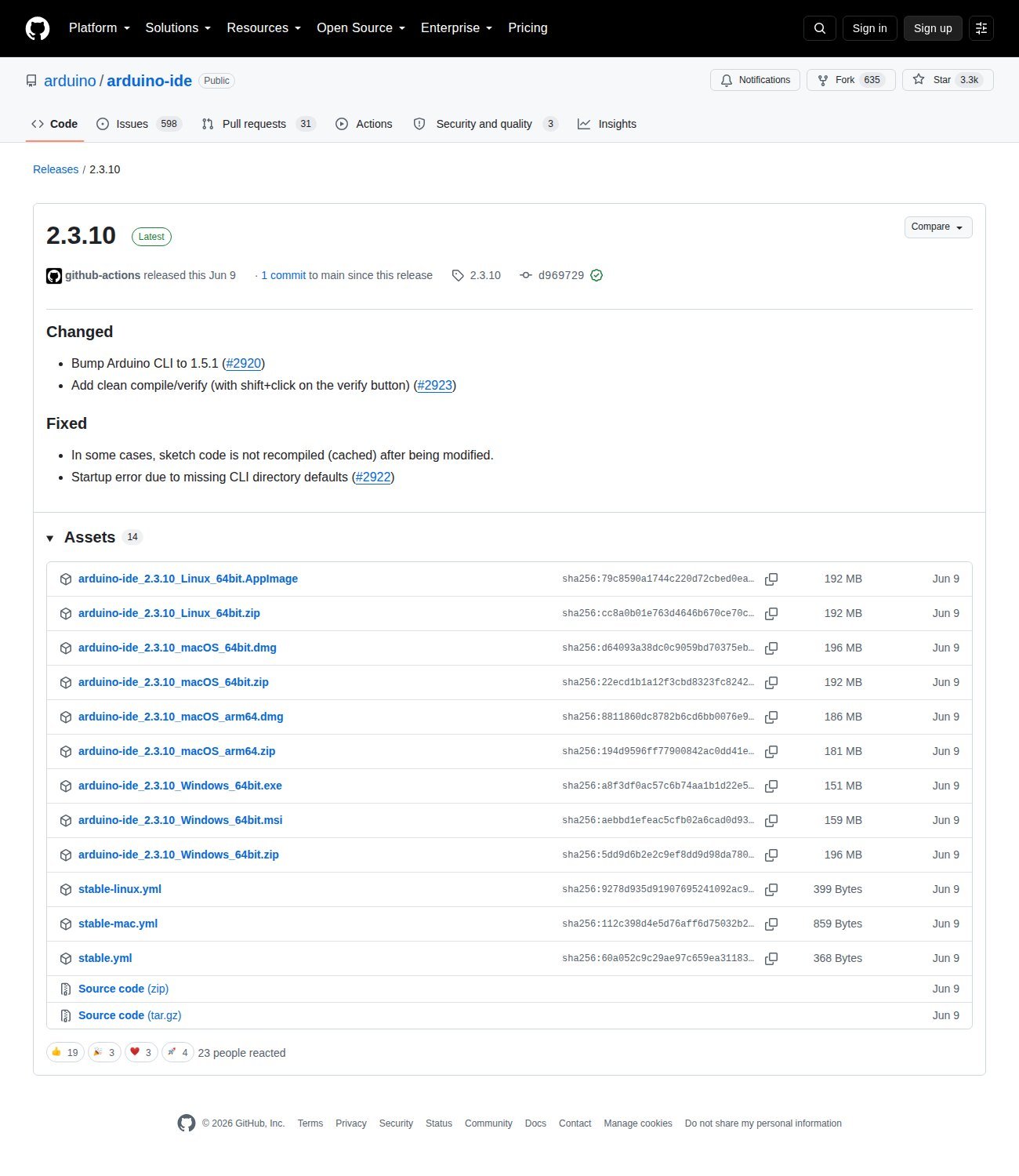
Download: Arduino IDE 2.3.10
Official download: arduino.cc/en/software — or straight from the source repository, github.com/arduino/arduino-ide/releases.
We do not mirror the installer. It is 150–200 MB, it is signed, and a stale copy of an IDE is exactly the kind of thing this site complains about. The version, sizes and SHA-256 below come from the GitHub release API, which publishes a digest field per asset — that is the official checksum, not one we computed.
Release 2.3.10 was published on 9 June 2026. Its own changelog entry is worth reading before anything else: “Bump Arduino CLI to 1.5.1”. The IDE does not detect ports itself — arduino-cli does, and the version bundled here is 1.5.1. Every behaviour described in this article is the CLI’s.
| File | Size | SHA-256 (official, from the release API) |
|---|---|---|
Windows 64-bit .exe |
158,074,632 B | a8f3df0ac57c6b74aa1b1d22e5f202dc5ddb46663579d4e5108a69cc99b6f823 |
Windows 64-bit .msi |
167,145,472 B | aebbd1efeac5cfb02a6cad0d93af8221054fc983a5b3c5ce6da8a6bfb9425165 |
macOS Apple silicon .dmg |
195,168,554 B | 8811860dc8782b6cd6bb0076e9215255849f404b1b9e6f38069fdc4f5c43648e |
macOS Intel .dmg |
205,500,613 B | d64093a38dc0c9059bd70375ebb93461cd4583019cdbb157dd6dced32efc35b7 |
Linux .AppImage |
201,750,502 B | 79c8590a1744c220d72cbed0ea91c6e2a7f4594292699b2fb3364ebd713cd566 |
Linux .zip |
201,276,182 B | cc8a0b01e763d4646b670ce70c1bc8c389a0fa14ab556dcc0749c03f475a7975 |
On Windows, run the .exe (the .msi is for managed deployments). On macOS, open the .dmg and drag the app to Applications; Apple silicon wants the arm64 build. On Linux, chmod +x the AppImage and run it — then do the dialout step further down, because that one is not optional.
The driver question, answered with the file itself
The Windows driver package the Arduino installer offers lives in the AVR core, at ArduinoCore-avr/drivers/arduino.inf. Open it and the first useful line is the date stamp:
DriverVer=11/24/2015,1.2.3.0
That package has not been rebuilt since 24 November 2015. It lists 33 USB IDs. The five official cores — AVR, SAMD, Renesas, megaAVR and mbed — currently declare 141 distinct VID/PID pairs across 56 boards. The overlap is 27. Which means 42 current boards appear nowhere in the official driver INF: both UNO R4 variants, Nano Every, Nano 33 BLE, Nano 33 IoT, the entire MKR family, Giga R1, Portenta, Opta, Nicla, Nano RP2040 Connect.
They all work on Windows anyway, and Microsoft documents why. From the USB Serial Driver (Usbser.sys) page: “If your device belongs to the communications and CDC control device class, Usbser.sys loads automatically. You don’t need to write your own INF file to reference the driver. Windows loads the driver based on a compatible ID match” — specifically USBClass_02 and USBClass_02&SubClass_02.
So the honest rule is short. A genuine Arduino — native USB, or the ATmega16U2 on an UNO R3 or Mega — needs no driver on Windows 10 or 11. A clone needs the driver for whatever USB-serial chip it carries, which is a different problem with a different fix: CH340, CH9102/CH343, CP2102 or FT232. That is also why those boards show up as “Unknown” in the board selector: Arduino’s own help centre says the port information “is not sufficient to determine the type of board that’s connected”, because a CH340 reports as a CH340, not as a Nano.
Every board, its two USB IDs, and what Linux calls it
This is the table that does not exist elsewhere. It was built by reading vid.N, pid.N, build.pid, upload.pid and upload.use_1200bps_touch out of the boards.txt of each official core on GitHub. The “sketch” column is the device the computer sees while your code runs; the “upload” column is the device it becomes when the bootloader takes over.
| Board | Sketch PID | Upload / bootloader PID | 1200 bps touch | Linux node |
|---|---|---|---|---|
| UNO R3 (ATmega16U2) | 2341:0043 |
same device (DTR reset) | no | ttyACM0 |
| Mega 2560 | 2341:0010 / 0042 |
same device (DTR reset) | no | ttyACM0 |
| Leonardo | 2341:8036 |
2341:0036 |
yes | ttyACM0 |
| Micro | 2341:8037 |
2341:0037 |
yes | ttyACM0 |
| Nano Every | 2341:0058 |
same device | yes | ttyACM0 |
| Nano 33 IoT | 2341:8057 |
2341:0057 |
yes | ttyACM0 |
| Nano 33 BLE | declares four: 005a 805a 015a 025a * |
yes | ttyACM0 |
|
| Nano RP2040 Connect | declares four: 005e 805e 015e 025e * |
yes | ttyACM0 |
|
| MKR WiFi 1010 | 2341:8054 |
2341:0054 |
yes | ttyACM0 |
| MKR Zero | 2341:804f |
2341:004f |
yes | ttyACM0 |
| UNO R4 Minima | 2341:0069 |
2341:0369 (DFU) |
no | ttyACM0 |
| UNO R4 WiFi | 2341:006d |
2341:1002 |
yes | ttyACM0 |
| Giga R1 | 2341:0266 |
2341:0366 (DFU) |
yes | ttyACM0 |
| Nano (classic, FT232) | 0403:6001 |
same device | no | ttyUSB0 |
| Clone with CH340 | 1a86:7523 |
same device | no | ttyUSB0 |
* The mbed core lists several IDs for those two boards without saying which belongs to which mode, so they are left unlabelled here. Every other row is labelled because the core itself says so, through build.pid (the sketch) or upload.pid (the bootloader).
The last two rows are not in any boards.txt — that is the whole reason they appear as “Unknown”, and the whole reason they are the only ones that need a driver. The ttyACM versus ttyUSB split in the right-hand column is not cosmetic either: ttyACM means the kernel’s CDC driver claimed it, ttyUSB means a chip-specific driver did.
The part nobody covers: the 0x8000 bit
Look down the table at the boards with two PIDs. Leonardo: 0036 and 8036. Micro: 0037 and 8037. MKR WiFi 1010: 0054 and 8054. Twenty-seven boards declare exactly this pattern, and the difference is always 0x8000: the bootloader keeps the plain number, and the sketch — whose USB descriptor is compiled into the binary from build.pid — sets the top bit.
The consequence is the thing that confuses people. In bootloader mode your board is, to the operating system, a different USB device. Windows may assign it a different COM number. Linux may assign a different ttyACM index. The port you selected in Tools > Port is genuinely gone for those few seconds, because the thing behind it is gone.
That is why the upload sequence exists at all. The arduino-cli platform specification defines use_1200bps_touch as a setting that “causes the selected serial port to be briefly opened at 1200 bps (8N1) before starting the upload” — that open-and-close is the signal that tells the board to reset into its bootloader — and wait_for_upload_port as one that “causes the upload procedure to wait for the serial port to (re)appear before and after the upload”. Thirty-seven of the 56 boards use the 1200 bps touch; 35 wait for the port to come back.
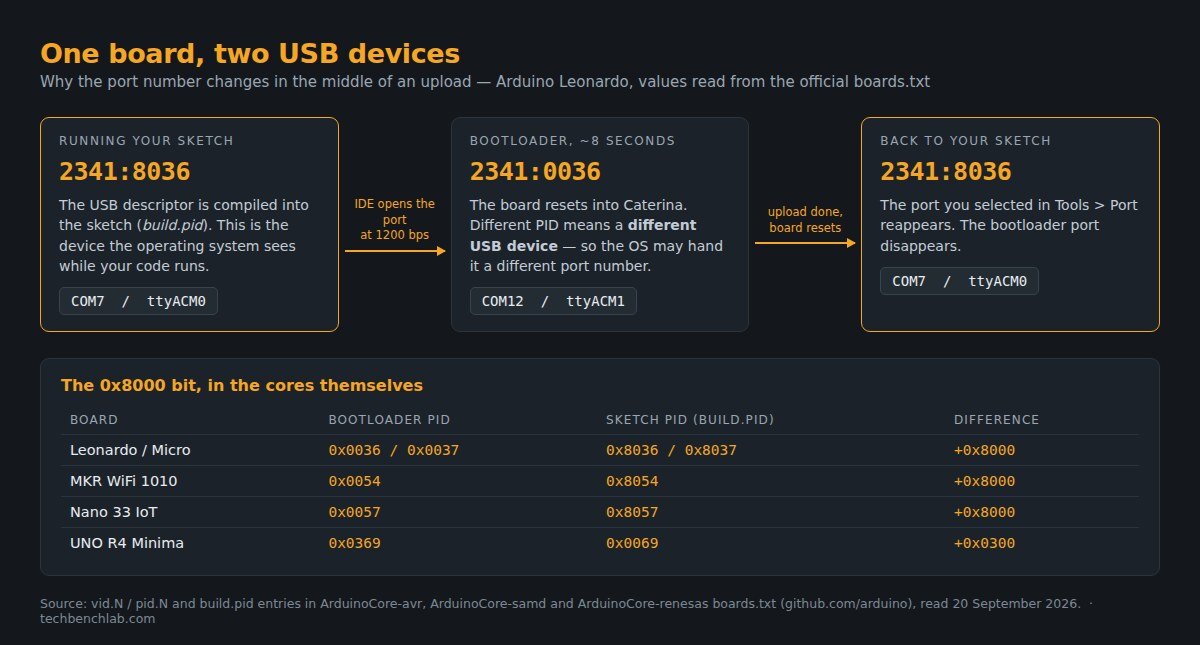
boards.txt of the official Arduino cores. Diagram by Tech Bench Lab.Practical use: if the upload fails with a port error but the board runs fine afterwards, watch Device Manager or dmesg during an upload. A second device with a different PID means the touch worked and the problem is downstream — stale port selection, or something holding the port open. Nothing appearing means the touch never reached the board.
Linux: the dialout group, and the brltty advice that expired
On Linux the port usually exists and you simply cannot open it. Arduino’s own instruction is one command: sudo usermod -a -G dialout <username>, then reboot. If the group is wrong on your distribution, run ls -l /dev/ttyACM0 and use whatever group name it prints.
The other Linux answer you will find everywhere is sudo apt remove brltty — brltty is the braille display daemon, and it once grabbed every CH340 on the system before the Arduino IDE could. That advice was true, and it has an expiry date. We pulled the shipped 85-brltty.rules out of the official Ubuntu .deb for each release and read the rule:
| Ubuntu | brltty package | Rule for 1a86:7523 (CH340) |
Effect |
|---|---|---|---|
| 20.04 Focal | 6.0+dfsg-4ubuntu6 | no rule at all | never touches your board |
| 22.04 Jammy | 6.4-4ubuntu2 | ENV{PRODUCT}=="1a86/7523/*", unconditional |
claims every CH340 |
| 24.04 Noble | 6.6-4ubuntu5 | same rule, plus ATTRS{idVendor}=="1a40" ATTRS{idProduct}=="0101" |
only behind one specific hub |
| 25.04 Plucky | 6.7-1ubuntu3 | line commented out | never touches your board |
| 26.04 Resolute | 6.7-1ubuntu6 | line commented out | never touches your board |
So the folklore is a 22.04 problem. That same file also carried active rules for CP2102 (10c4/ea60, matched on manufacturer string “Silicon Labs”) and FTDI (403/6001, matched on “FTDI”) — which is why some people lost FTDI-based Nanos too and never connected the two events. From 24.04 those lines are commented out and only genuine braille hardware matches. Debian 13 does not install the rules file at all, shipping it as an example under /usr/share/doc/brltty/examples/.
The origin is almost funny: brltty’s Baum driver lists .vendor=0X1A86, .product=0X7523 for the “NLS eReader Zoomax”, a braille device that happens to use a CH340 behind a hub. One shared chip, years of lost Arduino ports.
The five things that actually take a port away
- A charge-only USB cable. It is first on Arduino’s own troubleshooting list, ahead of everything else, and it costs nothing to rule out: “Connect your board with a data USB cable, not a charging-only cable.” Test the cable on a phone that shows file transfer.
- A clone with an undriven USB chip. On Windows, look in Device Manager under “Other devices” rather than “Ports” — an unknown device with VID
1a86or10c4is a missing chip driver, not a missing Arduino driver. - Another program holding the port. Serial monitors, plotters, a second IDE window, or a leftover
arduino-cli.exe. Arduino documents finding it with Process Explorer’s Find Handle or DLL and killing it withtaskkill /pid <PID> /F; on Linux,fuser /dev/ttyACM0answers the same question in one line. - The board sitting in a half-dead state. On MKR boards and newer Nanos, pressing RESET twice in quick succession forces the bootloader — the on-board LED fades in and out — and the bootloader PID appears as a fresh port you can upload to.
- Permissions, on Linux only. Not in dialout, or missing udev rules for the bootloader device, which produces the specific failure of a board you can select but not finish uploading to.
What the questions themselves say
To check that this ordering matches reality rather than habit, we pulled 479 unique questions about port detection from the Arduino Stack Exchange through its public API (ten queries, deduplicated by question ID). Drivers are mentioned in 102 of them (21%), ttyACM/ttyUSB in 53 (11%), CH340 or “clone” in 47 (9%), dialout or permissions in 19, the 1200 bps touch in 11, brltty in 4, cables in 3.
The more interesting number is the shape over time: 71 questions in 2015, 70 in 2017, then 31 in 2021, 16 in 2023 and 5 in 2025. Port trouble has not been solved by better advice. It has been solved by Windows loading usbser.sys on its own and by boards moving to native USB — which is exactly why the 2015 driver package is still sitting there, untouched, and still working for the boards it was written for.
FAQ
Do I need to install the Arduino drivers on Windows 11? Only for a clone. Genuine boards match USBClass_02&SubClass_02 and Windows loads usbser.sys without any package.
Why does my board show as “Unknown” but still upload? Because its USB ID is not in any boards.txt — typical for CH340 and FT232 clones. Select the board manually in Tools > Board and it uploads normally.
The port number changes every time I plug the board in. Is it broken? No. Windows assigns COM numbers per USB device, and a board that enumerates with two PIDs is two devices. Use the port that appears with the board name next to it.
Should I still remove brltty? Only on Ubuntu 22.04. On 24.04 the rule is narrowed to one hub, and on 25.04 and later it is commented out.
Sources
- Arduino IDE 2.3.10 release and its asset digests (GitHub Releases API)
- ArduinoCore-avr, ArduinoCore-samd and ArduinoCore-renesas
boards.txt arduino.inf— the Windows driver package,DriverVer24 November 2015- arduino-cli platform specification —
use_1200bps_touch,wait_for_upload_port,vid.N/pid.N - Microsoft Learn — USB Serial Driver (Usbser.sys)
- Arduino Help Center: board not detected, “Unknown” devices, port access on Linux, process blocking a port
- brltty
85-brltty.rules, read from the official Ubuntu packages at archive.ubuntu.com; CH340 entry in brltty’s Baum driver - Arduino Stack Exchange via the public Stack Exchange API (corpus of 479 questions)
Related guides
- CH340 driver on Windows 11 — the chip on most clones, and the one driver you may actually need
- CH9102 and CH343 driver — the CH340’s successor, increasingly common on new clones
- CP210x on macOS and Linux — including the “port busy” error
- FTDI FT232R driver — the chip on the classic Nano
- esptool.py step by step — when the board on the other end of that port is an ESP