Last checked: 27 October 2026.
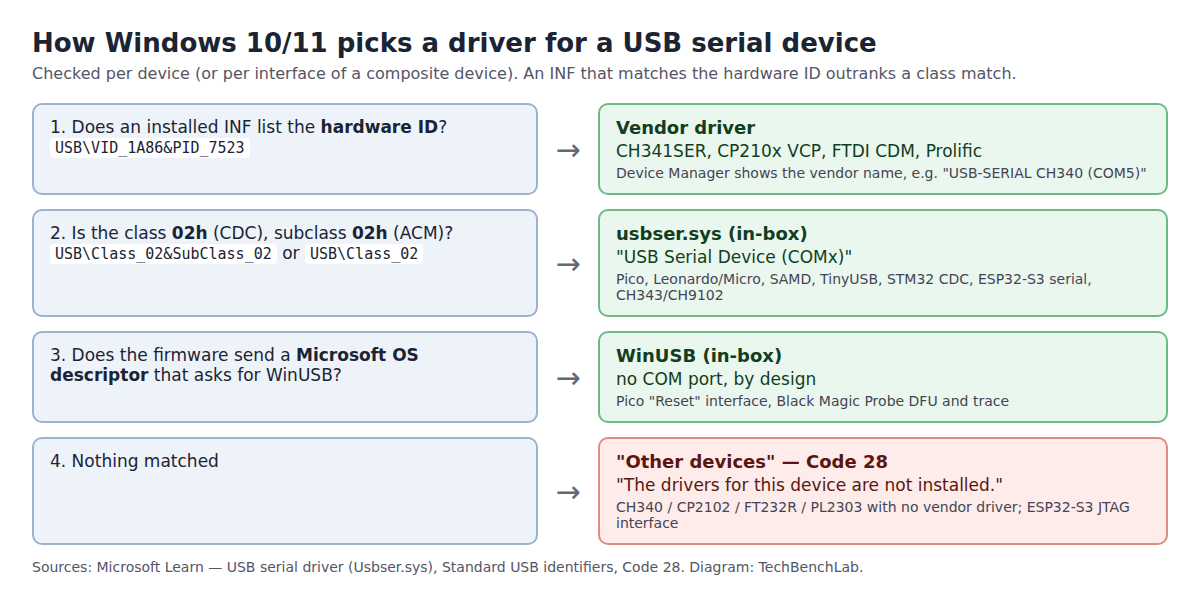
When Windows 10 or 11 lists a board as “USB Serial Device (COMx)”, it has bound Microsoft’s own usbser.sys. It does that for any device that reports USB class 02h (CDC) with subclass 02h (ACM), and it never needs a download. Boards built on a vendor-specific bridge chip (CH340, CP2102, FT232R, PL2303) don’t report that class. Without the vendor’s driver they sit under “Other devices” with Code 28, and no amount of waiting for usbser fixes that.
⬇ Nothing to download for CDC boards
Microsoft: USB serial driver (Usbser.sys)
usbser.sys ships inside Windows, so there’s no file for us to host and no checksum to compare. If someone offers you a “USB Serial Device driver” download, you don’t need it.
Which boards get usbser.sys, and which need a driver
The class codes below come from the firmware source of each board, not from forum lore. The vendor-chip rows are confirmed by Linux, which binds those chips by VID:PID in dedicated drivers (ch341.c, cp210x.c, ftdi_sio, pl2303.c) and never by the CDC class.
| Board / chip | VID:PID | What the firmware reports | Windows 10/11 with no download | Source |
|---|---|---|---|---|
| Arduino Leonardo / Micro (ATmega32U4) | 2341:8036 / 8037 | Device EFh/02h/01h (IAD), interface 02h/02h, protocol 00h | usbser, “USB Serial Device” | ArduinoCore-avr USBCore.cpp, CDC.cpp, boards.txt |
| Arduino Zero, MKR WiFi 1010, Nano 33 IoT (SAMD21) | 2341:804D / 8054 / 8057 | Same as above | usbser | ArduinoCore-samd USBCore.cpp, CDC.cpp |
Raspberry Pi Pico (SDK stdio_usb) |
2E8A:000A | EFh/02h/01h; CDC interface named “Board CDC”, plus a vendor “Reset” interface with a Microsoft OS 2.0 descriptor | usbser for the COM port; WinUSB for “Reset” | pico-sdk stdio_usb_descriptors.c |
| Anything on TinyUSB’s CDC macro (CircuitPython, many RP2040/ESP32-S2 builds) | varies | Interface 02h/02h, protocol 00h (“no specific protocol”) | usbser | TinyUSB usbd.h TUD_CDC_DESCRIPTOR |
| STM32 CubeMX CDC example | 0483:5740 | Device 02h/02h/00h, interface 02h/02h/01h (AT commands) | usbser | STM32CubeF4 CDC_Standalone usbd_desc.c, usbd_cdc.c |
| ESP32-S3 / C3 built-in USB | 303A:1001 | CDC-ACM serial + a JTAG interface | usbser for serial; JTAG needs Espressif’s driver | ESP-IDF docs |
| Black Magic Probe | 1D50:6018 | Two CDC ports + DFU (FEh/01h/01h) + trace (FFh); current firmware adds Microsoft OS descriptors for the last two | usbser for both COM ports | blackmagic usb_descriptors.h |
| WCH CH343 / CH9102 | 1A86:55D3 / 55D4 | CDC | usbser works; WCH driver optional | our CH9102 guide |
| WCH CH340 / CH341 | 1A86:7523 / 5523 | Vendor-specific | Code 28, “USB2.0-Serial” | Linux ch341.c |
| Silicon Labs CP2102 | 10C4:EA60 | Vendor-specific | Code 28, “CP2102 USB to UART Bridge Controller” | Linux cp210x.c |
| FTDI FT232R / FT231X | 0403:6001 / 6015 | Vendor-specific | Code 28, “FT232R USB UART”, until the FTDI driver is in | Linux ftdi_sio_ids.h |
| Prolific PL2303 | 067B:2303 | Vendor-specific | Code 28 until the Prolific driver is in | Linux pl2303.h |
One detail the table settles: the protocol byte doesn’t matter. Arduino and TinyUSB send protocol 00h, ST’s example sends 01h, and all of them get usbser. That’s because Microsoft lists the match as USB\Class_02&SubClass_02 or plain USB\Class_02, with no protocol part. The second form covers the STM32 case, where the class sits in the device descriptor itself. Per Microsoft’s Standard USB identifiers, that turns into the compatible ID USB\Class_02 for the whole device.
The CH340 and CP2102 names in the last rows are worth knowing because people paste them straight into a search engine. “cp2102 usb to uart bridge controller” and “ft232r usb uart driver” are among the queries that bring readers to this site from Bing.
Check yours in 30 seconds
- Device Manager → the device → Properties → Details → Compatible Ids. If you see
USB\Class_02&SubClass_02, usbser should take it. If you only seeUSB\Class_FFor nothing beyond the VID:PID, you need the vendor driver. - Or, on Windows 11 21H2 or newer, list every Code 28 device along with its IDs in one go:
pnputil /enum-devices /problem 28 /deviceids. The/problemfilter works from Windows 10 1903, and/deviceidsneeds 21H2 (PnPUtil syntax). - To see which INF a working port uses:
pnputil /enum-devices /class Ports /drivers.usbser.infmeans in-box, andoemNN.infmeans a vendor driver took over.
Common problems
- The COM port works but a second entry shows Code 28. This is a composite board with a non-CDC interface. On an ESP32-S3 it’s the JTAG interface: Espressif’s docs say Windows needs a driver for it (installed with
eim install-driversoridf-env driver install --espressif), but only if you debug over JTAG. A 2023 Zubax thread shows the same pattern on a Black Magic-based probe on Windows 11: the serial ports worked, and “Black Magic Trace Capture” and “Black Magic Firmware Upgrade” both showed Code 28. Ignore those entries unless you use trace or DFU. - The board shows as “Board CDC” instead of a COM port. Windows saw the interface but didn’t match the class. In PlatformIO thread 26150 (RP2040, Windows 10), the fix was Zadig → List all devices → “Board CDC” → USB Serial (CDC), which installs usbser by hand. Check Compatible Ids first: if they’re wrong, the firmware’s descriptor is the real bug.
- Your own STM32 CDC firmware gives Code 10, “This device cannot start.” The driver loaded, but the device failed to start. ST’s own knowledge article blames a too-small heap with the HAL USB library: “A value of 0x1000 should be enough for most cases”, or switch
USBD_mallocto static allocation. - An old vendor INF hijacks a CDC board. A hardware-ID match outranks the class match, so a 2015-era
arduino.infor an old ST VCP package can grab the board and fail. Remove it withpnputil /delete-driver oemNN.inf /uninstalland replug. - Windows 7 and 8.1. Microsoft only documents automatic usbser binding from Windows 10 on. Older systems need the board’s INF, which is why old guides still tell you to install one.
FAQ
Do I need the Arduino or STM32 “VCP driver” on Windows 11? Not for the boards in the green rows above. Install a vendor driver only if Compatible Ids show no class 02.
The port is there, but uploads fail with “Access is denied”. That isn’t a driver problem. Another program holds the port; see COM port busy.
Related guides
- Arduino IDE 2: port not showing
- Raspberry Pi Pico not detected
- ESP32 board USB driver hub
- Unknown USB Device (Device Descriptor Request Failed)
- USB VID/PID lookup for bench tools
Sources
- Microsoft Learn: USB serial driver (Usbser.sys), USB device class drivers included in Windows, Standard USB identifiers, Code 28, Code 10
- Arduino: ArduinoCore-avr USBCore.cpp, CDC.cpp, ArduinoCore-samd CDC.cpp
- pico-sdk stdio_usb_descriptors.c · TinyUSB usbd.h
- ST: CDC_Standalone usbd_desc.c, usbd_cdc.c, “USB device not recognized” article
- Espressif: USB Serial/JTAG Controller Console, Configure built-in JTAG
- Black Magic Probe usb_descriptors.h
- Linux: ch341.c, cp210x.c, ftdi_sio_ids.h, pl2303.h
- Threads: Zubax 2059, PlatformIO 26150
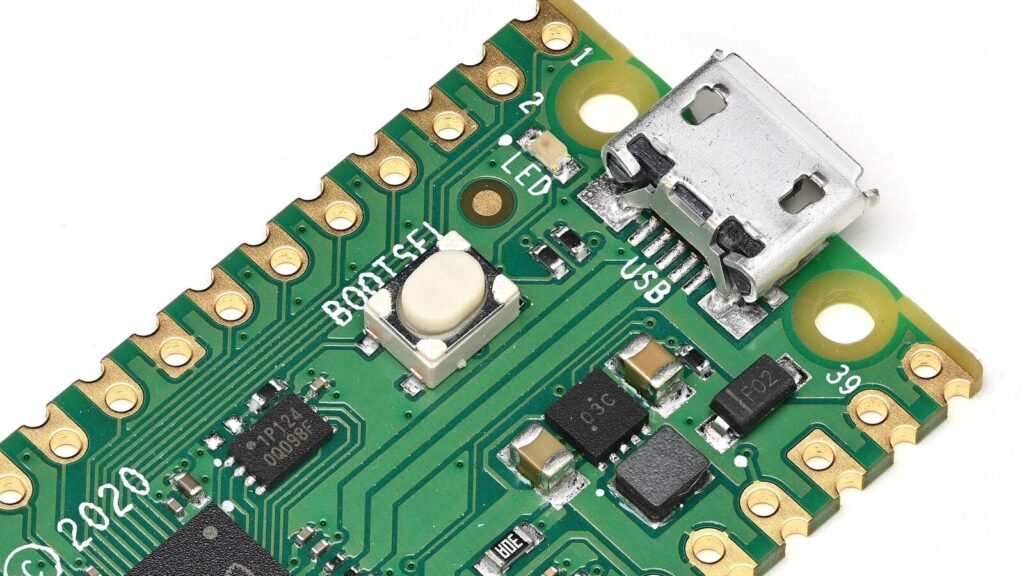
- Cover photo: Phiarc, Raspberry Pi Pico oblique, Wikimedia Commons, CC BY-SA 4.0 (cropped).