“Unknown USB Device” is not a driver problem most of the time. When the name in brackets says Port Reset Failed, Set Address Failed or Device Descriptor Request Failed, Windows never got far enough to learn the VID/PID, so no driver download can fix it. Below: what each message means, which step of USB enumeration it comes from, the next thing to try, and USBDeview (hosted here, unmodified) to read the real VID/PID when the device does enumerate.
⬇ USBDeview 3.10 (NirSoft, freeware)
Unmodified mirror of nirsoft.net/utils/usb_devices_view.html (official source, same files). Each zip holds USBDeview.exe, USBDeview.chm and readme.txt. NirSoft’s licence allows free redistribution as long as all files are included unchanged and nothing is charged. On 64-bit Windows use the x64 build: NirSoft notes that disable/enable only works with it.
| Build | Runs on | Use it when |
| x64 | Windows 7 / 8 / 10 / 11 64-bit | Almost every PC today; required for disable/enable |
| x86 | 32-bit Windows 2000 → 10 | Old shop PCs and XP-era bench machines |
Read the message before you download anything
Open Device Manager, expand Universal Serial Bus controllers (or Other devices), right-click the entry with the yellow mark, then go to Properties → General. The status text and the Code number are what you need. Then open Details → Device instance path. If it starts with USB\VID_0000, enumeration failed, and that number is a placeholder, not your device. One Windows 11 user’s log in a Microsoft Q&A thread shows it plainly: Code 43, instance USB\VID_0000&PID_0002\…, driver section BADDEVICE.DEV.NT.
Every message, mapped to the enumeration step that failed
The “step” column comes from Microsoft’s USB team, who documented the hub driver’s enumeration sequence, its timeouts and when it gives up and reports an “Unknown Device” (enumeration, failure causes, problem descriptions). The Code texts are quoted from Microsoft Learn.
| What Windows shows | Step that failed | What it usually is | Next step |
| Nothing at all, no sound, no entry | Debounce (the port must be stable for 100 ms; after 200 ms the hub disables it), or overcurrent/disconnect during enumeration | Charge-only cable, dead USB connector, device not powered, short on VBUS | Known data cable, rear port. On the board: VBUS present? D+/D− continuity to the connector? |
| Unknown USB Device (Port Reset Failed) | Port reset: 5 s timeout, retried 3 times with 500 ms between tries | The device never came back after reset: brown-out, crashed firmware, a hub that cannot supply it | Remove all power from the device and replug. Bypass the hub. Try a USB 2.0 port. |
| Unknown USB Device (Set Address Failed) | Set Address, the first command the device must obey | Signal integrity (long or extension cable, front-panel header) or firmware that hangs at address 0 | Short cable straight into the motherboard. Reflash the device’s bootloader if it has one. |
Unknown USB Device (Device Descriptor Request Failed) · Code 43 · VID_0000&PID_0002 |
Device descriptor request. Windows needs only the first 8 bytes and retries 3 times | Data lines (D+/D− open or swapped, bad ESD diode), MCU not running (dead crystal, wrong fuse), bad cable | Swap cable, then measure the USB data lines. A microcontroller board that fails here usually has no running firmware. |
| “The USB device returned an invalid USB configuration descriptor” (or device descriptor) | Descriptor validation | Firmware bug: self-built USB stack, half-flashed firmware | Reflash known-good firmware. If you wrote it, check the descriptor lengths. |
| “The SuperSpeed link … keeps going to an error state” (SSInactive / Compliance) | USB 3 link training | Marginal USB 3 cable or port | USB 2.0 cable or port forces a High-Speed link. |
| Real device name + “The drivers for this device are not installed. (Code 28)” | None. Enumeration worked | No INF matches the VID/PID (Microsoft: STATUS_PNP_NO_COMPAT_DRIVERS). Microsoft also lists low power on a bus-powered hub (100 mA per port vs 500 mA) |
Read the VID/PID (USBDeview or Details tab) and look it up in the VID/PID table. |
| “This device cannot start. (Code 10)” | Driver loaded, start failed | Wrong or blocked driver version, e.g. an old PL2303 under a new driver | Change the driver version, not the cable. See the PL2303 fix. |
| “Windows has stopped this device because it has reported problems. (Code 43)” on a named device | Driver reported a failure after start | Device hung (Microsoft’s first cause) or hardware failure | Unplug both USB and external power, wait, replug. If it persists on another PC, the device has failed. |
| “Windows cannot verify the digital signature … (Code 52)” | Driver signing | Unsigned driver on 64-bit Windows | Get a signed package. Microsoft says this is the only end-user fix. |
| Greyed-out entry, “Currently, this hardware device is not connected to the computer. (Code 45)” | None | A ghost from a device used earlier | Harmless. Remove it with USBDeview if old COM numbers are piling up. |
The first rule for reading the table: the top five rows happen before Windows knows what the device is. A driver pack, Zadig or a “USB repair tool” cannot touch them, because there is no VID/PID to bind a driver to yet. Below the Code 28 row the hardware is talking and the fix is software.
Using USBDeview to get the VID/PID
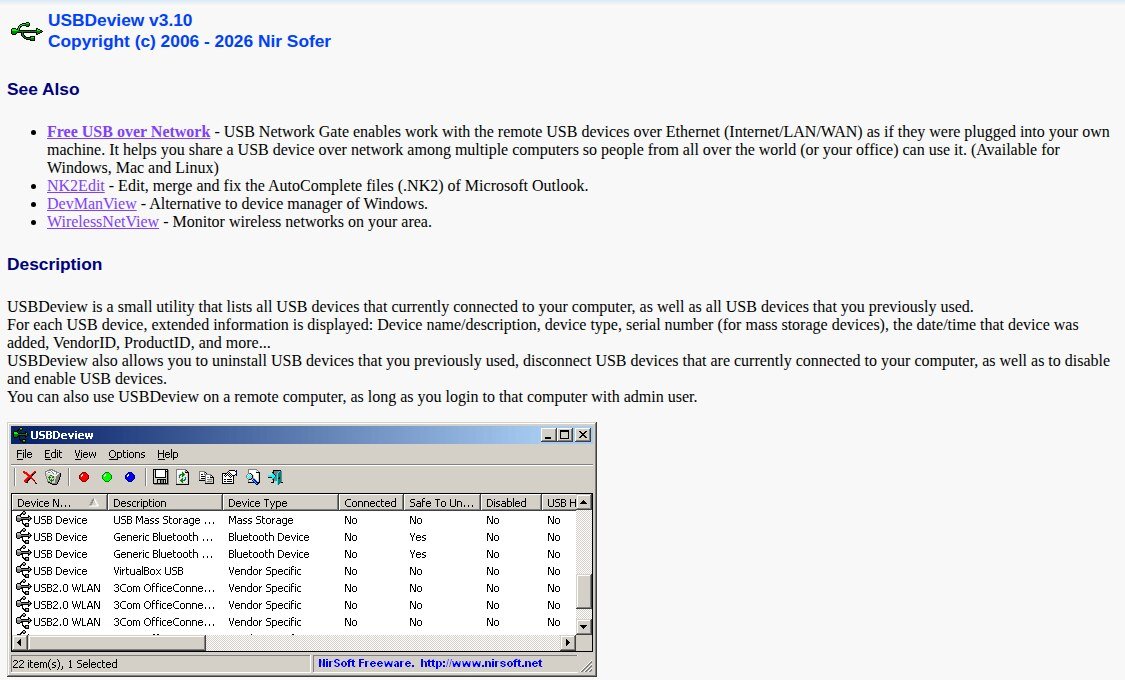
- Extract the zip and run USBDeview.exe. Nothing is installed. Accept the elevation prompt if you plan to remove entries.
- Plug the device in. Turn on Options → Mark Connected Devices so the live one shows with a green background.
- Read the VendorID and ProductID columns. The Device Instance ID, Driver Filename and Hub/Port columns tell you which driver is bound and which physical port it is on.
- If the vendor name column is empty, USBDeview has no name for the number. It looks names up in the
usb.idsfile, which (as of the 26 June 2026 release) has no entry for Raspberry Pi (2E8A) or Espressif (303A). The number is still correct. - To clean up ghosts, select the old entries and press the Uninstall button on the toolbar. Windows rebuilds them on the next plug-in.
If USBDeview lists the device with VID 0000, you are back in the top half of the table: fix the hardware path first.
Common traps
“It worked yesterday, now Port Reset Failed.” In a Microsoft Q&A thread, a Surface Pro user’s headphones started failing through a hub. No driver step fixed it. Unplugging the hub’s power supply did, because that forced a full reset of everything behind it. Microsoft’s own advice matches: power-cycle the hub or move to a root port.
“Same error on two PCs.” That moves the fault to the device or the cable. In a SanDisk forum thread, a flash drive showed Set Address Failed on every port and every computer, and the answers point to the drive’s own controller, not Windows.
Dev boards that drop out mid-flash. If a CH340 or CP2102 board enumerates and then vanishes during upload, the bridge is fine and the board is browning out. See the ESP32 boot-mode guide. Driver pages: CH340, CP2102, FTDI, Zadig / USBasp.
FAQ
Can a driver update fix “Device Descriptor Request Failed”? Not by itself. Windows assigns the placeholder BADDEVICE entry because the device never sent its descriptor, so there is no real VID/PID for a driver to match. Uninstalling the entry only makes Windows try again.
Is USBDeview safe to download here? The zips are byte-identical to NirSoft’s. Compare the SHA-256 above with the file you get from nirsoft.net.
Sources
- Microsoft USB Blog (Martin Borve): How does USB stack enumerate a device?, Why is my USB device not detected, What to try, Problem descriptions
- Microsoft Learn: Device Manager error messages (Codes 10, 28, 43, 45, 52)
- NirSoft: USBDeview v3.10 page, licence and version history
- Threads: Microsoft Q&A Code 43 / VID_0000&PID_0002, Port Reset Failed; SanDisk forum, Set Address Failed