When an Arduino Nano shows up as a COM port but every upload ends in ten lines of “not in sync” and “programmer is not responding”, the USB driver is already working: avrdude reached the port and nobody answered. In most threads the cause is on the board side, and the first thing to rule out is a bootloader running at a different baud rate from the one the IDE picked. Below: what the log is really telling you (read from avrdude’s source), a 10-second test that tells you which bootloader your Nano has, and the six causes in the order to check them.
⬇ Before you start: driver and port
CH340 driver for Windows 11 (hosted, with SHA-256)
No COM port at all? That is a different problem: start with Arduino IDE 2 port not showing or the FTDI driver guide. Nothing to download for the fix below; the only tools are the Arduino IDE (avrdude ships inside it) and the board’s RESET button.
What the log is telling you
The IDE talks to the Nano’s bootloader with avrdude using the STK500v1 protocol (-carduino in platform.txt). avrdude sends a sync command and expects 0x14 (INSYNC) back. It tries 10 times (MAX_SYNC_ATTEMPTS 10), then gives up. Which avrdude you get depends on the board package: Arduino AVR Boards 1.8.6 (November 2022) bundles avrdude 6.3.0-arduino17; 1.8.7 (January 2026) and 1.8.8 (May 2026) bundle avrdude 8.0.0-arduino1. The two print the same failure differently:
| Log line | Printed by | What it means |
|---|---|---|
avrdude: stk500_recv(): programmer is not responding |
avrdude 6.3 (AVR Boards ≤ 1.8.6) | A read timed out: zero bytes came back from the board. |
avrdude error: programmer is not responding |
avrdude 8.0 (AVR Boards 1.8.7+) | Same timeout, new message format. |
stk500_getsync() attempt 3 of 10: not in sync: resp=0x67 right after a “not responding” line |
avrdude 6.3 | The resp value is meaningless. On a timeout the 6.3 code never writes the response buffer, so it prints whatever was already in memory. Do not chase 0x67, 0xb1 or 0x00 here. |
avrdude warning: attempt 3 of 10: not in sync: resp=0x00 |
avrdude 8.0 | 8.0 clears the buffer first, so 0x00 after a timeout really means “nothing received”. 8.0 also re-pulses DTR/RTS to reset the board before every retry. |
| “not in sync” with a non-zero resp and no “not responding” line | both | Bytes did arrive but were not 0x14: something is talking on RX/TX, or the baud rate is wrong. |
can't open device "\\.\COM4" (6.3) / cannot open port \\.\COM4 (8.0), followed by “Access is denied” or “The system cannot find the file specified” |
both | Not a bootloader problem: the port is held by another program, or that COM number no longer exists. |
The IDE 2 summary at the bottom, “Failed uploading: uploading error: exit status 1”, only says avrdude failed. Turn on File › Preferences › “Show verbose output during upload” to see the lines above.
The 10-second test: which bootloader is on your Nano
The Arduino AVR core ships two bootloaders for the ATmega328P Nano, and they behave differently on reset. The values come straight from boards.txt and the two bootloader Makefiles in arduino/ArduinoCore-avr:
| Tools › Processor | Bootloader file | Upload speed | LED “L” after you press RESET |
|---|---|---|---|
| ATmega328P | optiboot_atmega328.hex | 115200 | 3 quick blinks (LED_START_FLASHES=3) |
| ATmega328P (Old Bootloader) | ATmegaBOOT_168_atmega328.hex | 57600 | 1 blink (NUM_LED_FLASHES=1) |
| ATmega168 | ATmegaBOOT_168_diecimila.hex | 19200 | chip is marked ATmega168 |
| Uno (for comparison) | optiboot_atmega328.hex | 115200 | 3 quick blinks |
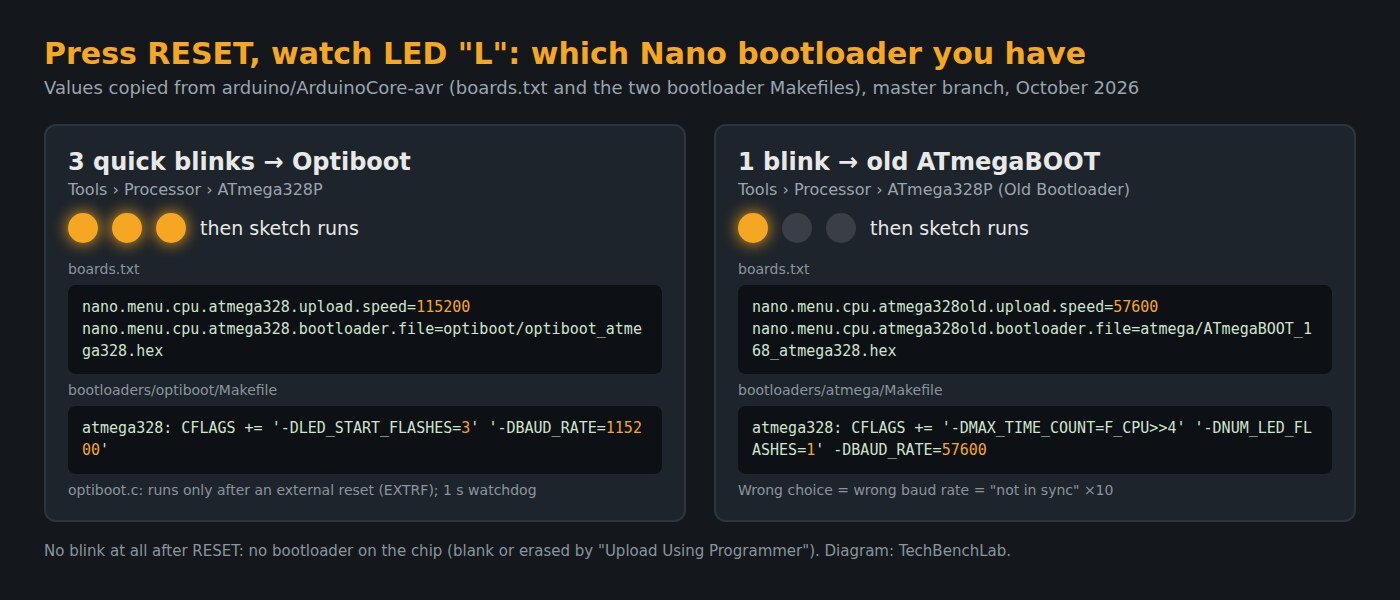
Press and release RESET and watch the LED marked L, ignoring whatever blink pattern your sketch makes afterwards. Use the button, not a fresh plug-in: Optiboot only runs after an external reset (it checks the EXTRF flag) and jumps straight to the sketch on power-up. A forum helper uses exactly this test in thread 1286238: one flash, so the user had to pick “Old Bootloader”.
The six causes, in the order to check them
| # | Check | How it shows | Fix |
|---|---|---|---|
| 1 | Port | “can’t open device” / “cannot open port” | Close Serial Monitor, Cura, PuTTY and any other app with the port open; re-select the port after re-plugging. |
| 2 | Processor option vs. bootloader | 10× “not in sync”; reset test gives 3 blinks but “Old Bootloader” is selected, or the other way round | Pick the option that matches the blink count. The seller’s doc can be wrong: in thread 1416352 the seller’s guide said “Old Bootloader”, and the first reply was to try without it. |
| 3 | Something on D0/D1 | “not in sync” with real non-zero resp values | Unplug shields, Bluetooth modules and sensors from pins 0 and 1. They share the line the bootloader listens on. |
| 4 | Auto-reset | Reset test passes, upload still times out | Hold RESET, click Upload, release it when the IDE prints the avrdude command line. If that works, the DTR-to-RESET capacitor path is the suspect. |
| 5 | No bootloader | No blink at all after RESET | The chip is blank, or “Upload Using Programmer” overwrote the bootloader (Arduino’s docs say so). Re-burn it with Tools › Burn Bootloader and an ISP programmer; see avrdude and USBasp on Windows. |
| 6 | Not an ATmega328P | None of the above helps | Read the chip marking. A helper in thread 1286238 first asks whether it is an LGT8F328P, which needs its own board package. A Nano with an ATmega168 needs the ATmega168 option (19200). |
Real threads that ended at cause 2: in thread 642293 (7,395 views) the reply was “Select Tools > Processor > ATmega328P (Old Bootloader)”. The user’s old IDE 1.6.8 only offered “ATmega328”, the old-bootloader setting, while the board had the new one, so the fix was to update the AVR core. In thread 1396311 a second Nano that “hung on uploading” with Old Bootloader uploaded at once with “ATmega328P”. The other Nano in that thread could only be programmed over ISP, and the cause was never found.
If it still fails: split the board in two
The loopback test from the Arduino forum’s loop-back sticky takes the ATmega out of the picture. Jumper RESET to GND, which holds the processor in reset, and jumper TX to RX. Then type into Serial Monitor at any baud rate. If what you type comes back, the USB cable, driver and USB-serial chip work, and the fault is on the ATmega side (bootloader, fuses, crystal): an ISP programmer is the next tool. If nothing echoes, look at the USB-serial chip and its solder joints. In thread 1416352 the IDE’s Tools › Get Board Info returned VID: 0x1A86 PID: 0x7523, which already proves the cable carries data.
Related: CH340 driver for Windows 11 · CH340 on macOS and Linux · USB VID/PID lookup · avrdude and USBasp · Arduino IDE 2 port not showing
Sources
- arduino/ArduinoCore-avr: boards.txt (Nano upload speeds and bootloader files), platform.txt (avrdude command line), optiboot Makefile, optiboot.c (EXTRF check), ATmegaBOOT Makefile, releases
- Arduino package_index.json (avrdude version bundled with each AVR Boards release)
- avrdude source: stk500.c v6.3, stk500.c v8.0, ser_win32.c v8.0
- Arduino docs: Burning sketches with an external programmer (Upload Using Programmer overwrites the bootloader)
- Arduino forum threads: 1286238, 1396311, 1203541, 1416352, 642293, loop-back test sticky