On a Mac or a Linux box, the CH340 question is usually not “which driver” but “do I need one at all”. Linux has carried its own ch341 driver in the kernel since 2.6.24, and macOS has bound the chip with an Apple-written driver since 10.14 Mojave. What actually breaks is something else: a braille daemon on Ubuntu that steals the port, a leftover 2018 kext on the Mac that creates a second, dead port, or an upload speed Apple’s driver will not sustain. This guide gives you the table of what binds the chip on each system, the WCH package for the cases where you do need it, and the fix for each failure, with the thread or source behind every row.
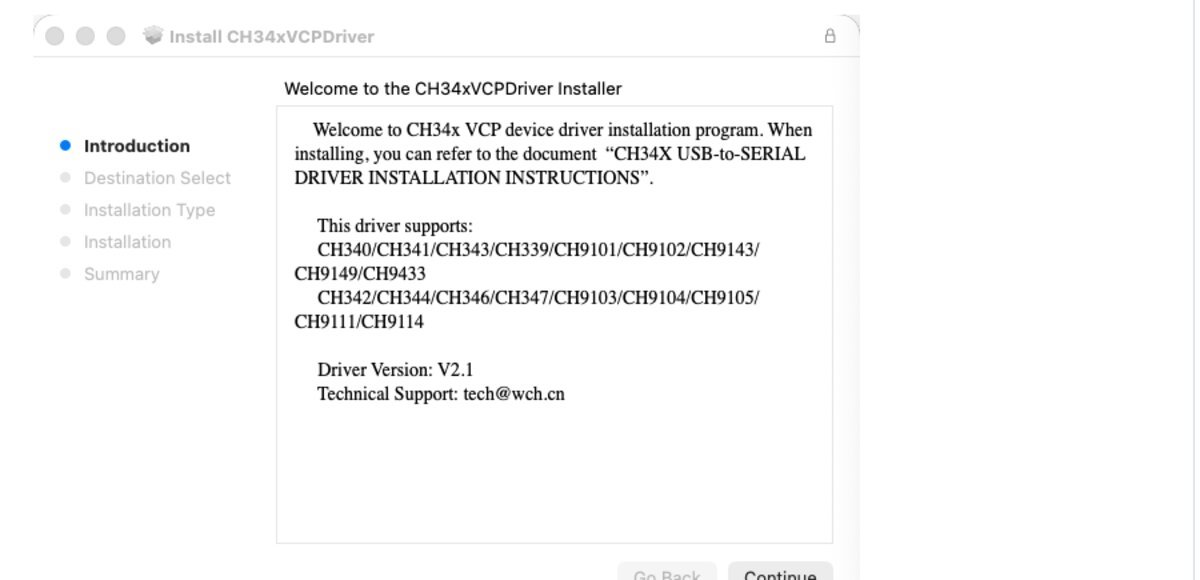
⬇ WCH CH34x driver for macOS, V2.1 (official package, mirrored)
Download CH34xVCPDriver V2.1 for macOS
Inside the zip: CH34xVCPDriver.pkg (1.9 MB, SHA-256 ab7e3542…454a31), CH34xVCPDriver.dmg (3.9 MB, SHA-256 8fbaa392…787b8) and CH34X_DRV_INSTAL_INSTRUCTIONS.pdf, exactly as WCH ships them. Linux needs no download: the driver is in the kernel. WCH’s out-of-tree Linux module, for people who want ttyCH341USBx and the newest chip quirks, is at WCHSoftGroup/ch341ser_linux. Windows users: the CH340 driver for Windows 11 is a separate page.
What binds the CH340 on each system
The rows below come from the kernel source, WCH’s package and README, the brltty source and bug tracker, and the threads linked in the last column. “Nothing to install” means the port appears the moment you plug in a working cable.
| System | What binds 1A86:7523 | Port name | Install? | What gets in the way |
|---|---|---|---|---|
| macOS 10.9 – 10.13 | WCH kext CH34xVCPDriver.kext 1.8 (shipped inside the same V2.1 pkg) |
/dev/cu.wchusbserialXXXX |
Yes, the pkg | Since 10.13 the kext must be approved in Security & Privacy (Apple TN2459) |
| macOS 10.14 – 10.15 | Apple’s AppleUSBCHCOM |
/dev/cu.usbserial-XXXX |
No | A WCH or Repleo kext from before 2018 creates a second, non-working port (PlatformIO guide) |
| macOS 11 – 26 (Intel and Apple Silicon) | Apple’s DriverKit extension com.apple.DriverKit-AppleUSBCHCOM.dext in /System/Library/DriverExtensions |
/dev/cu.usbserial-XXXX |
No for CH340/CH341; WCH’s dext for the chips Apple leaves alone (see table 2) | Uploads above 460,800 bps fail on recent Sequoia Macs (SparkFun thread); poor USB-C cables are rejected before any driver runs |
| Linux, any distro, kernel ≥ 2.6.24 | In-tree ch341 (drivers/usb/serial/ch341.c, GPL v2) |
/dev/ttyUSB0 |
No | Your user must be in dialout; ModemManager may probe the port for ~20 s (same mechanism as on the CP210x page) |
| Ubuntu 22.04 LTS | Kernel ch341, then brltty 6.4-4ubuntu3 takes it away |
ttyUSB0 for ~1 s |
No, but remove brltty | Bug 1990189: the June 2022 fix for FTDI and CP210x did not cover 1A86:7523; a December 2024 comment says 22.04 never got it |
| Ubuntu 23.10, 24.04 and later | Kernel ch341 |
/dev/ttyUSB0 |
No | Fixed: the brltty rule now also requires the Baum display’s parent hub (ATTRS{idVendor}=="1a40", ATTRS{idProduct}=="0101"), per the same bug |
| Arch Linux with brltty installed | Kernel ch341, then brltty |
none | No, but override the rule | 90-brltty-device.rules carries the 1A86:7523 entry (Arch forum, Oct 2021) |
| Raspberry Pi OS | Kernel ch341 |
/dev/ttyUSB0 |
No | Tested by SparkFun on Raspbian Stretch and Buster with no driver installed (SparkFun) |
Two facts from the kernel source are worth keeping. The in-tree driver binds six USB IDs, 1a86:5523, 1a86:7522, 1a86:7523, 2184:0057, 4348:5523 and 9986:7523, and clamps the line speed to the range the comment states, “46 to 3000000 bps”. Hardware RTS/CTS flow control was only added to it on 8 January 2025, so it is present from kernel 6.14 on (the symbol CH341_FLOW_CTL_RTSCTS is absent in 6.13 and present in 6.14). If you need flow control on an older kernel, that is the one real reason to build WCH’s out-of-tree module.
Table 2: the three drivers inside WCH’s one package
We unpacked the V2.1 pkg. It is not one driver but three, and which one loads depends on your macOS version. This is why the same download “works on Catalina” and “needs an app on Sonoma”.
| Component | Version (Info.plist) | Built against | Installs to | Loads on | Product IDs bound (vendor 1A86) |
|---|---|---|---|---|---|
CH34xVCPDriver.kext |
1.8 | macOS 10.9 SDK | /Library/Extensions |
10.9 – 10.15 | 24 IDs incl. 7523, 7522, 5523, 55D2–55EC, 5700, 5701, E523, plus 4348:5523 |
CH34xVCPControlDriver.kext |
1.9 | macOS 10.14 SDK | /Library/Extensions |
10.12 – 10.15 | 17 IDs, 55D2–55EC only: the control interface of the CH343/CH9102 family |
CH34xVCPDriver.app with the dext cn.wch.CH34xVCPDriver |
app 2.1 (build 7), dext 1.0 | macOS 26.5 SDK, DriverKit 25.5 | /Applications, the dext is activated by the app |
11.0 and later (LSMinimumSystemVersion) |
26 IDs, all under 1A86: the 23 WCH IDs above plus 55DE, 55EF and 5610; the 4348:5523 clone ID is dropped |
Two consequences. First, on Big Sur or later the kexts are never used, so the “Allow” button you are told to click is for a system extension activated by the app, not a kernel extension, and it lives under System Settings → Privacy & Security. Second, WCH’s dext claims 7523, the plain CH340, so after installing it you have two candidate drivers for the same chip and you will see cu.wchusbserialXXXX next to Apple’s cu.usbserial-XXXX; WCH’s README tells you to expect the former. Install WCH’s package only when the chip is one Apple’s driver does not pick up, or when you need WCH’s extras; for a bare CH340 on a modern Mac you need nothing.
macOS: install, approve, verify, uninstall
- Open
CH34xVCPDriver.pkg. WCH’s README says to use the dmg instead only “when using OS X 11.0 and above and the OS does not support Rosetta”; Homebrew’s cask (brew install --cask wch-ch34x-usb-serial-driver, version 2.1) installs the same pkg. - On macOS 11 or later, open Launchpad → CH34xVCPDriver → Install. macOS asks you to allow the extension in System Settings → Privacy & Security. On 10.9 to 10.15 the installer asks for a restart instead.
- Plug the adapter in. System Information → USB must show a device with Vendor ID
0x1a86; if it does not, no driver on earth will create a port, see problem 4 below. - Run
ls /dev/cu.*. You should seecu.wchusbserialXXXX(WCH’s driver) orcu.usbserial-XXXX(Apple’s). - Uninstall on 11 and later: drag the app to the Trash and restart. On 10.9 to 10.15:
sudo rm -rf /Library/Extensions/CH34xVCPDriver.kext /Library/Extensions/CH34xVCPControlDriver.kext, then the receipts under/var/db/receipts/, as the README lists.
Linux: the two commands that tell you everything
Plug the adapter in and read the kernel log. A healthy sequence looks like this, taken from the Ubuntu bug report before brltty intervenes:
usb 1-2.1.2: New USB device found, idVendor=1a86, idProduct=7523, bcdDevice= 2.63
usb 1-2.1.2: Product: USB2.0-Serial
ch341 1-2.1.2:1.0: ch341-uart converter detected
usb 1-2.1.2: ch341-uart converter now attached to ttyUSB0
Then check you may open it: ls -l /dev/ttyUSB0 shows group dialout, and groups must list it for your user. If not, sudo usermod -aG dialout $USER and log out and in. On an older CH340 you may also see break control not supported, using simulated break; that is the driver detecting a chip without the break register and enabling two quirks, not an error.
Common problems, with the thread behind each
1. Ubuntu 22.04: the port appears, then vanishes a second later. The log continues with usbfs: interface 0 claimed by ch341 while 'brltty' sets config #1 and ch341-uart converter now disconnected from ttyUSB0. brltty’s device table lists 1A86:7523 as a “Generic Identifier” for the Baum NLS eReader Zoomax, so the daemon claims every CH340 as a braille display. Ubuntu’s June 2022 fix (6.4-4ubuntu3) moved the FTDI and CP210x entries to an optional file but left this one in, which is exactly what bug 1990189 reports, with that log, on 22.04.1. If you use no braille hardware: sudo apt remove brltty. If you must keep it: copy the rule file to /etc/udev/rules.d/, delete the 1a86/7523 line, and sudo udevadm control --reload.
2. macOS: two ports, uploads fail on one of them. cu.wchusbserialXXXX and cu.usbserial-XXXX both exist and one is dead. That is an old kext fighting Apple’s driver; the PlatformIO guide and the Ventura thread resolve it the same way: remove the old kext (/Library/Extensions/usbserial.kext or CH34xVCPDriver.kext) and use Apple’s port.
3. macOS Sequoia on Apple Silicon: ESP32 upload dies with “The chip stopped responding”. In the SparkFun thread (May 2026, Mac Studio M2, 15.7.1, Apple’s cu.usbserial-510), the default 921,600 bps failed every time; 460,800 worked, and 115,200 was the “safe solve”. Drop the upload speed before you suspect the board; the esptool guide shows where.
4. macOS: nothing in /dev, nothing in System Information. Then the USB layer never enumerated the chip and the driver is irrelevant. The Arduino forum thread (M1 Air, Dec 2024) ends with a proper data cable or a USB-A hub; an Apple Developer Forums thread from 2021 shows the same symptom on an M1 Big Sur machine that no driver fixed. Try another cable and a different port first.
5. Linux: “Permission denied” on /dev/ttyUSB0. Not the driver: the dialout group, above. If the port is busy for the first 20 seconds instead, it is ModemManager probing it; the CP210x page walks through the udev rule that stops it, and the rule is chip-agnostic.
FAQ
Should I install WCH’s Linux driver instead of the kernel one? Only for a feature the in-tree driver lacks on your kernel, such as RTS/CTS before 6.14, or the newer multi-port chips. WCH’s README itself says the in-tree driver “has been built-in since the Linux mainline kernel version 2.6.24”; its module creates ttyCH341USBx instead of ttyUSB0, so your scripts will need the new name.
How do I know whether Apple’s driver is present? On Catalina or later, ls /System/Library/DriverExtensions/ | grep -i CHCOM lists com.apple.DriverKit-AppleUSBCHCOM.dext. It is part of the OS and cannot be removed.
My board has a CH9102 or CH343, not a CH340. Same WCH package on macOS, with the control kext in table 2 doing the work on 10.12 to 10.15. On Linux those chips use a different in-tree driver; the CH9102 and CH343 guide has the ID table, and the VID/PID lookup covers the rest of the bench.
Related guides
- CH340 driver for Windows 11: download, versions and the counterfeit lockout
- CP210x on macOS and Linux: the four owners of a busy port
- CH9102 and CH343 driver, and every chip’s USB ID
- ESP32 board USB driver hub: which chip is on your board
- Arduino IDE 2: why the port does not show up
- USB VID/PID lookup for bench tools
Sources
- WCH — ch34xser_macos: README, CH34xVCPDriver.pkg/.dmg, installation PDF (V2.1, 11 Sep 2026)
- WCH — CH34XSER_MAC download page
- WCH — ch341ser_linux README (“built-in since 2.6.24”, ttyCH341USBx)
- Linux kernel —
drivers/usb/serial/ch341.c(ID table, 46–3,000,000 bps, quirks, RTS/CTS) - brltty —
Programs/usb_devices.c(1A86:7523 “Generic Identifier”, Baum) - brltty — ChangeLog, 6.5 (9 Jun 2022): generic rules separable, parent-hub filtering
- Launchpad bug 1990189 — brltty claiming CH341 (22.04, log quoted above, fix in 23.10)
- Launchpad bug 1958224 — brltty claiming cp210x on 22.04
- Ubuntu — brltty 6.4-4ubuntu3 changelog
- brltty mailing list — “brltty claiming CH341 usbtty device” (19 Sep 2022)
- Arch Linux forum — CH340 ttyUSB0 missing, 90-brltty-device.rules
- PlatformIO community — Troubleshooting CH340G issues on macOS (Apple driver since 10.14, dext path)
- PlatformIO community — macOS Ventura and CH340
- SparkFun forum — RedBoard ESP32 upload fails on Sequoia 15.7.1 (May 2026)
- Arduino forum — macOS Sequoia serial port problem (Dec 2024)
- Apple Developer Forums — CH340g not appearing in /dev (2021)
- Apple — TN2459, User-Approved Kernel Extension Loading
- Homebrew — cask wch-ch34x-usb-serial-driver (2.1)
- SparkFun — How to Install CH340 Drivers (tested systems)