CMSIS-DAP is Arm’s open protocol for SWD/JTAG debug probes: a DAPLink board, a cheap “CMSIS-DAP” dongle and a WCH-LinkE in ARM mode all speak it. When the probe shows up in Device Manager and the tool still says “no device found”, the cause is rarely a missing driver. CMSIS-DAP v1 is a USB HID device, v2 is a WinUSB bulk device, and a WCH-LinkE changes its USB product ID when it changes mode. Below: what each one enumerates as, which tool sees it, the install for each, and a hosted OpenOCD build to test with.
⬇ OpenOCD for Windows (xPack build, 64-bit) and the official WCH-Link package
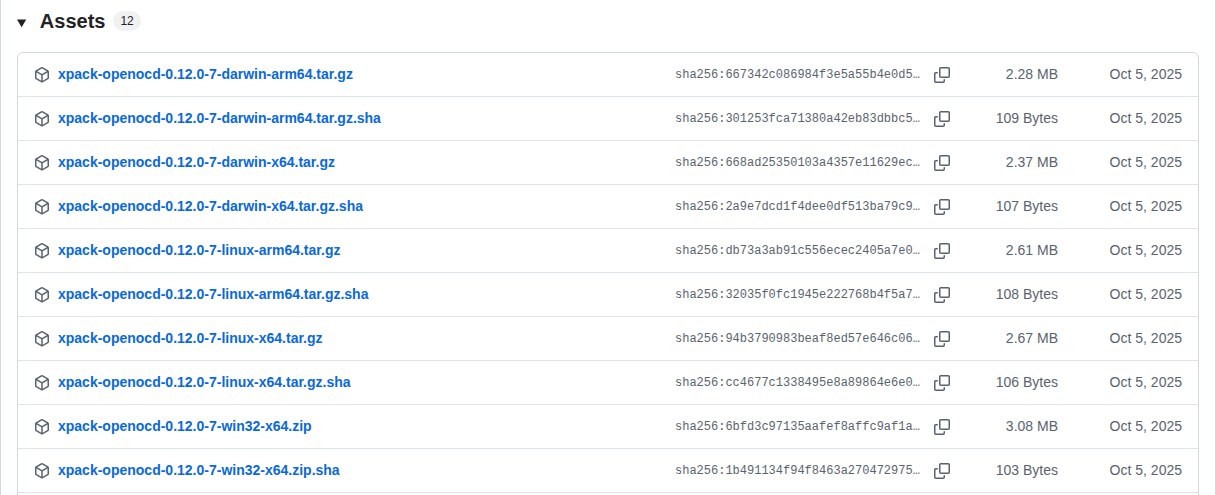
Download xpack-openocd-0.12.0-7-win32-x64.zip
WCH-LinkE driver and utility (official, not mirrored): WCH-LinkUtility_ZIP on wch-ic.com, and the same package published by WCH in its own GitHub repository: openwch/ch32v003 → WCH-LinkUtility. The Windows driver is Drv_Link\WCHLinkDrv_WHQL_S.exe (330,400 bytes, SHA-256 36cc2c949f9a5fd130c235b66857961e492866311175783222752ad2e6840aac for the GitHub copy); the English manual is Doc\WCH-LinkUserManual-EN.pdf (V1.8). pyOCD: python -m pip install -U pyocd. DAPLink firmware: ARMmbed/DAPLink releases (v0258, May 2023).
v1 is HID, v2 is WinUSB, and WCH-LinkE is two different devices
Arm’s specification keeps both transports alive. v1 talks through USB HID reports; v2, introduced in CMSIS-DAP 2.0.0, moved to vendor-specific bulk endpoints (class 0xFF) with the WinUSB device-interface GUID {CDB3B5AD-293B-4663-AA36-1AAE46463776} in the firmware’s Microsoft OS descriptors, which is why Arm states that on Windows 8 and above a compliant adapter needs no separate driver. Hosts find a v2 probe by reading the interface string and looking for the text “CMSIS-DAP”; OpenOCD’s bulk backend does exactly that (strstr(interface_str, "CMSIS-DAP") in cmsis_dap_usb_bulk.c), and the udev rule in 60-openocd.rules matches ATTRS{product}=="*CMSIS-DAP*" for the same reason. Nothing in that logic cares about VID/PID.
The WCH-LinkE does not fit that picture until you put it in ARM mode. WCH’s own INF (WCHLinkWDM.INF, DriverVer 08/23/2022, 1.2.2022.08, extracted from WCHLinkDrv_WHQL_S.exe) binds two hardware IDs to two different drivers: USB\VID_1A86&PID_8010&MI_00 → “WCH-LinkRV”, served by WCH’s own kernel driver WCHLinkWDM.sys/WCHLinkW64.sys; and USB\VID_1A86&PID_8012&MI_00 → “WCH CMSIS-DAP”, served by Microsoft’s WinUSB.sys with, again, the CMSIS-DAP GUID. The catalog is signed by “Microsoft Windows Hardware Compatibility Publisher” and lists OSAttr 2:10.0 for the 64-bit .sys files, so it installs on Windows 10 and 11 without test mode.
| Probe and mode | USB ID | USB class / transport | Device Manager (Windows 11) | Driver to install | Source |
|---|---|---|---|---|---|
| DAPLink board (micro:bit, Mbed, NXP FRDM, any vendor using DAPLink), firmware ≥ 0254 | 0D28:0204 |
Composite: MSD drive + CDC serial + HID “CMSIS-DAP v1” + bulk “CMSIS-DAP v2” (WinUSB); product string “DAPLink CMSIS-DAP” | USB drive (DAPLINK/MICROBIT), “USB Serial Device (COMx)”, “USB Input Device” under Human Interface Devices, and a WinUSB device under Universal Serial Bus devices | None | DAPLink usb_config.c, README; pyOCD probe docs (v2 needs 0254+) |
| DAPLink board, firmware < 0254 | 0D28:0204 |
MSD + CDC + HID only (v1) | As above, without the WinUSB entry | None; update firmware for v2 (bootloader drive, below) | DAPLink releases: v0254 = 15 May 2019 |
| Generic “CMSIS-DAP” v1 dongle or on-board probe (AK-CMSIS-DAP, LPC-Link2 in CMSIS-DAP mode, many clones) | vendor-specific; product string contains “CMSIS-DAP” | HID | “USB Input Device” under Human Interface Devices | None | Arm CMSIS-DAP firmware docs; OpenOCD README.Windows (“HID-based … you do not need to perform any additional configuration”) |
| Raspberry Pi Debug Probe / Picoprobe | 2E8A:000C / 2E8A:0004 |
CMSIS-DAP v2 bulk + CDC | WinUSB device + COM port | None | VID/PID table (debugprobe sources) |
| WCH-LinkE in RISC-V mode (WCH-LinkRV; blue LED off when idle) | 1A86:8010 |
Vendor-specific, WCH protocol; plus CDC serial | “WCH-Link” under Other devices until the driver is installed; then “Interface → WCH-LinkRV” | WCHLinkDrv_WHQL_S.exe (installs WCHLinkWDM) |
WCH INF; WCH manual V1.8 Table 1; Adafruit WCH-LinkE guide |
| WCH-LinkE in ARM mode (WCH-LinkDAP-WINUSB; blue LED on when idle; factory default) | 1A86:8012 |
CMSIS-DAP v2, bulk, WinUSB | “Interface → WCH CMSIS-DAP” after the WCH package; a WinUSB device otherwise | Same WCHLinkDrv_WHQL_S.exe (its INF binds WinUSB.sys to 8012) |
WCH INF; WCH manual §3.1 note (1) |
| WCH-DAPLink (WCH’s separate ARM-only probe) in HID mode | not listed in WCH’s INF | CMSIS-DAP v1 HID | “USB Input Device” | None (“supported in all versions of Keil”) | WCH manual V1.8 Table 8 |
| WCH-LinkE in bootloader/recovery (IAP/BOOT) | 4348:55E0 |
WCH ISP | Not a probe; only the recovery tools see it | WCH-LinkUtility / MounRiver handle it | EEVblog “Reflashing a bricked WCH-LinkE” (udev rule by MarkMLl) |
Two consequences. The old CH549-based WCH-Link has no mode button: MounRiver rewrites its firmware every time you change Target Mode (cjacker’s CH32V notes; WCH’s Table 4 lists the ModeS key only for the LinkE, DAPLink and LinkW). And upstream OpenOCD has no driver for the 8010 RISC-V protocol at all: the wlink interface and its wch-riscv.cfg exist only in WCH’s fork, which MounRiver Studio bundles as MounRiver\MounRiver_Studio\toolchain\OpenOCD\bin\openocd.exe (WCH’s manual, p. 23) and cjacker/wch-openocd mirrors with --enable-wlinke. The xPack build above sees a WCH-LinkE only in ARM mode.
Which tool sees which probe
| Host tool | CMSIS-DAP v1 (HID) | CMSIS-DAP v2 (WinUSB) | WCH-LinkE, RISC-V mode (8010) | WCH-LinkE, ARM mode (8012) | Source |
|---|---|---|---|---|---|
| OpenOCD 0.12 (xPack build above) | Yes, hid backend via hidapi |
Yes, usb_bulk backend (added in 0.11.0); backend auto tries bulk, then HID, then TCP |
No (needs WCH’s fork / MounRiver’s OpenOCD) | Yes, as a CMSIS-DAP v2; pin it with adapter usb vid_pid 0x1a86 0x8012 if more than one probe is plugged in |
OpenOCD manual, NEWS-0.11.0, cmsis_dap.c |
| pyOCD | Yes | Yes (DAPLink 0254 or newer); “if a debug probe provides both v1 and v2 interfaces, pyOCD will normally use the v2 interface” | No (not in the probe list) | Generic CMSIS-DAP path; WCH documents only Keil and MounRiver for this mode | pyOCD debug-probes page |
| Keil MDK (µVision, “CMSIS-DAP Debugger”) | Yes, all versions | MDK 5.29 and later. 5.28 and earlier always used USB interface 0, and new DAPLink builds put the MSD there and WinUSB on a higher interface | No | Yes. WCH says “Keil V5.25 and above”; Arm’s note says 5.28 and earlier miss a v2 WinUSB adapter, so treat 5.29 as the safe floor | Keil KB 4170 (Sep 2019); WCH manual Table 8 |
| MounRiver Studio | — | — | Yes (default IDE for CH32V) | Yes, for ARM-core WCH parts (CH32F) | WCH manual Table 1 |
| WCH-LinkUtility | — | — | Yes: flash, mode switch, firmware update | Yes: mode switch, firmware update | WCH manual §1.2, §6 |
| wlink (ch32-rs, command line) | — | — | Yes (VENDOR_ID 0x1a86, PRODUCT_ID 0x8010) |
Only to switch mode (PRODUCT_ID_DAP 0x8012) |
wlink src/probe.rs |
| probe-rs | Yes (hidapi, feature cmsisdap_v1) |
Yes (nusb bulk) | Yes (WCH-LinkRV support, 0x1a86:0x8010) |
Yes, as CMSIS-DAP | probe-rs cmsisdap/tools.rs, wlink/mod.rs |
Install and check, case by case
DAPLink or any CMSIS-DAP v2 probe on Windows 11. Plug it in and open Device Manager. You should see the entries from the first table and no yellow mark. There is nothing to run. Test with the hosted OpenOCD from a terminal in the unzipped folder:
bin\openocd.exe -f interface/cmsis-dap.cfg -c "cmsis-dap backend usb_bulk" -c "adapter speed 1000" -c "cmsis-dap info" -c "init" -c "exit"The log should print Using CMSIS-DAPv2 interface with VID:PID=0x0d28:0x0204, then CMSIS-DAP: FW Version = … and the capabilities (SWD, JTAG, SWO). Drop the backend option and OpenOCD picks v2 first and falls back to v1 on its own. Add -f target/<your_target>.cfg for a real session.
DAPLink firmware older than 0254 (v1 only). Hold the board’s reset button while plugging USB; it mounts as a drive called MAINTENANCE. Copy the vendor’s new firmware file onto it; if the copy fails the bootloader writes FAIL.TXT with the reason. Unplug, plug again without the button. That is DAPLink’s documented update path.
WCH-LinkE. Run WCHLinkDrv_WHQL_S.exe from WCH-LinkUtility\Drv_Link\ once; it installs both the RV driver and the WinUSB binding. Then pick the mode: blue LED steady = ARM, off = RISC-V, flashing = busy. Switch it in WCH-LinkUtility (Active WCH-Link Mode → WCH-LinkRV or WCH-LinkDAP-WINUSB → Set), in MounRiver Studio (Target Mode → Apply), by holding the ModeS button while plugging in (LinkE R0-1v2 and later; the case is clipped, not glued), or with wlink mode-switch --rv / --dap. One rule from WCH’s manual: “WCH-LinkUtility tool on will occupy the Link device and cause Keil software can not recognize the Link”, so close the utility before Keil or OpenOCD.

Keil. Options for Target → Debug → CMSIS-DAP Debugger → Settings. A WCH-LinkE must be in ARM mode; a DAPLink must be on MDK 5.29 or later to be seen through its v2 interface.
The five failures that come up in the threads, and what each one means
- OpenOCD: “unable to find a matching CMSIS-DAP device” / “unable to open CMSIS-DAP device 0x…”. On Linux it is permissions: an Arduino Nano Matter owner got both lines in July 2025 and fixed them by installing
60-openocd.rulesand reloading udev (Arduino forum). On Windows it is one of three things: the probe is a WCH-LinkE in RISC-V mode (8010 is not a CMSIS-DAP), another program holds it (WCH-LinkUtility, an open Keil session), or OpenOCD is running inside WSL, where USB does not pass through; the Artekit thread ended with native Windows OpenOCD and the probe correctly listed as a HID device (Artekit forum, Nov 2022). - Keil does not list the DAPLink. MDK 5.28 and earlier used interface 0 of the composite device, which newer DAPLink builds assign to the mass-storage drive, so the WinUSB interface was never opened. Arm published a patched
CMSIS_DAP.dllV0.2.14.1 and fixed it in 5.29 (Keil knowledgebase 4170, last reviewed 25 Sep 2019). - The same probe appears five times in the debugger’s list. A composite CMSIS-DAP exposes MSD, CDC, HID and bulk interfaces, and a tool that enumerates interfaces shows one entry each; picking the wrong one gives “unable to find CMSIS-DAP device”. VisualGDB added de-duplication by serial number after an SDP-K1 report (Sysprogs forum, Oct 2019); in OpenOCD,
cmsis-dap usb interface <n>selects it explicitly. - pyOCD: “OSError: exception: access violation” on a v2 probe. A pyusb finaliser bug with libusb 1.0.22 on Windows, reported with DAPLink 0254 and KitProg3 in June 2019 and fixed in pyusb by December 2019 (pyOCD issue #684). Update pyocd and pyusb rather than downgrading libusb.
- WCH-LinkE “bricked” after the firmware prompt. MounRiver and WCH-LinkUtility insist on updating the probe (2.7 → 2.8 in the CanHobby notes; MarkMLl’s unit, on 2.8, stopped working after MounRiver’s update prompt wrote the wrong image into it). Recovery, per the thread and the manual: open the case, hold the IAP/APP button while plugging in until the blue LED blinks, then let WCH-LinkUtility or MounRiver update it; on Linux the recovery device is
4348:55E0and needs its own udev rule first (EEVblog, Mar 2023, 2 pages). A second WCH-LinkE can also reflash the first over SWD (manual §6.3).
Do not run Zadig on a CMSIS-DAP probe. A v1 probe is HID and needs nothing; swapping its HID driver for WinUSB hides it from every HID-based tool. A v2 probe already has WinUSB bound by its own descriptors. probe-rs says it plainly: “This will uninstall any official drivers, which means that the official tools will most likely not work anymore after this.” Zadig is for devices with no descriptors of their own, as in the USBasp guide.
Two short answers from the threads. “WCH-Link” under Other devices means the WCH package is not installed yet. And a CH32V003 or CH32V203 cannot be flashed with the xPack build at all: use MounRiver’s OpenOCD (openocd -f wch-riscv.cfg) or cjacker’s mirror; for CH32F (ARM core) parts, switch the probe to ARM mode and the xPack build works as a normal CMSIS-DAP.
Related on this site: ST-Link V2 driver and STM32CubeProgrammer, J-Link driver and J-Flash Lite, Raspberry Pi Pico not detected, STM32 DFU driver on Windows 11, and the USB VID/PID lookup for 53 bench tools.
Sources
- Arm, CMSIS-DAP documentation: overview (v2.x “does not require driver installation”), Host OS Drivers (Windows 8+, CMSIS_DAP_v2.inf, udev), Firmware (product string must contain “CMSIS-DAP”; class 0xFF; WinUSB GUID), revision history (V2.0.0 = USB bulk; current V2.1.1)
- Arm Mbed, DAPLink: README (HID v1, WinUSB v2, MSC, CDC), usb_config.c (0x0D28:0x0204, “DAPLink CMSIS-DAP”, “CMSIS-DAP v1”), Users Guide (firmware update, FAIL.TXT), releases (v0254 15 May 2019, v0258 10 May 2023)
- OpenOCD: Debug Adapter Configuration (cmsis-dap backend hid/usb_bulk/auto, usb interface, info), cmsis_dap_usb_bulk.c, cmsis_dap_usb_hid.c and cmsis_dap.c (error strings), 60-openocd.rules;
NEWS-0.11.0andREADME.Windowsinside the hosted archive - xPack: openocd-xpack v0.12.0-7 (assets, .sha files); release notes
- pyOCD: Debug probes (v1 HID deprecated, v2 WinUSB, Windows 7 note, v2 preferred), issue #684
- Keil/Arm: KB 4170 “µVision does not detect Mbed DAPLink” (MDK ≤ 5.28, interface 0, fixed in 5.29)
- WCH: WCH-Link User Manual V1.8 (EN) (Table 1 modes and LED, §1.2 switching, Table 4, Table 8 Keil versions, §3.1 notes, §6 firmware, p. 23 OpenOCD path), WCHLinkDrv_WHQL_S.exe (INF and catalog read from the archive), WCH-Link product page
- ch32-rs, wlink: src/probe.rs (0x8010 / 0x8012), README (mode-switch, firmware notes)
- probe-rs: Probe setup (CMSIS-DAP “No driver installation required”; Zadig warning), cmsisdap/tools.rs, wlink/mod.rs, 69-probe-rs.rules
- cjacker, opensource-toolchain-ch32v (WCH fork of OpenOCD, old WCH-Link reflashed on mode change, firmware files in WCH-LinkUtility)
- Threads: EEVblog, Reflashing a bricked WCH-LinkE; Adafruit, WCH-LinkE on Windows; CanHobby on Hackaday.io (2.7 → 2.8 brick); Arduino forum; Artekit forum; Sysprogs forum