When an Arduino UNO R3 or Mega 2560 R3 shows up as “ATmega16u2 DFU” or “Arduino Uno DFU” with a yellow triangle, its USB chip is sitting in Atmel’s DFU bootloader at USB\VID_03EB&PID_2FEF, waiting for firmware. Two tools can write it on Windows 11: Atmel’s FLIP 3.4.7 (2012, needs Java and its own libusb-win32 driver) and the open-source dfu-programmer 1.1.0 (2023, works with WinUSB from Zadig). Everything below was read from the FLIP installer, the dfu-programmer source and Arduino’s firmware folder; the forum threads are linked at the end.
⬇ dfu-programmer 1.1.0 for Windows x64 (mirrored) · Atmel FLIP 3.4.7 (official link) · Zadig 2.9
Download dfu-programmer-x64-1.1.0.zip (414 KB)
Atmel FLIP 3.4.7.112, official link only (Microchip licence, not mirrored): Flip Installer – 3.4.7.112.exe · 5,907,981 bytes · SHA-256 129cf866b949af4ae315aa84e4a83ebd872c9af08fbbc34f450b5625bc84e0d1 · product page: microchip.com/flip. This installer does not include Java.
Zadig 2.9 (mirrored): Zadig-2.9.zip · 5,321,281 bytes · SHA-256 a1a653be3be514116eea78fb024bf44cc1927907e54daed29277142c3b60dd5f · official: zadig.akeo.ie.
Which chip, which USB ID, which board
The DFU product IDs, flash sizes and bootloader sizes are copied from the target_map table in dfu-programmer’s src/arguments.c; the same IDs appear in FLIP’s atmel_usb_dfu.inf. Arduino’s own DFU bootloader keeps Atmel’s VID and these per-chip PIDs “to maintain compatibility with their FLIP software” (Arduino’s firmware README).
| Chip | ID in DFU mode | Flash / DFU bootloader | dfu-programmer target | Where you meet it |
|---|---|---|---|---|
| ATmega16U2 | 03EB:2FEF |
16 KB / 4 KB | atmega16u2 |
UNO R3, Mega 2560 R3, Mega ADK R3 (USB-serial chip; normal ID 2341:0043 / 0042 / 0044) |
| ATmega8U2 | 03EB:2FEE |
8 KB / 4 KB | atmega8u2 |
original UNO and Mega 2560 (2341:0001 / 0010) |
| ATmega32U2 | 03EB:2FF0 |
32 KB / 4 KB | atmega32u2 |
USB-HID projects, some keyboards |
| ATmega16U4 / 32U4 | 03EB:2FF3 / 2FF4 |
16 / 32 KB, 4 KB | atmega16u4 / atmega32u4 |
chips that kept Atmel’s factory DFU bootloader (not Leonardo/Micro, which ship Arduino’s Caterina bootloader) |
| AT90USB162 / 82 | 03EB:2FFA / 2FF7 |
16 / 8 KB, 4 KB | at90usb162 / at90usb82 |
early LUFA hobby boards |
| AT90USB646/647, 1286/1287 | 03EB:2FF9 / 2FFB |
64 / 128 KB, 8 KB | at90usb646… at90usb1287 |
Atmel AT90USBKEY-style boards (Teensy++ uses PJRC’s own bootloader instead) |
What is actually inside FLIP’s DFU driver
This is the part nobody writes down, and it explains most of the Windows 11 trouble. Read from the 3.4.7.112 installer (7-Zip, nothing executed):
| Item | Value | Why it matters on Windows 11 |
|---|---|---|
| Driver | atmel_usb_dfu.inf, header “Copyright (c) 2010 libusb-win32 (GNU LGPL)”, DriverVer 10/02/2010, 1.2.2.0 |
it is plain libusb-win32 (libusb0.sys 1.2.2.0), not an Atmel kernel driver |
| Devices | 40 USB IDs, all VID_03EB, PID_2FD6…PID_2FFF (XMEGA, UC3, megaxU2/U4, AT90USB, AT89C51) |
covers every chip in the table above |
| Architectures | NT, NTAMD64, NTIA64 |
no NTARM64: nothing for Windows on ARM laptops |
| Signature | atmel_usb_dfu.cat signed 26 Jul 2012 by “Atmel Norway” (certificate valid 1 May–31 Dec 2012, VeriSign Class 3 Code Signing 2010 CA, timestamped) |
an Authenticode signature from 2012, no Microsoft (WHQL) signature; FLIP’s changelog: “Windows 8 is now supported thanks to the signed inf file” |
| GUI launcher | flip.exe = 32-bit (i386) launcher that reads HKLM\SOFTWARE\JavaSoft\Java Runtime Environment → CurrentVersion → JavaHome, then runs bin\javaw.exe -jar |
Java 9 and later register under SOFTWARE\JavaSoft\JRE instead (JDK-8187906), so FLIP prints “Could not find a Java Virtual Machine, cannot continue.” even with a modern Java installed |
| Command line | bin\batchisp.exe, 32-bit console program, no Java reference in its strings |
the scriptable path if you cannot install Java 8 |
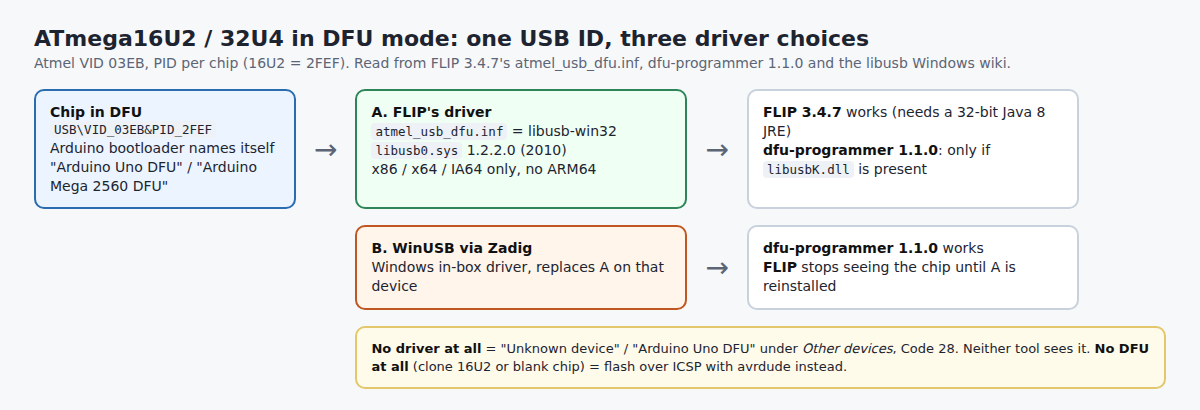
Path A: FLIP on Windows 11
- Install Java 8 (it writes the registry key FLIP looks for).
flip.exeis a 32-bit program, and Windows shows 32-bit programs the WOW6432Node view ofHKLM\SOFTWARE, so if the 64-bit Java 8 is not found, install the x86 one as well. - Install FLIP 3.4.7 and put the board in DFU: on an UNO R3, briefly short the two pins of the 16U2’s ICSP header nearest the USB jack (RESET to GND). The COM port disappears and a new device appears.
- Device Manager → the unknown device → Update driver → Browse my computer → the
usbfolder inside FLIP’s install folder. It should land under “Atmel USB Devices” as ATmega16U2. - In FLIP: Device → Select → ATmega16U2; Settings → Communication → USB → Open; File → Load HEX File; leave Erase, Program and Verify ticked in the operations flow and run it; then unplug and replug the board.
Path B: dfu-programmer + WinUSB
- With the chip in DFU, open Zadig, Options → List All Devices, pick the 03EB:2FEF device and install WinUSB.
- Unzip dfu-programmer and run:
dfu-programmer atmega16u2 erasedfu-programmer atmega16u2 flash Arduino-usbserial-atmega16u2-Uno-Rev3.hexdfu-programmer atmega16u2 reset - Unplug and replug: the board comes back as
2341:0043“Arduino Uno” with a COM port.
Why not keep FLIP’s driver for both? dfu-programmer’s README says libusb-win32 works, but the libusb Windows wiki states that libusb-1.0 reaches libusb0.sys only through libusbK.dll, and the 1.1.0 zip does not ship that DLL. If dfu-programmer says “no device present” on a FLIP-driven chip, switch it to WinUSB. To go back to FLIP, reinstall atmel_usb_dfu.inf on that device.
Which hex: through DFU, flash the usbserial-only file (Arduino-usbserial-atmega16u2-Uno-Rev3.hex, Mega2560 and MegaADK variants beside it) from firmwares/atmegaxxu2/arduino-usbserial in the AVR core. The …COMBINED-dfu-usbserial… files contain the DFU bootloader too and are meant for ICSP, which is where thread 318432 went wrong.
The errors in the threads, and what fixed them
| Symptom | Cause | Fix |
|---|---|---|
| “Could not find a Java Virtual Machine, cannot continue.” | no Java 8 registry key (Java 9+ uses JavaSoft\JRE) |
install Java 8 (x86 if needed) or use batchisp.exe / dfu-programmer |
| New UNO shows as “ATmega16u2 DFU” from day one (867957, 366761) | the 16U2 has no USB-serial firmware, only the bootloader | flash the usbserial hex (Path A or B) |
| Code 37 after installing FLIP (451010) | FLIP’s installer does not bind the device by itself | point Device Manager at FLIP’s usb folder (318432) |
| dfu-programmer: “no device present” (1422209) | wrong target name, a pre-16U2 build (the thread had 0.6.1), or no usable driver | use 1.1.0, the exact target from the table, WinUSB |
| Shorting the pins does nothing (1458951, Sep 2026) | clone without the DFU bootloader, or header not wired to the 16U2 | ICSP: avrdude -c usbasp -p m16u2 -U flash:w:…COMBINED…Uno-Rev3.hex -U lfuse:w:0xFF:m -U hfuse:w:0xD9:m -U efuse:w:0xF4:m -U lock:w:0x0F:m (fuses from Arduino’s README; worked in 1426555) |
FAQ
Does the UNO R4 use FLIP? No. It has no 16U2; see UNO R4 not detected.
My Leonardo / Pro Micro shows no DFU device. Those 32U4 boards run Arduino’s Caterina bootloader, not Atmel DFU; see the 8-second bootloader guide.
Related guides
- Zadig: which driver for USBasp, WinUSB vs libusbK vs libusb-win32
- avrdude on Windows with a USBasp (the ICSP route)
- Arduino IDE 2: port not showing
- STM32 DFU driver on Windows 11
- USB Serial Device Code 28
Sources
- Microchip: FLIP 3.4.7.112 installer (
usb\atmel_usb_dfu.inf,.cat,bin\flip.exe,info\Changes.txt) - dfu-programmer: v1.1.0 release, src/arguments.c, README (Windows driver files), GPL-2.0
- Arduino: firmwares/atmegaxxu2 (README with fuses, hex files), arduino-usbdfu/Descriptors.c, boards.txt; Arduino Help Center: flash the USB-to-serial firmware
- libusb wiki: Windows (libusb0.sys via libusbK.dll); OpenJDK JDK-8187906 (registry key change in Java 9); Microsoft Learn: Registry Redirector
- Arduino Forum: 318432, 451010, 867957, 366761, 1422209, 1426555, 1458951, 1431819