Saleae publishes one download link per operating system and no checksum, no version number and no file size next to any of them. Ask the download endpoint directly and the current build is Logic 2.4.46, six binaries stamped within two minutes of each other on 1 August 2026, the largest of them 269 MiB — and one of the six is a Windows ARM64 installer that Saleae’s own documentation says does not exist.
This is the practical download-and-install guide for Logic 2, plus the part that decides whether the software will ever see your hardware: the USB ID it looks for is not unique to Saleae. At least seven other devices ship with the same one.
Download links, versions and file sizes
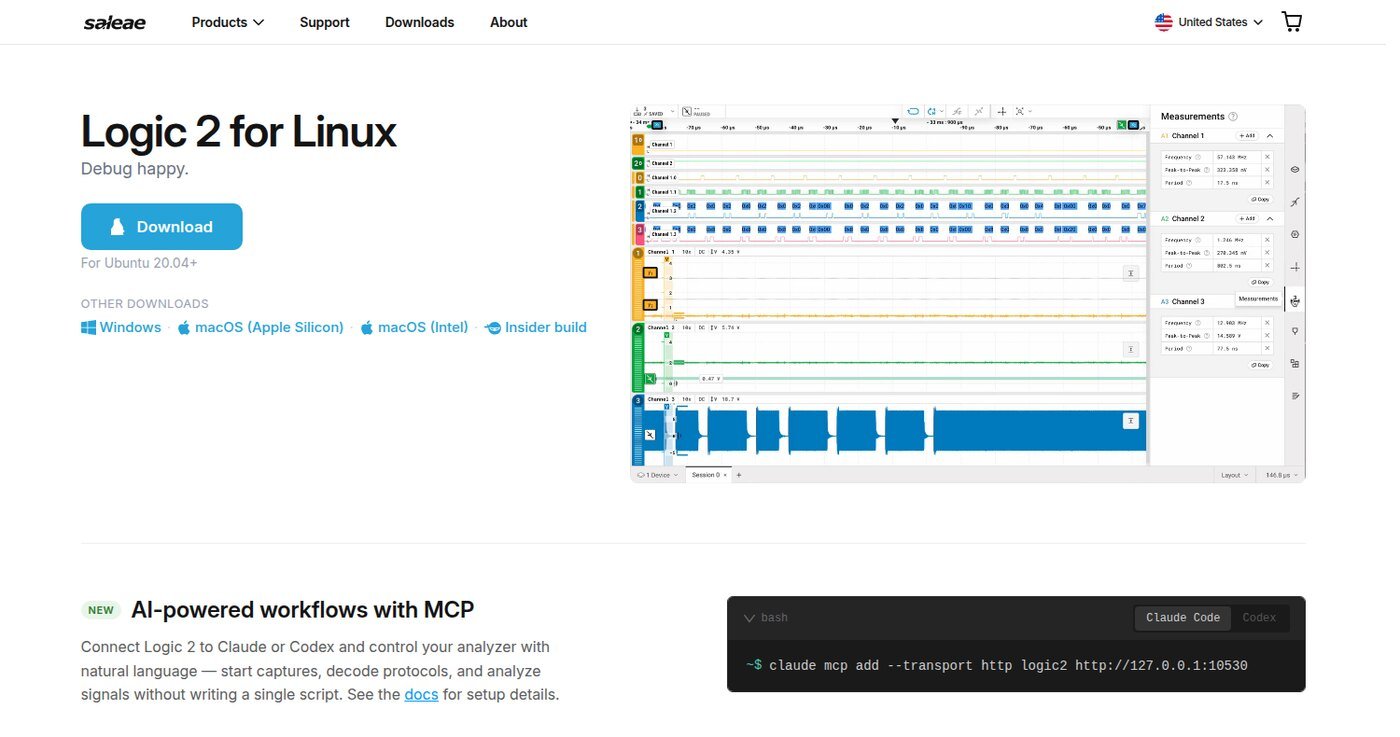
Every button on saleae.com/downloads points at logic2api.saleae.com/download, which 302-redirects to an S3 bucket. That redirect is the honest source of truth: it names the version, and the object behind it carries a real size and a real timestamp. Values below were read on 27 September 2026.
| Build | File served | Size | Object timestamp |
|---|---|---|---|
| Windows x64 | Logic-2.4.46-windows-x64.exe | 282,245,352 B (269 MiB) | 1 Aug 2026, 01:08 UTC |
| Windows ARM64 | Logic-2.4.46-windows-arm64.exe | 241,101,328 B (230 MiB) | 1 Aug 2026, 01:08 UTC |
| macOS Intel | Logic-2.4.46-macos-x64.zip | 207,381,272 B (198 MiB) | 1 Aug 2026, 01:07 UTC |
| macOS Apple silicon | Logic-2.4.46-macos-arm64.zip | 194,973,286 B (186 MiB) | 1 Aug 2026, 01:07 UTC |
| Linux x64 | Logic-2.4.46-linux-x64.AppImage | 206,690,808 B (197 MiB) | 1 Aug 2026, 01:06 UTC |
| Linux ARM64 | Logic-2.4.46-linux-arm64.AppImage | 203,237,896 B (194 MiB) | 1 Aug 2026, 01:07 UTC |
Two things fall out of that table. First, the Windows ARM64 build: the supported-systems page lists “Windows 10 & 11 (x64)” only, and the ARM support article says flatly that “our software does not officially support ARM on Windows” and points at a forum workaround. The installer is nonetheless built, signed and served on request — it is simply not linked from the download page. Second, Saleae publishes no hash for any of them. For the record, the Linux x64 AppImage above is SHA-256 82832ed0d3166701d7f4f7df57a620b721a23883e0cfe8f2e8e95a2e6720d6f2.
Older builds stay online at predictable URLs. Of the 46 possible 2.4.x numbers, 15 still resolve, and their timestamps sketch the release curve: 2.4.14 in July 2024, a three-week burst of 2.4.20/21/22 in late 2024, then roughly monthly releases from 2.4.39 through 2.4.44 in March 2026 — followed by a 116-day gap before 2.4.45 on 25 July 2026. The Windows installer grew from 218 MB to 282 MB over that span.
What is actually inside the 197 MiB
Unpacking the Linux AppImage (./Logic-2.4.46-linux-x64.AppImage --appimage-extract) turns it into 543 MB on disk and explains the size. Logic 2 is an Electron application, and a current one:
| Component | Version / size in 2.4.46 |
|---|---|
| Electron runtime | Electron 41.3.0, Chromium 146.0.7680.188, Node 24.15.0 |
| Main binary | Logic.bin, 204.9 MB |
| Capture / compute backend | libgraph_server_shared.so, 53.6 MB, built on libusb |
| Embedded Python | CPython 3.14 with NumPy and an OpenBLAS build (25 MB by itself) |
| Built-in protocol analyzers | 25 shared objects: I²C, SPI, serial, CAN, LIN, USB, JTAG, SWD, MDIO, MIDI, DMX-512, SMBus, HDLC, HDMI-CEC, PS/2, I²S, 1-Wire, Manchester, Atmel SWI, BiSS, HD44780, MCS-04, Modbus, simple parallel, async RGB LED |
| Also shipped | The React DevTools browser extension (7.4 MB) and a 2.9 MB easter.mp3 |
The single most useful line there is libusb. There is no proprietary Saleae kernel driver: on Windows the device binds to Microsoft’s WinUSB — Saleae’s own troubleshooting page names the four files (winusb.sys, WdfCoInstaller01007.dll, WinUSBCoInstaller.dll, WUDFUpdate_01007.dll) and tells you that anything else in that list belongs to a foreign driver that has attached itself to your analyzer. On Linux and macOS there is no driver at all, only permissions.
One more thing the unpacked build reveals: Logic 2 now embeds an MCP server, advertised on the download page as http://127.0.0.1:10530, with the in-app tooltip still calling the feature “new and evolving”. The documentation link for it (docs.saleae.com/mcp) redirected to a 404 when checked on 27 September 2026.
The USB ID problem
Saleae’s support article on VID/PID pairs lists seven devices. The udev rules file shipped inside 2.4.46 lists exactly the same seven, each with MODE="0666" — world read/write, which is how a normal user gets to the hardware without sudo.
| Device | VID:PID | In the shipped udev rules? |
|---|---|---|
| Original Logic (discontinued 2014) | 0925:3881 | Yes |
| Logic16 (discontinued 2014) | 21a9:1001 | Yes |
| Logic 4 | 21a9:1003 | Yes |
| Logic 8 | 21a9:1004 | Yes |
| Logic Pro 8 | 21a9:1005 | Yes |
| Logic Pro 16 | 21a9:1006 | Yes |
| Logic MSO | 21a9:1007 | Yes (absent from the older v1 rules file) |
The first row is the one that matters to anyone who bought an eight-channel analyzer for the price of a coffee. Note that it does not use Saleae’s own 21a9 vendor ID: the original Logic was a Cypress EZ-USB FX2LP board, and the sigrok project’s fx2lafw hardware table lists eight separate products under 0925:3881: the genuine Saleae Logic plus the EE Electronics ESLA100, the Lcsoft Mini Board, the “MCU123 Saleae Logic clone”, Robomotic’s BugLogic 3 and MiniLogic, and two USB oscilloscopes — the Hantek 6022BL and the Instrustar ISDS205X. sigrok’s wording for that column is blunt: these devices “clone the USB VID/PID of the original product… but instead illegally ship the software of the original product/manufacturer”.
Two consequences. Installing Saleae’s udev rule hands 0666 to every one of those devices, including a Hantek USB scope that has nothing to do with Saleae. And Logic 2 picks the firmware image it pushes by USB ID — Saleae’s driver article warns in capitals that choosing the wrong product “will cause our software to download the wrong firmware image, causing undefined behavior”. A clone does not get rejected at the door; it gets treated as an Original Logic.
If your analyzer is a clone, do not troubleshoot Logic 2. Install PulseView instead — the sigrok project writes the open fx2lafw firmware for exactly this hardware, legally, and supports it.
Installing it
Windows. Run the installer; it installs the WinUSB driver with it. It is packaged with Advanced Installer, so "Logic Setup 2.x.xx-master.exe" /quiet /qn from an elevated prompt gives a silent install, drivers included. If it fails, re-run it as /L*V installog.txt and read the log: the error Saleae sees most often in user logs is InstallDriverPackages failed with error 0xE0000242, a driver-signature validation failure usually cured by a Windows Update. The driver files themselves live in C:Program FilesLogicDrivers and can be installed by hand from Device Manager. Note that Logic 2 is 64-bit only — on a 32-bit Windows the installer stops with “this installation package is not supported by this processor type”, and the only route is legacy Logic 1.x.
macOS. Unzip, drag to Applications. macOS 12 Monterey or newer; the native Apple silicon build has existed since 2.4.8.
Linux. Mark the AppImage executable and run it. On first run with hardware attached it will ask you to install a udev rule, and the copy it offers sits inside the mounted AppImage:
cat /tmp/.mount_Logic-xxxxxx/resources/udev/99-SaleaeLogic.rules
  | sudo tee /etc/udev/rules.d/99-SaleaeLogic.rules
Saleae’s article prints that path as resources/linux/. In 2.4.46 there is no such directory — the rules live in resources/udev/, alongside an older -v1 copy that predates the Logic MSO. Copy the documented command verbatim and it fails on “No such file or directory”. Then log out and back in and re-plug the device. If the app still cannot see hardware that lsusb shows, Saleae’s documented workaround is sudo Logic --no-sandbox — an Electron sandbox problem, not a USB one.
Why the device vanishes halfway through
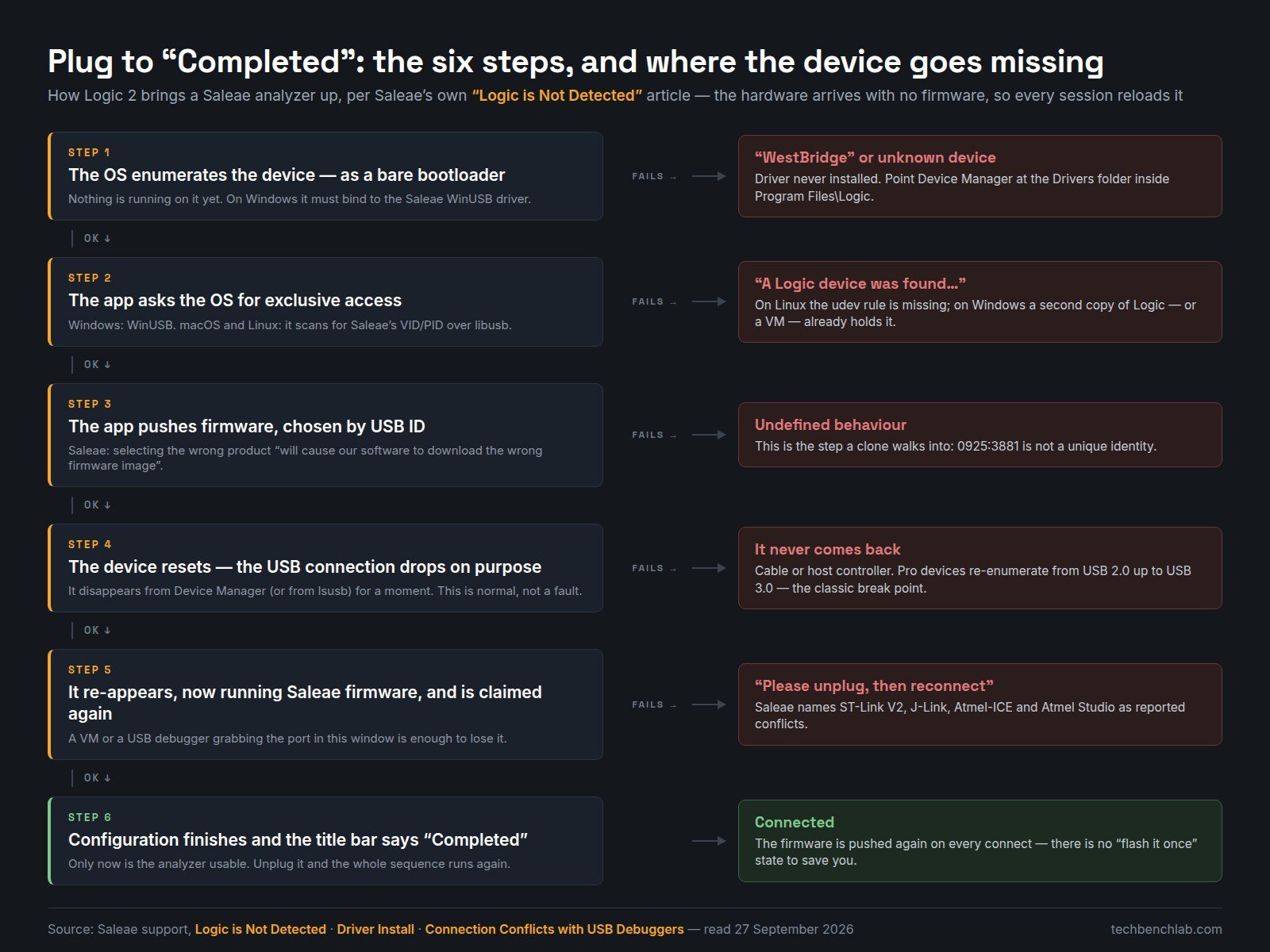
The single most common “it doesn’t work” report has a boring cause: Saleae hardware ships with no firmware. Per Saleae’s own connection walkthrough, the device enumerates as a bootloader, the app claims it, pushes firmware, and the device then resets and drops off the bus on purpose before coming back under a new identity. Watching Device Manager during that window and seeing the analyzer disappear is not a fault — it is step four of six.
That sequence also explains the five failures worth knowing about, all of them documented by the vendor:
- Shows up as “WestBridge” or an unknown device. The WinUSB driver never bound. Install it manually from the Drivers folder.
- “A Logic device was found, but there was a problem connecting to it.” Something else holds the device: a second copy of Logic, or a VM that grabbed it during re-enumeration. On Linux it is the missing udev rule.
- It never comes back after the firmware push. Cable or host controller. Logic Pro devices connect at USB 2.0 and then re-enumerate at USB 3.0, and that transition is the documented break point. Logic 2 also checks your controller against a known-bad list and will warn about ASMedia and VIA controllers, plus Intel’s November 2020 USB 3.1 xHCI driver; VIA drivers older than 4.90A are the ones with issues.
- It goes unstable when a debugger is plugged in. Saleae names ST-Link V2, Segger J-Link, Atmel JTAGICE3, Atmel-ICE and Atmel Studio. The workaround is ordering: open Logic 2, connect the analyzer, then connect the debugger. Do not reach for Zadig here — the Saleae device is already on WinUSB, and re-binding it will only break the pairing the installer set up.
- Your disk fills up during long captures. Protocol analyzers write
analyzer_dbindex directories into the temp folder and only clear them when the app restarts. Capture first, add analyzers afterwards.
If you need Logic 1.x
You need the legacy software in exactly one situation: hardware older than the October 2022 revision, on a 32-bit OS, or an ancient distro. Saleae’s archive page publishes 205 direct download links covering 36 versions from 1.0.34 up to 1.2.40, and — checked link by link on 27 September 2026 — all 205 return HTTP 200, 8.5 GB in total, the oldest object stamped 1 March 2012. That is an unusually good record; the equivalent check on sigrok’s download page found three dead links out of 25.
Watch one contradiction in those docs: the installation article still says “version 1.2.29 is the last version of Logic 1.x” while the archive page itself offers 1.2.40, dated March 2022. 1.2.40 is the real last one — but it dropped the Decoded Protocols panel, which is why Saleae still points people at 1.2.35 (Windows) and 1.2.33 (macOS) if they need that feature. And hardware built after October 2022 will not work with Logic 1.x at all.
FAQ
Is there a portable version of Logic 2? No, and it is a policy rather than an oversight. Saleae lists three reasons — the auto-updater, unmanageable prerequisites, and a driver install that needs admin rights anyway — and says support may build a standalone copy on request “if time permits”. For running several versions side by side, standalone builds are the only route.
Does Logic 2 still support the original Logic and Logic16? Yes. Both are in the shipped udev rules and both drivers are in the Windows driver list; they just no longer appear as demo-mode options because the products are discontinued.
Can I talk to the hardware from my own code? Only through the software. Saleae states it plainly: “We don’t have any other libraries that use the device, either. The Logic software is the only way to communicate with the hardware.” The automation API, the socket API and now the MCP endpoint all drive the running app.
The download itself stalls. The files sit on Amazon S3 behind downloads.saleae.com; Saleae’s own suggestion is to replace that host with s3.amazonaws.com/downloads.saleae.com/ and pull it over HTTPS directly.
Sources
- Saleae — Downloads (download endpoints, MCP announcement)
- Download & Installation and Supported Operating Systems
- Can Saleae Logic Run on ARM / Apple Processors?
- Driver Install (manual WinUSB install, udev instructions)
- Device USB VID and PID Information
- Logic is Not Detected (the six-step connection sequence)
- Possible USB Host Controller Problem Detected and Other Drivers Interfere
- Connection Conflicts with USB Debuggers
- Is Silent Installation Supported? and Installation Errors
- Logic 1.x Download (Deprecated) — the 205-link archive
- Logic 2 is Consuming Disk Space
- sigrok wiki — fx2lafw hardware table and Saleae Logic