If you own one of those $10 eight-channel USB logic analyzers, sigrok’s PulseView is the software that makes it legitimate and useful. The catch nobody puts on the download page in plain words: the last released version of PulseView is 0.4.2, from 31 March 2020, and the nightly build the project quietly recommends instead carries 3,428 commits the release never got — including the drivers for the Kingst LA2016 and the Raspberry Pi Pico.
This guide gives you the official download, which build to actually pick, and the handful of failures that account for almost every “it doesn’t see my device” thread. Everything below was checked against primary sources on 24 September 2026.
What PulseView is, and what it replaces
sigrok is an open-source signal-analysis stack: libsigrok talks to the hardware, libsigrokdecode turns raw edges into I²C/SPI/UART/CAN transactions, and PulseView is the GUI on top. sigrok-cli is the same engine without a window.
Why it matters for a cheap analyzer, in the wiki’s own words: its hardware table marks most of these boards as clones, devices that copy the USB VID/PID of the original product and “have no own PC software/firmware, but instead illegally ship the software of the original product/manufacturer.” The vendor CD in your envelope is, usually, someone else’s program. PulseView is how you use that hardware without it.
Official download
One page only: sigrok.org/wiki/Downloads. Never take a sigrok binary from a mirror or a “driver site” — the project ships no installer anywhere else.
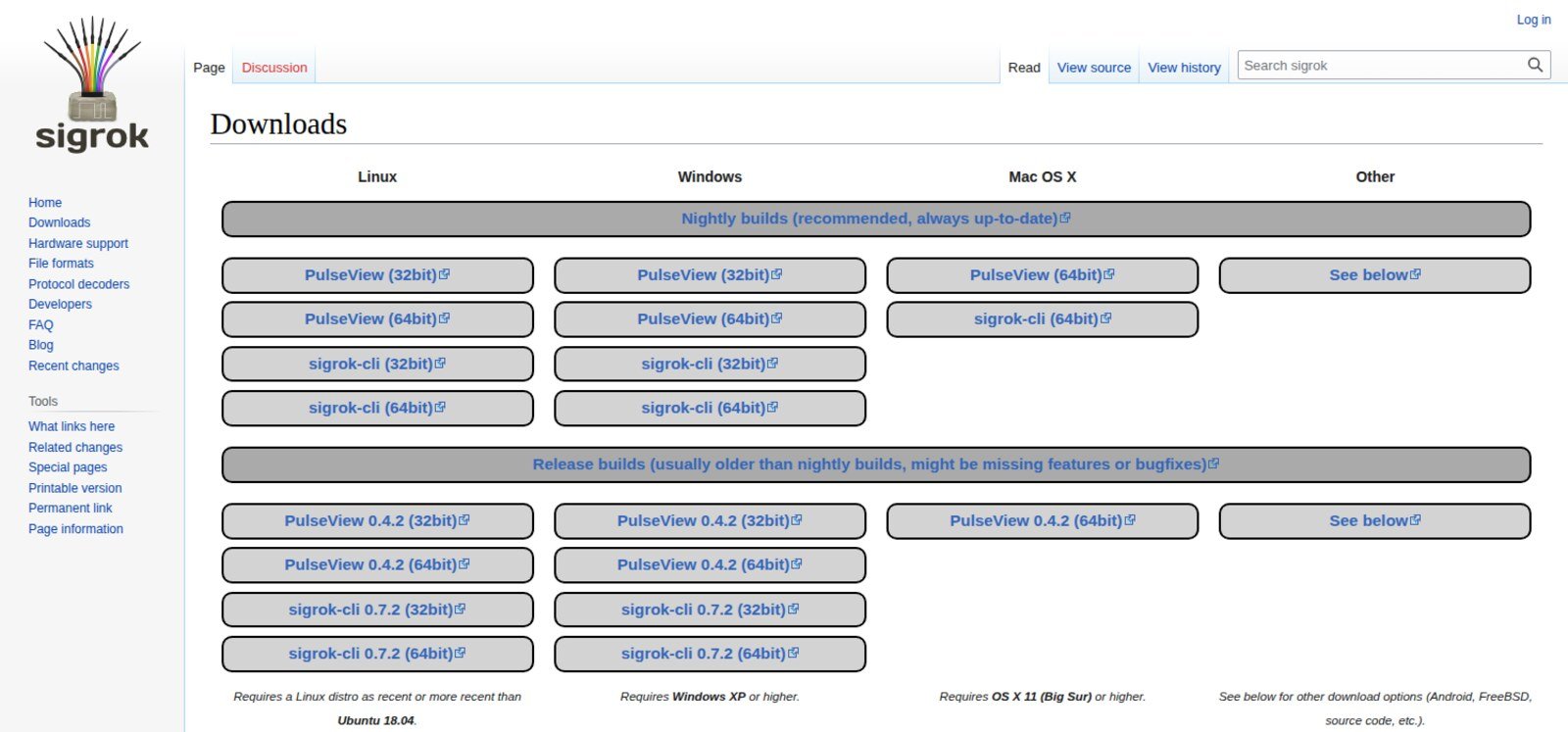
The page is laid out as two bands, and the top one is the one you want.
| Build | Windows | Linux | macOS | Verdict |
|---|---|---|---|---|
| Nightly (PulseView 0.5.0-git-e2fe9df) | installer .exe, 32 & 64-bit | AppImage, 64-bit only | .dmg, x86-64 | Use this |
| Release 0.4.2 (Mar 2020) | installer .exe, 32 & 64-bit | AppImage, 32 & 64-bit | .dmg | Only if the nightly misbehaves |
apt install pulseview |
— | 0.4.2 on every Ubuntu from 22.04 to 26.10 | — | Convenient, six years old |
Stated system requirements: Windows XP or higher; a Linux distro at least as recent as Ubuntu 18.04; macOS 11 Big Sur or higher.
Three things worth knowing before you click. First, the project publishes no checksums for any binary — unusual, and worth saying plainly. For the record, today’s 64-bit nightly AppImage (built 24 September 2026, 04:25 UTC, 44,214,776 bytes) is sha256 411d87c96a0b08894df07b6c02ca917efd4c948a75f33bfcdba26485f5428592; that hash is good for that one build and changes every night. Second, three of the 25 download links on that page are dead: the Android APK (discontinued in September 2023, as the page itself notes) and both 32-bit nightly AppImages. There is no 32-bit AppImage in the directory any more — on 32-bit Linux you are down to building from source. Third, the page offers the debug AppImage; a -release.AppImage also exists in the same directory but isn’t linked.
The data: what the 2020 release is missing
The project’s “might be missing features” is doing a lot of work. I cloned all four core repositories, verified each mirror’s HEAD against the canonical git://sigrok.org, and counted.
| Repository | Last release | Date | Age today | Commits on master not in the release |
|---|---|---|---|---|
| libsigrok (hardware drivers) | 0.5.2 | 25 Dec 2019 | 6 yr 9 mo | 1,849 |
| libsigrokdecode (decoders) | 0.5.3 | 11 Dec 2019 | 6 yr 9 mo | 748 |
| PulseView (GUI) | 0.4.2 | 31 Mar 2020 | 6 yr 6 mo | 821 |
| sigrok-cli | 0.7.2 | 1 Mar 2021 | 5 yr 7 mo | — |
| sigrok-firmware-fx2lafw | 0.1.7 | 14 Nov 2019 | 6 yr 10 mo | 10 |
In hardware support that comes to 70 driver directories in the release against 87 on master — 18 added, one retired (brymen-dmm, folded into serial-dmm). On the decoder side, 111 against 131: 23 new, and three that only look like losses (gpib and iec were merged into ieee488; max7219 was renamed max72xx).
Two of those 18 drivers decide the question for most people buying hardware today. The Kingst LA2016 driver landed on master on 7 June 2020 and the Raspberry Pi Pico driver on 27 September 2023 — neither has ever appeared in a release, so neither works with 0.4.2 or with anything apt will give you. The rest are mostly bench instruments: RDTech USB meters (UM24C, TC66), the UNI-T UT181A, Rigol DG function generators, ITECH and Siglent electronic loads, GreatFET One.
Running today’s nightly sigrok-cli and asking it directly, --list-supported reports 191 driver entries (the 87 directories each register more than one — serial-dmm alone accounts for dozens), 129 protocol decoders, 13 input and 13 output formats. It identifies itself as libsigrok 0.6.0-git and libsigrokdecode 0.6.0-git-71f4514 — and that hash matches the master HEAD I cloned, which is how you know the nightly really is master. The PulseView nightly reports 0.5.0-git-e2fe9df, one commit behind master. Note what those numbers are: a 0.5.0, a 0.6.0 and an 0.8.0 that have never been released.
Is the project still alive?
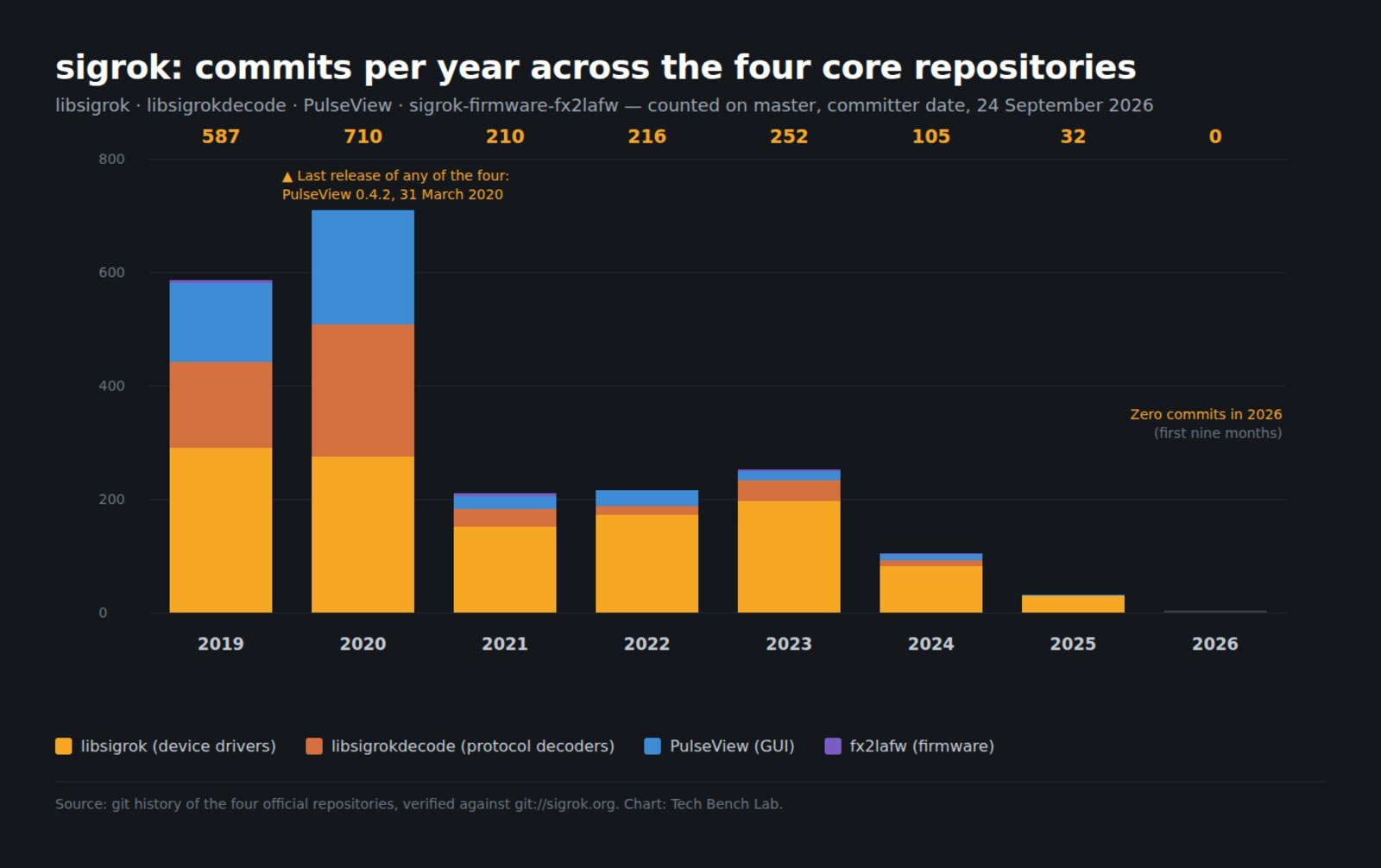
Barely, but the lights are on. Development peaked at 710 commits in 2020 and has fallen every year since: 105 in 2024, 32 in 2025, and zero so far in 2026 across all four repositories. The last commit of any kind was 20 November 2025.
And yet the build machine ran this morning. Today’s Windows installer and AppImages are all stamped 24 September 2026, 04:25 UTC. The infrastructure rebuilds nightly over source that stopped moving ten months ago — so the binary is fresh, the content isn’t. That’s also why the old release AppImage is the riskier choice: the 0.7.2 sigrok-cli AppImage from 2021 no longer starts on a current Linux at all. It dies with undefined symbol: g_module_open_full, because the bundle ships libgmodule-2.0.so.0 but not libgio-2.0.so.0, so a modern system libgio gets paired with a 2021 libgmodule that lacks the symbol. The nightly from the same day runs fine.
Install, by operating system
Windows. Run the nightly installer. Then plug in the analyzer and run Zadig — the sigrok installers ship zadig.exe and zadig_xp.exe in the install directory and on the Start menu. The vendor driver “is not going to work in almost all cases”; you need WinUSB. If you’ve already met Zadig on a different board, the drill is identical to our Zadig and USBasp guide.
Linux. Download the 64-bit AppImage, chmod +x, run it. For hardware access install the udev rules and reload with udevadm control --reload-rules && udevadm trigger. The rules work in two layers: 60-libsigrok.rules tags 108 known devices with ENV{ID_SIGROK}="1", then either 61-libsigrok-uaccess.rules (TAG+="uaccess", the systemd-logind default) or 61-libsigrok-plugdev.rules (MODE="660", GROUP="plugdev") grants access. If your analyzer is the common Saleae clone, the line you’re looking for is ATTRS{idVendor}=="0925", ATTRS{idProduct}=="3881". That pair is not unique to your board — eight different products ship with it, which is also why the vendor’s own Logic 2 software will try to push Saleae firmware at whatever answers to it.
macOS. The nightly .dmg, x86-64 only.
The five failures that cover almost everything
1. PulseView won’t start, error 0xc0150002. Windows only. The decoders need python34.dll, which needs msvcr100.dll from the Microsoft Visual C++ 2010 Redistributable. Install it and the error goes.
2. The device isn’t found after Zadig. Two traps, both from the sigrok wiki, both counter-intuitive. FX2-based analyzers renumerate: they appear with one VID/PID, receive firmware, then come back with a different one — so you must run Zadig twice, once before and once after a scan, because “Windows will be unable to tell that it’s actually the same USB device.” And Windows binds drivers per physical port for devices without a serial number, which these don’t have. Move the analyzer to another USB socket and you get to do Zadig again.
3. “Device only sent N samples” — capture stops early. The big one, and it isn’t your board being faulty. Per the wiki: 24 MSa/s on 8 channels (or 12 MSa/s on 16) is “near the theoretical bandwidth limit of the USB 2.0 connection”, the FX2 chip holds only “the fraction of a millisecond” of buffer, and “the slightest hiccup causes a FIFO overflow… Lost data cannot get recovered.” Sample slower, give the analyzer a port of its own with no hub, and cut the machine’s load during capture.
4. Flaky captures with the bundled cable. The project is unusually direct about this: do not use the USB cable that shipped with a cheap FX2 analyzer, because those cables “seem to be of a consistently very bad quality and cause all kinds of strange issues.” Swap it for one you trust before you debug anything else.
5. 48 MHz is in the menu and it should not be. See below.
The part nobody covers: the 24 MHz limit is written in the code and never enforced
The sample-rate list you see in PulseView isn’t arbitrary. In src/hardware/fx2lafw/protocol.c the driver picks one of two internal clocks and an integer divider — if ((SR_MHZ(48) % samplerate) == 0), else SR_MHZ(30). That’s why the list runs 20/25/50/100/200/250/500 kHz and 1/2/3/4/6/8/12/16/24/48 MHz, and why there’s no 5, 10 or 20 MHz in it.
Now the interesting part. protocol.h declares both ceilings:
#define MAX_8BIT_SAMPLE_RATE    SR_MHZ(24)
#define MAX_16BIT_SAMPLE_RATE   SR_MHZ(12)
Grep the entire libsigrok repository and MAX_8BIT_SAMPLE_RATE appears exactly once — on the line that defines it. Nothing uses it. Only the 16-bit ceiling is actually checked, and that check raises a clean error: “Unable to sample at %Hz when collecting 16-bit samples.” The 8-bit one has sat there unused since at least the 2014 tree reorganisation.
So with eight channels selected, PulseView offers you 48 MHz, the driver accepts it without a word, and the wiki elsewhere tells you 24 MHz is already at the edge of what USB 2.0 will carry. That’s the mechanism behind the truncated-capture reports. Treat 24 MHz as the real ceiling on 8 channels and 12 MHz on 16, and read the 48 MHz entry as a bug in the menu rather than a capability.
One more thing to keep expectations straight: there is no hardware trigger. The driver uses soft_trigger_logic_check() — everything streams to the PC and the host hunts for your condition afterwards, across at most four trigger stages. That’s fine for finding a stuck I²C bus; it is not a substitute for a scope’s trigger when you need to catch one glitch in a minute. If that’s where you’re headed, our notes on choosing a first oscilloscope for board repair are the better road.
FAQ
Which build should I download? The 64-bit nightly, on all three systems. The 2020 release exists for the rare case where a nightly regression bites you.
Is the nightly unstable? “Nightly” here means built from master every night, and master has had zero commits in 2026 — the build you get today is essentially the same code as the build from six months ago. It is far better tested by users than the label suggests.
Can I just use apt? You can, and you’ll get PulseView 0.4.2 on every Ubuntu from 22.04 through 26.10, with libsigrok 0.5.2 and libsigrokdecode 0.5.3 beneath it. Fine for an fx2lafw clone; useless for a Kingst LA2016 or a Pi Pico.
My analyzer says 24 MHz on the box. Real? On 8 channels, yes — that is the honest ceiling, and even reaching it depends on your PC keeping up. The 48 MHz option is not.
Do I need the firmware separately? On Windows and macOS the installers include the open firmware. On Linux the AppImage bundles it; distro users want the sigrok-firmware-fx2lafw package.
Sources
- sigrok wiki — Downloads (build wording, requirements, release tarballs)
- sigrok wiki — Windows (Zadig/WinUSB, renumeration, per-port binding, 0xc0150002, the truncated-acquisition FAQ)
- sigrok wiki — fx2lafw (hardware table, VID/PIDs, 24 MHz crystal, the clone note)
- sigrok.org release tarball index (release dates)
- libsigrok and libsigrokdecode official mirrors — driver and decoder counts, commit history,
src/hardware/fx2lafw/,contrib/*.rules; HEADs verified againstgit://sigrok.org - Launchpad API (packaged versions per Ubuntu series)
The same fx2lafw firmware also turns a cheap USB scope into a sigrok device: see the Hantek 6022BE driver guide, where the FX2LP shows up again with two USB IDs and three competing firmwares.
Related on the bench: Zadig and WinUSB, the CH340 driver when the serial side of the same board won’t enumerate, SOIC-8 test clips for hooking onto the chip you’re about to sniff, and reading a boardview to find the test points worth clipping.