The Hantek 6022BE is the $40 USB oscilloscope that ends up on a lot of first benches, and the software page for it is a small archaeology site. The download you are pointed at, HT6022_Software.zip, carries a Windows driver whose catalog was signed on 19 September 2014 with SHA-1 — ten months before Windows 10 shipped — and a second copy signed in 2016 by WoSign, a certificate authority that Mozilla, Google, Apple and Microsoft all stopped trusting the following year.
The fix is on the same page and almost nobody links to it: a separate download called Hantek6022BE Driver, listed 7 April 2025, whose catalog is SHA-256 and signed by Microsoft’s Windows Hardware Compatibility Publisher. This guide gives you both files, which one to install, and the numbers behind what this scope can and cannot actually do. Everything below was pulled from primary sources on 26 September 2026.
First, find the product page
Searching hantek.com for “6022” returns exactly two results, and neither is called 6022BE: the Hantek6002BE Series page (which is where the 6022BE, 6052BE, 6082BE, 6102BE and 6212BE live) and the Hantek6022BL page, the variant with 16 logic channels. Everything for the BE is under the Download tab of that first page.
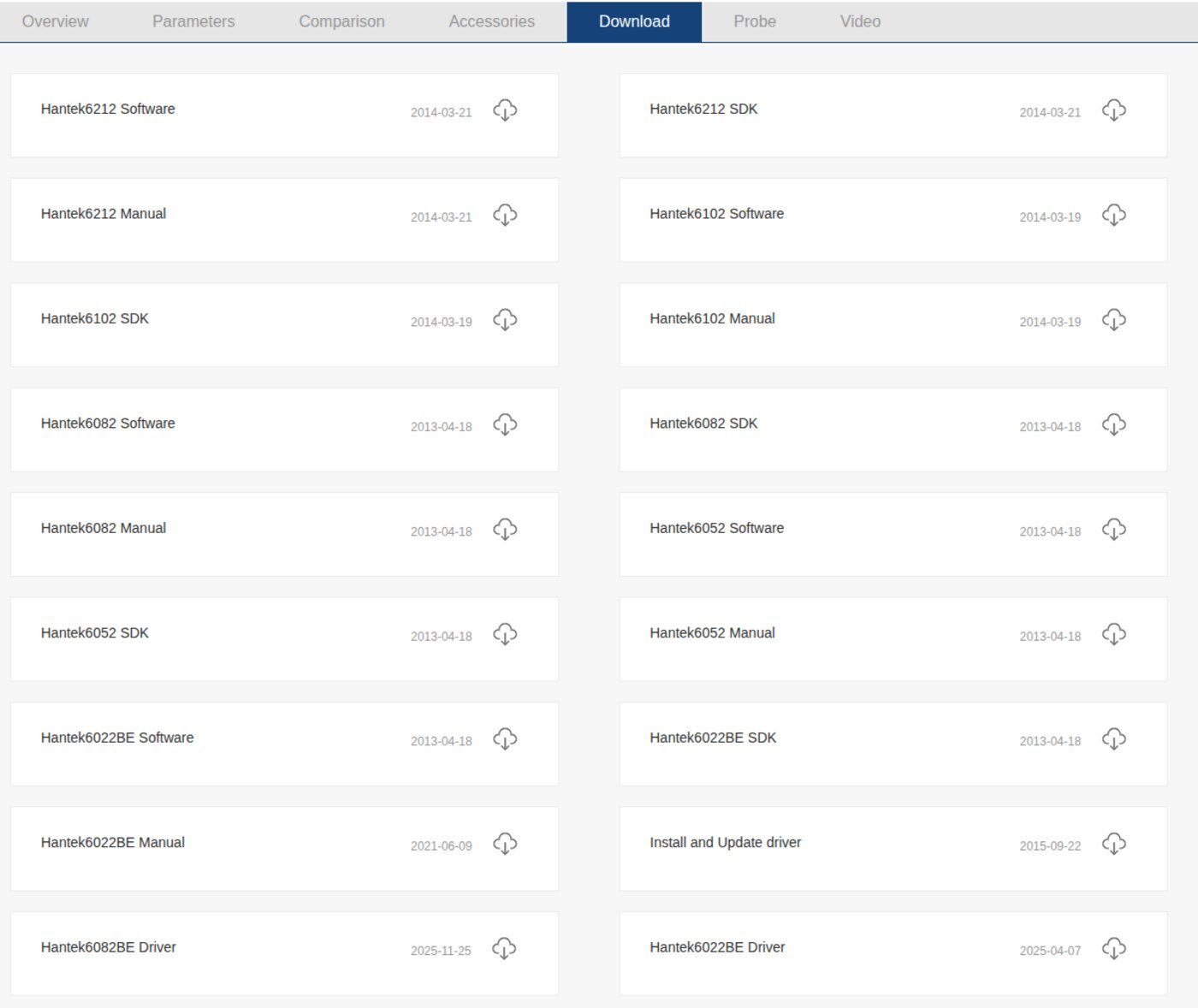
Official downloads, with real dates
The dates the page prints and the dates the server reports are not the same thing. The table below pairs both, plus the size and hash of each file as served today. Download only from hantek.com; every “Hantek driver” aggregator site is repackaging these same files.
| File | Page says | Server Last-Modified |
Bytes | What it is |
|---|---|---|---|---|
| Hantek6022BE Software | 2013-04-18 | 19 Mar 2019 | 12,258,122 | The scope application (Setup.exe, built 13 Dec 2017) + old drivers + manuals |
| Hantek6022BE Driver | 2025-04-07 | — | 164,657 | The driver to install. RAR, files dated 22–23 Oct 2024 |
| Hantek6022BE Manual | 2021-06-09 | — | 1,700,051 | User’s manual V1.0.5 (still written for Windows XP SP2) |
| Hantek6022BE SDK | 2013-04-18 | 26 Jul 2014 | 190,209 | HTMarch.dll + VB6/VC6/LabVIEW examples |
| Install and Update driver | 2015-09-22 | 22 Sep 2015 | 1,164,703 | Two PDFs, no files |
For the record, today’s HT6022_Software.zip is sha256 60689d1fc4b42311cc3e5f6a53e8e8c54e6425e481def30c277e4cf5b1410218 and the 2025 driver RAR is 6afdf5f6740177521424901dd08084875037bb31c29c52a680bc1109a592a497. Hantek publishes no checksums, so these are ours, taken from the server today.
Nothing in that bundle was rebuilt in 2019, incidentally. Of its 73 files the newest is a PDF, Update driver V1.3; the application is from December 2017, the drivers from 2014 and 2016.
The data: three drivers with the same filename
The software ZIP contains two driver folders — Driver/Driver for Win10 and Driver/others — and the separate 2025 download is a third. All three install a file called Hantek6022BE.inf with a catalog called Hantek6022BE.cat. They are not interchangeable. Reading the catalogs with openssl and the INFs directly:
| Package | Driver files dated | Catalog signed | Hash | Signed by | DriverVer in INF |
|---|---|---|---|---|---|
ZIP → Driver for Win10 |
19 Sep 2014 | 19 Sep 2014, 07:51 UTC | SHA-1 | Qingdao Hantek, via VeriSign Class 3 Code Signing 2010 CA (cert valid 3 Sep 2014 → 3 Sep 2015) | absent |
ZIP → others |
1 Mar 2016 | 1 Mar 2016, 01:27 UTC | SHA-1 | Qingdao Hantek, via WoSign Class 3 Code Signing CA | absent |
| Hantek6022BE Driver (2025 listing) | 22–23 Oct 2024 | 23 Oct 2024, 07:44 UTC | SHA-256 | Microsoft Windows Hardware Compatibility Publisher (Windows Third Party Component CA 2014) | 09/11/2017, 3.4.7.000 |
Three consequences, each with a rule behind it.
Signing. Microsoft’s kernel-mode code signing policy is explicit: “Starting with Windows 10, version 1607, Windows will not load any new kernel-mode drivers which are not signed by the Dev Portal.” Cross-signed drivers survive only if the PC was upgraded from an older Windows, if Secure Boot is off, or if the end-entity certificate was “issued prior to July 29th 2015” and chains to a supported cross-signed CA. The 2014 folder squeaks into that last exception — though the Microsoft cross-certificate embedded in its chain expired on 22 February 2021. The 2016 folder meets none of the three, and its CA is worse than expired: Mozilla documented the WoSign misissuance incidents and Google completed full distrust of WoSign and StartCom in July 2017. The 2024 package is the only one signed the way current Windows expects.
Ranking. Neither old INF has a DriverVer line. Microsoft’s INF DriverVer documentation says an INF “must have a DriverVer directive”, and that without one “the operating system applies the default date of 00/00/0000”. That is why the bundled driver behaves like it never sticks: dated to the year zero, it loses every driver-ranking contest Windows runs. The 2024 INF declares 3.4.7.000.
Device class. The old INF declares Class = USB but pairs it with a hand-made ClassGuid that spells out the model number — {79046022-7904-7904-1980-198007056022}. The 2024 INF uses the real USB class GUID, {36FC9E60-C465-11CF-8056-444553540000}, and its header names its origin: “(c) Copyright 2017 Cypress Semiconductor Corporation”. The binaries barely changed — they still report version 1.0.0.1 internally and still carry build paths pointing at Cypress’s ezusbdrv sample. What Hantek did in October 2024 was re-sign the old driver properly and fix the INF. That is the whole fix, and it is worth having.
Installing it, per operating system
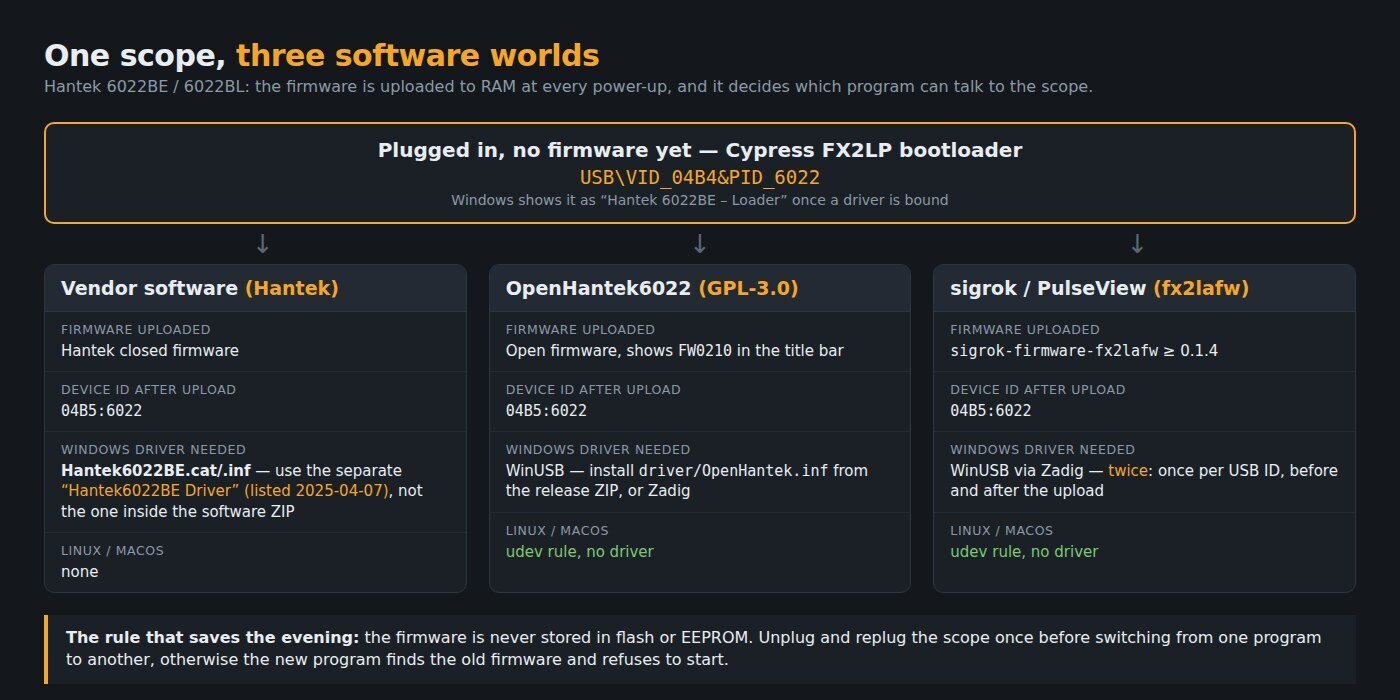
Windows, vendor software. Unzip HT6022_Software.zip, run Setup.exe, and skip its driver folders. Download the separate Hantek6022BE Driver RAR, extract it, plug the scope in, then in Device Manager right-click the unknown device → Update driver → Browse → point at the extracted folder. The INF covers both USB IDs the scope uses, 04B4:6022 before firmware and 04B5:6022 after, so you may see the wizard run twice.
Windows, OpenHantek6022. The free alternative is OpenHantek6022 (GPL-3.0), and its README is blunt: “The original Hantek driver for Windows doesn’t work!” — it needs WinUSB, not Hantek’s kernel driver. Grab openhantek_*_msvc_x64.zip from the releases page, right-click driver/OpenHantek.inf inside it and choose Install, then plug in the scope. The alternative is assigning WinUSB with Zadig. Confirm it worked by checking that the title bar reads FW0210.
Linux. No driver at all. apt install ./openhantek_3.4.1-rc2_amd64.deb (or the .rpm), replug the scope so the udev rule that came with the package applies, and run it. Raspberry Pi and FreeBSD builds exist; the macOS .dmg is published but described by the project as “completely untested”.
sigrok / PulseView. The scope is also a supported sigrok device through the hantek-6xxx driver and sigrok-firmware-fx2lafw. On Windows that means running Zadig twice — once for each USB ID, before and after the firmware upload. Our PulseView download guide covers which build to use.
The part nobody covers: the bandwidth is above the Nyquist rate
The box says 20 MHz and 48 MS/s. Those two numbers cannot both be used at once, and the people who wrote the open firmware say so in writing. OpenHantek’s limitations document states the usable ceiling: 30 MS/s with CH1 alone, 15 MS/s with both channels, “otherwise data overrun occurs”; the README lists 48 MS/s as “not supported due to unstable USB data streaming”. At 15 MS/s, a 20 MHz sine wave gets 0.75 samples per cycle. Even at the advertised 48 MS/s it gets 2.4. Apply the usual bench rule of ten samples per cycle and a two-channel capture is comfortable up to about 1.5 MHz.
| Manual V1.0.5 says | What the hardware does |
|---|---|
| Max sample rate 48 MS/s | 30 MS/s CH1-only, 15 MS/s dual-channel before overrun |
| Timebase 1 ns/div to 5000 s/div | One sample every 20.8 ns. At 1 ns/div the entire ten-division screen holds 0.48 samples. OpenHantek offers 10 ns/div to 10 s/div |
| Buffer size max 1M samples | No acquisition memory in the device — sigrok lists “Memory: none”. Everything streams over USB bulk in 20,000-sample blocks |
| Gain range 20 mV–5 V/div (eight steps) | Four hardware states, set by two 74HC4051 muxes: 200 mV; 500 mV; 1/2/5 V shared; 20/50/100 mV shared. The rest is software scaling |
| Coupling: DC | Correct, and it is a real limit — AC needs an external DC block or a documented hardware modification |
| Trigger: edge, auto/normal/single | No hardware trigger exists. sigrok lists “none (SW-only)”; the PC finds the edge after the fact |
| Max input ±5 V, protection 35 Vpk | Anything outside ±5 V is clipped to the rail, not just off-screen. Use a ×10 probe |
Per sigrok’s teardown it is a Cypress CY7C68013A FX2LP fed by an Analog Devices AD9288 dual 8-bit ADC, with AD8065 op amps in front and a 256-byte 24LC02B EEPROM holding the calibration. A USB microcontroller, an ADC and an analog mux — honest hardware at its price, as long as you know you bought a 1.5 MHz two-channel streamer, not a 20 MHz scope.
Five failures and their fixes
1. The driver installs but the scope stays unknown, or Windows reports a signature problem. You used a driver folder from inside the software ZIP. Uninstall the device (tick “delete the driver software”), then install the separate 2025 package.
2. The driver “doesn’t stick” — Windows replaces it after a reboot or an update. Same cause: the old INF has no DriverVer, so Windows dates it 00/00/0000 and prefers literally anything else.
3. OpenHantek or PulseView refuses to start, or reports the wrong firmware. The firmware lives in RAM only and dies at power-down. If the scope was last used with a different program, unplug it and plug it back in once before starting the new one — the project documents this explicitly.
4. The trace tears, freezes or the log says data overrun. You are above the streaming ceiling. Drop to 15 MS/s for two channels or 30 MS/s for one. On Linux, adding your user to a group with rtprio 99 measurably helps, and a realtime kernel helps more.
5. A flat line, or a waveform clipped into a square. Three candidates, in order: the input is beyond ±5 V (use a ×10 probe); the signal has a DC offset and this scope has no AC coupling; or you are reading the first samples of a capture, which the firmware authors describe as unstable by design — the ADC is driven outside its common-mode spec at start-up and the software drops roughly the first 2,000 values.
FAQ
Is the 6022BE the same as the 6022BL? Same analog front end and the same 48 MS/s ceiling; the BL adds 16 logic channels and has its own product page and its own software bundle. OpenHantek6022 supports both, but its specification document describes two analog channels only — nothing in it covers the BL’s logic inputs.
Can I get AC coupling? Not in software. Either put a DC-blocking capacitor in line (a BNC DC block is the clean way), or use the documented hardware modification; OpenHantek has supported the modified hardware since firmware 0204.
Do I have to reload firmware every time? Yes, and no, in the sense that it is automatic: whichever program you open uploads its firmware into RAM. Nothing is ever written to flash, which is also why a bad firmware upload is never permanent.
Is the vendor software still worth installing? It is the only path to the SDK and to the BL’s logic channels, and it is a 2017 build that runs. For everyday use, OpenHantek6022 is better maintained: 40 releases since November 2019, the latest on 3 May 2026. Of 86,539 downloads across all its release assets, 48.6% are the Windows builds (42,094), against 40.2% Linux/BSD and 11.1% macOS — a striking split for a project whose README says “No support for non-Linux related issues unless a volunteer steps in”.
Sources
- Hantek — Hantek6002BE Series product and download page (specification table, file dates)
- Hantek 6022BE User’s Manual V1.0.5 (Appendix A specifications)
- Microsoft — Kernel-mode code signing policy and INF DriverVer directive
- Mozilla — CA:WoSign Issues · Google Security Blog — Final removal of trust in WoSign and StartCom
- OpenHantek6022 — limitations.md and releases (download counts read from the GitHub API, 26 Sep 2026)
- Ho-Ro/Hantek6022API — the open firmware and calibration tools
- sigrok wiki — Hantek 6022BE (teardown, USB protocol, gain mux table)
Related on the bench: how to read an oscilloscope, your first oscilloscope for board repair, and the CH340 driver guide for the other USB chip that fills repair forums.