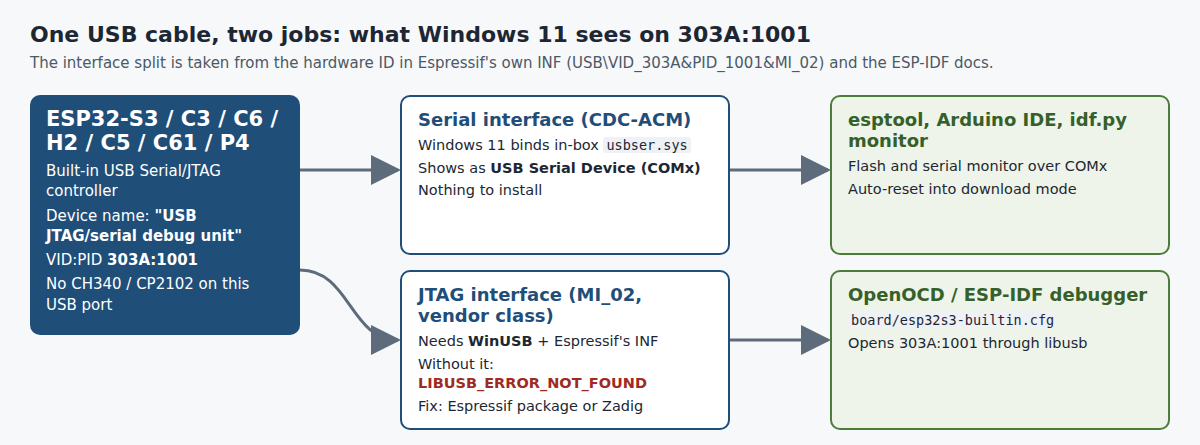
“USB JTAG/serial debug unit” is not an adapter you bought. It is the USB port built into the ESP32-S3, ESP32-C3, C6, H2, C5, C61 and P4 (USB ID 303A:1001), and it carries two things at once: a serial port that Windows 11 handles on its own, and a JTAG interface that needs WinUSB before OpenOCD can open it. If flashing works but debugging fails with LIBUSB_ERROR_NOT_FOUND, only that second interface is missing its driver. Last checked: 11 November 2026.
⬇ Espressif USB JTAG driver (official link) · Zadig 2.9 (mirrored)
Espressif ESP32 USB JTAG driver 6.1.7600.16386 (GitHub release, 5.2 MB)
What Windows 11 actually sees
Open Device Manager → Properties → Details → Hardware Ids on each new entry. The serial half is a CDC-ACM device, which Espressif documents as “a COM* port in the Windows Device Manager” with no driver to install, and it lands under Ports (COM & LPT) as USB Serial Device (COMx). The JTAG half is the one whose ID ends in MI_02: that is the exact hardware ID in Espressif’s INF, USB\VID_303A&PID_1001&MI_02. Once the driver is in, the INF renames it to USB JTAG debug unit under Universal Serial Bus devices.
Which chips have it, and on which pins
From the ESP-IDF “Configure Built-in JTAG Interface” page of each chip and the *-builtin.cfg board files in Espressif’s OpenOCD. The original ESP32 and the ESP32-S2 have no built-in config: their USB port, if any, goes through a CP2102, CH340 or similar bridge, so it cannot do JTAG.
| Chip | USB D− / D+ | OpenOCD config | Note |
|---|---|---|---|
| ESP32-S3 | GPIO19 / GPIO20 | board/esp32s3-builtin.cfg |
DevKitC-1 has two ports; only the one wired to GPIO19/20 is this device |
| ESP32-C3 | GPIO18 / GPIO19 | board/esp32c3-builtin.cfg |
Debugging needs chip revision v0.3 or newer; v0.1/v0.2 need ESP-Prog |
| ESP32-C6 | GPIO12 / GPIO13 | board/esp32c6-builtin.cfg |
|
| ESP32-C61 | GPIO12 / GPIO13 | board/esp32c61-builtin.cfg |
|
| ESP32-C5 | GPIO13 / GPIO14 | board/esp32c5-builtin.cfg |
|
| ESP32-H2 | GPIO26 / GPIO27 | board/esp32h2-builtin.cfg |
|
| ESP32-P4 | GPIO24 / GPIO25 | board/esp32p4-builtin.cfg |
|
| ESP32, ESP32-S2 | no USB Serial/JTAG controller | use the board’s bridge-chip driver, or ESP-Prog for JTAG | |
The two official driver packages, compared
Espressif ships this driver from two places. We unpacked both (without running anything) and read the INF and the catalog signatures:
| GitHub release (current) | dl.espressif.com (used by idf-env) |
|
|---|---|---|
| File | ESP32.USB.JTAG-v6.1.7600.16386.zip |
idf-driver-esp32-usb-jtag-2021-07-15.zip |
| Size / SHA-256 | 5,452,291 B · 92fe5974…cdcee50 |
5,446,239 B · 84e741db…f9db0f30e |
| INF | identical: DriverVer = 07/14/2021, 6.1.7600.16386, generated by libwdi, installs Microsoft’s WinUSB for MI_02 only |
|
| Catalog signed by | Espressif, cert valid 13 Oct 2022 – 15 Oct 2025, signed 12 Jul 2024, timestamped | Espressif, cert valid 23 Sep 2019 – 14 Oct 2022, signed 15 Jul 2021, timestamped |
| Architectures | INF sections NTx86, NTamd64, NTarm (32-bit ARM, with no arm folder in either zip). No NTarm64: on an ARM64 Windows laptop (Snapdragon X) this INF does not match |
|
Both certificates have expired, but each signature carries a timestamp from inside its validity window, which is what Windows checks.
Install on Windows 11
- Espressif package. Extract the zip, right-click
USB_JTAG_debug_unit.inf→ Install (the method in Espressif’s README), or from an admin prompt:pnputil /add-driver USB_JTAG_debug_unit.inf /install. Unplug and replug the board. - Or let Espressif’s tools do it. ESP-IDF’s docs list
eim install-drivers(Espressif Installation Manager) andidf-env.exe driver install --espressif; the second downloads the dl.espressif.com zip above. - Check.
openocd -f board/esp32s3-builtin.cfg(swap in your chip) should printesp_usb_jtag: Device found. Base speed ….
When it still fails
Error: libusb_open() failed with LIBUSB_ERROR_NOT_FOUND/esp_usb_jtag: could not find or open device!— interface 2 is on the wrong driver. Espressif’s engineers note in idf-installer #133 that Windows may refuse to replace an existing driver: uninstall the device in Device Manager, replug, then install again. The fix that keeps coming back in that thread (2022, and again from a Windows 11 user in September 2026): run Zadig as administrator, Options → List All Devices, pick the USB JTAG/serial debug unit entry for Interface 2, choose WinUSB and select Install Driver from the drop-down, not the default Install WCID Driver. Leave interface 0 on usbser.- No 303A:1001 at all, but a CP210x (
10C4:EA60) or CH340 shows up — your cable goes to a USB-to-UART bridge, not to the chip’s own USB pins. That port flashes but never debugs; use the other USB connector, or an external probe (openocd-esp32 #327). - The device vanishes after flashing — per ESP-IDF, if the firmware reconfigures the USB pins or enters deep sleep, “the device disappears from the system”. Hold BOOT while tapping RESET (GPIO0 low on the ESP32-S3) to get back into download mode.
- Windows 7 / 8 shows two “USB JTAG/serial debug unit” entries and no COM port — those versions lack the CDC class driver; Espressif’s ESP-Techpedia page walks through binding “USB Serial Device” by hand.
FAQ
Do I need any driver just to upload Arduino sketches to an ESP32-S3 over its USB port? No. The serial interface uses Windows’ in-box usbser.sys; if that port shows a Code 28, see our usbser.sys Code 28 fix.
Does replacing the driver on interface 2 break the COM port? No, as long as you leave interface 0 alone. That is the one mistake to avoid in Zadig.
Related guides
- ESP32 board USB drivers: which chip is on your board
- ESP-IDF install on Windows
- esptool step by step
- OpenOCD “unable to open ftdi device” 0403:6010 (ESP-Prog)
- Zadig: drivers, versions and which one avrdude wants
Sources
- Espressif: esp-win-usb-drivers (README, CHANGELOG, third-party licences); INF and catalog read from both zips; idf-env driver.rs (download URL, INF path)
- ESP-IDF: Configure Built-in JTAG Interface for ESP32-S3, C3, C6, C61, C5, H2, P4 (pins, Windows driver methods); ESP32-C3 JTAG debugging (revision v0.3); USB Serial/JTAG Controller Console
- OpenOCD (Espressif fork): esp_usb_jtag.cfg (303A:1001), board/*-builtin.cfg, esp_usb_jtag.c (error and success messages)
- Issues: idf-installer #133 (ESP32-C3 LIBUSB error, Zadig fix, Sept 2026 Windows 11 report); openocd-esp32 #327; platform-espressif32 #1220
- Microsoft Learn: INF Manufacturer section (platform decorations); PnPUtil