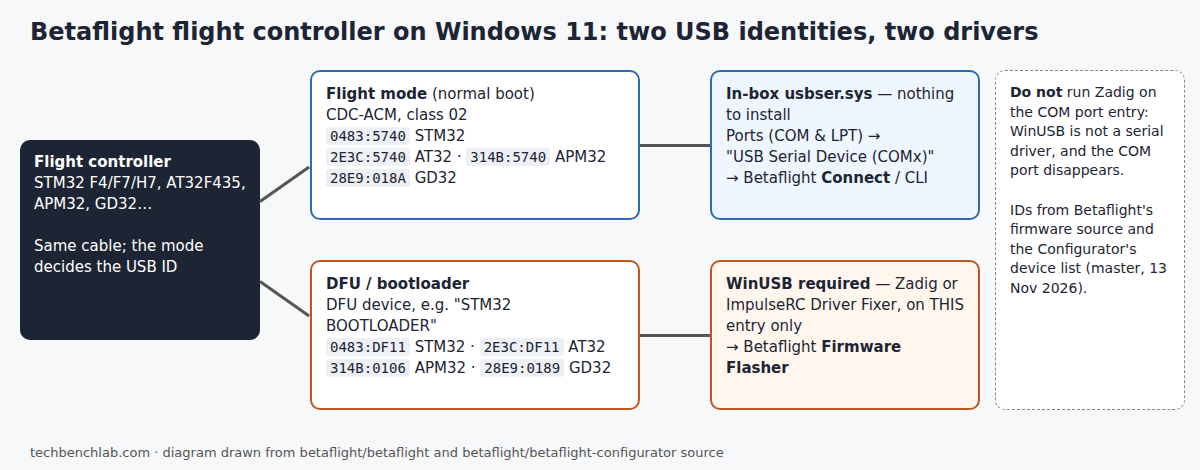
Betaflight needs two different drivers on Windows 11, because a flight controller shows up as two different USB devices. In flight mode it is a standard CDC serial port that Windows 11 already drives; in DFU (bootloader) mode it is a raw USB device that needs WinUSB before the Firmware Flasher can see it. Most “no COM port” and “no DFU device” threads come down to installing the right driver on the wrong one. Last checked: 13 November 2026.
⬇ Betaflight App 2026.6.2 (mirrored) · ImpulseRC Driver Fixer (official link) · Zadig 2.9 (mirrored)
Download Betaflight_2026.6.2.zip (12.5 MB)
Fake “ImpulseRC Driver Fixer” pages. Two GitHub organisations created on 19 September 2026, ImpulseRC-Drivers-Fixer and ImpulseRC-Driver-Fixer-2026, have a Russian-language profile README whose “GET” button leads to a download page on an unrelated github.io account. They are not ImpulseRC. The only release published by the ImpulseRC account is the one linked above; compare the SHA-256 before running anything.
The USB ID of every flight controller family Betaflight supports
Read straight from the USB descriptor files in Betaflight’s firmware source and from the device list the Betaflight App uses to filter serial ports and DFU devices (src/js/protocols/devices.ts), both at the master branch on 13 November 2026. In flight mode every family declares USB device class 02 (CDC), which is exactly the case where Windows 10 and 11 load the in-box usbser.sys by compatible ID, per Microsoft’s USB serial driver documentation: “you don’t need to distribute INF files”.
| MCU family | Flight mode (COM port) | DFU / bootloader | Windows 11 driver, flight / DFU |
|---|---|---|---|
| STM32 F4 / F7 / H7 / G4 | 0483:5740 (0483:3256 when built with CDC+HID) |
0483:DF11 |
in-box usbser.sys / WinUSB |
| Artery AT32F435 | 2E3C:5740 “AT32 Virtual Com Port” |
2E3C:DF11 |
in-box usbser.sys / WinUSB |
| Geehy APM32 | 314B:5740 |
314B:0106 |
in-box usbser.sys / WinUSB |
| GigaDevice GD32 | 28E9:018A |
28E9:0189 |
in-box usbser.sys / WinUSB |
| X32 (X-Core Labs) | 3997:5740 |
3997:DF11 |
in-box usbser.sys / WinUSB |
| Raspberry Pi RP2350 / RP2040 | 2E8A:0009 / 2E8A:000A |
2E8A:000F (listed for BOOTSEL) |
in-box usbser.sys / drag-and-drop UF2 |
| Older or KISS boards with a bridge chip | CP210x 10C4:EA60, CH340 1A86:7523, FT232R 0403:6001 |
serial bootloader through the bridge | CP210x, CH340 or FTDI driver |
Two things follow from the table. ST’s old “STM32 Virtual COM Port” package (STSW-STM32102) only renames the port on Windows 11; without it the board appears as USB Serial Device (COMx), which is normal: an ST Community thread shows an STM32F4 CDC device on Windows 11 listed as “USB Serial Device (COM12)” on the standard Microsoft driver. And the ImpulseRC README still describes the tool as being for “STM32 F3, F4 and F7 based flight controllers”; for AT32, APM32 or GD32 boards in DFU mode, Zadig is the tool that sees them.
Install, in this order
- Install the Betaflight App from the zip above. Plug the flight controller in and open Device Manager → Ports (COM & LPT). A new USB Serial Device (COMx) means flight mode works and no driver is needed. Pick that port and click Connect.
- Put the board in DFU: hold the BOOT button while plugging in, or use “Activate Boot Loader / DFU” in the app. The board now leaves Ports and reappears as a new device (on STM32, “STM32 BOOTLOADER”). Check Properties → Details → Hardware Ids against the DFU column above.
- Give that DFU entry WinUSB. Run ImpulseRC Driver Fixer as administrator, or in Zadig: Options → List All Devices, select the DFU entry (the USB ID must match the DFU column), driver WinUSB, Replace/Install Driver. The app flashes over WebUSB, and its own Windows error text says what it wants: “Access to the DFU device was denied. Install the WinUSB driver (ImpulseRC Driver Fixer or Zadig)”.
- Flash, then unplug and replug normally. The board returns as a COM port. Full background on the DFU side is in our STM32 DFU driver guide.
The common failures and the fix
- Zadig run on the COM port entry. WinUSB is not a serial driver, so the port disappears from Ports and Betaflight shows nothing. In Device Manager, find the board under Universal Serial Bus devices, Uninstall device with “Attempt to remove the driver for this device” ticked, and replug; usbser.sys binds again. A Windows 11 user in the ArduPilot forum “loaded all four drivers available in Zadig” and the board vanished every time it left DFU.
- Nothing appears at all, not even an unknown device. The cable is charge-only or the USB connector is damaged; Windows has no USB ID to bind anything to. A driver cannot fix this. See “Device Descriptor Request Failed” if Windows shows that instead.
- COM port listed but “Failed to open serial port”. Another program that opens serial ports (a second Betaflight window, a serial terminal, another flasher) holds it. See COM port busy / access denied.
- Port appears in Device Manager but not in Betaflight. The app filters ports by the USB IDs above; a board with an unusual bridge chip is hidden until you enable the app’s “Show all serial devices (for manufacturers or development)” option.
- Yellow triangle, Code 28 on the COM port. An old vendor INF is outranking the in-box match; remove it with
pnputil /delete-driver oemNN.inf /uninstall. Details in our usbser.sys Code 28 guide.
FAQ
Do I need the STM32 VCP driver on Windows 11? No, for any board in the table: in flight mode they all declare CDC class 02 and get usbser.sys. The ST package only changes the name in Device Manager. Threads like IntoFPV’s “No Coms port on Betaflight” (Windows 11, 2022) show pilots stacking ImpulseRC, Zadig and every driver on the download page without knowing which one mattered.
Can I find my board’s USB ID without Device Manager? Yes, with USBDeview; see our USB VID/PID lookup.
Sources
- Betaflight firmware, USB descriptors: STM32 vcp_hal, STM32 vcpf4, AT32, APM32, GD32, X32, Pico
- Betaflight App: devices.ts (serial and DFU filters), messages.json, release 2026.6.2
- ImpulseRC/ImpulseRC_Driver_Fixer (README and release v1_forever)
- Microsoft Learn: USB Serial Driver (Usbser.sys)
- ST Community: STM32 virtual COM port on Windows 11
- ArduPilot Discourse: Windows 11 won’t connect after flashing; IntoFPV: No Coms port on Betaflight