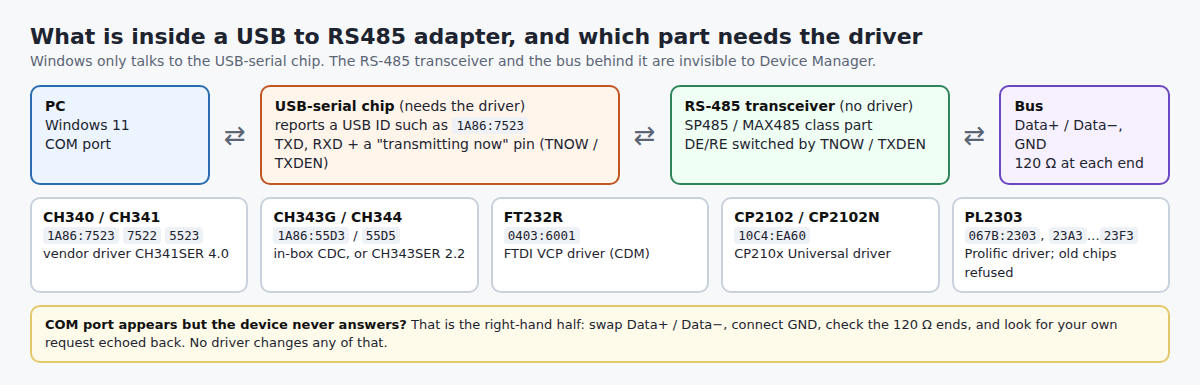
There is no such thing as an “RS485 driver”. Every USB to RS485 adapter is a USB-to-serial chip (CH340, CH343, FT232R, CP2102 or PL2303) wired to an RS-485 transceiver, and Windows 11 only needs the driver for that chip. Read the adapter’s USB ID, match it in the table below, install that one package. Last checked: 9 November 2026.
⬇ WCH drivers for CH340 and CH343 / CH344 adapters (mirrored) · FTDI, Silicon Labs, Prolific (official links)
Download CH341SER_V4.0.zip (CH340 / CH341, 697 KB)
Download CH343SER_V2.2.zip (CH343 / CH344, 620 KB)
Official links only (licences do not allow mirroring, or the vendor site is the safer source): FTDI FT232R → ftdichip.com VCP drivers and our FT232R guide · Silicon Labs CP210x → silabs.com and our CP2102 guide · Prolific PL2303 → our PL2303 “Phased Out” fix.
Step 1: read the USB ID
Plug the adapter in, open Device Manager, and find the new entry under Ports (COM & LPT) or Other devices. Right-click → Properties → Details → Hardware Ids. You get a string like USB\VID_1A86&PID_7523: the first four hex digits are the chip vendor, the last four the chip. The printing on the plastic shell tells you nothing; this string does.
Step 2: match the chip, install its driver
IDs and device names below are copied from the vendors’ own INF files and datasheets and from the Linux kernel’s ID tables (all linked under Sources).
| USB ID | Chip | Without a driver it shows as | With the driver | Windows 11 driver |
|---|---|---|---|---|
1A86:75231A86:75221A86:5523 |
WCH CH340 CH340K CH341 (serial mode) |
“USB2.0-Serial” with a yellow mark | USB-SERIAL CH340 (COMx) | Not in-box. CH341SER 4.0 (above); details in the CH340 guide |
1A86:55D3 |
WCH CH343G | works anyway: “USB Serial Device (COMx)” | USB-Enhanced-SERIAL CH343 (COMx) | In-box (CDC class, usbser.sys). CH343SER 2.2 is optional; see the CH343 guide |
1A86:55D5 |
WCH CH344L / CH344Q (four ports) | four “USB Serial Device” ports | USB-Enhanced-SERIAL-A … -D CH344 | In-box CDC, or CH343SER 2.2 (same package) |
0403:6001 |
FTDI FT232R (FT232RL, FT232RNL) | an unknown device with a yellow mark | USB Serial Converter + USB Serial Port (COMx) | FTDI VCP driver, from Windows Update or the FT232R guide |
10C4:EA60 |
Silicon Labs CP2102 / CP2102N | “CP2102 USB to UART Bridge Controller” | a CP210x COM port | CP210x Universal Windows Driver; CP2102 guide |
067B:2303067B:23A3 … 23F3 |
Prolific PL2303 (older types) PL2303 G series (GC, GB, GT, GL, GE, GS) |
a device with a yellow mark | a Prolific COM port; on end-of-life chips the text “PL2303HXA PHASED OUT SINCE 2012. PLEASE CONTACT YOUR SUPPLIER.” | Prolific driver; end-of-life chips are refused on Windows 11, see the PL2303 fix |
An ID that is not here? Paste it into the USB VID/PID lookup.
Which chip the makers say is inside
| Adapter | Chip, per the maker | Expect |
|---|---|---|
| Waveshare USB TO RS485 | “original FT232RL inside”, SP485 transceiver, onboard 120 Ω resistor | 0403:6001 |
| Waveshare USB TO RS485 (B) | CH343G; “the default driver of the computer is the CDC driver” | 1A86:55D3 |
| Waveshare USB TO 4CH RS485 | CH344L + SP485EEN | 1A86:55D5 |
| Waveshare USB TO RS232/485/TTL and RS232/485/422/TTL | FT232RL and FT232RNL | 0403:6001 |
| FTDI / Connective Peripherals USB-RS485-WE-1800-BT cable | FT232R inside the USB plug; 300 baud to 3 Mbaud | 0403:6001 (FT232R default) |
Unbranded sticks rarely say. Read the ID: 1A86:7523 means CH340, whatever the listing claimed.
Install
- CH340: unzip
CH341SER_V4.0.zip, runSETUP.EXE→ INSTALL, replug. Or Device Manager → Update driver → Browse → the unzippedCH341SERfolder. - CH343 / CH344: nothing to install on Windows 10 and 11: Microsoft’s
Usbser.infloads for any CDC-class serial device. Install CH343SER only if your software asks for WCH’s vendor driver, which the datasheet calls the “high-speed VCP” one. - FT232R, CP210x, PL2303: follow the guide linked in the table; each has version history and checksums.
The port is there but the device never answers
From here on it is wiring, not the driver.
| Symptom | Cause | Fix |
|---|---|---|
| Timeouts or garbage on every request | The two data wires are reversed. The letters do not help: FTDI’s own cable datasheet labels orange “Data+ (B)” and yellow “Data− (A)”, while chip makers label the non-inverting pin “A”. B+B SmartWorx calls reversing them “by far the most common initial error” | Match + to + and − to −, ignore A/B. B+B’s advice if the data is garbled: “reverse the leads, and try again” |
| Reply starts with a copy of your own request; Modbus reports CRC errors | Local echo: on a two-wire bus the receiver hears the transmitter. FT232R datasheet: this “requires the application software to remove the transmitted data” | On the FTDI cable echo is off by default (CBUS4 = TXDEN) and is changed with FT_Prog; on other adapters look for an echo jumper or switch (minimalmodbus troubleshooting notes) |
| Looking for an “RTS toggle” setting | Not needed: CH340 and CH343 raise TNOW while sending, FT232R raises TXDEN “1 bit period before the start bit”, and that pin switches the transceiver | Leave flow control at None. Waveshare lists it as “hardware automatic control” |
| Where does the 120 Ω resistor go? | FT232R datasheet: the cable is “terminated at each end”, nowhere else | The FTDI cable carries the resistor inside: its brown and green wires are the two resistor pins, used only when the cable is the first or last device. Waveshare’s FT232RL model has it onboard |
| Prolific-based adapter dead after moving to Windows 11 (Plugable thread 21258) | End-of-life PL2303 revision that the current driver refuses | PL2303 fix, or replace the adapter |
FAQ
Is there one driver for all USB to RS485 converters? No. Two adapters that look identical can carry different chips; the USB ID decides.
The adapter disconnects after a while. Waveshare’s FAQ for its FT232RL model lists, in order: unstable USB power, a poor cable, then the driver. Try another port and cable first.
“Access is denied” when opening the port? Another program holds it: see COM port busy.
Related guides
- CH340 driver for Windows 11
- CH9102 and CH343 driver
- FTDI FT232R driver
- CP2102 / CP210x driver
- “USB Serial Device (COMx)” and Code 28
Sources
- WCH: CH341SER.ZIP 4.0 and CH343SER.ZIP 2.2 (INF files: IDs, names, DriverVer); CH340 datasheet v3.4 (TNOW, section 7.4); CH343 datasheet v2.0 (CDC or VCP driver, TNOW); CH344 datasheet
- FTDI: FT232R datasheet v2.07 (default VID/PID, TXDEN, section 7.2; copy hosted by Waveshare); USB-RS485 cable datasheet CP_000072 v1.1 (wire colours, terminator, local echo); FTDI CDM 2.12.36.20 INF files (device names)
- Waveshare wiki: USB TO RS485, USB TO RS485 (B), USB TO 4CH RS485, USB TO RS232/485/TTL
- Microsoft Learn: USB serial driver (Usbser.sys)
- Linux kernel: pl2303.h, ch341.c, ftdi_sio_ids.h
- B+B SmartWorx / Advantech: Polarities for Differential Pair Signals; minimalmodbus: troubleshooting (local echo)