There is no separate “PICkit driver” or standalone MPLAB IPE download. Microchip ships MPLAB IPE inside the MPLAB X IDE installer, and the drivers come with it — so the only real question is which version, and that depends on which PICkit is on your bench. Pick the newest release for a PICkit 3 and it simply won’t show up.
This guide gives you the official download with Microchip’s SHA-256 checksums, one table that nobody publishes in one place — every PICkit’s USB ID, the last MPLAB version that supports it, how much current it can feed the target, and whether it can do high-voltage entry — then the install per OS, the command-line programmer, and the errors that show up most in 195 Electronics Stack Exchange questions about PICkits.
The download: MPLAB X IDE, which contains IPE
⬇ MPLAB X IDE + MPLAB IPE — official Microchip page
We do not re-host this. The installers are around a gigabyte and come straight from Microchip’s CDN. Heads-up: microchip.com refuses datacenter IP addresses, so the version and checksum data below were read from the Internet Archive’s capture of the official page dated 30 July 2026. Check the live page for anything newer. PICkit 3 owner? Skip to the version table first.
The newest release in that capture is MPLAB X IDE v6.35, dated 24 July 2026. Microchip’s checksums, as published on the page:
| File (v6.35) | SHA-256 (published by Microchip) |
|---|---|
| MPLABX-v6.35-windows-installer.exe | 64a5247d5c1e2db7c6fb3b8d2fa43d5578d7efebe2e51db44706b20d441c2061 |
| MPLABX-v6.35-linux-installer.tar | 4c747363dcfb315726439f968d0e25b0b17214bb9ba5d2fd4a7f3bab28c56705 |
| MPLABX-v6.35-osx-installer.dmg | 3bc7fac105ac522f435e0e81eae45ac773566c6828e60f28e70df5f9b33ccfe6 |
Check it before you run it: certutil -hashfile MPLABX-v6.35-windows-installer.exe SHA256 on Windows, sha256sum on Linux, shasum -a 256 on macOS. The IDE is 64-bit only (since v5.40), runs on Intel/AMD x86-64 or Apple silicon, and supports Windows 11 from v6.05 on.
Which version your PICkit needs
Microchip documents tool support in four places: the MPLAB X page, the readme for each tool, and a separate user’s guide per programmer. Put together:
| Programmer | USB ID (VID:PID) | Newest MPLAB X / IPE | Powers the target | High-voltage program entry |
|---|---|---|---|---|
| PICkit 3 | 04D8:900A |
v6.20 — removed in v6.25 | Up to 30 mA | Yes (VPP 1.8–14 V) |
| PICkit 4 | 04D8:9012 PIC mode · 03EB:2177 AVR mode · 04D8:9017 bootloader |
Current, but no new devices since 1 Sep 2023 | Up to 50 mA | Only when target VDD ≥ 2.8 V (fixed on units labelled 10-10094-R6) |
| MPLAB Snap | 04D8:9018 PIC mode · 03EB:2180 AVR mode · 04D8:9019 bootloader |
Current | No | No |
| PICkit 5 | 04D8:9036 |
Current | Up to 150 mA | Yes, target VDD 1.8–5.0 V |
| PICkit Basic | 04D8:9054–9057, 04D8:90AB–90AE |
Current | No | No |
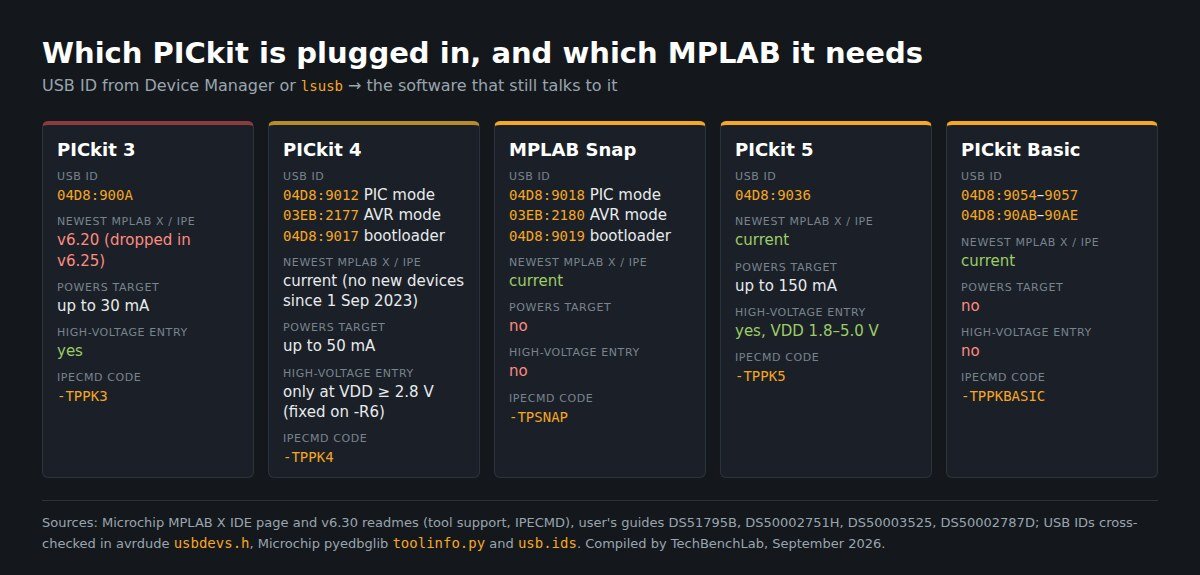
The part nobody covers: the USB ID tells you more than the model name. A PICkit 4 or Snap that shows up as 03EB:2177 or 03EB:2180 — under the old Atmel vendor ID, not Microchip’s — is in AVR mode, the mode avrdude needs. The avrdude manual says so directly: these two probes “can only be utilised by avrdude when in AVR mode”, switched with -x mode=avr and back with -x mode=mplab. A 9017 or 9019 means the probe is sitting in its bootloader. A PICkit 5 has just one ID in avrdude’s table, with no AVR-mode entry. So when the IPE tool list comes up empty, run lsusb or look up the hardware ID in Device Manager before you reinstall anything.
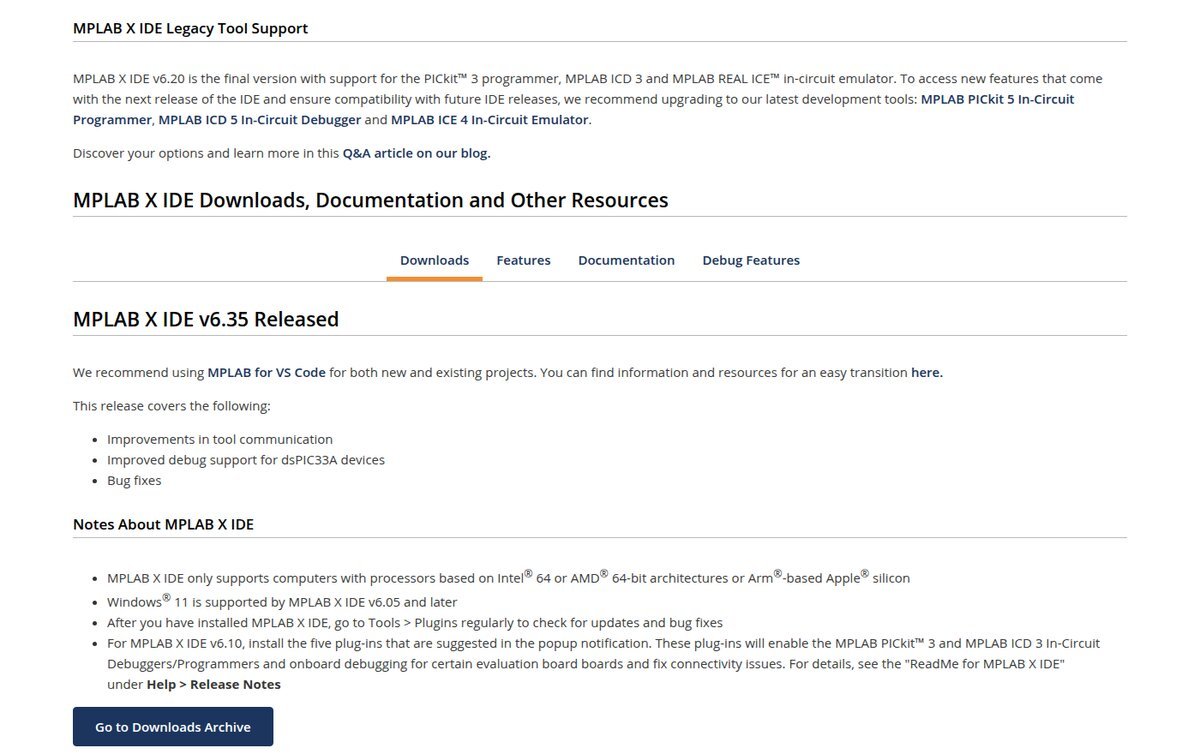
The other part: PICkit 3 is not a dead tool. It is named in 107 of the 195 PICkit questions on Electronics Stack Exchange, more than every other PICkit combined. Yet the MPLAB X page now says plainly that “MPLAB X IDE v6.20 is the final version with support for the PICkit 3 programmer, MPLAB ICD 3 and MPLAB REAL ICE”. The v6.30 readme adds that PICkit 3 On Board debuggers on eval kits are gone too. Two leftovers can mislead you: the v6.30 IPE readme still lists PICkit 3 as a supported tool, and IPECMD still documents -TPPK3. Believe the IDE readme — IPE ships in the same package.
Install, per operating system
Windows
- Run the installer. IDE and IPE are both ticked by default. For a production PC that only programs chips, untick the IDE, or run it silently:
MPLABX-v6.35-windows-installer.exe --mode unattended --ide 0. - Accept every driver pop-up. The readme is explicit: “Confirm USB device driver installation for all dialogs.”
- Plug in the probe. For PICkit 4, Microchip says MPLAB X v4.15 or later “will automatically update any necessary device drivers upon connecting to USB”. The same line is in the PICkit 5 and PICkit Basic readmes. There is no separate driver to download.
- PICkit 3: download v6.20 from Microchip’s MPLAB downloads archive. It installs to its own versioned folder (
...MPLABXv6.20), so it can sit next to v6.35. If you’re on v6.10, install the five plug-ins it offers at first launch. Without them, PICkit 3 and ICD 3 fail with “Failed to download firmware. Connection Failed”.
Linux
Per the readme: tar -xf MPLABX-v6.35-linux-installer.tar, then sudo ./MPLABX-v6.35-linux-installer.sh. The readme says to run it as root, and the default location is /opt/microchip/mplabx/. Silent install needs an extra --: sudo ./MPLABX-v6.35-linux-installer.sh -- --mode unattended. Anything before the -- goes to the shell script, not the installer.
macOS
Mount the .dmg and run the installer app. Ignore the old warnings in the IPE readme about macOS Catalina and 32-bit apps — MPLAB X has been 64-bit since v5.40. Microchip’s reference configuration is still macOS 12.5.1 Monterey, and the readme warns that parts of the IDE “may not be supported on macOS 14 Sonoma” because of an OpenJFX bug. For scripting on a Mac, use ipecmd.sh, not the .jar.
MPLAB IPE in two minutes
- Advanced Mode password: the IPE user’s guide gives the default as
microchip, lowercase (Settings → Advanced Mode). Production Mode hides everything else on purpose. - Powering the board from the probe: Advanced Mode → Power → “Power target circuit from (tool)”. Keep it within the current limits in the table above.
- Command line (IPECMD), from the v6.30 readme:
java -jar ipecmd.jar -TPPK4 -P16F18446 -Fmycode.hex -M.-TPselects the tool (PK3,PK4,PK5,SNAP,PKBASIC),-Pthe part,-Fthe hex,-Mprograms every region, and-W(or-W3.3) powers the target from the tool. Use the Java runtime bundled undersysjavain the install. Options run in Microchip’s fixed order of precedence, not the order you type them.
The five errors that come up most
We pulled every Electronics Stack Exchange question that mentions a PICkit — 195 of them, 2009–2025 — through the site’s public API and counted error strings and topics. The MCLR pin comes up in 47. Connection failures in 13, verify/mismatch failures in 11, invalid device ID in 9, VDD/voltage errors in 9. The fixes below come from Microchip’s documentation, with the linked threads as real-world examples.
1. “Target Device ID (0x0) is an Invalid Device ID”
The probe talked to nothing. That means wiring, MCLR or power, almost never the chip. A PICkit 3 + PIC16F684 thread was fixed by dropping the tool’s supply from 5 V to 4.875 V; its second answer blames intermittent jumper cables. A PICkit 5 thread shows the same message with the tool supplying 3.25 V. Microchip’s guides recommend a pull-up from VPP/MCLR to VDD (the Snap guide says 10–50 kΩ), and the Snap guide adds: no capacitors on MCLR, PGC or PGD, because they slow the edges.
2. “…no voltage has been detected on VDD”
The project is set for self-powered, and the board isn’t powered. Example with a PICkit 5. Either power the board, or tick “Power target circuit” — and remember Snap and PICkit Basic can’t do that at all.
3. PICkit 3 missing from MPLAB X
If you’re on v6.25 or later, that’s by design: install v6.20. If you’re on v6.10, install the five plug-ins (thread). On Windows, the MPLAB X readme warns that other software can grab the HID driver the PICkit 3 relies on. Close anything like that and replug.
4. The chip needs high voltage and your probe can’t do it
If MCLR is set as an input or LVP is disabled, entering program mode takes roughly 9–12 V on VPP. This PIC12F629 thread explains the trade-off. Snap and PICkit Basic can’t generate it. A PICkit 4 older than revision -R6 only does it at target VDD of 2.8 V or more. Microchip also published ETN #37, a resistor rework for VPP overshoot latch-up on early PICkit 4 boards.
5. PICkit 4 or Snap vanished after using avrdude
It’s still in AVR mode (03EB:2177 / 03EB:2180). Switch it back with avrdude -c pickit4_updi -p <your part> -P usb -x mode=mplab, or -c snap_updi for the Snap, as documented in the avrdude manual.
FAQ
Is there an MPLAB IPE download without the IDE?
No separate installer — but you can untick the IDE in the same installer, or pass --ide 0.
Can I still buy a PICkit 4?
Its release notes say that as of 1 September 2023 it is “not recommended for new designs and no new device support will be added”. It still works for the parts it already supports. Microchip points new work to the PICkit 5.
Does MPLAB X still matter now that there’s MPLAB for VS Code?
Microchip now recommends the VS Code extension “for both new and existing projects”, but it still ships MPLAB X and IPE, and v6.35 came out in July 2026. For programming a chip on the bench, IPE is still the shortest path.
Sources
- Microchip — MPLAB X IDE (v6.35 files, SHA-256, legacy tool notice; read via the Internet Archive capture of 30 July 2026)
- MPLAB X IDE v6.30 release notes package: Readme for MPLAB X IDE, MPLAB IPE, IPECMD, PICkit 4, PICkit 5, PICkit Basic (zip)
- User’s guides: PICkit 3 (DS51795B) · PICkit 4 (DS50002751H) · PICkit 5 (DS50003525) · Snap (DS50002787D) · MPLAB IPE (DS50002227)
- avrdude — usbdevs.h · avrdude manual (-x mode) · Microchip pyedbglib — toolinfo.py · usb.ids
- Stack Exchange API — 195 Electronics Stack Exchange questions mentioning PICkit, retrieved 17 September 2026
Related guides
- avrdude on Windows with USBasp — the other side of the AVR-mode switch
- J-Link driver and J-Flash Lite — another probe whose USB ID gives away its driver mode
- ST-LINK V2 driver and STM32CubeProgrammer — the same questions, for STM32
- XGpro for TL866II / T48 / T56 — when you’d rather program the PIC out of circuit