“Qualcomm HS-USB QDLoader 9008” is the name Windows gives a Snapdragon phone or board sitting in Emergency Download (EDL) mode, USB\VID_05C6&PID_9008. Qualcomm now publishes the driver itself on GitHub, signed through Microsoft’s hardware program, so on Windows 11 you no longer need “test mode” or a driver from a mirror site. This page covers where to get it, what every 05C6 port in Device Manager means, how to force EDL, and which driver each flashing tool expects.
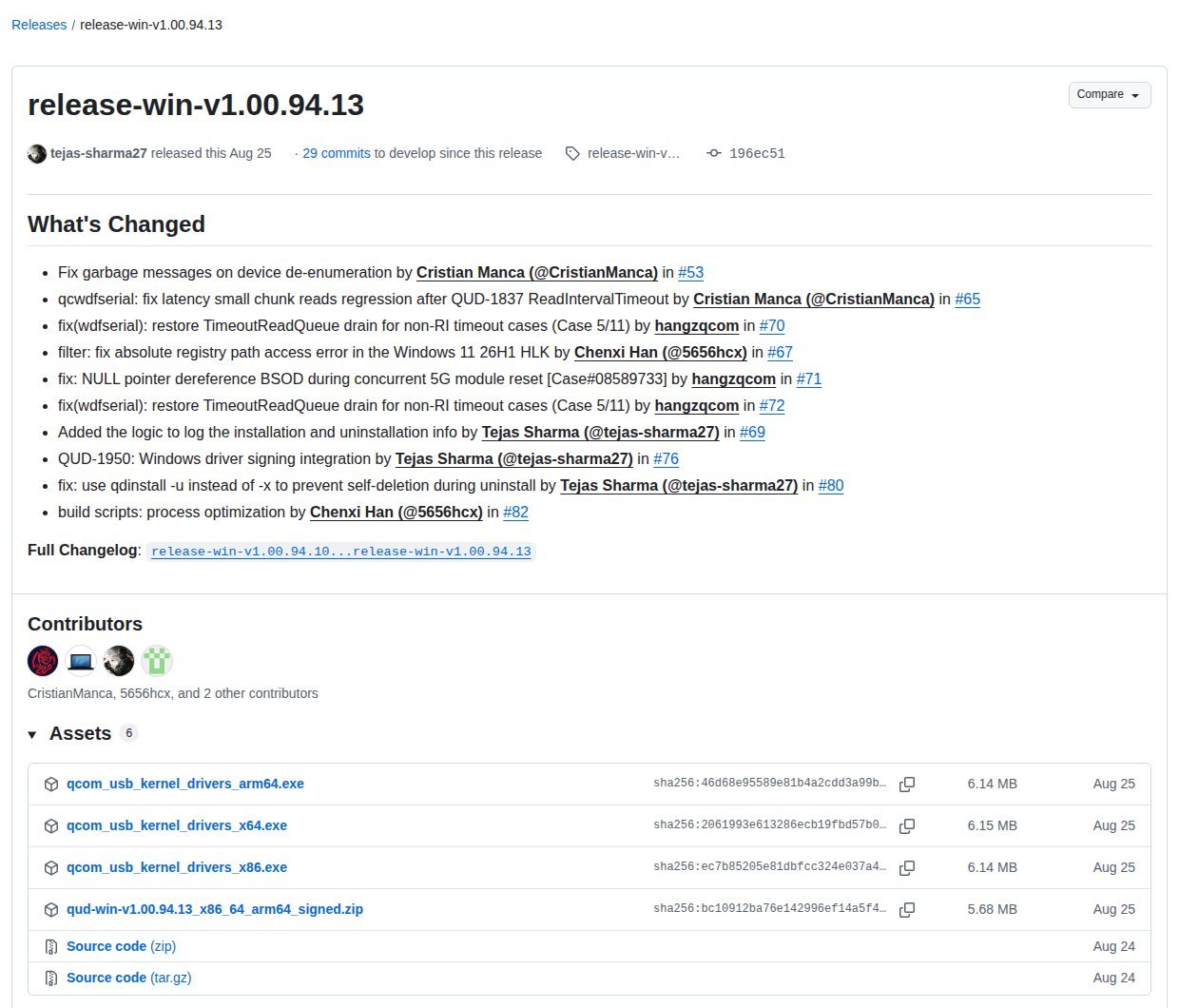
⬇ Qualcomm USB Driver (QUD) 1.00.94.13: official link
Get it from Qualcomm on GitHub
Not mirrored here: we link Qualcomm’s own release page and publish its checksums. Newer 1.00.95.x builds exist, but Qualcomm marks them “Pre-release”. The .cat files in the zip are signed by “Microsoft Windows Hardware Compatibility Publisher”, so the driver loads with Secure Boot on.
⬇ qdl 2.8 for Windows x64 (open-source EDL flasher)
Download qdl 2.8 (Windows x64)
Unmodified mirror of linux-msm/qdl v2.8. The checksum is the same as GitHub’s published digest; only the outer file name is changed. Inside: qdl.exe plus its libusb/libxml2/libzip DLLs. BSD-3-Clause, © Linaro Ltd., Bjorn Andersson and Qualcomm Technologies, Inc. (licence text). ARM64 build: official release page.
Install the driver on Windows 11
- Uninstall old “Qualcomm HS-USB” drivers from driver-pack sites first. In Device Manager, right-click the device, choose Uninstall device and tick Attempt to remove the driver for this device.
- Run
qcom_usb_kernel_drivers_x64.exe, or extract the signed zip and run, as administrator:pnputil /add-driver qcwdfser.inf /install(the command Qualcomm’s README gives). - Put the device in EDL (table further down) and plug it in. It should appear under Ports (COM & LPT) as Qualcomm HS-USB QDLoader 9008 (COMx).
- With no driver at all, it shows under Other devices as QHSUSB__BULK. That is the product string the boot ROM reports; a Linux log in edl issue #59 shows it with manufacturer “Qualcomm CDMA Technologies MSM”.
What each Qualcomm port in Device Manager means
We read the hardware IDs out of the INF files in Qualcomm’s signed package (qcwdfser.inf alone matches 282 different 05C6 product IDs) and checked each composition against the USB gadget scripts Google ships for Pixel phones in AOSP. The names below are exactly what Windows will show.
| VID:PID | Device Manager name (QUD 1.00.94.13) | What the device is doing | What you can do |
05C6:9008 |
Qualcomm HS-USB QDLoader 9008 (one port, whole device) | Boot ROM emergency download: Sahara protocol, waiting for a Firehose programmer | Flash or read storage with QFIL, qdl or edl, plus a Firehose loader signed for that chip and that OEM |
05C6:900E |
Qualcomm HS-USB Diagnostics 900E | Two meanings. After a crash, it is the crash-dump / memory-debug mode (qdl README, edl udev rules). With Android running, it is the plain diag composition (AOSP Pixel 4a script). |
Crash case: dump RAM (edl memorydump), then force 9008. Android case: it is a diag port, not EDL. |
05C6:9006 |
Qualcomm HS-USB Diagnostics 9006 | Listed as “Qualcomm Memory Debug” in edl’s udev rules; seen as QHSUSB__BULK on a Pixel 4a 5G (edl #375) | Treat like the crash case of 900E |
05C6:901D |
Android DIAG 901D + ADB Interface 901D | Android running, sys.usb.config=diag,adb |
adb reboot edl |
05C6:9091 |
Diagnostics 9091 (MI_00), Modem 9091 (MI_01), WWAN Adapter 9091 (MI_02), ADB Interface 9091 (MI_03) | Android running, diag,serial_cdev,rmnet,adb. AOSP calls it the “Default composition” |
QPST/QXDM diag work; adb reboot edl |
05C6:90DB |
Diagnostics, Modem, WWAN, DPL Data, QDSS Data and ADB Interface 90DB | Android running, diag,serial_cdev,rmnet,dpl,qdss,adb |
Same as 9091, plus trace ports |
Rule of thumb on a phone: 9008 is the Firehose flashing port. If you see 9091, 901D or 90DB with Android on screen, the phone is booted and talking, so nothing is bricked. The PID alone is not proof, though. The qdl README also lists 90DB (“diag dump”) and 901D among the IDs some Qualcomm boards use outside Android. Since v2.8, qdl recognises EDL by the interface signature (vendor class FF, subclass FF, protocol 10, 11, 13 or FF), because “new devices keep appearing with new IDs”.
Forcing EDL
| Method | Needs | Source |
adb reboot edl |
Android booted, USB debugging on; some OEMs block it | Qualcomm IQ9 FAQ |
| “EDL cable” (D+ shorted to GND) + forced reboot (Vol Up + Power over 20 s, or battery disconnect) | Working XBL/SBL; eMMC or UFS | edl README |
| Short eMMC DAT0 to GND with the battery out, connect the battery, then remove the short | eMMC boards, board open | edl README |
| UFS: interrupt the UFS clock at boot, or use the OEM test point | Board-specific test points | edl README (“very much more complicated”) |
Which driver each tool expects
This is the trap behind most “Device detected… and nothing happens” reports. The tools do not share a driver:
- QFIL / QPST talk to the COM port, so they need the Qualcomm driver above.
- qdl 2.8 works with either.
--backend quduses the Qualcomm COM port with no driver swap;--backend usbneeds WinUSB bound with Zadig; the default,auto, tries both. Runqdl listfirst. - bkerler/edl uses libusb: WinUSB or libusb-win32 through Zadig, or UsbDk installed next to the Qualcomm driver (its README). In edl #588 the reported fix was “install the WinUSB driver with Zadig”. In #52 the author blames hangs at 99% on “improper kernel driver” and USB power saving.
- Linux needs no driver. The kernel’s
qcserialalready lists 05C6:9008 as “Generic Gobi QDL device”, and edl blacklists it so libusb can claim the device. Qualcomm’s FAQ adds: stop ModemManager while flashing.
Once you swap 9008 to WinUSB with Zadig, the COM port disappears, so QFIL can no longer see the device. To go back, uninstall the device with “Attempt to remove the driver” ticked and replug.
Common problems
“Driver signature” errors from an old package. Use the signed QUD above instead. If you must load an old unsigned driver once, Windows’ Startup Settings has option 7, “Disable Driver Signature Enforcement”, picked at boot. Avoid bcdedit -set TESTSIGNING ON. Microsoft notes that it needs Secure Boot disabled and leaves a “Test Mode” watermark on the desktop until you turn it off.
Stuck at “Mode detected: sahara”. The port is fine, but the loader is wrong or refused. Firehose programmers are tied to the chip and the OEM signing key (edl names them by msmid_pkhash).
Unknown USB Device instead of QHSUSB__BULK. The phone never enumerated. That is a cable or port problem, not a driver one; see the Unknown USB Device guide. Other IDs are in the VID/PID table.
Sources
- Qualcomm: qcom-usb-kernel-drivers (README, BSD-3, release 1.00.94.13; INFs read: qcwdfser, qcwdfmdm, qcadb, qcwwan, qdbusb); IQ9 FAQ
- linux-msm/qdl README and
src/qud.c(v2.8) - AOSP: Pixel 4a init.msm.usb.configfs.rc, Pixel init.common.diag.rc
- bkerler/edl README,
Drivers/51-edl.rules, issues #52, #59, #375, #588 - Linux kernel qcserial.c; Microsoft Learn/Support pages linked above