The MediaTek USB VCOM driver is what turns a MediaTek phone in BROM, Preloader or Download Agent mode into a COM port that SP Flash Tool and mtkclient can talk to (USB\VID_0E8D&PID_2000 and friends). You do not need a “driver pack” or to disable driver signing on Windows 11: MediaTek’s package, version 3.0.1504.0, is on Microsoft’s own Update Catalog, signed by Microsoft’s hardware program. This page has the exact package to pick, what each 0E8D port means, and the mtkclient change from 12 October 2026 that matters on Windows.
⬇ MediaTek USB VCOM 3.0.1504.0: official Microsoft Update Catalog package
Open the Microsoft Update Catalog
Not mirrored here: MediaTek’s driver is proprietary, so we link Microsoft’s copy and publish its checksum. Inside: cdc-acm.inf, cdc-acm.cat and usb2ser.sys for x86 and x64.
⬇ UsbDk 1.0.22 (for mtkclient on Windows)
Unmodified mirror of daynix/UsbDk v1.00-22 (March 2020, still the latest release). Apache-2.0, licence text included in the zip. The MSI is signed by Red Hat, Inc.; the Windows 10 kernel driver inside it is signed by Microsoft Windows Hardware Compatibility Publisher.
Which MediaTek package is which
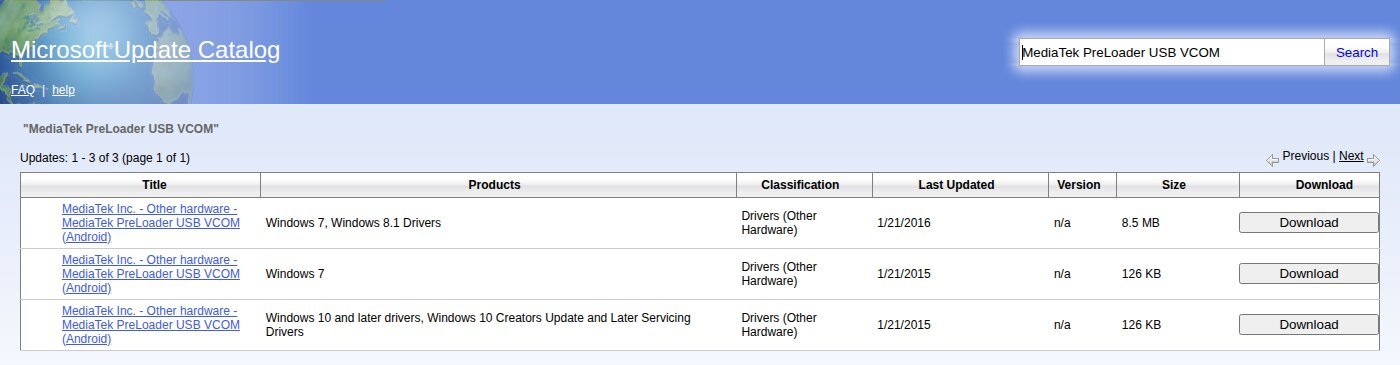
Searching the catalog for “MediaTek USB VCOM” returns 10 entries. They all carry the same version, 3.0.1504.0, but they point to only three different files. We downloaded all three and read their INF and signature catalogs.
| Package | Size | Microsoft lists it for | OS versions inside the signed .cat | Use on Windows 11? |
Catalog cab 20896845_… (signed 15 Jul 2016) |
126 KB | Windows 10 and later; Windows 10 Creators Update and later servicing | XP to 7, plus 10.0 | Yes, this one. Windows 11 still reports NT 10.0. |
Catalog cab 20851002_… (signed 10 Mar 2016) |
126 KB | Windows 7 | XP to 7 only (no 10.0) | No. Same INF, but the catalog does not cover Windows 10/11. |
Catalog cab 20913465_… (signed 16 Aug 2016) |
8.5 MB | Windows 7, Windows 8.1 | 2000 to 8.1, plus 10.0 | Only if you also want MediaTek’s ADB (WinUSB 11.0), RNDIS tethering and MBIM drivers. The VCOM part is the same INF. |
Windows’ own usbser.sys |
built in | n/a | n/a | Loads by itself only when the device reports CDC class 02, subclass 02 (Microsoft Learn). mtkclient’s Windows notes accept it as long as Device Manager shows no warning icon. |
| “MTK USB All” and similar driver packs | varies | not on the catalog | unknown | Not needed. If you already have one, compare it against the SHA-256 above. |
Two limits come from the INF itself. It has x86 and x64 sections only, so there is no ARM64 driver for Snapdragon-based Windows laptops. It is also dated 22 January 2015, and the catalog has nothing newer.
Install it on Windows 11
- Download the 126 KB “Windows 10 and later” cab and check it:
certutil -hashfile 20896845_fdc6bb5aa9a9bac99adf85d931d6c21d1130a96e.cab SHA256. - Extract it with the tool Windows already has:
expand -F:* 20896845_fdc6bb5aa9a9bac99adf85d931d6c21d1130a96e.cab C:\mtkvcom - As administrator:
pnputil /add-driver C:\mtkvcom\cdc-acm.inf /install - Connect the phone powered off. It should show under Ports (COM & LPT) with one of the names in the table below.
What each 0E8D port means
MediaTek’s cdc-acm.inf matches 111 hardware IDs on 64 product IDs under VID 0E8D. Most of them are interfaces of a phone that is already running (41 “VCOM”, 29 ETS, 24 ELT, 10 modem and 4 AT ports). Three are the ones that matter for flashing and unbricking:
| VID:PID | Name Windows shows (from the INF) | What the phone is doing | How you get there |
0E8D:0003 |
MediaTek USB Port | BootROM (BROM), the mask ROM before anything on flash runs | Phone off, hold Vol Up + Power or Vol Down + Power, connect (mtkclient README) |
0E8D:2000 |
MediaTek PreLoader USB VCOM (Android) | The preloader from flash, waiting briefly for a tool | Phone off, no buttons, connect |
0E8D:2001 |
MediaTek DA USB VCOM (Android) | The Download Agent the tool just uploaded | Appears on its own during a flash |
0E8D:201D, 20FF, 3000, 6000; LG 1004:6000; OPPO 22D9:0006 |
Not in the INF | Preloader ports that mtkclient knows (config/usb_ids.py) |
These get no “MediaTek” name from this driver. mtkclient opens them over libusb instead. |
One example from mtkclient’s history: an 0E8D:201D preloader reports device class 0x00 with vendor-specific interfaces. The fix (commit 4b580a8, 14 Sep 2026) was checked on Windows 11 build 26200 and connects through the UsbDk fallback. No COM driver is involved.
mtkclient on Windows: what changed on 12 October 2026
mtkclient’s Windows guide still says: install the MTK serial port driver (or use the default Windows COM port), then UsbDk. Pull request #358, merged 12 Oct 2026, changed the order. mtkclient now uses its own bundled libusb-1.0.dll and has turned off the UsbDk option on its normal path, because “UsbDk enumeration is broken on this Windows build (26200)”. UsbDk is still the fallback when Windows answers “Access denied” (errno 13), which means a kernel driver already owns the port. Keep UsbDk installed, and update your mtkclient clone.
Common problems
The port appears for a second, then disappears. That is how the preloader is supposed to behave. A mtkclient bug report calls it “MTK’s sub-second Preloader/BROM window”. Start the tool first, so it shows “Waiting for PreLoader VCOM” (#44), then plug the phone in.
Buttons do nothing on a new phone. On MT6781, MT6789, MT6855, MT6886, MT6895, MT6983 and MT8985 the BootROM is patched, so mtkclient needs preloader mode plus a V6 loader (README). If the preloader is disabled, the README suggests adb reboot edl.
DAA_SIG_VERIFY_FAILED. The driver is working. The phone refused an unsigned Download Agent; #274 calls this “expected device security behavior”.
Nothing at all, or “Unknown USB Device”. The phone never enumerated, so this is a cable or port problem; see the Unknown USB Device guide. For other chips’ IDs, see the VID/PID table. Qualcomm phones use a different driver: QDLoader 9008.
Sources
- Microsoft Update Catalog: “MediaTek USB VCOM” search (10 entries, 3 files). We read the INF (
DriverVer=01/22/2015,3.0.1504.0), the.catOS attributes and the Authenticode signers. - Microsoft Learn: USB Serial Driver (Usbser.sys), Driver Signing Policy
- bkerler/mtkclient: README, README-WINDOWS,
config/usb_ids.py,usblib.py, PR #358, issues #44 and #274 (GPL-3.0) - daynix/UsbDk README and v1.00-22 release