Last checked: 26 October 2026.
Rigol and Siglent bench scopes are USBTMC devices (USB class FEh, subclass 03h), and Windows 11 ships no driver for that class, so out of the box the scope lands under “Other devices” with a yellow mark. The driver that fixes it is ausbtmc.sys from the IVI Foundation, which every VISA installer carries and which renames the scope to “USB Test and Measurement Device (IVI)”. Many Owon scopes are a different case: they don’t use USBTMC at all, and they need Owon’s own libusb driver.
⬇ The software, from the official sources (no mirror)
NI-VISA (National Instruments)
We link rather than host: NI-VISA and the vendor tools are proprietary. The checksum is for the file we downloaded from Rigol on 26 October 2026; if yours differs, Rigol has replaced it.
Which driver your scope needs
The USB IDs come from the usb.ids database, sigrok’s 60-libsigrok.rules and the vendors’ own programming guides. You can read yours in Device Manager under Properties > Details > Hardware Ids.
| Scope | VID:PID | USB interface | Windows 11 alone | Driver that makes it work | VISA resource example |
|---|---|---|---|---|---|
| Rigol DS1000Z / MSO1000Z | 1AB1:04CE | USBTMC (FEh/03h) | No driver; “Other devices” | ausbtmc.sys (IVI), via NI-VISA or Ultra Sigma |
USB0::0x1AB1::0x04CE::DS1ZA160801111::INSTR (Rigol guide) |
| Rigol DS2000 / DS6000 | 1AB1:04B0 | USBTMC | No driver | Same | USB0::0x1AB1::0x04B0::DS6D133000042::INSTR (Ultra Sigma guide) |
| Rigol DS4000 / MSO5000 | 1AB1:04B1 / 1AB1:0515 | USBTMC | No driver | Same | USB0::0x1AB1::0x0515::<serial>::INSTR |
| Siglent SDS1104X-E (also SDM3055) | F4EC:EE38 | USBTMC | No driver | Same, via NI-VISA | USB0::0xF4EC::0xEE38::<serial>::INSTR |
| Siglent SDS1202X-E, SDG1010 | F4ED:EE3A | USBTMC | No driver | Same | USB0::0xF4ED::0xEE3A::<serial>::INSTR |
| Owon HDS2102S (usb.ids also lists PDS6062T) | 5345:1234 | Plain bulk pipes, no USBTMC framing | No driver | Owon’s libusb driver from its PC software, or WinUSB via Zadig | None: VISA doesn’t see it |
Why “no driver”: Microsoft’s list of in-box USB class drivers has an empty row for Application Specific (FEh). It names no driver and only recommends WinUSB to developers. The Linux kernel binds the same class/subclass pair in usbtmc.c, so on Linux the scope just works.
What Rigol’s installer actually puts on your PC
Rigol’s programming guide for the DS1000Z says that installing Ultra Sigma installs “the NI-VISA library” automatically, without saying which version. We opened the official zip (file listing and MSI tables only, nothing executed):
| Component inside UltraSigma.zip | Version | Date in the file |
|---|---|---|
Ultra Sigma installer (setup.ini) |
00.01.06.01 / 1.6.1 | 30 Oct 2015 |
NI-VISA runtime (NIVISAruntime64.msi) |
“NI-VISA x64 support 5.4.1” | 21 Jan 2014 |
| IVI VISA Shared Components 64-bit | 1.6.0 | 21 Jan 2014 |
ausbtmc.inf (inside the shared components) |
DriverVer 16.3.17614.0 | 14 Aug 2013 |
| Also bundled | .NET Framework 4.0, LabVIEW 2010 runtime | 2010–2013 |
The INF is what matters. It matches USB\Class_FE&SubClass_03&PROT_00 and PROT_01, names the device “USB Test and Measurement Device (IVI)” and puts it in the “USB Test and Measurement Devices” class. Any VISA that carries the IVI shared components does the same thing: Siglent’s USB checklist names AUSBTMC.SYS as the correct driver. The NI-VISA 5.4.1 inside Ultra Sigma dates from 2014: on NI’s download page only 5.4 is older, and the newest release is 2026 Q4. Siglent’s remote control manual (RC0102X-E01A) also points to NI-VISA 5.4.
Install, in this order
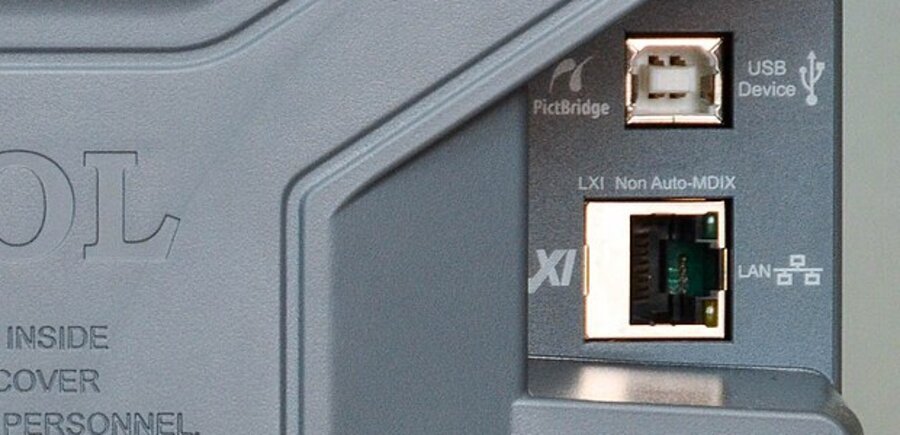
- On the scope: Rigol DS1000Z: Utility > IO Setting > USB Device = Computer (the DS1000Z programming guide, p. 1-2). Siglent: set the USB port to USBTMC (Siglent’s checklist: “USBTMC or similar for remote control”).
- Install one VISA. Want Rigol’s GUI? Run Ultra Sigma and let it install its bundled 5.4.1. Want Python, LabVIEW or Siglent tools? Install the current NI-VISA. One EEVblog user (April 2017) found Ultra Sigma 1.6.1 working with 5.4.1 and not with NI-VISA 16, so if you need both, test Ultra Sigma after the upgrade.
- Plug in and check Device Manager. You want “USB Test and Measurement Devices > USB Test and Measurement Device (IVI)”. If the scope is still under “Other devices”, use Update driver > Browse > Let me pick, and choose that entry (Siglent’s checklist does the same).
- Test. In NI MAX or Python:
pyvisa.ResourceManager().list_resources(), then send*IDN?to theUSB0::…::INSTRstring.
Common problems
- Scope never appears, not even as unknown. The port is in the wrong mode: PictBridge on Rigol, anything other than USBTMC on Siglent. Switch it as in step 1. Siglent’s checklist also asks for a direct, short cable, ideally with ferrite chokes, rather than a hub.
- “Ultra Sigma has stopped working”. In the EEVblog thread (2016–2017), the fix was the Windows decimal separator. Rigol software wants a dot, so a comma locale (most of Europe, Brazil) crashes it. Changing the regional format to English (US) cured it, and one Windows 10 user also needed Windows 7 compatibility mode.
- Device Manager shows it, NI MAX / PyVISA don’t. Usually someone ran Zadig on it. The pyvisa-py docs tell you to replace the USBTMC driver with WinUSB, and that is exactly what hides the scope from NI-VISA. Pick one stack: NI-VISA +
ausbtmc.sys, or pyvisa-py 0.8.1 (MIT) + libusb + WinUSB. On Windows, pyvisa-py also can’t list a device another program has open, so close Ultra Sigma first. - Owon software stopped seeing the scope. Owon’s tool talks through libusb. If you switched it to WinUSB for a third-party app such as owowon, which requires WinUSB, reinstall Owon’s driver, or use Zadig to put libusb back.
FAQ
Do I need NI-VISA if I only use Rigol’s software? No separate download: Ultra Sigma installs NI-VISA 5.4.1 itself. You only need a newer NI-VISA for other tools.
Can I skip VISA and use LAN? Yes, scopes with a LAN port take TCPIP::<ip>::INSTR and no USB driver at all. That’s often easier on Windows 11.
Related guides
- USB VID/PID lookup for bench tools
- Hantek 6022BE driver: the other common USB scope
- Zadig: WinUSB, libusbK, libusb-win32
- “Unknown USB Device (Device Descriptor Request Failed)”
Sources
- Microsoft Learn: USB device class drivers included in Windows
- Rigol: UltraSigma.zip (setup.ini, MSI Property/File tables, ausbtmc.inf read on 26 Oct 2026); MSO1000Z/DS1000Z Programming Guide (PGA19108-1110); Ultra Sigma user guide
- NI: NI-VISA download page (versions 5.4 to 2026 Q4)
- Siglent: USB connectivity checklist; How to install the USBTMC driver; Remote Control Manual
- Linux kernel usbtmc.c; pyvisa-py usbtmc.py
- IDs: usb.ids, 60-libsigrok.rules, owowon device.rs
- EEVblog: Rigol Ultra Sigma has stopped working