Creality printers have no driver of their own. The USB port on almost every Marlin-based Creality board goes into a USB-to-serial bridge chip, and Windows 11 needs the driver for that chip. Creality’s own download pages offer firmware, Creality Print and manuals, not a USB driver. Below is which chip each board uses and the driver for each one.
⬇ CH340 / CH341 driver (mirrored) · FTDI driver (official link)
Step 1: read the Hardware Id (30 seconds)
- Plug the printer into a rear USB port with a cable you know carries data. Switch the printer on.
- Open Device Manager. Look under Ports (COM & LPT) and Other devices.
- Right-click the new entry → Properties → Details → Hardware Ids. Read the
VID_xxxx&PID_xxxxpair.
VID_1A86 is WCH (CH340/CH341): install the zip above. VID_0403 is FTDI. If nothing appears at all, skip to problem 1 below.
Step 2: install (CH340/CH341 boards)
- Unplug the printer. Extract the zip and run
CH341SER\SETUP.EXE→ INSTALL. - Plug the printer back in. Device Manager should now show USB-SERIAL CH340 (COMx) under Ports.
- In your slicer or host software, pick that COM port at 115200 baud. That is the
BAUDRATEin Creality’s own Marlin sources for the Ender-3 V2, Ender-3 S1 and Ender-3 V3 SE.
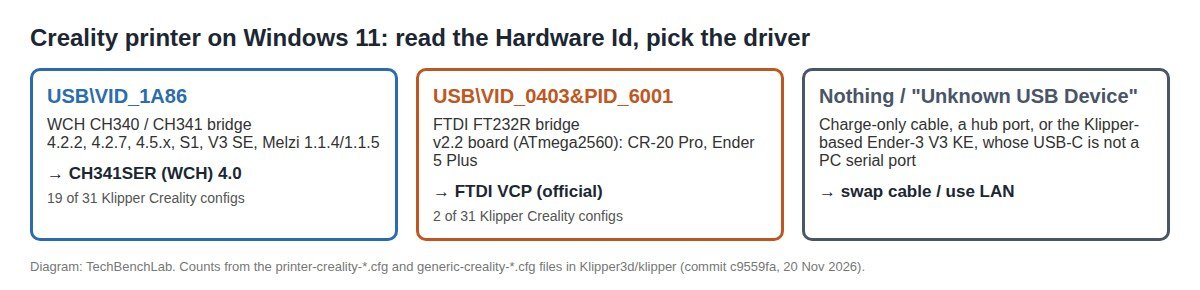
Which chip each Creality board uses
The Klipper project ships a config file for each common Creality printer, and each file names the serial device the host sees. In the 31 Creality configs in Klipper3d/klipper (commit c9559fa, 20 Nov 2026), 19 name a WCH device (usb-1a86_…). Two name an FTDI FT232R, eight use a generic /dev/ttyUSB0 (the 8-bit boards), one uses an internal port and one is left blank. Board and MCU come from the comment at the top of each file.
| Printer (Klipper config) | Board / MCU | USB bridge | Windows driver |
| Ender-3 Pro, Ender-5 Pro (2020) | 4.2.2 · STM32F103 (GD32F103 on some 2022 boards) | WCH (1a86) |
CH341SER |
| Ender-3 V2, V2 Neo, Ender-3 Max, Ender-6, CR-30 | STM32F103, USART1 PA10/PA9 | WCH (1a86) |
CH341SER |
| Generic 4.2.7 / 4.2.10 | STM32F103 | WCH (1a86) |
CH341SER |
| Ender-3 S1, S1 Pro, S1 Plus | STM32F103 or STM32F401 | WCH (1a86) |
CH341SER |
| Ender-5 S1 (2023) | STM32F401 | WCH (1a86) |
CH341SER |
| Ender-2 Pro (2021 / 2022) | STM32F103 / HC32F460 | WCH (1a86) |
CH341SER |
| CR-6 SE (4.5.2 / 4.5.3), Sermoon D1, Sermoon V1 | STM32F103 (Sermoon V1: STM32F401) | WCH (1a86) |
CH341SER |
| Ender-5 (2019) | ATmega1284P (also the v1.1.5 silent board) | WCH (1a86, “USB2.0-Serial”) |
CH341SER |
| CR-20 Pro, Ender-5 Plus | v2.2 · ATmega2560 | FTDI FT232R | FTDI VCP |
| Ender-3 (2018), Ender-2, CR-10, CR-10 Mini | Melzi · ATmega1284P | not named (ttyUSB0) |
read the Hardware Id |
| Ender-3 V3 SE (not in Klipper) | GD32F303RET6, BOARD_NO_NATIVE_USB |
bridge on SERIAL_PORT 1 |
CH341SER, per the Creality forum |
Two notes. On the Melzi boards, MatterHackers says most older Creality printers need the FTDI driver, and the V1.1.4 board needs the CH340 driver, so read the Hardware Id. On the Ender-3 V3 SE, Creality’s pin file declares the board has no native USB. So the USB-C port is a bridge, and in the forum thread a user confirms Cura “started seeing my printer” after installing CH341SER.
Common problems
1. Nothing appears in Device Manager. Usually a charge-only cable. On the Ender-3 Neo (4.2.2), the touch screen lights up from the PC’s 5 V even when the printer is switched off. A lit screen therefore proves power, not data. In this Ender-3 V2 thread, Windows assigned the COM port on one hub socket and not another. Try a rear port with no hub.
2. Ender-3 V3 KE: “Unknown USB Device (Port Reset Failed)”. The KE runs Klipper on an internal Linux board. In this thread a forum member points out that its USB-C port is for the vibration-compensation sensor, not for a PC. No driver fixes that. Print over LAN or Wi-Fi. For the descriptor error itself, see Unknown USB Device (Device Descriptor Request Failed).
3. The port exists but the slicer cannot see the printer. In Cura the USB connection is a plugin setting: one V2 owner fixed it by ticking enable USB printing in the printer’s general settings (same V2 thread). In the V3 SE thread, Creality Print saw the printer over LAN only, while Cura saw it over USB.
4. “Access is denied” or “port busy”. Another program (OctoPrint, a second slicer, Pronterface) holds the COM port. Close it first, or see COM port busy / Access is denied.
5. Driver installed, port drops out on cloned chips. WCH’s newer drivers stop working with counterfeit CH340s. The rollback to 3.5.2019.1 is in our CH340 driver guide.
FAQ
Do I need a driver to print from the SD card? No. The driver only matters for USB printing, for flashing over USB, or for a host like OctoPrint.
And on Linux or a Raspberry Pi? No driver is needed: the kernel’s ch341 module binds 1a86:7523. Details are in CH340 on macOS and Linux.
Sources
- Klipper3d/klipper config files (
printer-creality-*.cfg,generic-creality-*.cfg, commit c9559fa) - CrealityOfficial on GitHub (Marlin sources for Ender-3 V2, S1, V3 SE)
- WCH CH341SER (INF read from the mirrored zip)
- MatterHackers: Creality FTDI/CH340 drivers
- Creality Community Forum threads linked above (2023–2026)