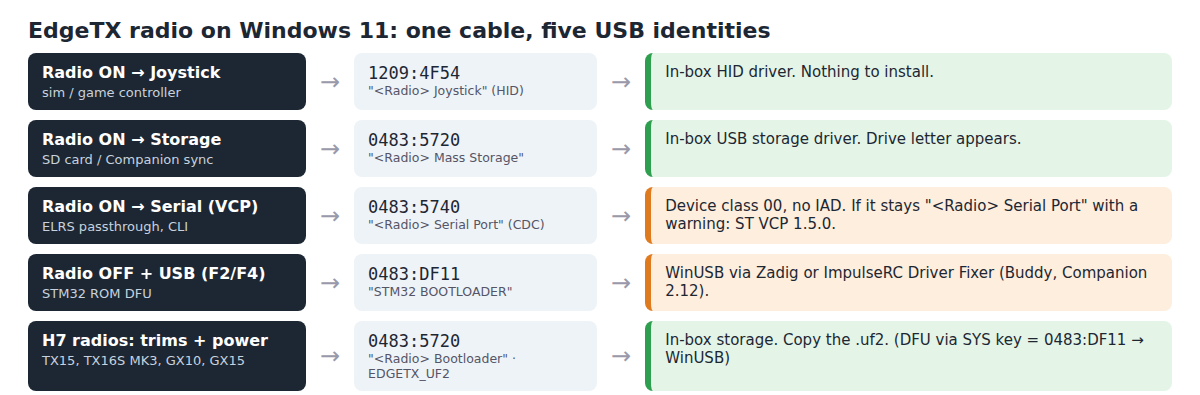
A Radiomaster radio running EdgeTX is not one USB device on Windows 11 but five, depending on whether it is on or off and which USB mode you pick on its screen. Three of them use drivers Windows already has; the DFU mode that EdgeTX Buddy and Companion flash through needs WinUSB, and the serial mode that ExpressLRS uses can need ST’s VCP driver. Last checked: 16 November 2026.
⬇ EdgeTX Companion 2.12.5 (mirrored) · Zadig 2.9 (mirrored) · ImpulseRC Driver Fixer and ST VCP (official links)
Download edgetx-cpn-win64-v2.12.5.zip (78.3 MB)
The five USB identities, read from EdgeTX source
From radio/src/targets/common/arm/stm32/usbd_desc.c and the board files at EdgeTX master on 16 November 2026. The name Windows shows comes from the radio’s hardware definition, so a Boxer reads “RadioMaster Boxer Joystick”, a Pocket “RadioMaster Pocket Serial Port”, and so on.
| Radio state | USB ID | Product string | Windows 11 driver |
|---|---|---|---|
| On, USB mode Joystick | 1209:4F54 |
<Radio> Joystick | in-box HID |
| On, USB mode Storage | 0483:5720 |
<Radio> Mass Storage | in-box USB storage |
| On, USB mode Serial (VCP) | 0483:5740 |
<Radio> Serial Port | usbser.sys or ST VCP (see below) |
| Bootloader (trims in + power) | 0483:5720 |
<Radio> Bootloader | in-box USB storage |
| DFU (off + USB; H7: SYS key) | 0483:DF11 |
STM32 BOOTLOADER (F2/F4 ROM) or <Radio> DFU (H7) | WinUSB, via Zadig |
Which Radiomaster radio has which chip
The microcontroller decides how the radio flashes. Read from targets/taranis, targets/horus and the H7 target CMakeLists.txt files; DFU key combos from the EdgeTX manual.
| Radio | MCU | How to enter DFU | Flash with |
|---|---|---|---|
| TX12 (MK1), T8 | STM32F205 | TX12: radio off, plug USB (T8 not listed in the manual) | Buddy or Companion (DFU) |
| TX12 MK2, Zorro, Pocket | STM32F407xE | radio off, plug USB (top port) | Buddy or Companion (DFU) |
| Boxer, MT12, GX12 | STM32F407xG | off + USB; MT12 side port; GX12 hold SG + tap power | Buddy or Companion (DFU) |
| TX16S MK1 / MK2 | STM32F429 | radio off, plug USB (top port) | Buddy or Companion (DFU) |
| TX15, TX16S MK3, GX10, GX15 | STM32H750 + external QSPI flash | plug USB, tap SYS | UF2 copy, or Companion 2.12 (DFU). Not Buddy |
Install, by what you are trying to do
- Use the radio as a sim controller or copy files. Pick Joystick or Storage on the radio’s prompt. Nothing to install.
- Flash EdgeTX on an F2/F4 radio. With the radio off, plug it in. Device Manager shows a new STM32 BOOTLOADER; check Properties → Details → Hardware Ids for
VID_0483&PID_DF11. In Zadig, Options → List All Devices, select it, choose WinUSB, Replace Driver (or run ImpulseRC Driver Fixer as administrator). Buddy flashes through WebUSB, and the 2.12 Companion flashes through EdgeTX’srs_dfulibrary, built onnusb, whose documentation says the device “must be associated with the WinUSB driver”. EdgeTX sends no WCID descriptor, so Windows never installs WinUSB on its own. - Flash an H7 radio. Hold both horizontal trims in and power on: the EDGETX_UF2 drive appears with no driver, and you copy the
.uf2to it. Companion’s DFU route uses the same0483:DF11, so the WinUSB binding from step 2 covers it. - Update the internal ExpressLRS module. Radio on, Serial (VCP) mode, ExpressLRS Configurator with EdgeTXPassthrough. The ExpressLRS guide says the radio must appear as an STMicroelectronics Virtual COM Port and that “any mention of <Radio Name> Serial Port means drivers aren’t installed”; its fix is ST’s
VCP_V1.5.0_Setup_W7_x64_64bits.exe.
Why the serial port is the odd one out
Microsoft’s usbser.sys documentation says to load the in-box driver automatically you “set the class code to 02 and subclass code to 02 in the Device Descriptor”. EdgeTX’s device descriptor sends class 00 for every mode, and its two CDC interfaces (02/02/01 and data 0A) carry no Interface Association Descriptor. Our Betaflight guide’s flight controllers declare class 02 and bind cleanly; an EdgeTX radio relies on interface-level matching instead. Check Device Manager → the device → Details → Compatible Ids: if the warning stays, install ST’s package, which is what Radiomaster’s own support FAQ prescribes for “TX not recognized on Windows 10 or later”. More on in-box matching in our usbser.sys Code 28 guide.
The common failures and the fix
- Buddy says no device, radio shows a USB mode menu. The radio was on. DFU “only operates when the handset is plugged in when in the OFF state”, per EdgeTX’s troubleshooting page.
- Two drivers mixed up. In an IntoFPV thread a Boxer owner had installed “the STM drivers” and the ImpulseRC fixer and still could not flash EdgeTX or ELRS; the answer was that EdgeTX uses the DFU driver with the radio off and ELRS the VCP driver with the radio on. Fix the one that matches the job.
- TX15 dead after flashing with Buddy. In EdgeTX discussion #6964 (January 2026) Buddy failed with “Address 82b21ff outside of memory map” and the EDGETX_UF2 drive showed 0 MB free; the fix was Companion 2.12 in DFU mode. Per the answer there, Buddy is not for H7 radios, whose firmware lives in external flash.
- Zadig run on the joystick or serial entry. WinUSB replaces the HID or serial driver and that mode stops working. Uninstall the device with “Attempt to remove the driver” ticked and replug.
- Nothing appears at all. Use a USB-A to USB-C cable: the EdgeTX H7 guide warns against USB-C to USB-C. If Windows reports an unknown device, see “Device Descriptor Request Failed”.
FAQ
Does binding WinUSB to 0483:DF11 affect my flight controllers? Yes, in a good way. STM32 flight controllers in DFU use the same ID, so Betaflight’s flasher sees them too. See our STM32 DFU driver guide.
Is there a “Radiomaster driver” download? No. Every mode maps to a Windows in-box driver, WinUSB, or ST’s VCP package.
Sources
- EdgeTX source at commit
02b9d2d: usbd_desc.c, boards/hw_defs, taranis CMakeLists.txt, tx15 CMakeLists.txt, bootloader/boot.cpp - EdgeTX/rs-dfu; nusb (Windows section)
- EdgeTX manual: Access DFU and Bootloader Mode, Updating your STM32H7 radio, Having trouble updating?
- ExpressLRS: Typical Updating Steps; Radiomaster support FAQ
- Microsoft Learn: USB Serial Driver (Usbser.sys)
- IntoFPV: Radiomaster Boxer can’t update Edge TX or ELRS; EdgeTX GitHub: discussion #6964