Meshtastic boards reach Windows 11 through one of four USB paths: a Silicon Labs CP210x bridge, a WCH CH9102F or CH340 bridge, the ESP32-S3’s own USB port, or the nRF52840’s own USB port. Only the first two need a driver, and the USB ID in Device Manager tells you which one you have in ten seconds, before you download anything.
The table below is built from the USB IDs the Meshtastic project itself writes into its firmware board files and its Python CLI, so it matches what your board actually reports. Last checked: 18 November 2026.
⬇ CH9102F driver (mirrored) · CP210x driver (official link)
Download CH343SER_V2.2.zip (CH9102F, 620 KB)
Download CH341SER_V4.0.zip (CH340, for RAK11200, 697 KB)
CP210x Universal Windows Driver 11.6.0 (Silicon Labs, official page)
Step 1: read the USB ID
- Plug the board in with a cable you know carries data (see problem 1 below).
- Open Device Manager and look under Ports (COM & LPT) and Other devices.
- Right-click the new entry → Properties → Details → Hardware Ids. Read the
VID_xxxx&PID_xxxxpair and find it in the table.
Meshtastic’s own driver test page lists the four names a working board shows: Silicon Labs CP210X USB to UART Bridge (COMx), Silicon Labs CH9102 USB to UART Bridge (COMx), USB-Enhanced-SERIAL CH9102 (COMx) or USB Serial Device (COMx). If you see any of them, the driver is done and the problem is elsewhere.
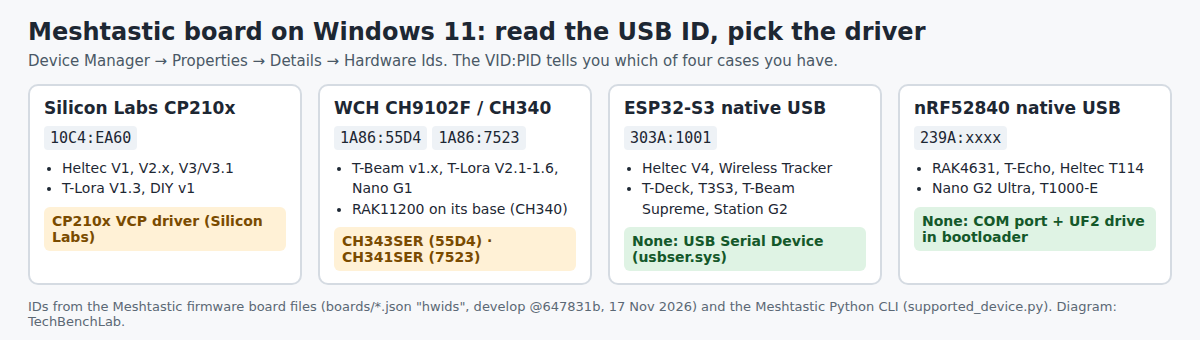
The table: board × USB ID × what Windows 11 needs
| Board (Meshtastic target) | USB ID | USB chip | Windows 11 driver |
|---|---|---|---|
| Heltec LoRa32 V3 / V3.1, Wireless Stick Lite V3 | 10C4:EA60 | CP2102 (per Meshtastic’s V3 page) | CP210x driver, install by hand |
| Heltec V1, V2.0, V2.1 · T-Lora V1.3 · Meshtastic DIY v1 | 10C4:EA60 | CP210x | CP210x driver |
| LilyGO T-Beam v1.1 / M8N / M8N_SX1262 · T-Lora V2.1-1.6 · Nano G1 | 1A86:55D4 | WCH CH9102F | CH343SER (mirrored above) |
| RAK11200 (ESP32 WisBlock core) | 1A86:7523 | CH340 on the base board | CH341SER |
| Heltec V4, Wireless Tracker · LilyGO T-Deck, T3S3, T-Beam Supreme / S3-Core, T-Beam 1W · Station G2 | 303A:1001 | ESP32-S3 native USB | none (in-box usbser.sys) |
| Seeed XIAO ESP32-S3 | 2886:0059 | ESP32-S3 native USB | none |
| RAK4631 · Nano G2 Ultra · Seeed T1000-E | 239A:8029 / 0029 / 002A / 802A | nRF52840 native USB | none (COM port; UF2 drive in bootloader) |
| LilyGO T-Echo · Heltec Mesh Node T114 | 239A:4405 / 0029 / 002A | nRF52840 native USB | none |
Sources for every ID: the hwids field in meshtastic/firmware boards/*.json (develop branch, commit 647831b, 17 Nov 2026) and supported_device.py in the Meshtastic Python CLI. If your T-Beam reports 10C4:EA60 instead of 1A86:55D4, it carries a CP210x: use the CP210x row.
The detail that explains most “no COM port” threads: Silicon Labs’ release notes say the CP210x driver is installed automatically by Windows Update only for the alternate PIDs EA63, EA7A and EA7B, “not default values”. Heltec V3 boards report the default EA60, so on a clean Windows 11 PC the driver has to be installed by hand.
Step 2: install (only rows 1–4)
- CP210x (Heltec V3, V2): unzip the Silicon Labs package, right-click
silabser.inf→ Install, replug. If Windows still shows “CP2102 USB to UART Bridge Controller” under Other devices, use Update driver → Browse my computer and point at the unzipped folder. - CH9102F (T-Beam, T-Lora V2.1): unzip
CH343SER_V2.2.zip, runSETUP.EXEas administrator, click INSTALL, replug. Details in our CH9102/CH343 guide. - CH340 (RAK11200): same steps with
CH341SER_V4.0.zip; see the CH340 driver guide.
Meshtastic’s driver page asks for a reboot after installing. Native-USB boards (rows 5–8) need nothing: do not install a bridge driver on them, it will not match their ID.
Common problems and the fix
- Nothing appears at all. Charge-only cable. In an Arduino forum thread on Windows 11 (Aug 2025) the board’s LED was on and the driver “failed”; the fix was a data cable. Meshtastic’s Heltec page also recommends USB-A to USB-C over C-to-C for charging.
- ESP32-S3 board’s COM port vanishes while flashing. Expected: the chip re-enumerates when it enters download mode. Meshtastic’s Heltec docs say to use the web flasher’s “1200bps reset” button; the manual way is to unplug, hold the USER button, plug in and release after 2–3 seconds (antenna connected first). If an extra “USB JTAG/serial debug unit” shows a yellow mark, that is the debug interface, not the serial port; see our USB JTAG/serial debug unit guide.
- nRF52 board (RAK4631, T-Echo) shows no drive. The drive only exists in bootloader mode. Per Meshtastic’s bootloader page: double-press reset within about half a second, or run
meshtastic --enter-dfu; the T1000-E has no reset button, so hold its button for 3 s while it powers up (bootloader 2.5+). In a 20-reply RAK forum thread (2024) the cause was a faulty reset switch on the base board. - Web flasher sees no port. flasher.meshtastic.org uses Web Serial and Meshtastic’s docs state it requires Chrome or Edge. Close the Meshtastic app, Arduino Serial Monitor or PuTTY first; only one program can hold a COM port (“Access is denied” fix).
- Windows 11 on ARM (Snapdragon laptops). The CP210x 11.6.0 notes list Windows 11 x64 only. The CH343SER INF has ARM64 entries for the CH9102F, and native-USB boards use the in-box driver.
FAQ
Does the Heltec V4 need the CP2102 driver like the V3? No. Its board file declares 303A:1001, the ESP32-S3’s own USB, so it appears as “USB Serial Device” with no install.
Which T-Beam driver do I need? T-Beam v1.x: CH9102F (1A86:55D4) per the Meshtastic CLI. T-Beam Supreme and 1W: none, they are ESP32-S3 native.
Related guides
Sources
- Meshtastic firmware: boards/*.json (hwids, USB CDC flags) and variants/; Python CLI supported_device.py
- Meshtastic docs: Serial drivers, Heltec LoRa32 (CP2102 on V3), Web flasher
- Silicon Labs: CP210x Universal Windows Driver release notes (11.6.0, Windows Update PIDs)
- WCH: CH343SER, CH341SER
- Threads: Arduino forum, VCP install issue (Win11); RAK forum, RAK4631 not showing up